MP4 has long been known as the universal file format for delivering great video quality within a compressed file. However, it is still not perfect, as every format has its drawbacks. In contrast, 3GP is well-known for its suitability for 3G and 4G mobile devices. It is especially popular for its high compression rate, which often surpasses that of an MP4 file. With this in mind, you might find the need to convert MP4 à 3GP to save storage space on your mobile device. Luckily, this post provides the best solutions for this matter. Let's begin with the best desktop and Android solutions.
Part 1. How to Convert MP4 to 3GP on Windows and Mac
Méthode 1 : Convertisseur AVAide MP4
AVAide Convertisseur MP4 easily claims the top spot for offline MP4 to 3GP conversion, especially if you want to avoid the typical pixelation that plagues low-resolution 3GP files. Instead of just compressing your video, the built-in video enhancer feature allows you to convert MP4 to 3GP while reducing video noise and optimizing brightness. For those who want absolute control over file size, the MP4 to 3GP software offers a customizable toolbox to tweak the video encoder (H.263/MPEG-4), frame rate, and bitrate. This ensures your 3GP output is perfectly tailored for older 3G/4G devices without completely sacrificing visual clarity.
- Offer standard and widely compatible 3GP output presets.
- Support full hardware acceleration to quickly change MP4 to 3GP format in batches.
- Offer practical video editing features and AI enhancement tools.
- Easily adjust the video bitrate, FPS, resolution, and more parameters.

 Téléchargement sécurisé
Comment convertir un fichier MP4 en 3GP avec AVAide MP4 Converter
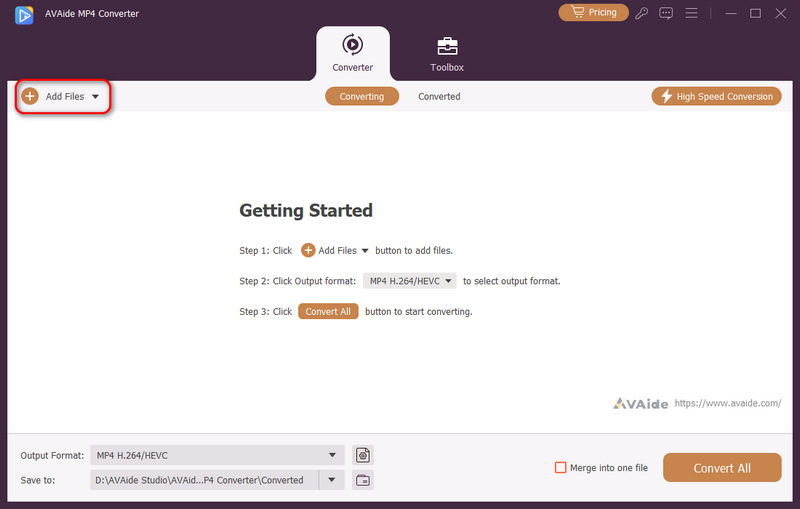
Étape 1Add MP4 Fils to AVAide MP4 Converter
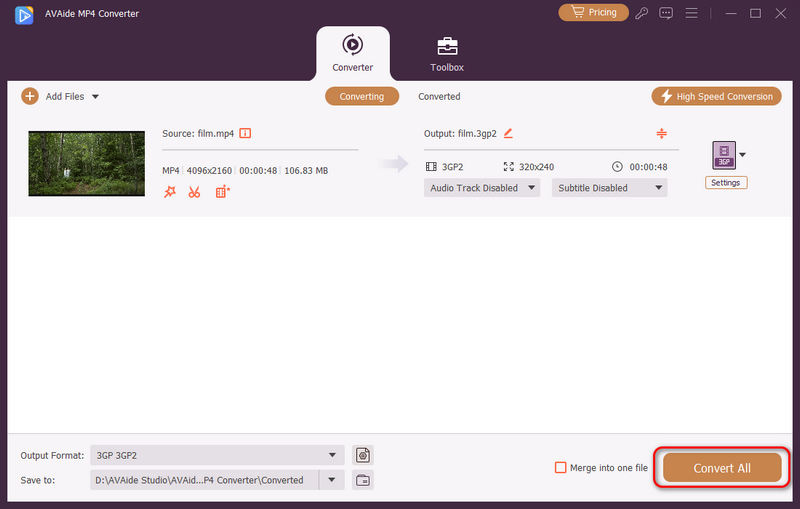
Téléchargez, installez et lancez AVAide Convertisseur MP4 on your PC or Mac. Click the Ajouter des fichiers button to load your MP4 files, and you will also notice that you can add multiple MP4 files or an entire folder to do a bulk conversion.
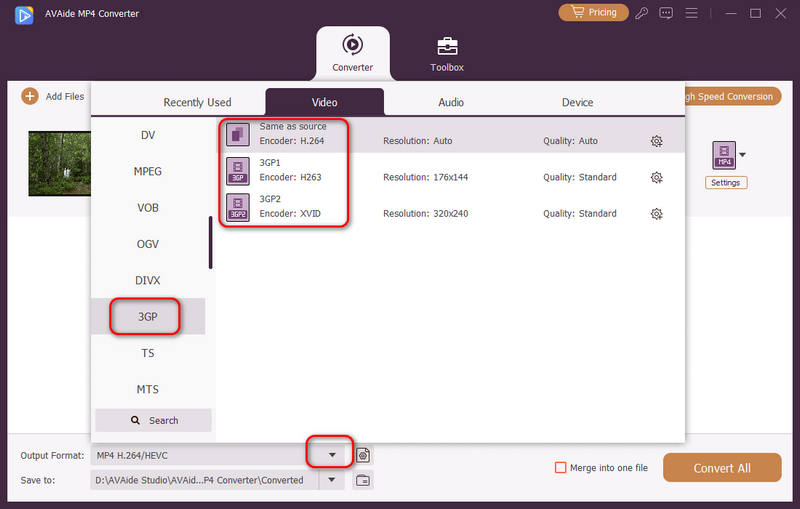
Étape 2Choose a 3GP Preset
Your MP4 files are loaded. Click the Format de sortie dropdown button on the bottom left side. Then, select the Vidéo onglet, choisissez l'onglet 3GP category, and select a 3GP preset, like Identique à la source, 3GP1, et 3GP2. While 3GP is an old format that is playable on legacy devices, we highly recommend you choose 3GP1 ou 3G2.
Étape 3Convertir MP4 en 3GP
Enfin, cliquez sur le Enregistrer dans dropdown button to select a destination folder for the upcoming 3GP video. Then, click the Tout convertir button to easily change your MP4 files to 3GP format.
Method 2: WinXvideo AI
WinXvideo AI is another reliable offline option for converting MP4 to 3GP. While it is widely known for its AI upscaling tools, its core conversion engine remains highly capable for daily tasks. It supports a wide range of mobile formats, allowing you to easily compress large MP4 videos into compact 3GP files suitable for older devices. It's a straightforward, solid choice if you need a dependable converter that gets the job done without complex setups.
How to Convert MP4 to 3GP with WinXvideo AI:
Étape 1Launch WinXvideo AI and select the Convertisseur vidéo caractéristique.
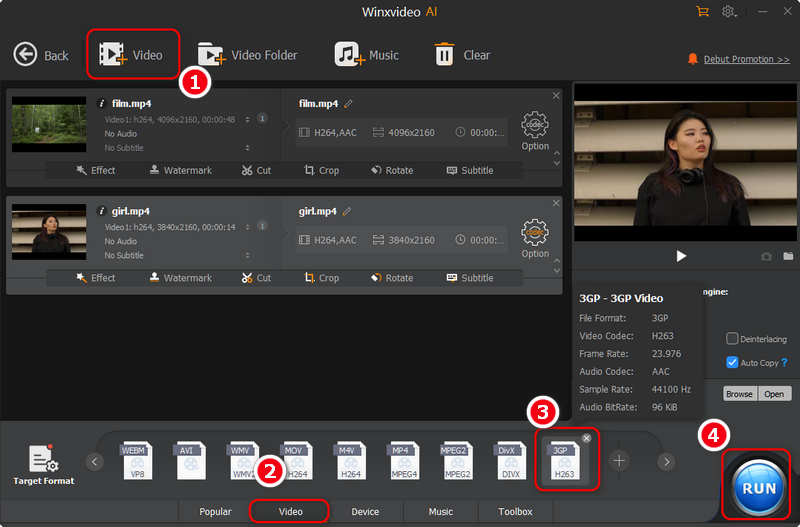
Étape 2Clique le Vidéo button on the top left side to import your MP4 videos. You can add multiple files.
Étape 3Locate the Target Format tab at the bottom. Select the Vidéo tab. Then, you should find and select the 3GP format de sortie.
Étape 4Just keep the default settings for the output 3GP format and click the COURS button in the bottom right corner to quickly convert your MP4 to 3GP with hardware acceleration.
Method 3: VLC Media Player
VLC Media Player is a powerful, open-source freeware that hides a robust video converter beneath its famous playback interface. While most users only use it to watch videos, it is a highly reliable option for converting MP4 to 3GP completely free of charge. Granted, VLC's conversion interface isn't the most intuitive for beginners, and the layout can feel a bit dated. However, once you know where to click, it can convert MP4 to 3GP perfectly without requiring you to install any new software. Here is the simplified guide to navigating VLC's conversion feature.
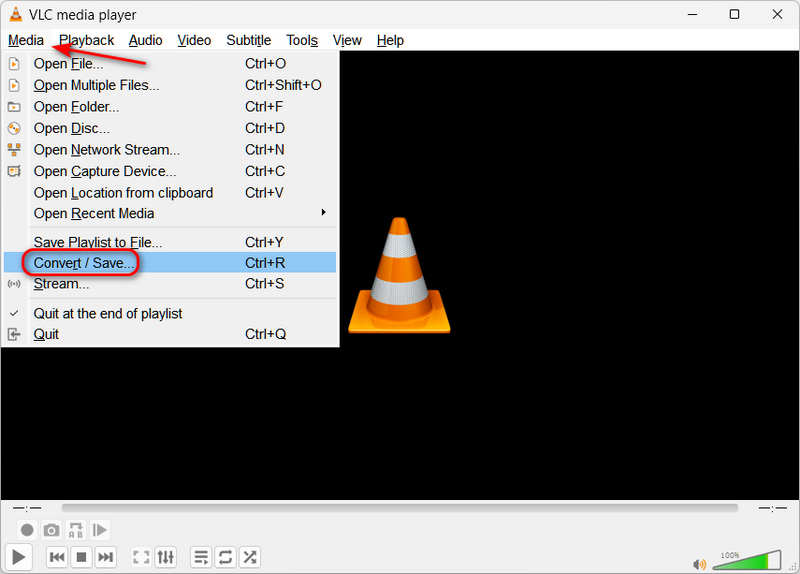
Étape 1Launch the tool on your PC. Click the Media button, then the Convertir/Enregistrer button to launch the media converter tool in VLC.
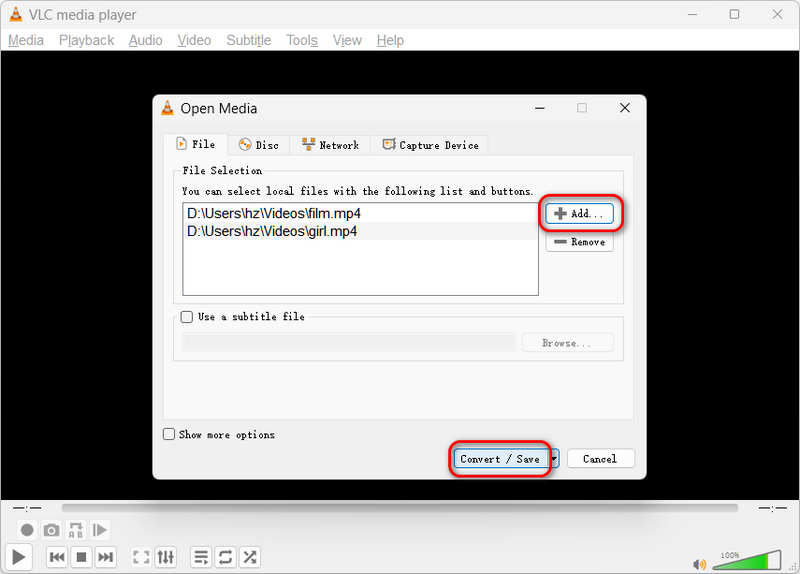
Étape 2Add your MP4 files by clicking the Ajouter bouton, puis cliquez sur Convertir/Enregistrer button again at the bottom.
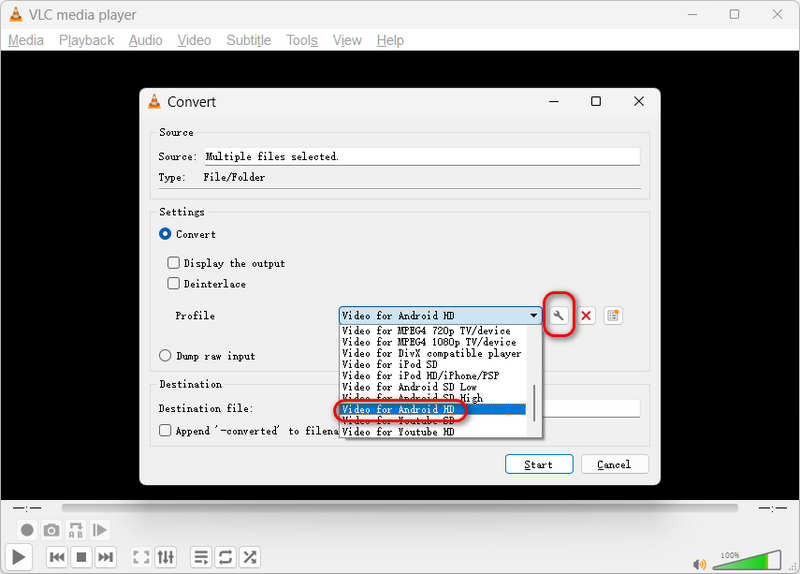
Étape 3Now, you've come to the most important step. Click the Profil dropdown button and select Video for Android HD. Ensuite, cliquez sur le Modifier le profil sélectionné bouton.
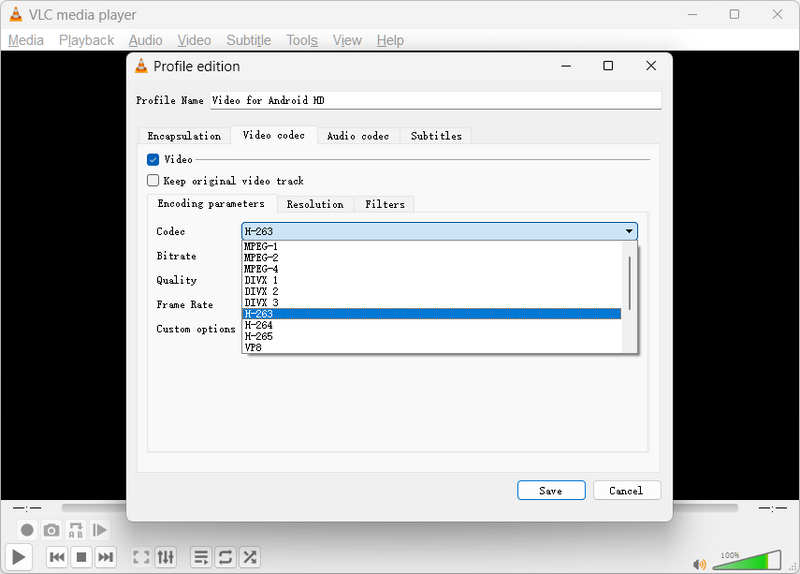
Étape 4Sélectionnez le Codec vidéo onglet et cliquez sur le Codec dropdown button to select H-263.Then, click the Sauvegarder bouton.
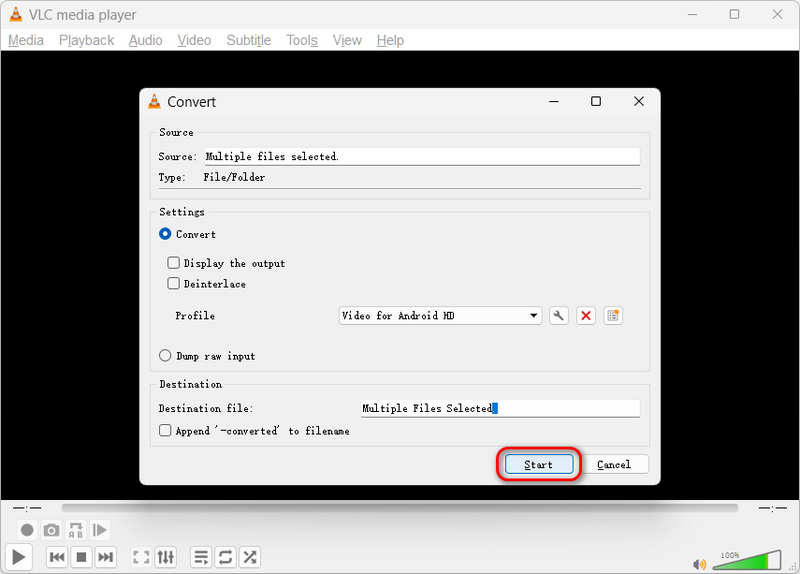
Étape 5Finally, just click the Démarrer button to convert MP4 to 3GP with VLC. This is really a free but complicated media converter.
Part 2. How to Convert MP4 to 3GP Free Online
La conversion en ligne est également un excellent moyen de convertir vos fichiers. Cependant, l'exécution de la conversion en ligne peut sembler risquée pour les autres la plupart du temps. Heureusement, Convertisseur en ligne gratuit AVAide a enfin mis fin à la spéculation. Cet outil en ligne est le moyen le plus sûr de convertir librement MP4 en 3GP, soyez assuré que vos fichiers et données sont sécurisés à 100 % grâce à sa fonction de cryptage élevé. De plus, aucune publicité ne sera vue sur sa page Web. De plus, il dispose d'un paramètre intégré qui vous aidera à améliorer la vidéo et l'audio selon vos préférences.
Contrairement à d'autres, AVAide Free Online Converter permet aux utilisateurs de profiter du service de manière illimitée. Pas besoin de s'inscrire pour augmenter la taille du fichier, les utilisateurs ont le privilège de convertir n'importe quelle taille, n'importe quand, n'importe où. De plus, c'est l'un des outils de conversion en ligne les plus rapides, et découvrons donc le processus rapide de ce convertisseur vidéo en ligne MP4 vers 3GP avec les directives ci-dessous.
Étape 1Installation du lanceur
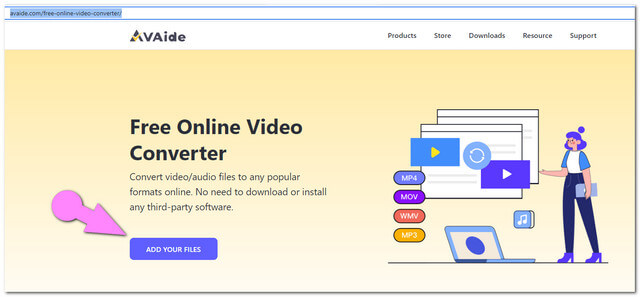
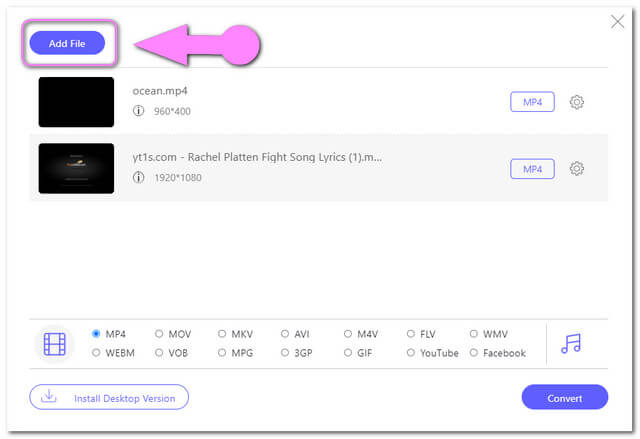
Procurez-vous le lanceur à partir du site Web. Clique le AJOUTEZ VOS FICHIERS bouton, puis suivez la direction.
Étape 2Téléchargement de fichiers MP4
Frappez le AJOUTEZ VOS FICHIERS à nouveau pour télécharger initialement les fichiers. Pour ajouter d'autres fichiers, cliquez sur le Ajouter le fichier bouton sur l'interface.
Étape 3Sorties prédéfinies sur 3GP
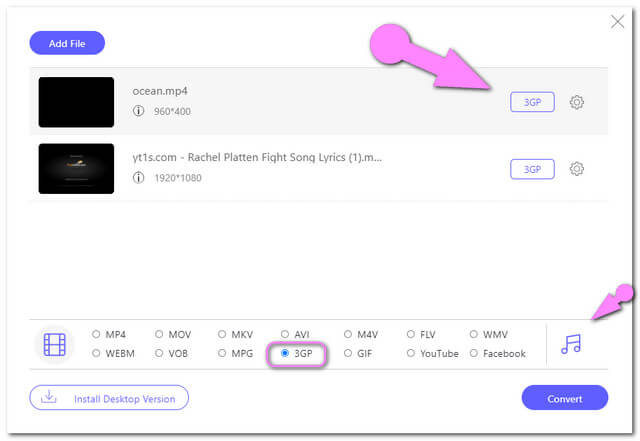
Sélectionnez le 3GP parmi les formats vidéo présentés ci-dessous. Si vous souhaitez que les formats audio soient disponibles, cliquez sur le Noter icône sur le côté des formats vidéo.
Étape 4Démarrer la conversion
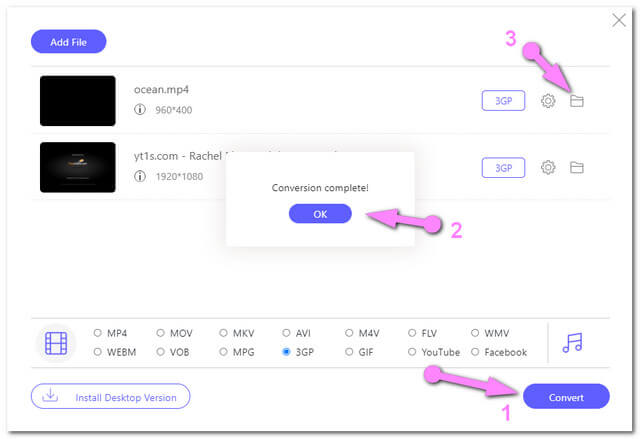
Clique le Convertir button and choose a local file destination from the pop-up window. Afterward, it will quickly convert MP4 files to 3GP online for free.
Part 3. How to Convert MP4 to 3GP on Android
Video Compressor & Converter by Technozer Solution
For an Android solution, Video Compressor & Converter stands out as one of the best choices. This MP4 to 3GP app is free to download and accessible anytime you need an on-the-go conversion. Beyond changing formats, it packs handy mobile editing features that allow you to compress, crop, trim, and adjust video speed (fast and slow motion). Follow the simple guidelines below to convert MP4 to 3GP directly on your phone:
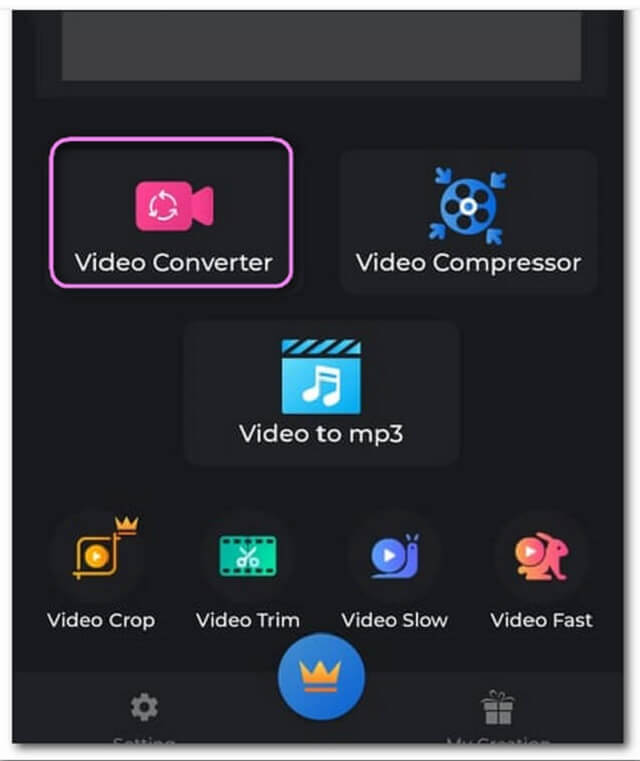
Étape 1Lancez l'application et cliquez sur Convertisseur vidéo pour télécharger un fichier MP4.
Étape 2Choisissez 3GP parmi les formats vidéo, puis cliquez sur le Convertir bouton.
Étape 3Rename the file to save, then tap the Démarrer button to convert your MP4 file to 3GP format.
Partie 4. FAQ sur la conversion MP4 en 3GP
Does converting MP4 to 3GP affect the video quality?
3GP is a legacy video format, so converting MP4 to 3GP will definitely reduce the video quality. However, you don't need to make the video higher quality because this conversion is mainly for playback on old devices with low-end and outdated screens.
What are the disadvantages of 3GP format?
The 3GP format has two significant disadvantages: It is quite outdated, and most devices and platforms today cannot recognize it; it's video quality is quite low today, mostly no higher than 640:480 pixels.
Why is 3GP outdated?
3GP became outdated because mobile technology rapidly evolved beyond the limitations of early 3G networks. As smartphones introduced high-definition screens and powerful processors, the heavily compressed 3GP format—which relies on low-resolution encodings like H.263 and maximum resolutions of 320×240, could no longer deliver acceptable visual quality.
Now, you've learned some reliable converters that can convertir MP4 en 3GP format. You can get a 3GP video and play it seamlessly on your target devices or players. Today, a reliable and stable media converter is needed when you want to get some legacy output formats, so AVAide Convertisseur MP4 is highly recommended. It supports standard 3GP output presets, and you just need to select and convert.
À PROPOS DE L'AUTEUR

Un convertisseur MP4 multifonctionnel pour convertir n'importe quel format vidéo en MP4 avec une qualité de sortie élevée.