Θέλεις τον δικό σου εξατομικευμένο ήχο κλήσης. Όχι κάτι από πουθενά. Κάτι που έφτιαξες εσύ για κλήσεις και ειδοποιήσεις.
Είμαστε εδώ για να σας βοηθήσουμε με αυτό. Θα σας δείξουμε διαφορετικούς τρόπους για να ηχογράφηση ήχου κλήσης σε διαφορετικά συστήματα. Θα μοιραστούμε επίσης απλές συμβουλές για καλύτερα αποτελέσματα. Ετοιμάστε, λοιπόν, τη φωνή ή τον ήχο σας για έναν προσαρμοσμένο ήχο κλήσης.
Μέρος 1. Πώς να ηχογραφήσετε έναν ήχο κλήσης στο iPhone
1. Φωνητικό υπόμνημα σε ήχο κλήσης (Ο ευκολότερος τρόπος)
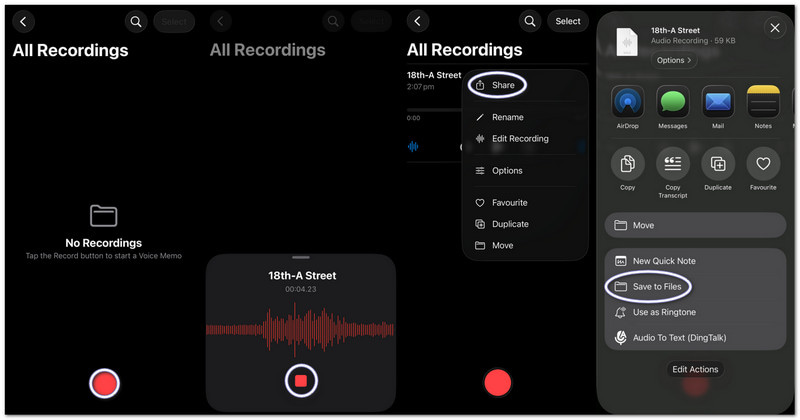
Τα φωνητικά μηνύματα καταγράφουν ήχο και τον μετατρέπουν αμέσως σε έναν χρησιμοποιήσιμο προσαρμοσμένο ήχο κλήσης με βασικά εργαλεία περικοπής, και αυτό το μέρος θα σας διδάξει ακριβώς πώς να μετατρέψετε μια φωνητική ηχογράφηση σε ήχο κλήσης σε ένα iPhone.
Βήμα 1Εκκινήστε τα Φωνητικά μηνύματα στο iPhone σας.
Βήμα 2Πατήστε το κόκκινο Ρεκόρ και μιλήστε ή αναπαράγετε τον ήχο σας.
Βήμα 3Παρακέντηση Να σταματήσει όταν τελειώσετε.
Βήμα 4Πατήστε το τρεις τελείες (...) στην ηχογράφηση σας.
Βήμα 5Επιλέγω Αποθήκευση σε αρχεία για να αποθηκεύσετε τον ήχο σας και να τον χρησιμοποιήσετε αργότερα ως ήχο κλήσης.
2. Οποιοδήποτε αρχείο ήχου (MP3/M4A) σε ήχο κλήσης
Τα αποθηκευμένα αρχεία ήχου MP3 ή M4A από λήψεις ή εφαρμογές μουσικής μπορούν να επιλεγούν και να οριστούν ως ήχοι κλήσης σε ένα iPhone.
Βήμα 1Κατεβάστε το αρχείο MP3 ή M4A και αποθηκεύστε το στο Αρχεία εφαρμογή.
Βήμα 2Τρέξιμο Μπάντα του γκαράζ και διάλεξε Συσκευή εγγραφής ήχου.
Βήμα 3Εντοπίστε τον ήχο σας στο Αρχείακαι, στη συνέχεια, σύρετέ το στη χρονολογική σειρά.
Βήμα 4Παω σε Αρχεία, βρείτε τον ήχο σας και σύρετέ τον στη χρονολογική σειρά.
Βήμα 5Περιορίστε το σε λιγότερο από 30 δευτερόλεπτα και, στη συνέχεια, πατήστε Μερίδιο > Ήχος κλήσης > Εξαγωγή.
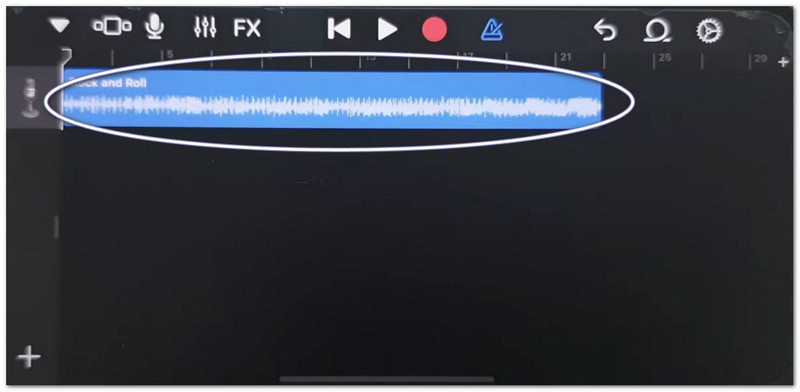
3. Χρήση του GarageBand (Για παλαιότερες εκδόσεις iOS)
Το GarageBand επεξεργάζεται ηχητικά κλιπ με ακριβή χειριστήρια, επιτρέποντας στους χρήστες να κόβουν, να τακτοποιούν και να εξάγουν εύκολα προσαρμοσμένους ήχους κλήσης, γεγονός που διευκολύνει την κατανόηση του τρόπου ορισμού μιας φωνητικής ηχογράφησης ως ήχου κλήσης σε ένα iPhone.
Βήμα 1Ανοιξε Μπάντα του γκαράζ και επιλέξτε Συσκευή εγγραφής ήχου.
Βήμα 2Πατήστε το Προβολή ιχνών, έπειτα ανοίξτε το Πρόγραμμα περιήγησης βρόχου.
Βήμα 3Εισαγάγετε το αποθηκευμένο φωνητικό υπόμνημα ή αρχείο ήχου.
Βήμα 4Σύρετέ το στη γραμμή χρόνου και περικόψτε το σε 30 δευτερόλεπτα ή λιγότερο.
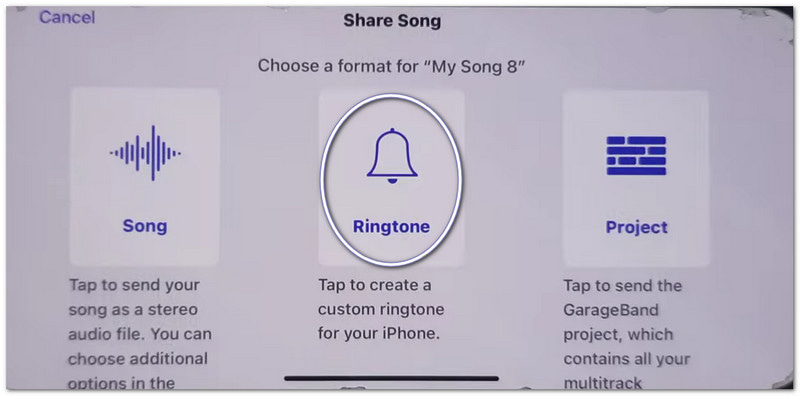
Βήμα 5Παρακέντηση Τα τραγούδια μου, τότε Μερίδιο > Ήχος κλήσης > Εξαγωγή.
Αντιμετώπιση προβλημάτων "Η κοινή χρήση σημειώσεων στο iPhone δεν λειτουργεί"
Εάν το Φύλλο κοινής χρήσης παγώνει, παρουσιάζει σφάλμα ή δεν εμφανίζει εφαρμογές κατά την κοινή χρήση φωνητικών μηνυμάτων ή αρχείων GarageBand, δοκιμάστε αυτές τις διορθώσεις.
Γρήγορες λύσεις:
- Αναγκαστική επανεκκίνηση: Πατήστε Αύξηση έντασης ήχου και Μείωση έντασης ήχουΣτη συνέχεια, κρατήστε πατημένο το κουμπί λειτουργίας μέχρι να εμφανιστεί το σύμβολο της Apple.
- Ενημέρωση iOS: Μεταβείτε στη διεύθυνση Ρυθμίσεις > Γενικός > Αναβάθμιση λογισμικούΕγκαταστήστε τυχόν ενημερώσεις. Διορθώνει σφάλματα συστήματος.
- Εναλλαγή AirDrop: Άνοιγμα Κέντρο ελέγχου για να απενεργοποιήσετε το AirDrop. Απενεργοποιήστε και ενεργοποιήστε ξανά το AirDrop. Η κοινή χρήση ανανεώνεται.
Διορθώσεις συστήματος
- Ελευθερώστε χώρο αποθήκευσης: Διατηρήστε τουλάχιστον 2 gigabyte ελεύθερου χώρου. Διαγράψτε αχρησιμοποίητα αρχεία ή βίντεο. Ο χαμηλός χώρος αποθήκευσης μπορεί να εμποδίσει τη λειτουργία του Share Sheet.
Τελική Διόρθωση
- Επαναφορά όλων των ρυθμίσεων: Μεταβείτε στο Ρυθμίσεις > Γενικός > Μεταφορά ή Επαναφορά iPhone > Επαναφορά όλων των ρυθμίσεωνΔεν διαγράφει τα δεδομένα σας. Απλώς επαναφέρει τις ρυθμίσεις συστήματος και μπορεί να διορθώσει προβλήματα με το Κοινόχρηστο Φύλλο.
Μέρος 2. Πώς να ηχογραφήσετε έναν ήχο κλήσης σε Android
1. Χρήση εφαρμογής δημιουργίας ήχων κλήσης (συνιστάται περισσότερο)
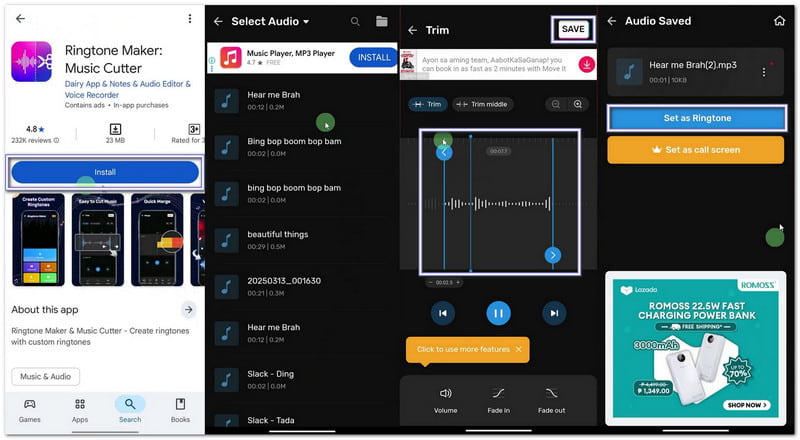
Αν θέλετε να μάθετε πώς να ηχογραφείτε τον δικό σας ήχο κλήσης, μπορείτε να χρησιμοποιήσετε το Maker: Music Cutter στο Google Play Store. Ο κύριος στόχος του είναι να σας βοηθήσει να περικόψετε τραγούδια, να κόψετε ακριβή ηχητικά μέρη και να τα ορίσετε άμεσα ως προσαρμοσμένους ήχους κλήσης σε τηλέφωνα Android.
Βήμα 1Ανοίξτε το Google Play Store. Αναζητήστε Δημιουργός Ήχων Κλήσης: Κόφτης Μουσικής. Εγκαταστήστε το. Στη συνέχεια, πατήστε Ανοιξε.
Βήμα 2Παρακέντηση Ξεκίνα. Επιλέγω Περικοπή ήχου. Επιτρέψτε δικαιώματα, ώστε η εφαρμογή να έχει πρόσβαση στα αρχεία σας.
Βήμα 3Επιλέξτε ένα τραγούδι ή ένα αρχείο ήχου από το τηλέφωνό σας. Μετακινήστε τα ρυθμιστικά για να επιλέξετε τα αρχικά και τα τελικά μέρη του ήχου κλήσης.
Βήμα 4 Παρακέντηση Τομή ή ΣώσειΕπιλέξτε την ευκρίνεια, εάν χρειάζεται. Πατήστε Επιβεβαιώνω. Στη συνέχεια, κάντε κλικ Ορισμός ως ήχος κλήσηςΕπιτρέψτε την πρόσβαση στις ρυθμίσεις συστήματος και επιλέξτε τον προεπιλεγμένο ήχο κλήσης.
2. Ενσωματωμένες ρυθμίσεις (Για ληφθέντα ήχο)
Οι ρυθμίσεις Android επιτρέπουν την άμεση επιλογή αποθηκευμένων αρχείων ήχου και την αντιστοίχισή τους ως ήχους κλήσης χωρίς να απαιτούνται επιπλέον εφαρμογές ή εργαλεία.
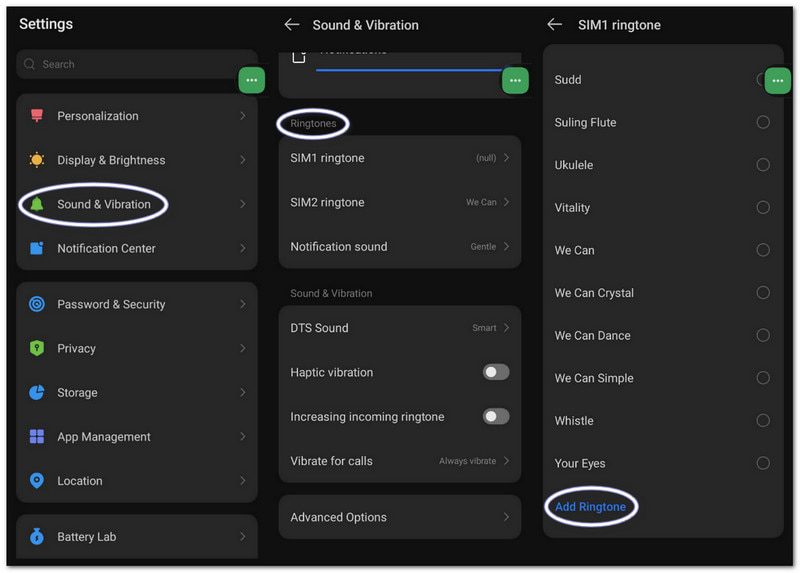
Βήμα 1Μεταβείτε στις ρυθμίσεις του τηλεφώνου σας. Πατήστε Ήχος και δόνηση ή Ήχος.
Βήμα 2Παρακέντηση Ήχος κλήσης τηλεφώνου για να δείτε τις διαθέσιμες επιλογές.
Βήμα 3Πατήστε το Συν κουμπί ή το Προσθήκη ήχου κλήσης κουμπί στο επάνω μέρος.
Βήμα 4Περιηγηθείτε στον αποθηκευτικό χώρο σας. Επιλέξτε το αρχείο ήχου σας. Πατήστε. ΟλοκληρώθηκεΣτη συνέχεια, επιβεβαιώστε για να το ορίσετε ως προεπιλεγμένο ήχο κλήσης.
Μέρος 3. Πώς να μετατρέψετε μια εγγραφή οθόνης σε ήχο κλήσης
Μπορείτε επίσης να μετατρέψετε μια εγγραφή οθόνης σε ήχο κλήσης σε υπολογιστή Windows ή Mac χρησιμοποιώντας Εγγραφή οθόνης AVAideΔιαθέτει λειτουργία εγγραφής ήχου που καταγράφει τον ήχο από το σύστημά σας και τη φωνή σας, γεγονός που διευκολύνει την εγγραφή ενός ήχου κλήσης.
Προσφέρει επίσης ρυθμίσεις ήχου, όπου μπορείτε να μειώσετε ή να αυξήσετε την ένταση του ήχου, να ενεργοποιήσετε την ακύρωση θορύβου και να εμφανίσετε μια προειδοποίηση όταν δεν ανιχνεύεται ήχος. Φυσικά, μπορείτε να εξαγάγετε τον ήχο κλήσης σας σε υποστηριζόμενες μορφές όπως MP3 και M4A, οι οποίες λειτουργούν καλά για κινητές συσκευές.
Βήμα 1Αποκτήστε και εγκαταστήστε το AVAide Screen Recorder στον υπολογιστή σας Windows ή Mac.

ΔΩΡΕΑΝ ΛΗΨΗ Για Windows 7 ή νεότερη έκδοση
 Ασφαλής λήψη
ΔΩΡΕΑΝ ΛΗΨΗ Για Mac OS X 10.13 ή νεότερη έκδοση
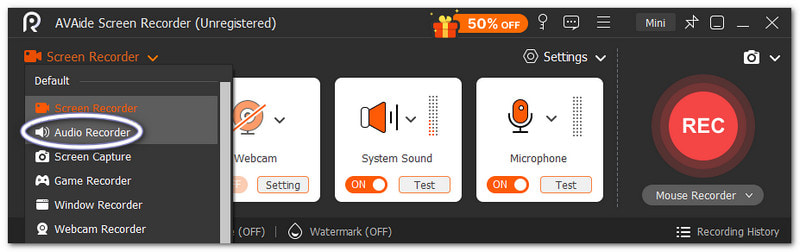
Ασφαλής λήψηΒήμα 2Ξεκινά σε λειτουργία εγγραφής οθόνης. Κάντε κλικ στο αναπτυσσόμενο μενού. Επιλέξτε Συσκευή εγγραφής ήχου για καλύτερη λήψη ήχου.
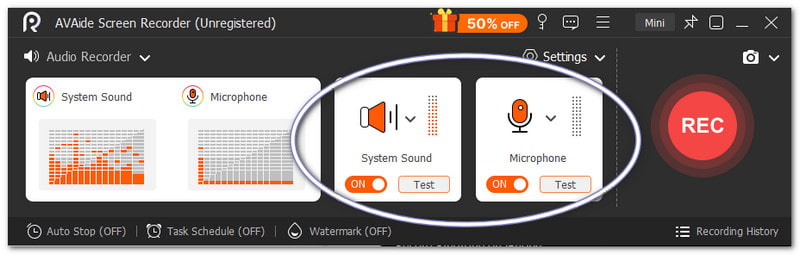
Βήμα 3Ανάβω Ήχος συστήματος για να εγγράψετε εσωτερικό ήχο. Ενεργοποιήστε το Μικρόφωνο αν θέλετε να προστεθεί η φωνή σας. Μπορείτε επίσης να ρυθμίσετε την ένταση του ήχου με ακρίβεια, εάν χρειάζεται.
Βήμα 4Κτύπημα REC για να ξεκινήσετε και περιμένετε την αντίστροφη μέτρηση. Μόλις ξεκινήσει, αναπαράγετε τον ήχο που θέλετε. Πατήστε το Να σταματήσει κουμπί μόλις ολοκληρωθεί η διαδικασία. Μετά από αυτό, το αρχείο αποθηκεύεται αυτόματα. Μπορείτε επίσης να το περικόψετε ή να το επεξεργαστείτε πριν το χρησιμοποιήσετε ως ήχο κλήσης.
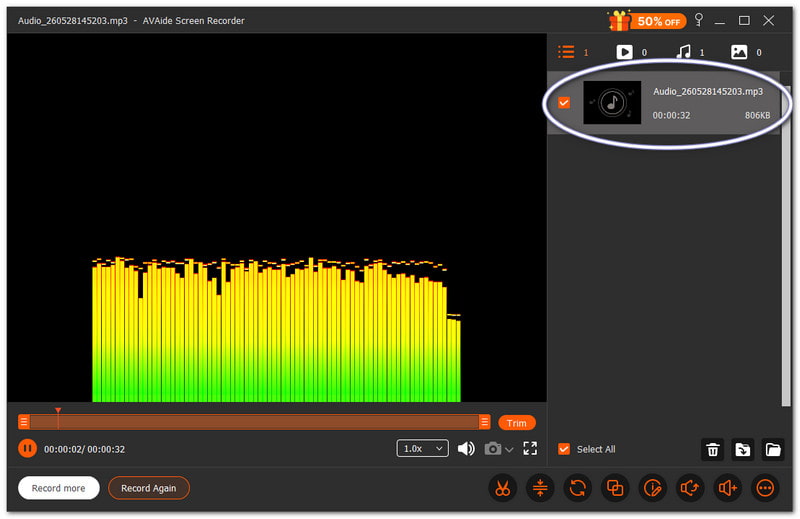
Δεν υπάρχει αμφιβολία ότι αυτός ο Mac και Εγγραφή ήχου των Windows μπορεί να σας βοηθήσει να δημιουργήσετε έναν ήχο κλήσης που θέλετε και σας αρέσει προσωπικά για τη συσκευή σας.
Μέρος 4. Βήματα ειδικά για τη Samsung
1. Χρήση της ενσωματωμένης συσκευής εγγραφής οθόνης
Η εφαρμογή Samsung Screen Recorder καταγράφει ήχο από βίντεο και βοηθά στη μετατροπή των ηχογραφημένων ήχων σε χρησιμοποιήσιμους ήχους κλήσης.
Βήμα 1Στο Γρήγορος πίνακας, σύρετε προς τα κάτω. Πατήστε το Εγγραφή οθόνης κουμπί. Πριν ξεκινήσετε, επιλέξτε το Ήχοι πολυμέσων.
Βήμα 2Αναπαραγωγή του βίντεο ή της μουσικής που θέλετε να καταγράψετε. Αφήστε την εφαρμογή εγγραφής οθόνης να το εγγράψει με ήχο.
Βήμα 3Διακόψτε την εγγραφή μόλις ολοκληρωθεί. Το αρχείο θα αποθηκευτεί στη συλλογή σας. Χρησιμοποιήστε μια εφαρμογή μετατροπής βίντεο σε MP3 για να εξαγάγετε τον ήχο.
Βήμα 4Μετακινήστε το αρχείο MP3 στο δικό σας Εσωτερική αποθήκευση > Φάκελος ήχων κλήσης ώστε να μπορεί να χρησιμοποιηθεί αργότερα.
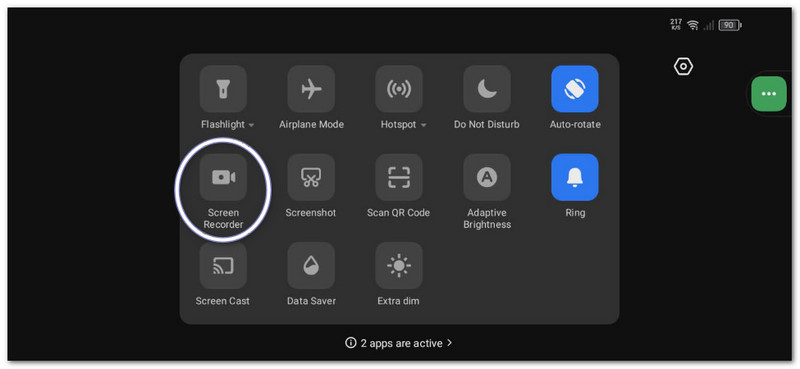
Αυτή η μέθοδος δείχνει Εγγραφή οθόνης SamsungΕπομένως, φροντίστε να μετατρέψετε το εγγεγραμμένο βίντεο μόνο σε ήχο, ώστε να μπορεί να χρησιμοποιηθεί ως ήχος κλήσης.
2. Ενσωματωμένο Ringtone Maker
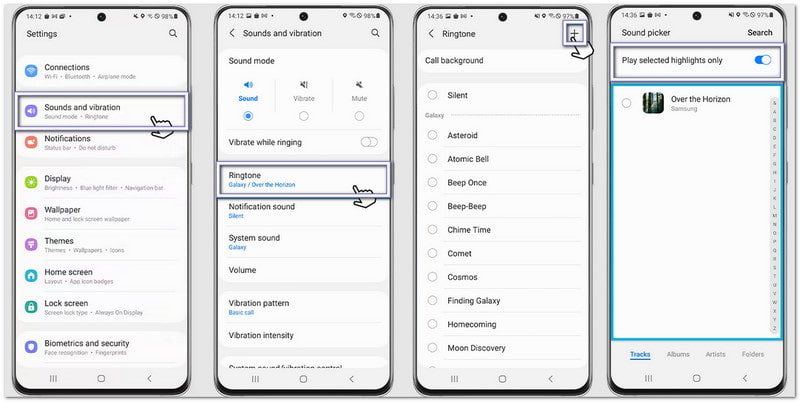
Οι ρυθμίσεις ήχου κλήσης της Samsung επιτρέπουν στους χρήστες να επιλέγουν τραγούδια, να περικόπτουν τις καλύτερες στιγμές και να τις αντιστοιχίζουν άμεσα ως τον προεπιλεγμένο ήχο κλήσης του τηλεφώνου.
Βήμα 1Άνοιξε το τηλέφωνό σου και πήγαινε στο Ρυθμίσεις. Παρακέντηση Ήχοι και δόνηση. Στη συνέχεια, επιλέξτε Ήχος κλήσης.
Βήμα 2Πατήστε το Προσθήκη και επιλέξτε ένα αποθηκευμένο τραγούδι ή ηχογράφηση από το τηλέφωνό σας.
Βήμα 3Καθιστώ ικανό Αναπαραγωγή μόνο επιλεγμένων στιγμιότυπων εάν είναι διαθέσιμο. Η Samsung θα περικόψει αυτόματα το καλύτερο μέρος του ήχου.
Βήμα 4Επιβεβαιώστε την επιλογή σας και ο ήχος θα οριστεί πλέον ως ο προεπιλεγμένος ήχος κλήσης.
3. Μέθοδος Διαχείρισης Αρχείων
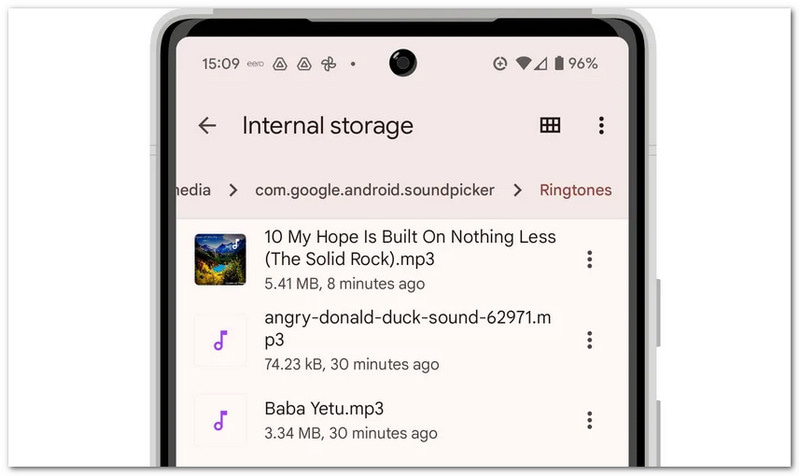
Το Samsung File Manager οργανώνει τα αρχεία ήχου και επιτρέπει την άμεση αντιγραφή στον φάκελο Ringtones για αυτόματη ανίχνευση ήχου κλήσης.
Βήμα 1Εκκινήστε το Τα Αρχεία μου εφαρμογή στο τηλέφωνό σας Samsung.
Βήμα 2Παω σε Λήψεις ή Ήχος φάκελο. Εντοπίστε τον ηχογραφημένο ή τον ληφθέντα ήχο σας.
Βήμα 3Πατήστε παρατεταμένα το αρχείο. Πατήστε αντίγραφοΣτη συνέχεια, μεταβείτε στο Εσωτερικός αποθηκευτικός χώρος > Ήχοι κλήσης.
Βήμα 4Επικολλήστε το αρχείο μέσα στον φάκελο Ringtones (Ήχοι κλήσης). Στη συνέχεια, επιστρέψτε στις ρυθμίσεις ήχου. Το αρχείο σας θα εμφανιστεί πλέον στη λίστα ήχων κλήσης.
Μέρος 5. Επαγγελματικές συμβουλές για καλύτερα αποτελέσματα
Πριν ορίσετε τον ήχο κλήσης σας, είναι χρήσιμο να ακολουθήσετε μερικές απλές συμβουλές. Αυτές θα κάνουν τον ήχο κλήσης σας να ακούγεται καθαρά και να λειτουργεί καλύτερα στο τηλέφωνό σας.
Συμβουλή #1: Κρατήστε το σύντομο.
Κάντε τον ήχο κλήσης σας να διαρκεί μόνο 30 έως 40 δευτερόλεπτα. Έτσι, θα είναι ομαλός και πλήρως συμβατός με τηλέφωνα Android.
Συμβουλή #2: Χρησιμοποιήστε τη σωστή μορφή.
Χρησιμοποιήστε αρχεία MP3 ή M4A όταν είναι δυνατόν. Αυτές οι μορφές λειτουργούν καλά στις περισσότερες συσκευές Android χωρίς σφάλματα.
Συμβουλή #3: Ελέγξτε πρώτα την ένταση του ήχου.
Παίξτε τον ήχο κλήσης σας πριν τον ορίσετε. Βεβαιωθείτε ότι δεν είναι πολύ δυνατός ή πολύ χαμηλός. Αυτό σας βοηθά να αποφύγετε εκπλήξεις όταν κάποιος σας καλεί.
Έχετε μάθει πώς να ηχογραφήσετε έναν ήχο κλήσης σε ένα iPhone, Android και έναν επιτραπέζιο υπολογιστή. Έτσι, ανεξάρτητα από τη συσκευή που χρησιμοποιείτε, μπορείτε να δημιουργήσετε τον δικό σας προσαρμοσμένο ήχο κλήσης ανά πάσα στιγμή.
Για χρήστες Windows και Mac, Εγγραφή οθόνης AVAide κάνει τη διαδικασία εύκολη. Μπορείτε να ηχογραφήσετε τη δική σας φωνή ή να καταγράψετε ήχο από το σύστημά σας. Μπορείτε επίσης να περικόψετε το αρχείο μετά την ηχογράφηση. Σας βοηθά να κρατήσετε μόνο το καλύτερο μέρος για τον ήχο κλήσης σας.
ΣΧΕΤΙΚΑ ΜΕ ΤΟΝ ΣΥΓΓΡΑΦΕΑ

Καταγράψτε δραστηριότητες οθόνης με ήχο, διαδικτυακές συσκέψεις, βίντεο παιχνιδιού, μουσική, κάμερα web κ.λπ.