How to record music on an iPhone? Recording your favorite music is a simple task, thanks to the phone's pre-built feature and reliable apps. Whether you are recording a short song, dealing with instrumental tracks, or capturing calls, your iPhone can offer flexible options that can assist beginners and professionals. So, if you want various methods to effectively record your music, it would be better to start reading everything in this tutorial.

Part 1. Record Music on iPhone Using the Built‑in Voice Memos App

One of the iPhone MP3 recorder apps you can use to record your music is the Voice Memos app. It is a built-in app you can access on your iPhone device. This music recorder allows you to record and capture any audio content clearly and instantly. It is ideal for jotting down song ideas, melodies, and full practice sessions. The best part here is that the app has an intuitive UI. You can smoothly trim your recorded content, organize, and share without encountering any difficulties. Also, for musicians who want to 在 iPhone 上錄製音頻, we can't tell that the Voice Memos app might be the ideal tool.

To learn how to record an MP3 on an iPhone, you can follow the detailed steps below.

Record Music Voice Memos App

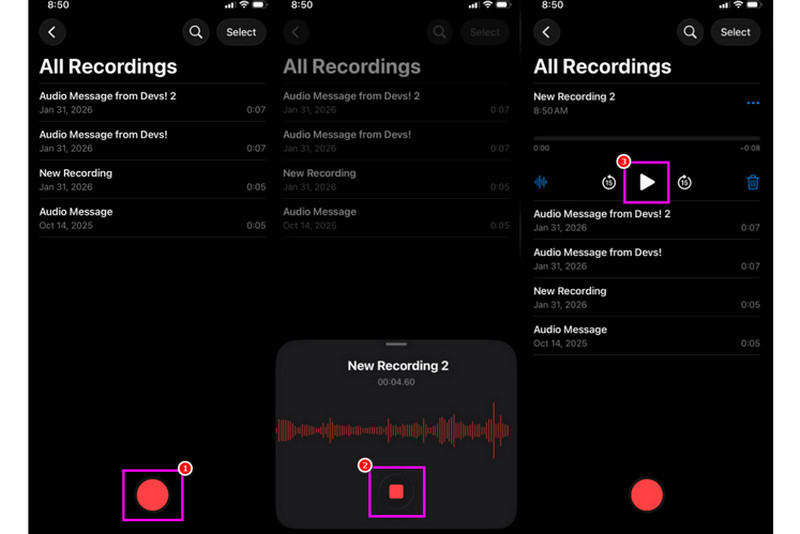
步驟1On your iPhone, proceed to the 實用程序 部分,然後點擊 語音備忘錄 app. Then, ensure that the music you want to record is already prepared.

第2步After that, proceed to the bottom interface and hit the 記錄 button. Once done, you can now play the music on your iPhone or on another device.

第 3 步Once done recording, hit the 停止 button. With that, you can now have your recorded music. You can even edit or share the file if you want to.

Part 2. Capture Music Using GarageBand

Do you want to create your own music and record it to save it on your device? In that case, you can access 車庫樂隊. This is a free app that ensures you can record music on your iPhone. With its recorder feature, there is no doubt that recording your music is a simple task. You can even access various instruments that you can use if you want to create your own music. Thus, if you need an all-in-one recording solution, consider using this application.

Capture Music GarageBand

步驟1前往 蘋果商店 and begin downloading 車庫樂隊. After the installation, run it on your device.

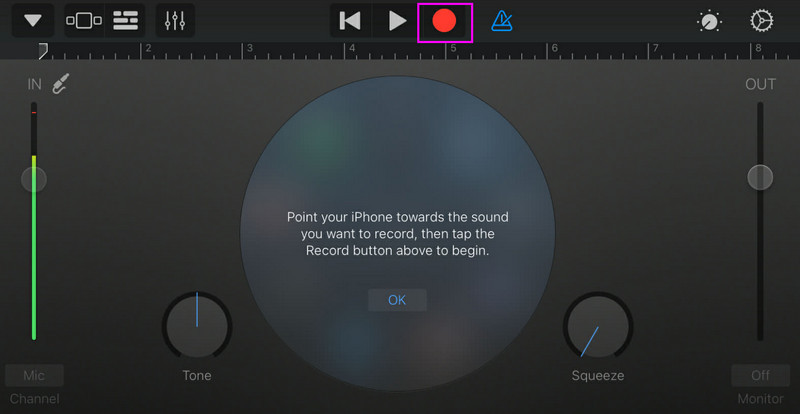
第2步From the interface, you have to select and press the 錄音機. Then, the main interface will appear on your screen.

第 3 步Start recording your music by tapping the 記錄 button above. Then, tap 停止 to finish the recording.

Part 3. Multi‑Track Recording with Third‑Party Apps

GarageBand is helpful for recording music. However, there are more apps you can access that can cater specifically to various styles of songwriting, tracking, and cross-platform collaboration. Some of the apps are:

  • BandLab - This tool is ideal for cloud-based collaboration. It is perfect for musicians since it has better features, such as mastering algorithms, an extensive loop library, and multi-recording.
  • FL Studio Mobile - This is a subscription-based tool. Hip-hop, electronics, and pop producers prefer it.
  • Cubasis 3 - It is a professional studio option ported over from desktop Cubase. The tool can offer elite MIDI editing, limitless audio track and multi-track recording, making it an ideal tool for users.

Effective Way to Record Music on a Desktop

Are you looking for a desktop-based recorder that can help you record your music? In that case, you can access AVAide 屏幕錄像. This program can offer its Phone Recorder to record your music from your iPhone. This software is ideal if you want to save your recording directly to your computer. What we like here is that this recorder can give you a smooth and simple recording process, thanks to its intuitive UI. This program also ensures that you can save the audio with the best quality, for up to 320 kbps, leading to better audio playback. You can even edit your audio based on your preferences, making the audio recorder ideal for all users.

步驟1下載 AVAide 屏幕錄像 on your desktop. Then, launch it to begin the process.

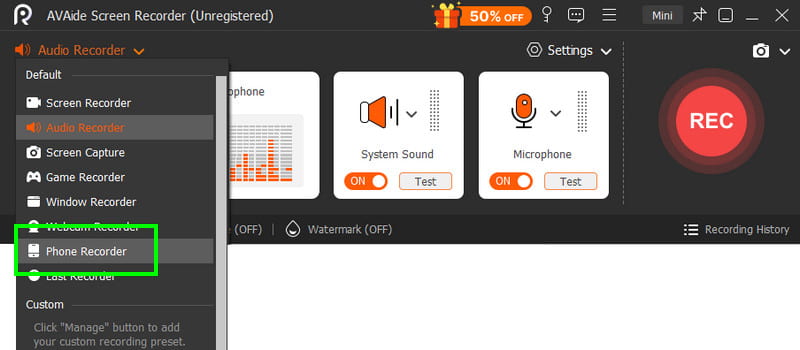
第2步從介面轉到 落下 按鈕並選擇 電話錄音機 feature. Then tap iOS and connect your phone.

Phone Recorder AVAide

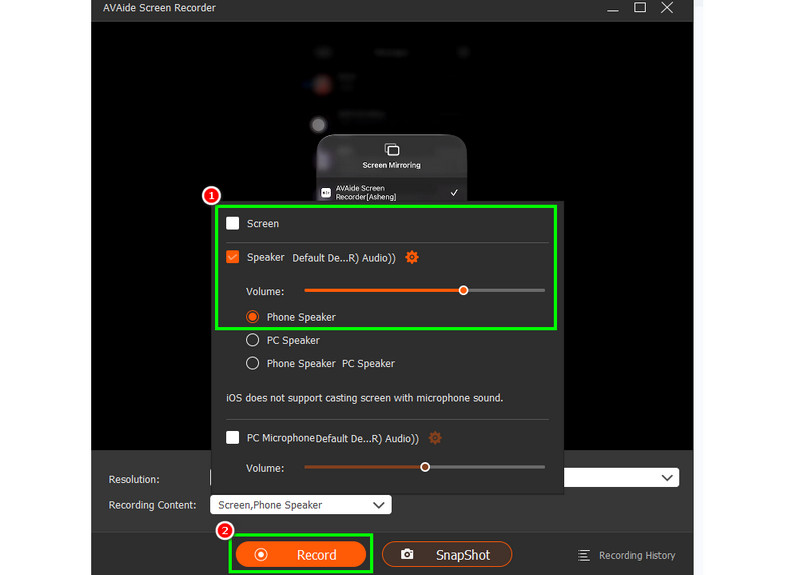
第 3 步之後,繼續進行 錄製內容 section to uncheck the 屏幕 選項並選擇 電話揚聲器 option. Once done, tap 記錄 to start the recording process.

Phone Speaker Record AVAide

輕敲 停止 to finish the recording.

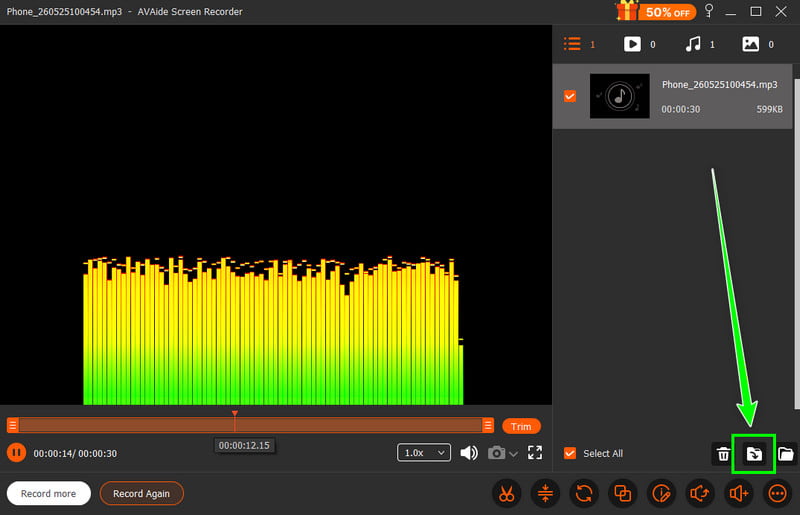
步驟4When the Preview shows up, click 出口 to start saving the recorded audio.

Export Music AVAide

Part 4. Recording in MP3 Format

By default, the Apple ecosystem saves music as WAV or AAC. However, we can still say that MP3 is among the most portable audio formats out there. Thus, converting your recordings to MP3 is the best option. To convert your recording, you can use the Audio Recorder app. With this app, you can convert your recordings from Voice Memos to MP3 for better compatibility. You can convert AAC 轉 MP3, WAV to MP4, FLAC to WAV, and more.

Record Convert in MP3

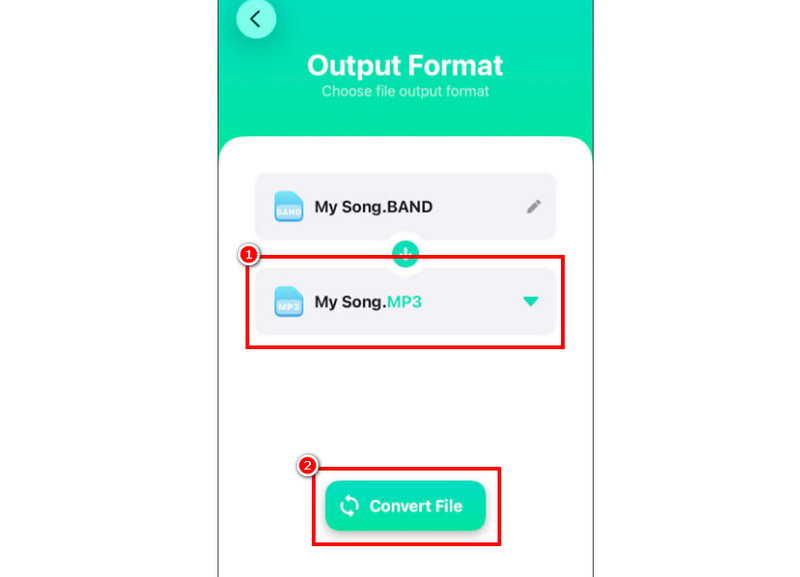
步驟1去你的 蘋果商店 並下載 音頻轉換器 app. Then, launch the converter and start adding the recording.

第2步來自 格式 section, start choosing the MP3 格式。然後,點擊 兌換 按鈕。

第 3 步After the conversion process, you can now play your MP3 file.

Part 5. How to Record Music from YouTube on iPhone

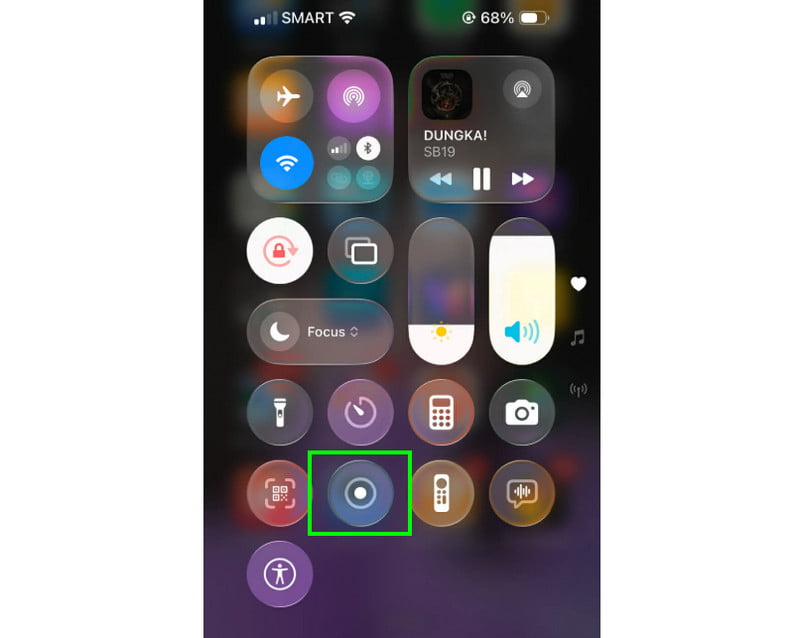
Do you want to record music from YouTube on your iPhone? In that case, all you need is to use the Recorder feature on your device. With this feature, you can record any music from YouTube. To start the recording feature, all you need to do is tap 輔助觸控 and proceed to the Control Center section. That hit the Recorder feature. The procedure will begin after the 3-second countdown. With that, you can start playing the music from YouTube. Taps stop to finish the recording. Once done, you can now use any video to MP3 converter to turn your video into an audio file.

Record Music from YouTube Recorder

Part 6. Pro Tips for Better Sound Quality

Check this section and get more insights on how to get a better sound quality.

  • Always record in a quiet place to minimize background noise.
  • When using an app like GarageBand, you must keep input gain balanced. Always avoid clipping by staying below the red zone.
  • For better quality, always record in AIFF or WAV.
  • Monitor recording with headphones. You can use wired headphones to address issues in real time.
結論

record a song on an iPhone, use all the methods provided in this tutorial. With that, you can get the result you want after the process. Also, if you want to record music from your phone using your desktop, you can access AVAide 屏幕錄像. With this program's Phone Recorder feature, you can connect your iPhone and record any music and save it with the best quality, making it the best recorder you can rely on.

經過 艾莎·約翰遜 on 6 月 10, 2026

關於作者

艾莎·約翰遜
艾莎·約翰遜

艾莎·約翰遜是一位多媒體製作技術員,專長於螢幕錄製和音訊擷取工作流程。她曾幫助教育工作者、培訓師和播客團隊建立穩定的錄製環境,並解決常見的硬體和配置問題。她的實作經驗能夠幫助創作者提升錄製清晰度,製作出更可靠的內容。

相關文章