Facebook Messenger processes voice data in a way that prevents direct access; that is why most individuals try to 從 Facebook Messenger 下載音頻 without success. The files are integrated, and in most cases, they require specific procedures to extract and use. Knowledge of this organization prevents mistakes and wastes of time. In this article, you will get to know why you should have these limits, how to store audio in various devices, and what to do when files do not work properly.

Part 1. Why Can't You Download Audio from Facebook Messenger

Facebook Messenger audio is not easy to download because it is not designed as a file-sharing platform but rather as an in-app playback service. Messenger stores the voice messages on its servers and broadcasts them when you press play. It implies that the audio is not delivered as a simple downloadable file in MP3 or WAV format.

Another key issue is file format and structure. Voice messages are often saved in compressed formats such as AAC within an MP4 container. These files are hidden behind Messenger's interface, so you do not see a direct "save" or "download" button. Sandboxing is also applied on mobile devices, where the app prevents the user from accessing internal file directories where audio is temporarily stored.

The addition of security and privacy controls adds an extra layer. On desktop, audio is loaded via web scripts, which makes it harder to find the original file without developer tools. Android and iOS do not permit apps to easily extract stored media on their mobile devices, preventing easy extraction in either system.

Browser and app behavior also play a role. On desktop, audio loads through web scripts, making it harder to locate the original file without using developer tools. On mobile, both Android and iOS restrict how apps share stored media with the user, which blocks simple extraction.

In short, the difficulty comes from three main factors: streaming-based delivery, hidden file formats, and system-level restrictions. Understanding these limits is key before moving on to the methods that actually let you save the audio, and it applies to downloading Facebook videos as well.

Part 2. Download Audio from Facebook Messenger on PC and Mac

If you want to know how to download Facebook Messenger audio on PC and Mac, one convenient solution is a screen recorder like AVAide 屏幕錄像. Since Messenger does not allow direct downloads, this tool lets you record sound as it plays at high quality, without lag. It is easy to carry around, user-friendly, and supports a wide range of formats, including MP3, M4A, and FLAC, which can be played easily. You can also manage and organize your recorded files within the software, making it a reliable option for saving Messenger audio without dealing with hidden file systems or restrictions.

步驟1Download the screen recorder for your chosen device by clicking the appropriate button here. Then follow the installation promptly and launch the tool.

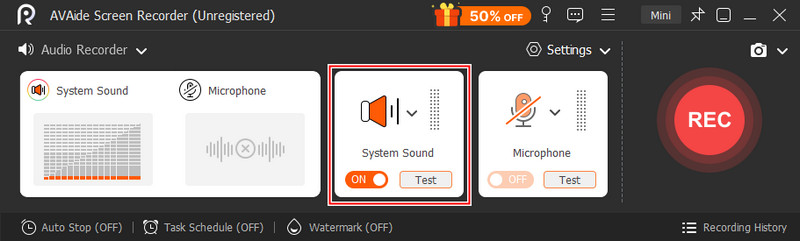
第2步Next, set up the 錄音機 and activate System Recording so you can record audio on your PC. Open Facebook Messenger, go to Chats, and find the audio recording you want to save.

Audio Messenger Recording

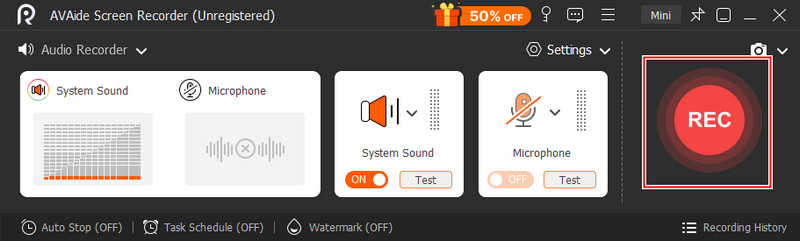
第 3 步然後,單擊 錄音 button to start recording, and then play the audio clip in Messenger. Once you are done recording, click the 停止 按鈕。

Start Recording Messenger

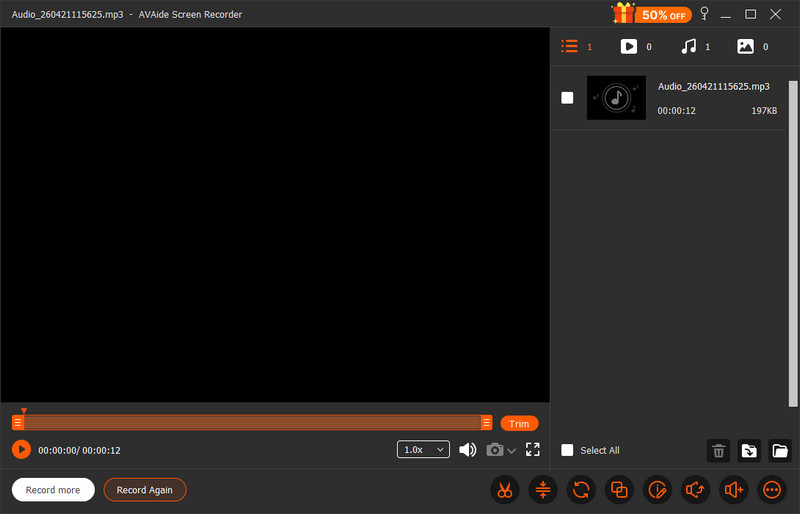
步驟4Take a quick preview of the recording you have done by clicking the button, and now you have the audio recording from Messenger saved on your PC.

Play Messenger Recording

Part 3. Download Audio from Facebook Messenger on Android and iOS

If you need a trusted Facebook Messenger audio downloader on mobile, using the plain version of the browser on Facebook is an ingenious workaround. Messenger encrypts audio files within the app, although this approach reveals them as plain .mp4 files, allowing downloads without additional applications. It comes in particularly handy when you need a fast, no-install solution. Although it involves using mobile data and some manual steps, it provides you with direct access to the file in a format that can be saved, found, and played on your device easily.

步驟1Turn off Wi-Fi and switch to mobile data, then open your mobile browser and go to free.facebook.com. Log in to your account.

第2步點擊 Messages tab below the search bar and open the conversation with the audio clip.

第 3 步Locate the audio message, which appears as a link ending in .mp4, then tap the link.

步驟4Select the download option, wait for it to finish, and check your browser's download manager to access and play the file.

Part 4. Why Downloaded Messenger Audio Files Can't Play

Some of the files might not be playable due to format or compatibility issues, even after knowing how to download audio from Facebook Messenger. Messenger audio can be stored in an MP4 container, which many default players cannot fully read. The audio is AAC, and the output will most likely say "This File isn't supported by QuickTime" if you are a Mac user, particularly when the file was extracted or recorded incorrectly. Missing codecs or wrong file extensions can also cause playback errors in a few cases

The easiest way is to convert the file with AVAide 視頻轉換, which makes everything fast and safe. It can also handle formats such as MP3 and WAV, which are compatible with a wider range of devices without sacrificing audio quality, so your downloaded Messenger audio can be easily played and handled.

步驟1Download the multimedia converter on your computer by clicking the download button here, then follow the installation process before you can open it.

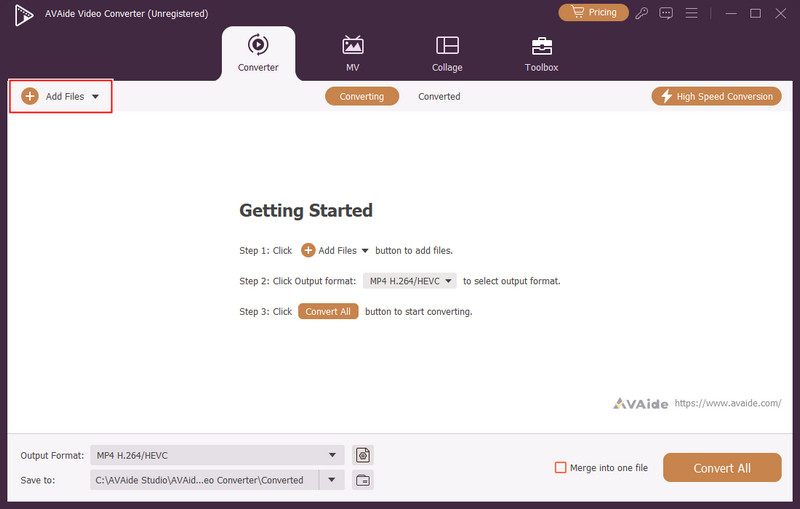
第2步之後,單擊 + button and upload the downloaded audio file from Messenger to the app.

Upload Audio Recorded

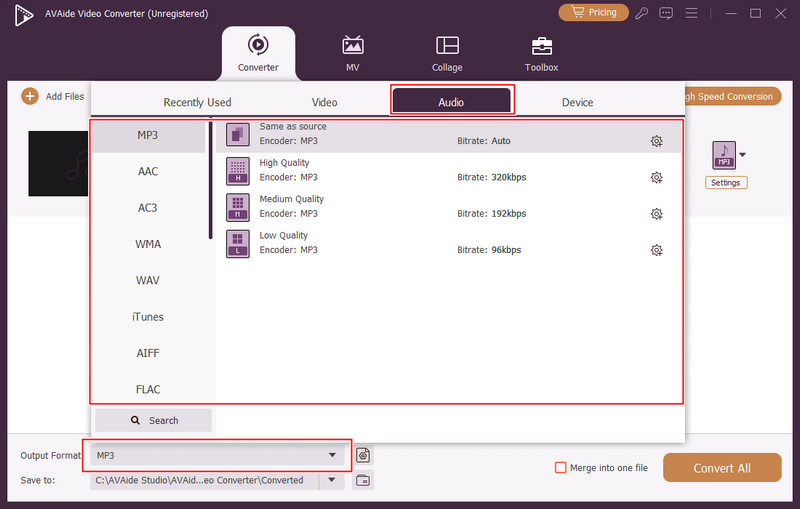
第 3 步接下來,單擊 落下 並選擇 聲音的 format from the options. Then, select from the vast library of audio formats available here to make your audio compatible, such as MP3.

選擇音訊格式

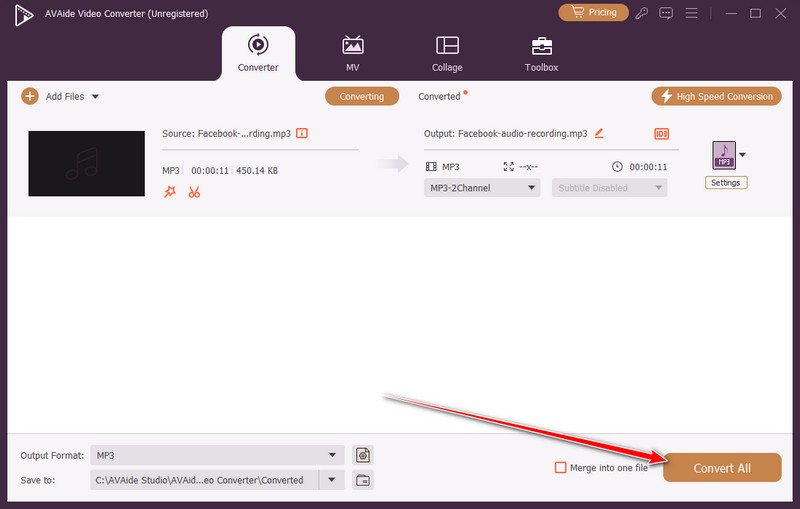
步驟4最後,點擊 全部轉換 按鈕開始轉換過程。

Start Converting Audio
結論

It might seem that downloading voice messages isn't that simple, yet once you learn how to download audio in Facebook Messenger, it will be much easier to handle this issue. Whether it's a desktop recorder, a browser workaround on a mobile device, or a converter to correct playback problems, all of them address a particular shortcoming of the platform. The trick is to select the method that suits your gadget and requirements. You can easily save, access, and play Messenger audio without trouble, with the right tools and steps.

經過 艾莎·約翰遜 on 5 月 19, 2026

關於作者

艾莎·約翰遜
艾莎·約翰遜

艾莎·約翰遜是一位多媒體製作技術員,專長於螢幕錄製和音訊擷取工作流程。她曾幫助教育工作者、培訓師和播客團隊建立穩定的錄製環境,並解決常見的硬體和配置問題。她的實作經驗能夠幫助創作者提升錄製清晰度,製作出更可靠的內容。

相關文章