Bilgisayarınıza çok sayıda fotoğraf veya belge aktardığınızı ve "Oluşturulma Tarihi" veya "Değiştirilme Tarihi" alanlarının tamamen karışmış olduğunu hayal edin. Yedekleme hatası veya saat dilimi uyumsuzluğu gibi nedenlerle, yanlış dosya zaman damgaları dijital arşivlemenizi mahvedebilir ve iş akışınızı alt üst edebilir.
Neyse ki, bu karmaşayla yaşamak zorunda değilsiniz. Özel bir ekip dosya tarihi değiştirici Meta verileriniz üzerinde mutlak kontrol sahibi olmanızı sağlayan bu araçlar, yalnızca birkaç tıklamayla dosya zaman damgalarını toplu olarak düzenlemenize olanak tanır. Bu kılavuzda, dijital organizasyonunuzun kontrolünü yeniden ele geçirmenize yardımcı olmak için Windows ve Mac için en iyi 5 dosya tarih değiştirme aracını bir araya getirdik. Hadi başlayalım!
Bölüm 1. En İyi 5 Dosya Tarih Değiştirme Programının Kapsamlı İncelemesi
Bu bölümde, güvenebileceğiniz en iyi dosya tarih değiştirme araçlarını tanıtacağız. Bu araçların görevinizi başarmanıza nasıl yardımcı olabileceğini öğrenmek için okumaya devam edin!
1. AVAide Video Dönüştürücü
Hem Windows hem de Mac için mevcuttur. AVAide Video Dönüştürücü Güçlü ve yerleşik bir Dosya Tarih Değiştiriciye sahip çok yönlü bir platformdur. Bu sezgisel özellik, oluşturma, değiştirme ve son erişim tarihleri de dahil olmak üzere kapsamlı zaman damgası ayrıntılarını zahmetsizce değiştirmenize olanak tanır.
- Video, ses ve görüntü dahil olmak üzere birçok medya formatını sorunsuz bir şekilde işleyin.
- Birden fazla dosyayı aynı anda içe aktarın ve güncelleyin, böylece zamandan tasarruf edin ve iş akışınızı kolaylaştırın.
- Dosya tarihini hızlıca değiştirmeniz için temiz ve kullanıcı dostu bir arayüz sunar.
- Tarih değişikliklerinden sonra bile dosyanızda sorunsuz bir şekilde çalışmaya devam edin.
2. Dosya Tarihi Değiştirici
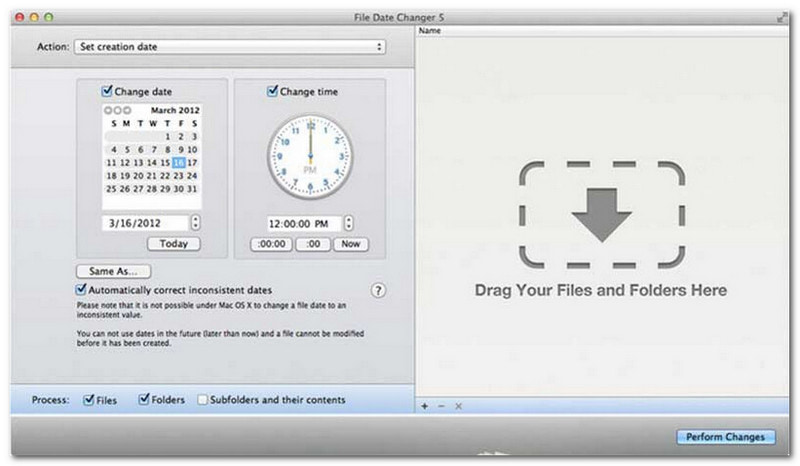
Dosya Tarihi Değiştirici, dosya oluşturma tarihlerini değiştirme konusunda özel bir çözüm sunarak adının hakkını veriyor. Basit tasarımı sayesinde her seviyedeki kullanıcı için erişilebilir durumda. Hem oluşturma hem de değiştirme tarihlerini destekliyor. İster tek tek dosyaların ister tüm klasörlerin tarihlerini değiştirmeniz gereksin, Mac'teki bu dosya tarihi değiştirici, verimli işlevselliğiyle süreci basitleştiriyor.
Dosya Tarih Değiştirici ücretli bir araç olsa da, değeri maliyet ve işlevsellik açısından özel ihtiyaçlarınıza bağlıdır. Bazı kullanıcılar, fiyatına göre özellik setini biraz temel bulabilir. Bununla birlikte, verimliliğe ve sorunsuz bir iş akışına öncelik verenler için, dosya tarih değiştirici olarak oldukça güvenilir ve değerli bir yatırım olmaya devam etmektedir.
Dosya Tarih Değiştirici'nin Temel Özellikleri:
- Birden fazla dosya için oluşturma, değiştirme ve son erişim tarih ve saatlerini düzenleyin.
- Belirli günleri, saatleri, dakikaları veya saniyeleri eklemeyi veya çıkarmayı destekler.
- Dosya özelliklerini (örneğin, salt okunur veya gizli olarak) değiştirin ve EXIF meta verilerini güncelleyin.
- Dosya tarih değiştirme programı anında çalışır ve kullanımı kolay bir arayüz sunar.
3. Exif Aracı
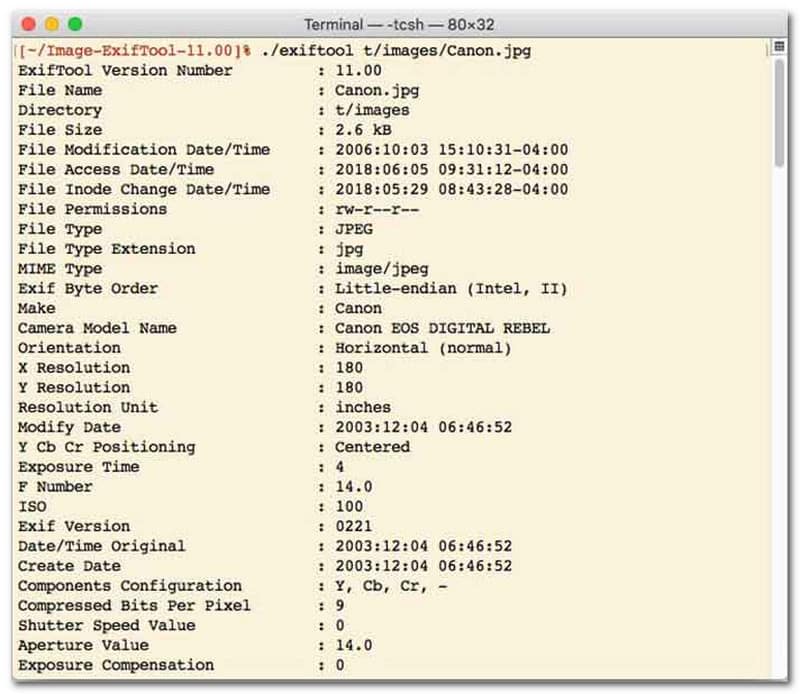
Komut satırı arayüzü (CLI) ile dosya tarih değiştirme aracı tercih eden kullanıcılar için ExifTool, ultra hassas dosya yönetimi için altın standarttır. Bu son derece çok yönlü dosya tarih değiştirme aracı, fotoğraflar, videolar, belgeler ve ses dosyaları da dahil olmak üzere çok çeşitli dosya türlerini destekler. ExifTool, yalnızca oluşturma ve değiştirme tarihlerini düzenlemenin ötesinde, zaman damgası meta verilerini bir dosyadan diğerine sorunsuz bir şekilde kopyalamanıza olanak tanıyarak, tüm medya kitaplığınızın sorunsuz bir şekilde mükemmel bir şekilde senkronize kalmasını sağlar.
ExifTool'un Başlıca Özellikleri:
- Dosya sistemi zaman damgalarını sorunsuz bir şekilde okuyun ve değiştirin.
- Tamamen farklı meta veri katmanları arasında tarihleri kopyalayın.
- Dosya tarihlerini toplu olarak değiştirmenize yardımcı olmak için gelişmiş tarih ve saat hesaplamalarını destekler.
- Her tür dosyadan tarih ve medya bilgilerini çıkarın.
4. Toplu Dosya Değiştirici
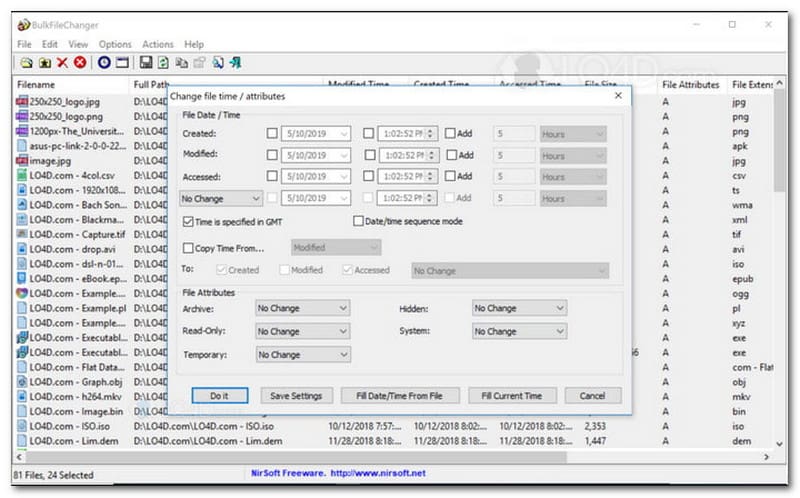
BulkFileChanger, Windows'ta zahmetsiz dosya zaman damgası yönetimi için tasarlanmış hafif ve yüksek performanslı bir dosya tarih değiştirme yardımcı programıdır. Kullanıcıların, belgelerden resimlere ve videolara kadar neredeyse her dosya türünde oluşturma, değiştirme ve son erişim zamanları dahil olmak üzere çeşitli tarih ve saat özelliklerini hızlı bir şekilde değiştirmelerine olanak tanır. Çapraz format uyumluluğu ve hızı, onu dijital arşivleri düzenlemek için mükemmel bir dosya tarih değiştirme aracı yaparken, kullanılabilirliği yalnızca Windows işletim sistemiyle sınırlıdır; bu da macOS ve Linux kullanıcılarının başka alternatiflere bakmaları gerektiği anlamına gelir.
BulkFileChanger'ın Başlıca Özellikleri:
- Dosyanın oluşturulma, değiştirilme ve son erişim tarihlerini düzenleyin.
- Belgeler, resimler ve videolar da dahil olmak üzere neredeyse tüm dosya türlerini sorunsuz bir şekilde işler.
- Son derece hızlı ve toplu meta veri güncellemesine olanak tanıyan hafif bir tasarıma sahiptir.
- Belirli günleri, saatleri, dakikaları ve saniyeleri ekleyin veya çıkarın.
5. ÖzellikMagic
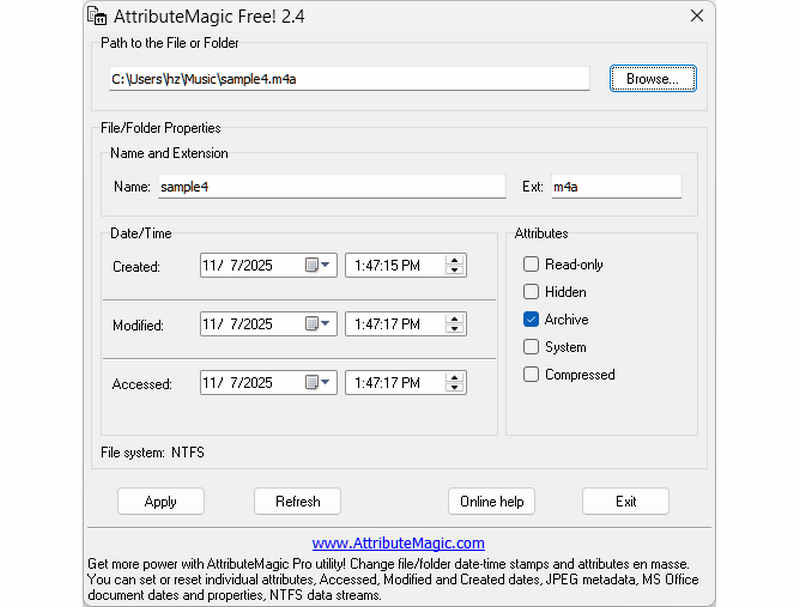
AttributeMagic, basit bir dosya tarih değiştirme aracından çok daha fazlasını sunarak hem klasör hem de dosya özelliklerini yönetmek için gelişmiş bir çözüm sunar. Bu kapsamlı araç, hassas zaman damgası düzenlemesine olanak tanıyarak kullanıcıların oluşturma, değiştirme ve son erişim tarihlerini zahmetsizce yeniden yazmalarını sağlar. AttributeMagic, özel bir dosya tarih değiştirme aracı olmanın ötesinde, arşivleme ihtiyaçlarınıza uygun olarak dosya sistemi özelliklerinde derinlemesine özelleştirme imkanı sunar. Ücretsiz sürüm temel zaman damgası düzenleme işlevselliği sağlarken, premium sürüme yükseltme gelişmiş meta veri kontrolü ve güçlü otomasyon özelliklerinin kilidini açar.
AttributeMagic'in Temel Özellikleri:
- Oluşturma, değiştirme ve son erişim zaman damgalarını değiştirin veya gizleyin.
- Tek bir dosya veya tüm dosya klasörü için dosya tarihini değiştirin.
- Dosya zaman damgalarını kolayca artırın, azaltın veya ileri ya da geri kaydırın.
- Salt okunur, gizli ve sistem gibi temel dosya sistemi özelliklerini ayarlayın, sıfırlayın veya tersine çevirin.
Bölüm 2. 5 Dosya Tarihi Değiştirme Programının Karşılaştırılması
| Ürün | Desteklenen Platformlar | Kullanıcı arayüzü | Toplu Düzenleme | Ek Yetenekler |
| AVAide Video Dönüştürücü | Windows ve macOS | Modern, Temiz ve Akıcı | Evet (Ultra Hızlı) | Tam Paket: 8K Video Dönüştürme, DVD Kopyalama, Meta Veri Düzenleme, Müzik Videosu/Slayt Gösterisi Oluşturma |
| Dosya Tarihi Değiştirici (NirSoft) | Sadece Mac | Eski (Eski Web/Kullanıcı Arayüzü) | Sınırlı | Yok (Tek amaçlı) |
| Exif Aracı | Windows, macOS, Linux | Yalnızca Komut Satırı (GUI Yok) | Evet (Karmaşık komut dosyaları gerektirir) | Yalnızca meta veri okuma/yazma |
| TopluDosyaDeğiştirici | Yalnızca Windows | Klasik Windows Yardımcı Programı | Evet | Temel Windows dosya öznitelik ayarları |
| NitelikBüyüsü | Yalnızca Windows | Katı / Karmaşık | Evet | Yalnızca dosya sistemi bayrak yönetimi |
Bölüm 3. AVAide Video Converter'da Dosya Verilerini Değiştirme
Dijital dosyalarınızı daha iyi organize etmek için hiç bir dosyanın oluşturulma tarihini değiştirmeniz gerekti mi? Bunu kullanarak yapabilirsiniz AVAide Video Dönüştürücü! Dosyanızı yönetmenize yardımcı olmak amacıyla dosyada oluşturulan tarihi nasıl değiştireceğinizi öğrenmek için okumaya devam edin.
Aşama 1Tam erişim için resmi web sitesinden AVAide Video Converter'ı indirip yükleyin.

ÜCRETSİZ İNDİR Windows 7 veya üzeri için
 Güvenli indirme
ÜCRETSİZ İNDİR Mac OS X 10.13 veya üzeri için
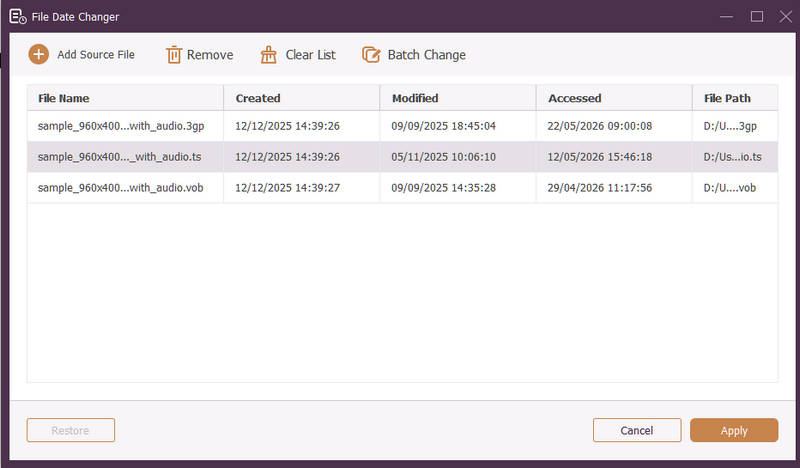
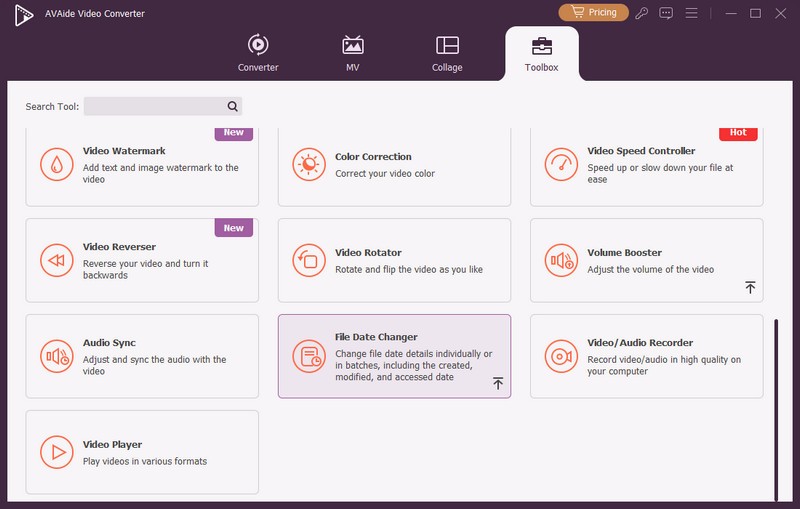
Güvenli indirmeAşama 1Başlamak için programı bilgisayarınızda açın. Şuraya gidin: araç kutusu çeşitli özelliklere erişmek için sekmeyi tıklayın. Farenizi aşağı kaydırın, arayın Dosya Tarihi Değiştirici seçenekler arasından seçim yapın ve tıklayın. Dosya tarihi detaylarını değiştirmek için kullanacağınız özelliktir.
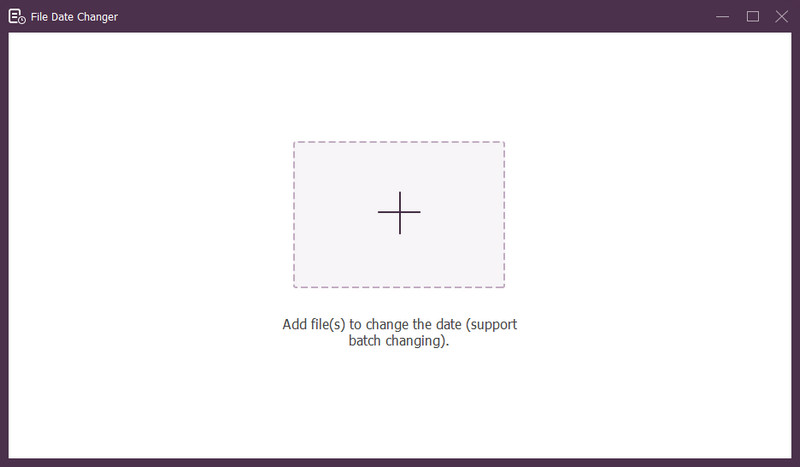
Aşama 3( tuşuna basın+) düğmesine basarak dosyaları içe aktarın. Bu ses, görüntü ve ses dosyaları olabilir. Dosya ayrıntılarını değiştirmek için birden fazla dosyayı içe aktarabilirsiniz.
4. AdımTüm dosyalar içe aktarıldıktan sonra tarihlerini değiştirmeye başlayabilirsiniz. Oluşturulan, değiştirilen ve erişilen tarihleri buna göre değiştirebilirsiniz. Bunu yapmak için öğeyi görüntülenene kadar tıklayın. Ok düzenleme için işaret ederek görünür.
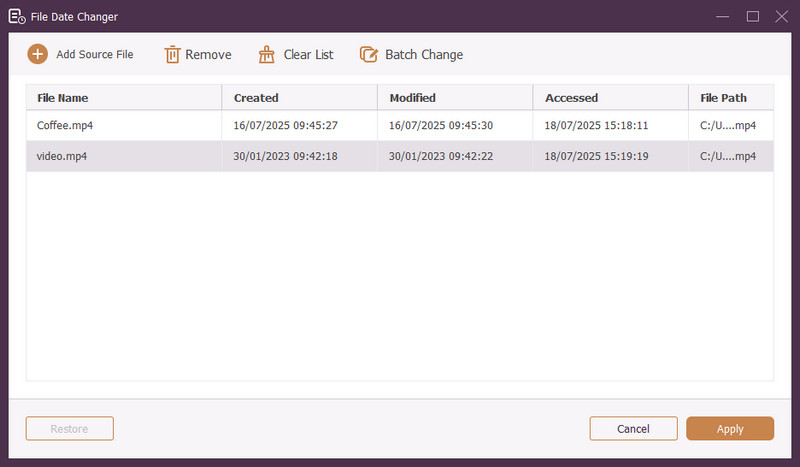
Adım 5Tüm dosya tarihlerini düzenledikten sonra, Uygulamak Değişiklikleri onaylamak için düğmesine basın. Değişiklikler uygulandıktan sonra doğruluğundan emin olmak için güncellenen dosya verileri ayrıntılarını inceleyin.
Bölüm 4. En İyi Dosya Tarih Değiştirici Hakkında Sıkça Sorulan Sorular
Bir dosyanın tarih bilgisini nasıl görüntüleyebilirim?
Bir dosyanın ne zaman oluşturulduğunu veya en son ne zaman değiştirildiğini kontrol etmek istiyorsanız bunu doğrudan bilgisayarınızda yapabilirsiniz. Lütfen dosyayı bulun, sağ tıklayın ve Özellikler'i seçin. Daha sonra dosyayla ilgili tüm detayları görebilirsiniz. Bunlar oluşturma ve değiştirme tarihlerini içerir.
Dosyanın tarihini ne zaman değiştirdiğimi bilen var mı?
HAYIR! Bir dosyanın tarihinin değiştirilmesi herhangi bir iz bırakmaz. Yani, değişikliği ne zaman yaptığınızı kimse bilmeyecek.
Tarih ve saatlerin dosyadan kaybolmasının nedeni nedir?
Tarih ve saatlerin dosyalardan kaybolmasının birkaç nedeni vardır. Bir dosyayı indirdiğinizde ve zayıf internet bağlantısı nedeniyle bazı bilgileri kaybettiğinizde bu durum ortaya çıkabilir. Bazen bunun nedeni dosyayı indirdiğiniz web sitesidir.
Dosyanın değiştirilen oluşturulma tarihini alabilir miyim?
Evet! Orijinal tarihi manuel olarak başlangıç değerine ayarlayarak geri yükleyebilirsiniz. Dosyanın oluşturulma tarihini almanın tek yolu budur.
Dosya tarihini ve saatini değiştirmek dosya bütünlüğünü veya içeriğini etkiler mi?
HAYIR! Bir dosyanın tarih ve saatlerinin değiştirilmesi içeriği veya bütünlüğü etkilemez. Yalnızca oluşturma ve değiştirme tarihleri gibi meta verileri değiştirir. Gerçek dosyayı değiştirmeden bırakır.
İşte aldın! Öğrendin bir dosyada oluşturulan tarihin nasıl değiştirileceğiçeşitli nedenlerden dolayı yararlı olabilir. Daha akıcı ve yeni başlayanlara uygun bir deneyim için, dosya tarih değiştiriciniz olarak AVAide Video Converter'ı kullanmayı düşünün. Dijital dosyalarınızı yönetmek için en iyi seçimdir. Deneyin ve düşüncelerinizi aşağıda paylaşın!
YAZAR HAKKINDA

Video ve sesi kalite kaybı olmadan dönüştüren en kapsamlı medya dönüştürücü.
Videoyu düzenle
- Yapay Zeka Üst Düzey Video
- Filigranı Videodan Kaldır
- Videodan Metni Kaldır
- 4K'dan 1080p/720p'ye küçültme
- Videodan Arka Plan Gürültüsünü Kaldırın
- MP4 Meta Veri Düzenleyicisi
- Video Kalitesini Keskinleştir
- Ters Video
- Kötü Kaliteli Videoyu Düzeltin
- Video/Ses'ten Meta Verileri Kaldır
- Ayna/Aynasız Ön Kamera Videosu