Uzun videolarla çalışmak çoğu zaman can sıkıcı bir ikilem yaratır: Depolama alanınızın tamamını tüketmeden kusursuz video kalitesini nasıl koruyabilirsiniz? İşte burada video sıkıştırma standartları devreye giriyor. Video boyutu, kalitesi ve cihaz uyumluluğu arasında denge kurmak istiyorsanız, kaçınılmaz olarak şu iki seçenek arasında seçim yapmak zorunda kalacaksınız: H.264 (AVC) ve H.265 (HEVC).
Bu kapsamlı kılavuzda, H.264 ve HEVC arasındaki temel farkları ayrıntılı olarak ele alacak, iş akışınıza hangisinin daha uygun olduğuna karar vermenize yardımcı olacak ve kalite kaybı olmadan aralarında sorunsuz bir şekilde nasıl dönüştürme yapacağınızı göstereceğiz.
Bölüm 1. HEVC ve H264: Bunlar Nedir?
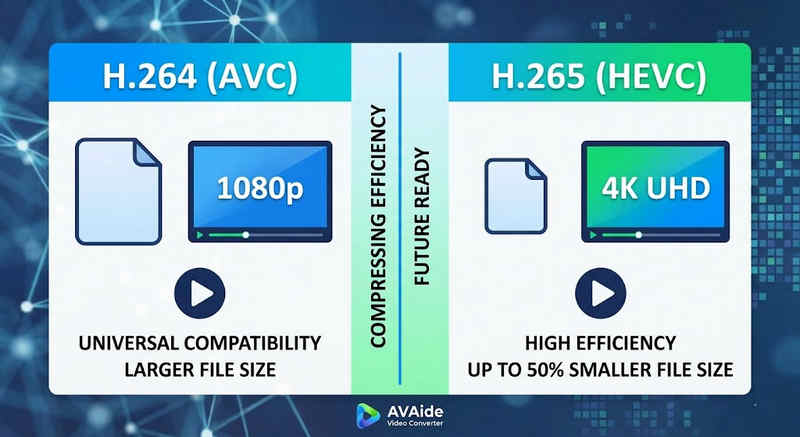
Kısa Cevap: H.264 (AVC) evrensel uyumluluk sunar ve neredeyse her cihazda çalışır, ancak daha büyük dosyalar oluşturur. H.265 (HEVC) üstün sıkıştırma sağlar, aynı görsel kaliteyle dosya boyutlarını 50%'ye kadar azaltır, ancak daha yüksek işlem gücü gerektirir ve eski donanımlarda sınırlı desteğe sahiptir.
1. H.264 kodeği (AVC) nedir?
Gelişmiş Video Kodlama (AVC) olarak tanıtılan H.264, video uyumluluğunun tartışmasız kralıdır. Çevrimiçi yayın, mobil kayıt ve günlük video oynatma için endüstri standardıdır. Çözme işlemi için çok az işlem gücü gerektirdiğinden, H.264 videoları eski akıllı telefonlardan modern akıllı TV'lere kadar akla gelebilecek hemen her dijital cihazda sorunsuz bir şekilde oynatılır.
2. H.265 Codec (HEVC) nedir?
Yüksek Verimlilikli Video Kodlama (HEVC) veya H.265, H.264'ün doğrudan halefidir. Özellikle 4K, 8K ve VR içeriğinin büyük veri taleplerini karşılamak için tasarlanmıştır. HEVC, video verilerini selefine göre çok daha verimli bir şekilde sıkıştırmak için daha gelişmiş algoritmalar kullanır ve 50%'ye kadar daha küçük dosya boyutlarında net, yüksek çözünürlüklü görüntüler sunar. Ancak bu verimliliğin bir bedeli vardır: gecikme olmadan işlem yapabilmesi için modern donanım gerektirir.
H.265 ve H.264: Hızlı Karşılaştırma Tablosu
| Özellikleri | H.264 (AVC) | H.265 (HEVC) |
| Desteklenen Formatlar | m2ts, evo, 3gp, f4v, mkv, mp4, qtff, asf, avi, mxf, ps, ts | mxf, ps, ts, 3gp, mkv, mp4, qtff, asf, avi |
| Sıkıştırma Verimliliği | Orta (Daha büyük dosya boyutları) | Üstün (25-50% daha küçük dosyalar) |
| Video kalitesi | 1080p için mükemmel | 4K, 8K ve HDR için optimize edilmiştir. |
| Cihaz Uyumluluğu | Evrensel (99% cihaz) | Sınırlı (Eski bilgisayarlar desteklemeyebilir) |
| İşlem Gücü | Düşük (Hızlı işleme/oynatma) | Yüksek (Daha yeni işlemci/ekran kartı gerektirir) |
| İdeal Kullanım Örnekleri | Web akışı, sosyal medya, eski cihazlar | 4K drone görüntüleri, iPhone sinematik videoları, yerden tasarruf sağlayan arşivleme |
Bölüm 2. HEVC mi, H.264 mü Tercih Edilmeli?
Doğru kodeği seçmek tamamen özel hedeflerinize bağlıdır. İşte birini diğerine tercih etmenizin nedenleri:
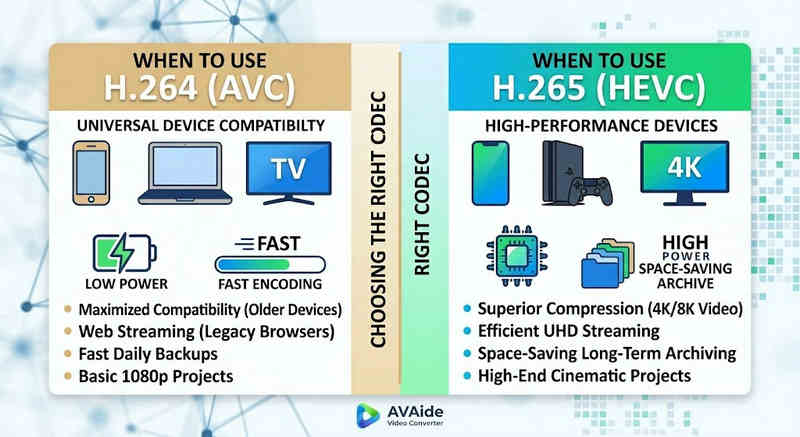
HEVC (H.265)'e Neden İhtiyacınız Var:
- Depolama Alanından Maksimum Tasarruf: Uzun metrajlı videoları veya büyük 4K arşivlerinizi yedekliyorsanız, HEVC doğal bir video boyutu küçültücü görevi görerek sabit diskinizdeki alanın yarısını boşaltır.
- Bant Genişliği Optimizasyonu: HEVC, akış için çok daha az bant genişliği gerektirir; bu da onu, daha yavaş internet bağlantılarında bile ara belleğe alma olmadan sorunsuz 4K oynatma için ideal hale getirir.
- Geleceğe Hazırlık: Sektör ultra yüksek çözünürlüklü (UHD) ve VR içeriğe doğru geçiş yaparken, HEVC videolarınızın yüksek kalitede kalmasını ve yeni nesil platformlarla uyumlu olmasını sağlar.
H.264 (AVC)'ye Neden İhtiyacınız Var:
- Kusursuz Oynatma ve Düzenleme: Video düzenleme yazılımınızda gecikme yaşanıyorsa veya medya oynatıcınız "Kodek Desteklenmiyor" hatası veriyorsa
- Uyumluluk ve Sorunsuz Paylaşım: H.264, en yaygın uyumluluğa sahip video kodeğidir. Videolarınızı arkadaşlarınızla, NAS cihazlarıyla, Plex veya Kodi gibi medya sunucularıyla paylaşmak isteseniz de, H.264 sorunsuz paylaşım ve oynatma sağlar.
Bölüm 3. HEVC ve H.264 Arasında Kolayca Dönüştürme Nasıl Yapılır
Videoların HEVC(H.265) ve H.264 formatlarından aktarılması durumunda, AVAide Video Dönüştürücü diğerlerinden daha iyi yapar. Dönüştürme kalitesinden ödün vermeyen ve çeşitli formatları destekleyen verimli ve kullanımı kolay bir arayüz sunar. Nedeni ne olursa olsun, HEVC'nin daha verimli olması veya H264'ün daha geniş çapta benimsenmesi olabilir, AVAide ikisi arasında sorunsuz bir şekilde geçiş yapmanızı sağlar.
Ayrıntılı Prosedür:
Aşama 1AVAide Video Converter'ı edinin
İndirin, kurun ve başlatın. AVAide Video Dönüştürücü Windows veya Mac bilgisayarınızda.

ÜCRETSİZ İNDİR Windows 7 veya üzeri için
 Güvenli indirme
ÜCRETSİZ İNDİR Mac OS X 10.13 veya üzeri için
Güvenli indirmeAdım 2Videolarınızı AVAide Video Dönüştürücüye Ekleyin
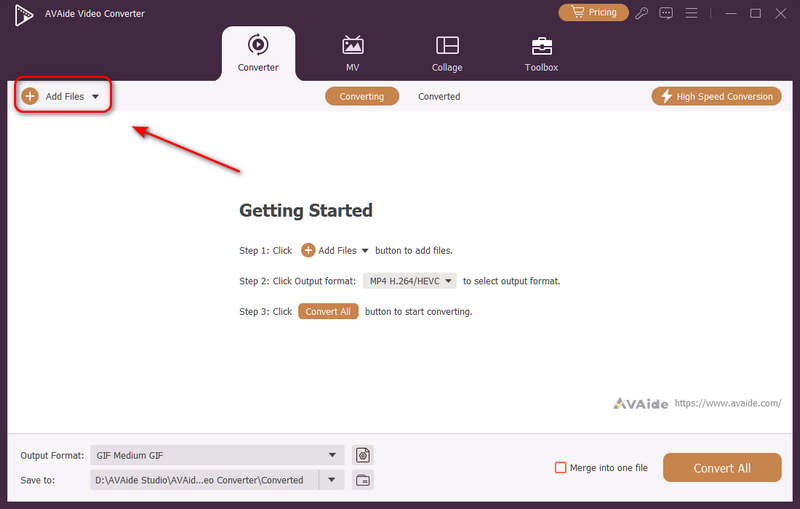
Birden fazla video dosyası ekleyebilir ve toplu dönüştürme yapabilirsiniz. Tıklayın. Dosya Ekle Video dosyalarınızı içe aktarmak için sol üst köşedeki düğmeyi kullanın.
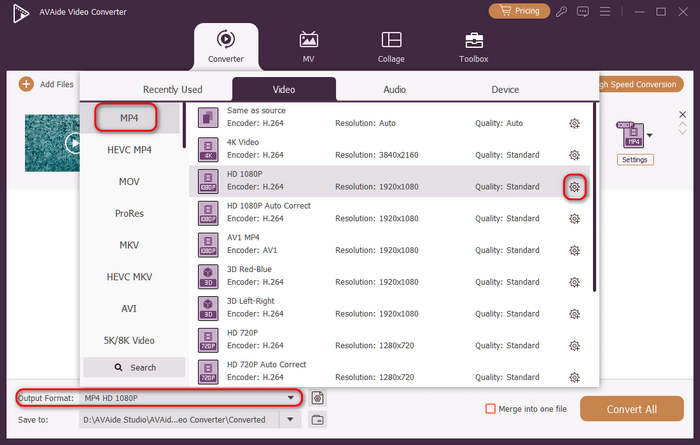
Aşama 3H.264 veya H.265 kodeğini seçin.
Tıkla Çıkış formatı Sol alt köşedeki açılır menü düğmesine tıklayın. Ardından, önce istediğiniz video formatını seçin. Sonra tıklayın. Özel Profil Video ön ayar çubuğundaki düğme (dişli çark simgesiyle).
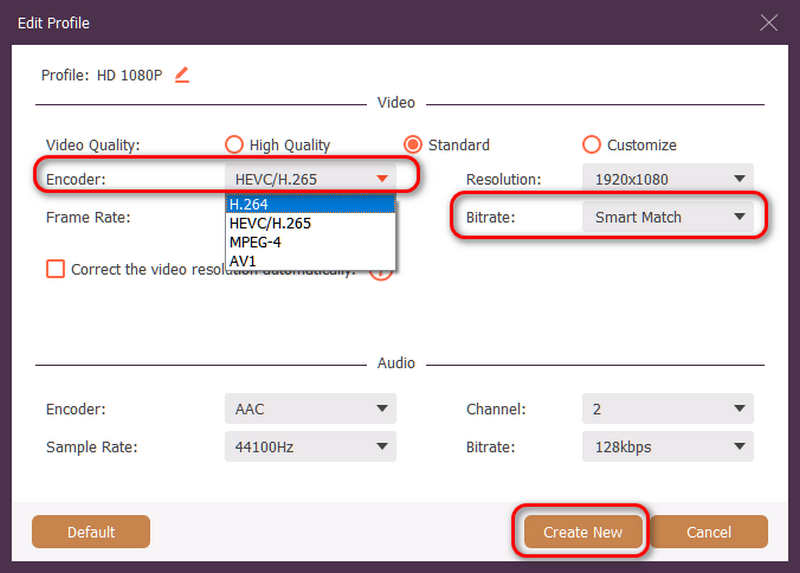
Ardından, bu panelde şunlara tıklayabilirsiniz: kodlayıcı açılır menü düğmesiyle seçim yapın H.264 veya HEVC/H.265 Kodek. Video kalitesini değiştirmek istiyorsanız, ayar yapabilirsiniz. Bit hızıAncak biz tavsiye ediyoruz. Akıllı Eşleştirme Uyumluluğu sağlamak için. Tıklayın. Yeni oluşturmak Ayarlarınızı kaydetmek için düğmeye tıklayın.
4. AdımVideo Yeniden Kodlamayı Başlat
Son olarak, Şuraya kaydet İstediğiniz çıktı klasörünü seçmek için açılır menü düğmesine tıklayın. Hepsini dönüştür Video kodeğinizi H.264 veya H.265 olarak değiştirmek için düğme.
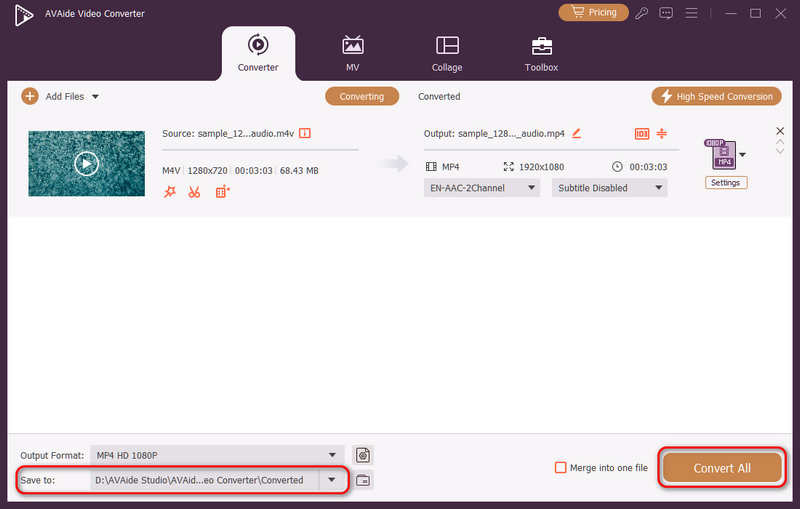
Bölüm 4. H.265 ve H.264 ile ilgili Sıkça Sorulan Sorular
NVENC H.264 ile NVENC HEVC arasındaki temel fark nedir?
Temel fark, sıkıştırma verimliliği ve donanım nesli optimizasyonunda yatmaktadır. NVENC HEVC (H.265), NVENC H.264'e (AVC) göre 50%'ye kadar daha iyi sıkıştırma sağlar. Bu, aynı görsel kaliteyi yarı bit hızında (ve yarı dosya boyutunda) üretebileceği anlamına gelir; bu da onu 4K videoları arşivlemek veya sınırlı bant genişliği üzerinden yayın yapmak için üstün bir seçenek haline getirir.
Modüler çok kanallı HEVC/H.264 kodlayıcı nedir?
Modüler çok kanallı HEVC/H.264 kodlayıcı, birden fazla video akışını eş zamanlı olarak sıkıştırmak ve yayınlamak için tasarlanmış, kurumsal düzeyde bir donanım cihazıdır. Tüketici yazılım kodlayıcılarından farklı olarak, modüler (bıçak tipi) bir tasarıma sahiptir ve kullanıcıların proje ölçeklerine bağlı olarak donanım kodlama kartlarını değiştirmelerine veya yükseltmelerine olanak tanır. Hem H.264 hem de HEVC/H.265'i destekler.
H.265+ nedir?
H.265+ (Smart H.265+ olarak da bilinir), Hikvision tarafından geliştirilen ve özellikle güvenlik ve gözetim izleme için optimize edilmiş gelişmiş, tescilli bir video sıkıştırma teknolojisidir.
Artık bu kapsamlı analizi kullanabiliriz HEVC ve H.264 Video gereksinimlerinize en uygun kodeği belirlemek için. H.264 isteyip uyumluluğa odaklanın veya HEVC isteyip daha iyi sıkıştırmayı hedefleyin, her iki kodeğin de avantajları vardır. AVAide Video Converter, hızlı olmasının yanı sıra mükemmel kalitede çıktı sağlayarak bu sorunla başa çıkmak için zarif ve etkili bir çözüm sunar. AVAide, basit arayüzleri ve gelişmiş işlevleriyle video sıkıştırma ve dönüştürme görevini kolaylaştırır.
YAZAR HAKKINDA

Kayıpsız kalitede dönüştürme için 350'den fazla formatı destekleyen eksiksiz video araç kutunuz.