Kendinize özel, kişiselleştirilmiş bir zil sesi istiyorsunuz. Herhangi bir yerden alınmış bir şey değil. Aramalar ve bildirimler için kendi yarattığınız bir zil sesi.
Bu konuda size yardımcı olmak için buradayız. Size farklı yollar göstereceğiz. bir zil sesi kaydet Farklı sistemlerde. Daha iyi sonuçlar için basit ipuçları da paylaşacağız. Öyleyse, özel bir zil sesi için sesinizi veya sesinizi hazırlayın.
Bölüm 1. iPhone'da Zil Sesi Nasıl Kaydedilir
1. Sesli Notu Zil Sesi Olarak Ayarlama (En Kolay Yol)
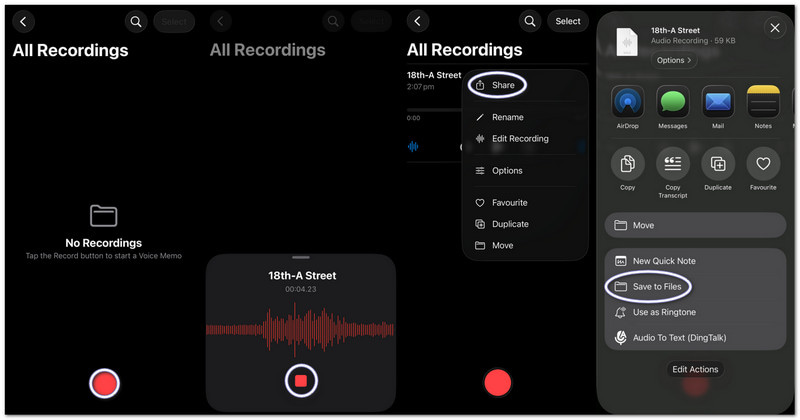
Sesli Notlar uygulaması ses kaydı yapar ve temel düzenleme araçlarıyla anında kullanılabilir özel bir zil sesine dönüştürür. Bu bölümde ise bir ses kaydını iPhone'da zil sesi haline getirmenin adım adım nasıl yapılacağını öğreneceksiniz.
Aşama 1iPhone'unuzda Sesli Notlar uygulamasını başlatın.
Adım 2Kırmızıya dokunun Kayıt Düğmeye basın ve konuşun veya sesinizi oynatın.
Aşama 3Musluk Durmak bitirdiğinizde.
4. Adımöğesine dokunun. üç nokta (...) Kaydınızda.
Adım 5Seçmek Dosyalara Kaydet Ses dosyanızı kaydedip daha sonra zil sesi olarak kullanmak için.
2. Herhangi Bir Ses Dosyasını (MP3/M4A) Zil Sesi Olarak Ayarlayın
iPhone'da indirilen veya müzik uygulamalarından kaydedilen MP3 veya M4A ses dosyaları seçilerek zil sesi olarak ayarlanabilir.
Aşama 1MP3 veya M4A dosyanızı indirin ve kaydedin. Dosyalar uygulama.
Adım 2Koşmak Garaj Bandı ve seç Ses kaydedici.
Aşama 3Ses dosyanızı bulun. DosyalarArdından zaman çizelgesine sürükleyin.
4. Adımgit DosyalarSes dosyanızı bulun ve zaman çizelgesine sürükleyin.
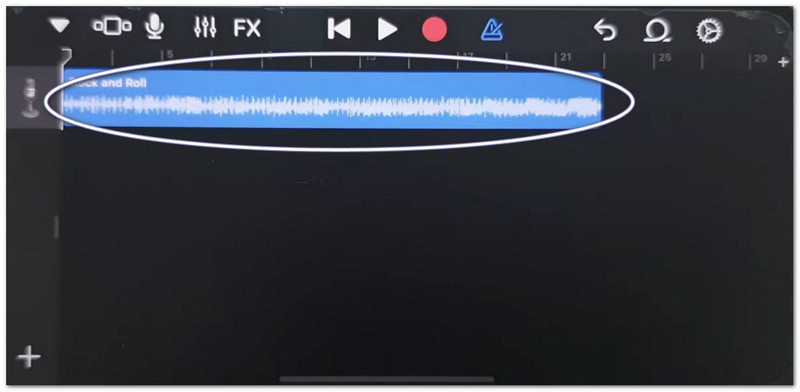
Adım 5Süreyi 30 saniyenin altına indirin, ardından dokunun. Paylaş > Zil sesi > İhracat.
3. GarageBand Kullanımı (Eski iOS Sürümleri İçin)
GarageBand, ses kliplerini hassas kontrollerle düzenleyerek kullanıcıların özel zil seslerini kolayca kesmesine, düzenlemesine ve dışa aktarmasına olanak tanır; bu da bir ses kaydını iPhone'da zil sesi olarak ayarlamanın nasıl yapılacağını anlamayı kolaylaştırır.
Aşama 1Açık Garaj Bandı ve seçin Ses kaydedici.
Adım 2öğesine dokunun. İzler görünümüardından açın Döngü Tarayıcısı.
Aşama 3Kaydedilmiş sesli notunuzu veya ses dosyanızı içe aktarın.
4. AdımSürükleyerek zaman çizelgesine ekleyin ve süresini 30 saniye veya daha kısa olacak şekilde kırpın.
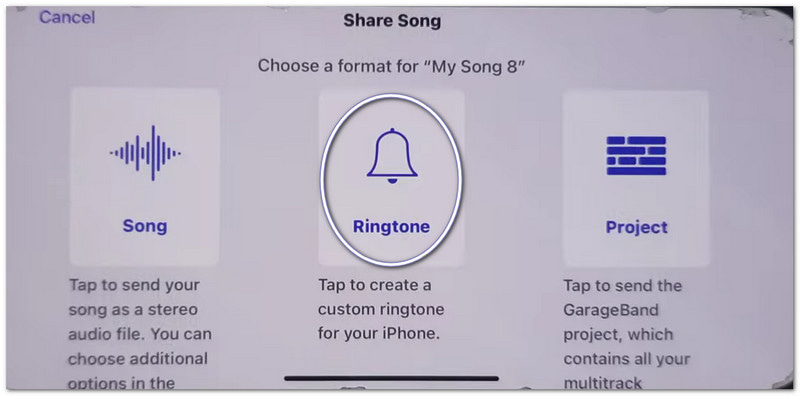
Adım 5Musluk Şarkılarım, sonra Paylaş > Zil sesi > İhracat.
"iPhone'da Notları Paylaşma Çalışmıyor" Sorun Giderme
Sesli notları veya GarageBand dosyalarını paylaşırken Paylaşım Sayfası donarsa, çökerse veya uygulamaları göstermezse, şu çözümleri deneyin.
Hızlı Çözümler:
- Zorla Yeniden Başlat: Basın Sesi Aç ve Sesi AzaltArdından, Apple logosu görünene kadar Güç düğmesini basılı tutun.
- iOS güncellemesi: Şuraya gidin: Ayarlar > Genel > Yazılım güncellemesiTüm güncellemeleri yükleyin. Bu, sistem hatalarını düzeltir.
- AirDrop'u Aç/Kapat Kontrol Merkezi AirDrop'u kapatmak için. AirDrop'u kapatıp tekrar açın. Paylaşım yenilenecektir.
Sistem Düzeltmeleri
- Depolama Alanınızı Boşaltın: En az 2 gigabayt boş alan bırakın. Kullanılmayan dosyaları veya videoları silin. Düşük depolama alanı, Paylaşım Sayfasının çalışmasını engelleyebilir.
Son Düzeltme
- Tüm Ayarları Sıfırla: Şuraya gidin: Ayarlar > Genel > Transfer veya iPhone'u Sıfırla > Tüm Ayarları SıfırlaVerilerinizi silmez. Sadece sistem ayarlarını sıfırlar ve Paylaşım Sayfası sorunlarını düzeltebilir.
Bölüm 2. Android'de Zil Sesi Nasıl Kaydedilir
1. Zil Sesi Oluşturma Uygulaması Kullanmak (En Çok Tavsiye Edilen Yöntem)
Kendi zil sesinizi nasıl kaydedeceğinizi öğrenmek istiyorsanız, Google Play Store'da bulunan Maker: Music Cutter uygulamasını kullanabilirsiniz. Uygulamanın temel amacı, şarkıları kırpmanıza, sesin belirli bölümlerini kesmenize ve bunları Android telefonlarda anında özel zil sesi olarak ayarlamanıza yardımcı olmaktır.
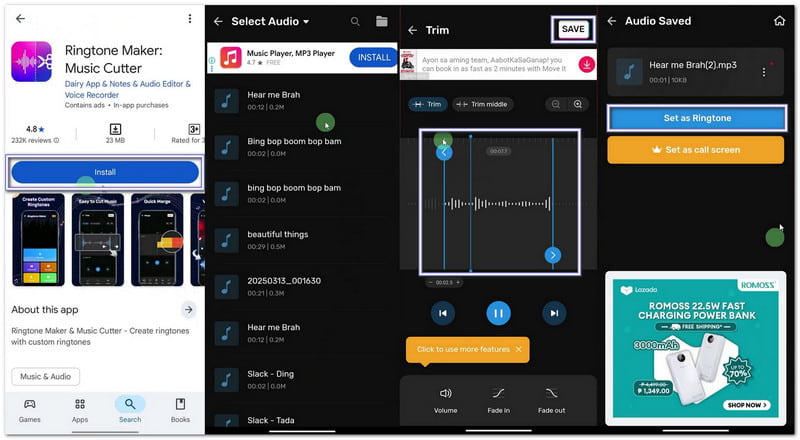
Aşama 1Google Play Store'u açın. Arama çubuğuna şunu yazın: Zil Sesi Oluşturucu: Müzik Kesici. Kurun. Ardından, basın. Açık.
Adım 2Musluk Başlamak. Seçmek Ses AyarıUygulamanın dosyalarınıza erişebilmesi için izinleri verin.
Aşama 3Telefonunuzdan bir şarkı veya ses dosyası seçin. Zil sesinizin başlangıç ve bitiş kısımlarını seçmek için kaydırıcıları hareket ettirin.
4. Adım Musluk Kesmek veya KaydetmekGerekirse netlik seviyesini seçin. Basın. Onaylamak. Ardından tıklayın Zil sesi olarak ayarlaSistem ayarlarına erişime izin verin ve varsayılan zil sesini seçin.
2. Dahili Ayarlar (İndirilen Ses Dosyaları İçin)
Android ayarları, ek uygulama veya araçlara ihtiyaç duymadan kaydedilmiş ses dosyalarını doğrudan seçmeye ve zil sesi olarak atamaya olanak tanır.
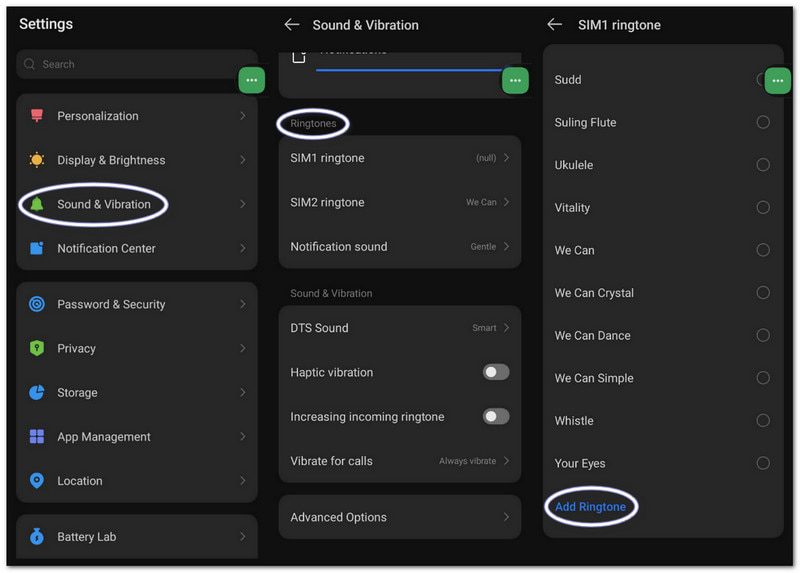
Aşama 1Telefonunuzun ayarlarına gidin. Dokunun. Ses ve titreşim veya Ses.
Adım 2Musluk Telefon zil sesi Mevcut seçenekleri görmek için.
Aşama 3öğesine dokunun. Artı düğmesi veya Zil sesi ekle Üstteki buton.
4. AdımDepolama alanınızda gezinin. Ses dosyanızı seçin. Dokunun. TamamlandıArdından, varsayılan zil sesi olarak ayarlamak için onaylayın.
Bölüm 3. Ekran Kaydını Zil Sesine Dönüştürme
Windows veya Mac bilgisayarınızda ekran kaydını zil sesi olarak da ayarlayabilirsiniz. AVAide Ekran KaydediciSistemden ve sesinizden gelen sesleri kaydeden bir ses kayıt modu bulunur, bu da zil sesi kaydetmeyi kolaylaştırır.
Ayrıca ses ayarları da sunuyor; burada sesi kısabilir veya yükseltebilir, gürültü engellemeyi etkinleştirebilir ve ses algılanmadığında uyarı gösterebilirsiniz. Elbette, zil sesinizi MP3 ve M4A gibi desteklenen formatlarda dışa aktarabilirsiniz; bu formatlar mobil cihazlar için de uygundur.
Aşama 1AVAide Screen Recorder'ı Windows veya Mac bilgisayarınıza indirin ve kurun.

ÜCRETSİZ İNDİR Windows 7 veya üzeri için
 Güvenli indirme
ÜCRETSİZ İNDİR Mac OS X 10.13 veya üzeri için
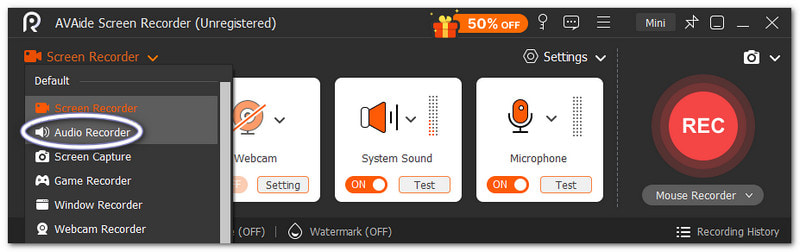
Güvenli indirmeAdım 2Ekran Kaydedici modunda başlar. Açılır menüye tıklayın. Seçin. Ses kaydedici Daha iyi ses yakalama için.
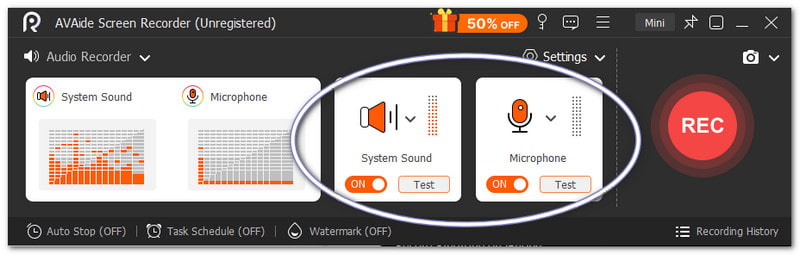
Aşama 3Aç Sistem Sesi Dahili ses kaydı yapmak için. Açın Mikrofon İsterseniz sesinizi de ekleyebilirsiniz. Gerekirse ses seviyesini de ince ayar yapabilirsiniz.
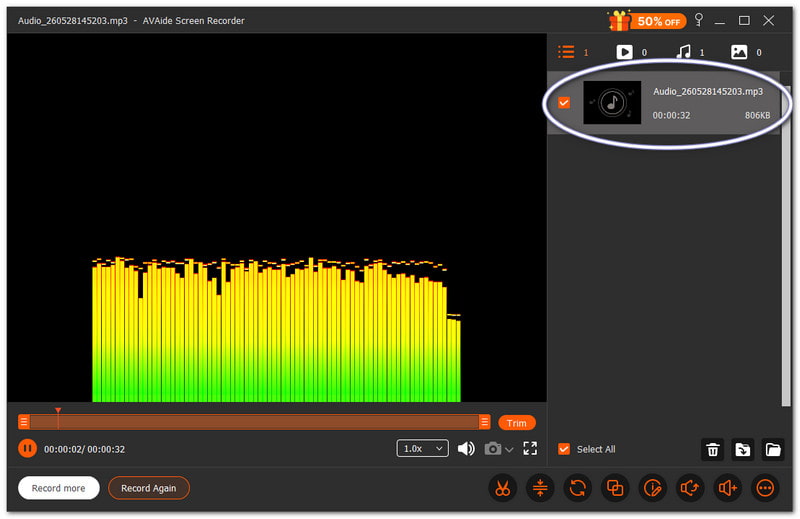
4. AdımVurmak KAYIT Başlamak için lütfen geri sayımı bekleyin. Başladıktan sonra istediğiniz sesi çalın. Basın. Durmak İşlem tamamlandığında düğmeye basın. Bundan sonra dosya otomatik olarak kaydedilir. Ancak zil sesi olarak kullanmadan önce dosyayı kırpabilir veya düzenleyebilirsiniz.
Hiç şüphe yok ki bu Mac ve Windows ses kaydedici Cihazınız için kişisel olarak istediğiniz ve beğendiğiniz bir zil sesi oluşturmanıza yardımcı olabiliriz.
Bölüm 4. Samsung'a Özgü Adımlar
1. Dahili Ekran Kaydediciyi Kullanma
Samsung Ekran Kaydedici, videolardan ses yakalar ve kaydedilen sesleri kullanılabilir zil seslerine dönüştürmeye yardımcı olur.
Aşama 1İçinde Hızlı PanelAşağı kaydırın. Basın. Ekran kaydedicisi Düğme. Başlamadan önce, seçin. Medya sesleri.
Adım 2Kaydetmek istediğiniz videoyu veya müziği oynatın. Ekran kaydedicinin sesli olarak kaydetmesini sağlayın.
Aşama 3Kayıt işlemi tamamlandığında durdurun. Dosya galerinizde saklanacaktır. Ses dosyasını çıkarmak için bir video-MP3 uygulaması kullanın.
4. AdımMP3 dosyasını taşıyın Dahili Depolama > Zil sesleri klasörü Böylece daha sonra kullanılabilir.
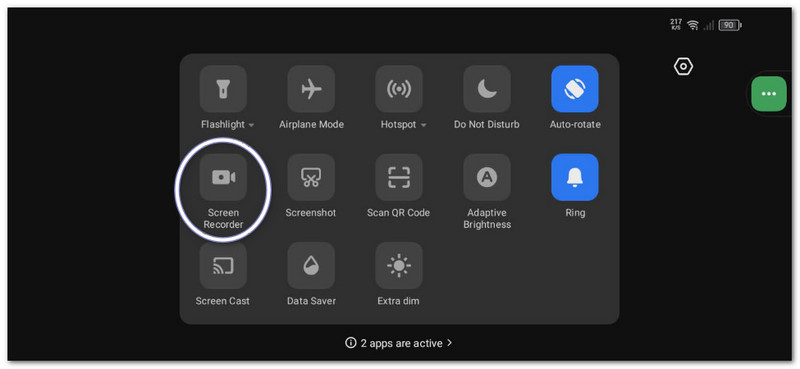
Bu yöntem gösteriyor Samsung ekran kaydıBu nedenle, lütfen kaydedilen videoyu yalnızca ses dosyasına dönüştürdüğünüzden emin olun, böylece zil sesi olarak kullanılabilir.
2. Dahili Zil Sesi Oluşturucu
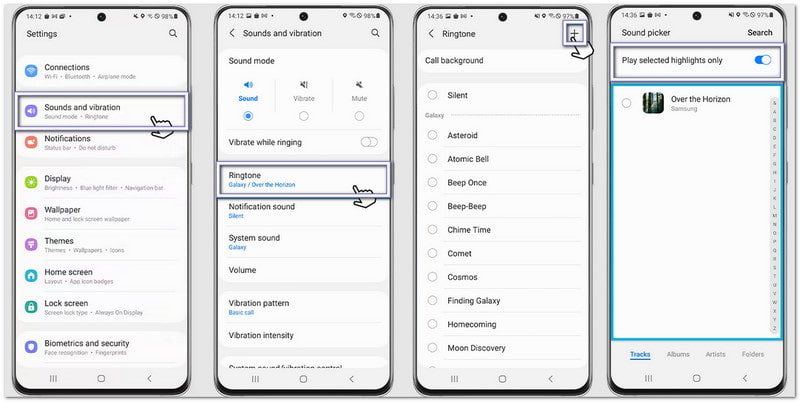
Samsung zil sesi ayarları, kullanıcıların şarkı seçmesine, öne çıkanları kırpmasına ve anında varsayılan telefon zil sesi olarak atamasına olanak tanır.
Aşama 1Telefonunuzu açın ve şuraya gidin: Ayarlar. Musluk Sesler ve titreşimler. Ardından seçin Zil sesi.
Adım 2öğesine dokunun. Eklemek Bu düğmeye basın ve telefonunuzdan kaydedilmiş bir şarkı veya kayıt seçin.
Aşama 3Olanak vermek Sadece seçilmiş öne çıkan anları oynat Eğer mevcutsa. Samsung, sesin en iyi kısmını otomatik olarak kırpacaktır.
4. AdımSeçiminizi onaylayın ve ses artık varsayılan zil sesiniz olarak ayarlanacaktır.
3. Dosya Yöneticisi Yöntemi
Samsung Dosya Yöneticisi, ses dosyalarını düzenler ve otomatik zil sesi algılama için doğrudan Zil Sesleri klasörüne kopyalamaya olanak tanır.
Aşama 1Başlat Dosyalarım Samsung telefonunuzdaki uygulama.
Adım 2git İndirilenler veya Ses Klasörü bulun. Kaydettiğiniz veya indirdiğiniz sesi bulun.
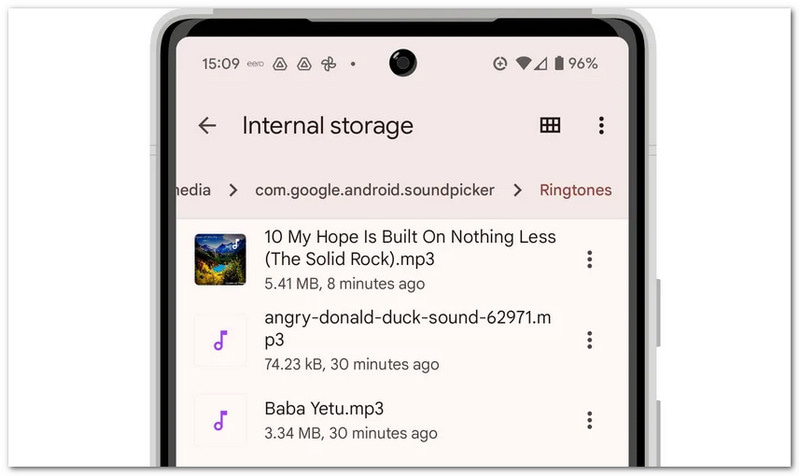
Aşama 3Dosyaya uzun süre basılı tutun. Dokunun. kopyalaArdından, şuraya gidin: Dahili depolama > Zil sesleri.
4. AdımDosyayı Zil Sesleri klasörüne yapıştırın. Ardından, Ses ayarlarına geri dönün. Dosyanız artık zil sesi listesinde görünecektir.
Bölüm 5. En İyi Sonuçlar İçin Profesyonel İpuçları
Zil sesinizi ayarlamadan önce, birkaç basit ipucunu takip etmek faydalı olacaktır. Bu ipuçları, zil sesinizin daha net duyulmasını ve telefonunuzda daha iyi çalışmasını sağlayacaktır.
İpucu #1: Kısa tutun.
Zil sesinizin süresini yalnızca 30 ila 40 saniye arasında ayarlayın. Bu sayede zil sesi akıcı olur ve Android telefonlarla tam uyumludur.
İpucu #2: Doğru formatı kullanın.
Mümkün olduğunca MP3 veya M4A dosyaları kullanın. Bu formatlar çoğu Android cihazda hatasız çalışır.
İpucu #3: Öncelikle ses seviyesini kontrol edin.
Zil sesini ayarlamadan önce dinleyin. Çok yüksek veya çok kısık olmamasına dikkat edin. Bu, biri aradığında sürprizlerle karşılaşmanızı önlemenize yardımcı olur.
Öğrendin iPhone'da zil sesi nasıl kaydedilir?Android ve masaüstü bilgisayarlar dahil olmak üzere, hangi cihazı kullanırsanız kullanın, istediğiniz zaman kendi özel zil sesinizi oluşturabilirsiniz.
Windows ve Mac kullanıcıları için, AVAide Ekran Kaydedici Bu işlem süreci kolaylaştırır. Kendi sesinizi kaydedebilir veya sisteminizden ses kaydı alabilirsiniz. Kayıttan sonra dosyayı kırpabilirsiniz. Bu sayede zil sesiniz için yalnızca en iyi bölümü saklayabilirsiniz.
YAZAR HAKKINDA

Ses, çevrimiçi toplantılar, oyun videoları, müzik, web kamerası vb. ile ekran etkinliklerini yakalayın.