Представьте, что вы переносите на компьютер огромное количество фотографий или документов, и обнаруживаете, что поля «Дата создания» или «Дата изменения» в них полностью перепутаны. Будь то ошибка резервного копирования или несоответствие часовых поясов, некорректные метки времени файлов могут испортить ваше цифровое архивирование и нарушить рабочий процесс.
К счастью, вам не придётся мириться с этим беспорядком. Преданный своему делу специалист сменщик даты файла Эта программа предоставляет вам полный контроль над метаданными, позволяя редактировать метки времени файлов в пакетном режиме всего несколькими щелчками мыши. В этом руководстве мы собрали 5 лучших программ для изменения даты файлов для Windows и Mac, которые помогут вам восстановить контроль над организацией ваших цифровых данных. Давайте начнем!
Часть 1. Подробный обзор 5 лучших программ для смены даты файлов.
В этом разделе будет представлен лучший инструмент для изменения даты файла, на который вы можете положиться. Читайте дальше, чтобы узнать, как эти инструменты могут помочь вам в решении вашей задачи!
1. Конвертер видео AVAide
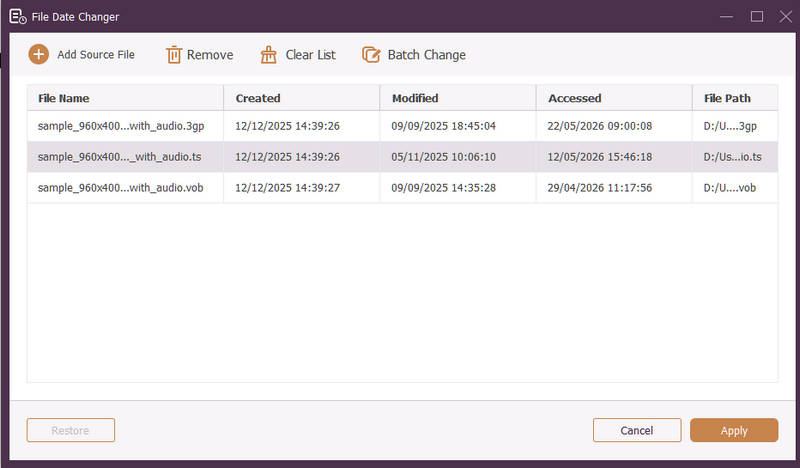
Доступно для Windows и Mac. Конвертер видео AVAide Это универсальная платформа, оснащенная мощным встроенным инструментом изменения даты файла. Эта интуитивно понятная функция позволяет легко изменять подробные данные о временных метках, включая даты создания, изменения и последнего доступа.
- Обеспечивает бесперебойную работу со множеством медиаформатов, включая видео, аудио и изображения.
- Импортируйте и обновляйте несколько файлов одновременно, чтобы сэкономить время и оптимизировать рабочий процесс.
- Отличается чистым и удобным интерфейсом, позволяющим быстро изменять дату файла.
- Сохраните целостность файла после изменения даты.
2. Изменение даты файла
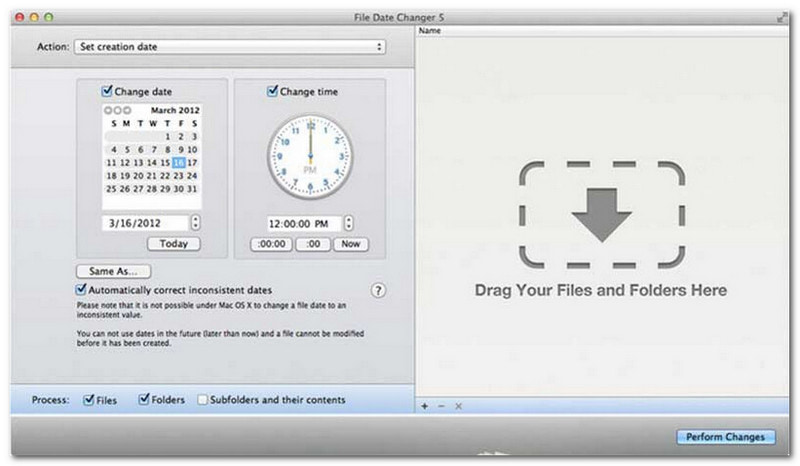
File Date Changer полностью оправдывает свое название, предлагая специализированное решение для изменения дат создания файлов. Он отличается простым дизайном, что делает его доступным для пользователей любого уровня. Поддерживается изменение как дат создания, так и дат изменения. Независимо от того, нужно ли вам изменить даты для отдельных файлов или целых папок, этот инструмент для изменения дат файлов на Mac упрощает процесс благодаря своей эффективной функциональности.
Хотя File Date Changer — платный инструмент, его ценность зависит от ваших конкретных потребностей в отношении стоимости и функциональности. Некоторым пользователям набор функций может показаться несколько ограниченным по сравнению с ценой. Однако для тех, кто ставит во главу угла эффективность и бесперебойный рабочий процесс, это остается очень надежным и выгодным вложением средств для изменения даты файлов.
Основные функции программы для изменения даты файла:
- Измените даты и время создания, изменения и последнего доступа для нескольких файлов.
- Поддерживается добавление или вычитание конкретных дней, часов, минут или секунд.
- Измените свойства файла, такие как «Только для чтения» или «Скрытый», и обновите метаданные EXIF.
- Программа для смены даты файла работает мгновенно и имеет понятный интерфейс.
3. Эксифтул
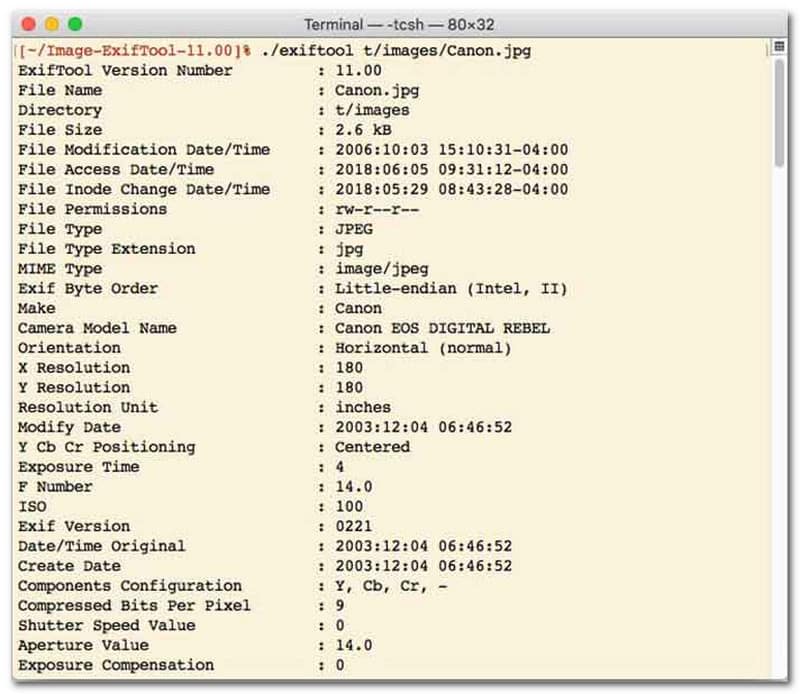
Для пользователей, предпочитающих инструмент для изменения даты файла с помощью интерфейса командной строки (CLI), ExifTool является эталоном для сверхточного управления файлами. Этот исключительно универсальный инструмент для изменения даты файла поддерживает широкий спектр типов файлов, включая фотографии, видео, документы и аудио. Помимо простого редактирования дат создания и изменения, ExifTool позволяет легко копировать метаданные временных меток из одного файла в другой, обеспечивая идеальную синхронизацию всей вашей медиатеки без лишних проблем.
Основные возможности ExifTool:
- Беспрепятственно считывайте и изменяйте метки времени файловой системы.
- Копирование дат между совершенно разными уровнями метаданных.
- Поддерживаются сложные вычисления с датами и временем, позволяющие изменять даты файлов в пакетном режиме.
- Извлекайте дату и информацию о медиафайлах из всех типов файлов.
4. Массовая смена файлов
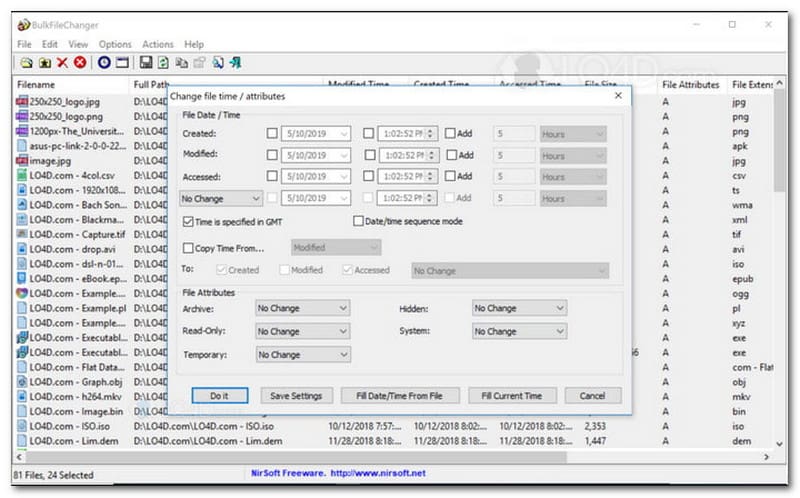
BulkFileChanger — это легкая и высокопроизводительная утилита для изменения даты файлов, разработанная для удобного управления временными метками файлов в Windows. Она позволяет пользователям быстро изменять различные атрибуты даты и времени, включая время создания, изменения и последнего доступа, практически для любого типа файлов, от документов и изображений до видео. Хотя ее кроссформатная универсальность и скорость делают ее отличным инструментом для изменения даты файлов при организации цифровых архивов, ее доступность строго ограничена операционной системой Windows, поэтому пользователям macOS и Linux придется искать другие решения.
Основные возможности BulkFileChanger:
- Изменяйте даты создания, изменения и последнего доступа к файлам.
- Без проблем обрабатывает практически все типы файлов, включая документы, изображения и видео.
- Отличается облегченной конструкцией, позволяющей сверхбыстро и массово обновлять метаданные.
- Добавить или извлечь данные за определенные дни, часы, минуты и секунды.
5. Магия атрибутов
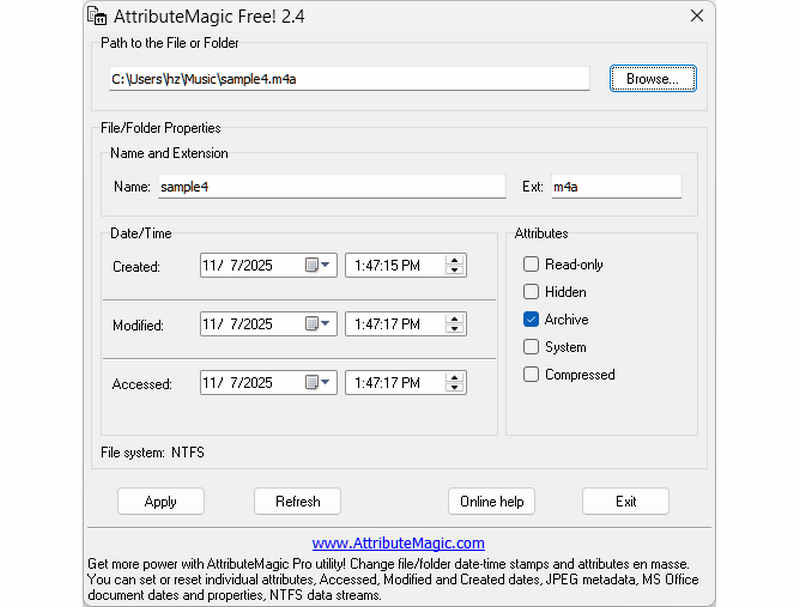
AttributeMagic — это гораздо больше, чем просто инструмент для изменения даты файла, предлагающий расширенное решение для управления атрибутами папок и файлов. Эта комплексная утилита позволяет точно изменять метки времени, давая пользователям возможность легко переписывать даты создания, изменения и последнего доступа. Помимо своих возможностей в качестве специализированного инструмента для изменения даты файла, AttributeMagic предоставляет широкие возможности настройки свойств файловой системы в соответствии с вашими конкретными потребностями в архивировании. Бесплатная версия предоставляет основные функции редактирования меток времени, а обновление до премиум-версии открывает расширенные возможности управления метаданными и мощные функции автоматизации.
Основные особенности AttributeMagic:
- Изменять или скрывать метки времени создания, изменения и последнего доступа.
- Изменить дату файла как для отдельного файла, так и для всей папки с файлами.
- Легко увеличивайте, уменьшайте или сдвигайте метки времени файла вперед или назад.
- Устанавливать, сбрасывать или инвертировать основные атрибуты файловой системы, такие как «Только для чтения», «Скрытый» и «Системный».
Часть 2. Сравнение 5 программ для изменения даты файла.
| Товар | Поддерживаемые платформы | Пользовательский интерфейс | Пакетное редактирование | Дополнительные возможности |
| Конвертер видео AVAide | Windows и macOS | Современный, чистый и динамичный. | Да (сверхбыстрый) | Полный пакет программ: конвертация видео в 8K, копирование DVD, редактирование метаданных, создание музыкальных клипов/слайдшоу. |
| Программа для изменения даты файла (NirSoft) | Только для Mac | Устаревший (унаследованный веб-интерфейс) | Ограниченное | Нет (одноцелевого назначения) |
| ExifTool | Виндовс, МакОС, Линукс | Только командная строка (без графического интерфейса). | Да (требуются сложные скрипты) | Метаданные только для чтения/записи |
| BulkFileChanger | Только для Windows | Классическая утилита Windows | Да | Базовая настройка атрибутов файлов Windows |
| AttributeMagic | Только для Windows | Жесткий / Сложный | Да | Управление флагами файловой системы (только) |
Часть 3. Как изменить данные файла в видеоконвертере AVAide.
Вам когда-нибудь приходилось менять дату создания файла, чтобы лучше организовать ваши цифровые файлы? Вы можете сделать это, используя Конвертер видео AVAide! Продолжайте читать, чтобы узнать, как изменить дату создания файла, чтобы облегчить управление файлом.
Шаг 1Загрузите и установите AVAide Video Converter с официального сайта для полного доступа.

БЕСПЛАТНАЯ ЗАГРУЗКА Для Windows 7 или новее
 Безопасная загрузка
БЕСПЛАТНАЯ ЗАГРУЗКА Для Mac OS X 10.13 или более поздней версии
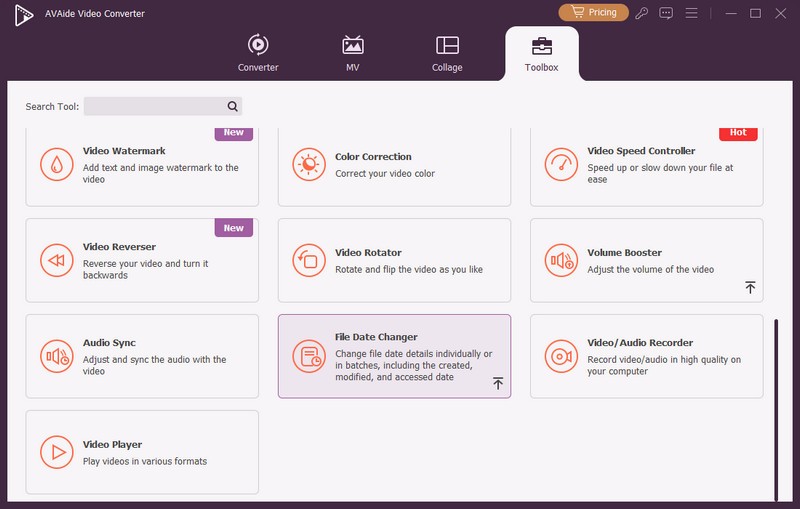
Безопасная загрузкаШаг 1Откройте программу на своем компьютере, чтобы начать. Отправляйтесь в Ящик для инструментов вкладка для доступа к нескольким функциям. Прокрутите мышкой вниз и найдите Изменение даты файла среди вариантов и щелкните его. Это функция, которую вы будете использовать для изменения сведений о дате файла.
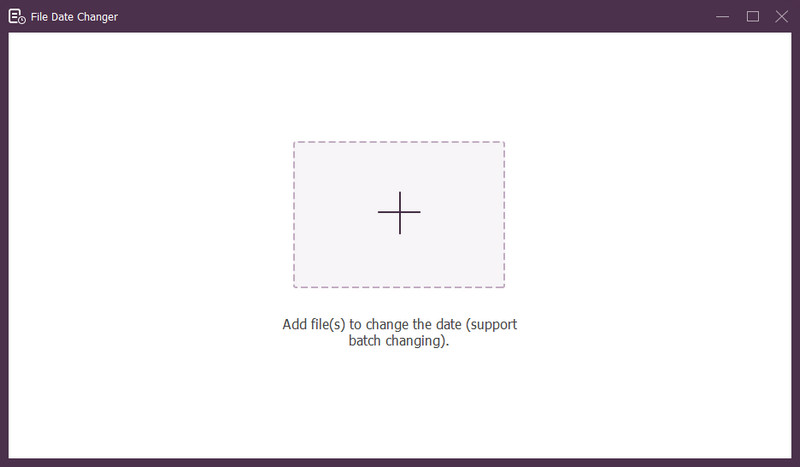
Шаг 3Нажмите (+) для импорта файлов. Это могут быть аудио, изображения и аудиофайлы. Вы можете импортировать более одного файла, чтобы изменить сведения о файле.
Шаг 4Вы можете начать менять их даты, как только все файлы будут импортированы. Вы можете соответствующим образом изменить даты создания, изменения и доступа. Для этого нажимайте на элемент до тех пор, пока не Стрелка появится сообщение о необходимости редактирования.
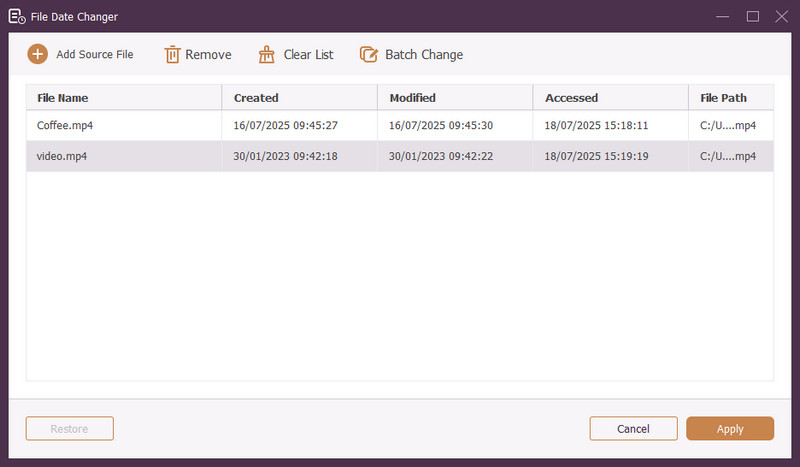
Шаг 5После редактирования всех дат файла нажмите кнопку Применять кнопку для подтверждения изменений. После применения изменений просмотрите обновленные данные файла, чтобы убедиться в их точности.
Часть 4. Часто задаваемые вопросы о лучшем инструменте для смены даты файла.
Как я могу просмотреть информацию о дате файла?
Если вы хотите проверить, когда файл был создан или последний раз изменен, вы можете сделать это прямо на своем компьютере. Найдите файл, щелкните его правой кнопкой мыши и выберите «Свойства». Затем вы можете увидеть все подробности о файле. К ним относятся даты создания и изменения.
Кто-нибудь узнает, когда я изменю дату файла?
Нет! Изменение даты файла не оставит никаких следов. Таким образом, никто не узнает, когда вы внесли изменения.
По какой причине из файла исчезают дата и время?
Есть несколько причин, по которым дата и время могут исчезнуть из файлов. Это может произойти, когда вы загружаете файл и теряете некоторую информацию из-за плохого подключения к Интернету. Иногда это связано с веб-сайтом, с которого вы загрузили файл.
Могу ли я получить измененную дату создания файла?
Да! Вы можете восстановить исходную дату, вручную установив ее исходное значение. Это единственный способ получить дату создания файла.
Влияет ли изменение даты и времени файла на целостность или содержимое файла?
Нет! Изменение даты и времени файла не повлияет на его содержимое или целостность. Он изменяет только метаданные, такие как даты создания и изменения. Фактический файл остается неизменным.
Вот оно! Вы узнали как изменить дату создания файла, что может быть полезно по разным причинам. Для более простого и удобного для новичков использования AVAide Video Converter в качестве инструмента смены даты файла. Это лучший выбор для управления вашими цифровыми файлами. Попробуйте и поделитесь своими мыслями ниже!
ОБ АВТОРЕ

Самый полный медиаконвертер для преобразования видео и аудио без потери качества.
Редактировать видео
- Высококачественное видео AI
- Удалить водяной знак из видео
- Удалить текст из видео
- Уменьшите разрешение 4K до 1080p/720p
- Удалить фоновый шум из видео
- Редактор метаданных MP4
- Повышение резкости видео
- Обратное видео
- Исправить видео плохого качества
- Удалить метаданные из видео/аудио
- Зеркальное/незеркальное видео с фронтальной камеры