Trabalhar com vídeos longos muitas vezes apresenta um dilema frustrante: como manter a qualidade de vídeo impecável sem consumir todo o espaço de armazenamento? É aí que entram os padrões de compressão de vídeo. Se você deseja equilibrar tamanho do vídeo, qualidade e compatibilidade com dispositivos, inevitavelmente se deparará com a escolha entre H.264 (AVC) e H.265 (HEVC).
Neste guia completo, vamos detalhar as principais diferenças entre H.264 e HEVC, ajudar você a decidir qual deles se adapta melhor ao seu fluxo de trabalho e mostrar como converter entre eles perfeitamente, sem perda de qualidade.
Parte 1. HEVC vs H264: O que são?
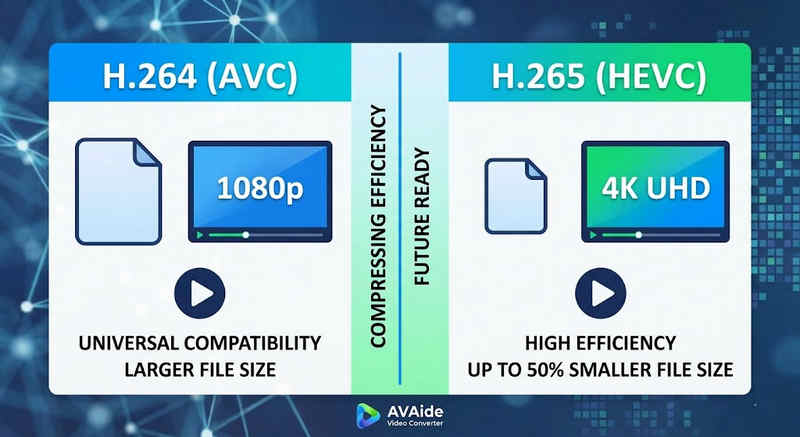
Resposta curta: O H.264 (AVC) oferece compatibilidade universal e funciona em praticamente qualquer dispositivo, mas gera arquivos maiores. O H.265 (HEVC) proporciona compressão superior, reduzindo o tamanho dos arquivos em até 50% com qualidade visual idêntica, mas exige maior poder de processamento e tem suporte limitado em hardware mais antigo.
1. O que é o codec H.264 (AVC)?
Apresentado como Advanced Video Coding (AVC), o H.264 é o rei da compatibilidade de vídeo. É o padrão da indústria para streaming online, gravação em dispositivos móveis e reprodução diária de vídeos. Como exige muito pouco poder de processamento para decodificar, os vídeos em H.264 são reproduzidos sem problemas em praticamente qualquer dispositivo digital imaginável, desde smartphones antigos até smart TVs modernas.
2. O que é o codec H.265 (HEVC)?
O High Efficiency Video Coding (HEVC), ou H.265, é o sucessor direto do H.264. Foi projetado especificamente para lidar com as enormes demandas de dados de conteúdo 4K, 8K e VR. O HEVC utiliza algoritmos mais avançados para comprimir dados de vídeo com muito mais eficiência do que seu antecessor, oferecendo visuais nítidos e de alta resolução com tamanhos de arquivo até 50% menores. No entanto, essa eficiência tem um custo: requer hardware moderno para processamento sem travamentos.
H.265 vs. H.264: Tabela de comparação rápida
| Recursos | H.264 (AVC) | H.265 (HEVC) |
| Formatos suportados | m2ts, evo, 3gp, f4v, mkv, mp4, qtff, asf, avi, mxf, ps, ts | mxf, ps, ts, 3gp, mkv, mp4, qtff, asf, avi |
| Eficiência de compressão | Moderado (Arquivos de tamanho maior) | Superior (arquivos menores 25-50%) |
| Qualidade de vídeo | Excelente para 1080p | Otimizado para 4K, 8K e HDR |
| Compatibilidade de dispositivos | Universal (99% de dispositivos) | Limitado (Compatíveis com PCs antigos podem não ser compatíveis) |
| Poder de processamento | Baixa (Renderização/reprodução rápida) | Alto (Requer CPUs/GPUs mais recentes) |
| Casos de uso ideais | Transmissão web, redes sociais, dispositivos legados | Imagens aéreas em 4K feitas com drones, vídeos cinematográficos gravados com iPhone, arquivamento que economiza espaço. |
Parte 2. Quando escolher HEVC em vez de H.264
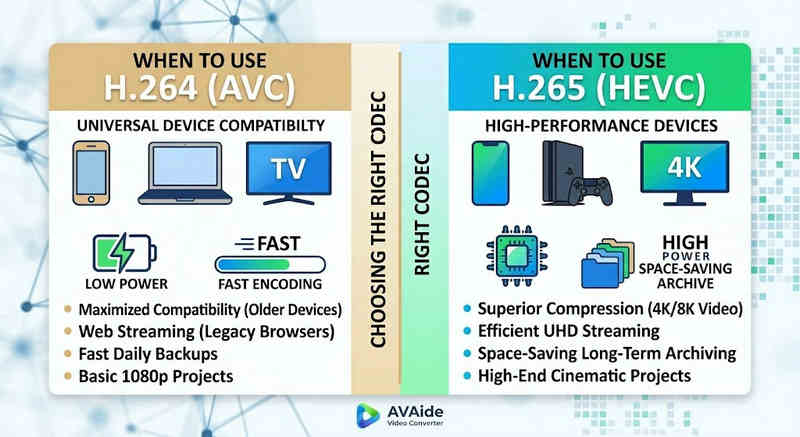
A escolha do codec certo depende inteiramente dos seus objetivos específicos. Veja por que você pode precisar de um em vez de outro:
Por que você precisa do HEVC (H.265):
- Economia máxima de espaço de armazenamento: Se você faz backup de vídeos longos ou bibliotecas enormes em 4K, o HEVC funciona como um redutor natural do tamanho dos vídeos, liberando metade do espaço no seu disco rígido.
- Otimização da largura de banda: O HEVC requer muito menos largura de banda para transmissão, tornando-o ideal para reprodução 4K fluida mesmo em conexões de internet mais lentas, sem interrupções.
- Preparando-se para o futuro: À medida que a indústria transita para conteúdo de ultra-alta definição (UHD) e realidade virtual (VR), o HEVC garante que seus vídeos mantenham alta qualidade e sejam compatíveis com as plataformas de próxima geração.
Por que você precisa do H.264 (AVC):
- Reprodução e edição impecáveis: Se o seu software de edição de vídeo estiver lento ou se o seu reprodutor de mídia exibir a mensagem "Codec não suportado",
- Compatibilidade e compartilhamento sem preocupações: O H.264 é o codec de vídeo mais amplamente compatível. Seja para compartilhar seus vídeos com amigos, em um NAS ou em servidores de mídia como Plex ou Kodi, o H.264 garante compartilhamento e reprodução perfeitos.
Parte 3. Como converter facilmente entre HEVC e H.264
No caso de transferência de vídeos de e para os formatos HEVC (H.265) e H.264, AVAide Video Converter faz isso melhor do que o resto. Ele fornece uma interface eficiente e fácil de usar que não compromete a qualidade da conversão e suporta vários formatos. Seja qual for o motivo, pode ser pela maior eficiência do HEVC ou pela adoção mais ampla do H264, o AVAide permite que você alterne entre os dois sem problemas.
Procedimento detalhado:
Passo 1Obtenha o conversor de vídeo AVAide
Baixe, instale e execute. AVAide Video Converter no seu computador Windows ou Mac.

DOWNLOAD GRATUITO Para Windows 7 ou posterior
 Download seguro
DOWNLOAD GRATUITO Para Mac OS X 10.13 ou posterior
Download seguroPasso 2Adicione seus vídeos ao conversor de vídeo AVAide
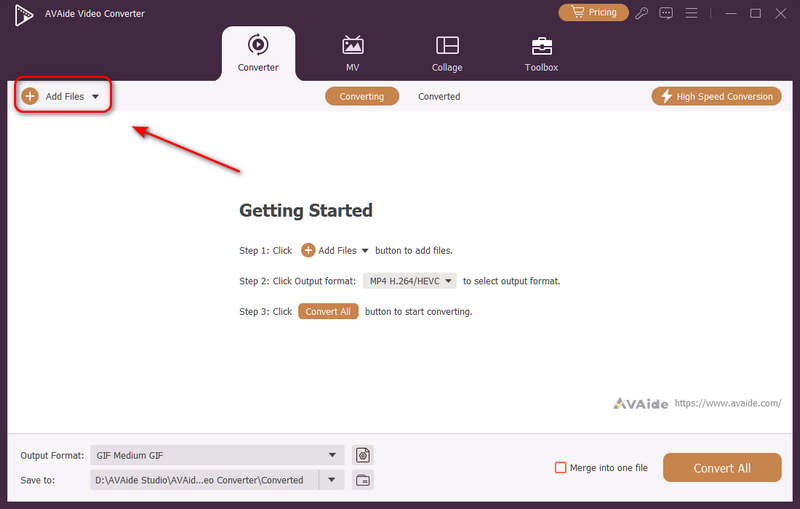
Você pode adicionar vários arquivos de vídeo e fazer uma conversão em lote. Clique em Adicionar arquivos Clique no botão no canto superior esquerdo para importar seus arquivos de vídeo.
etapa 3Escolha o codec H.264 ou H.265.
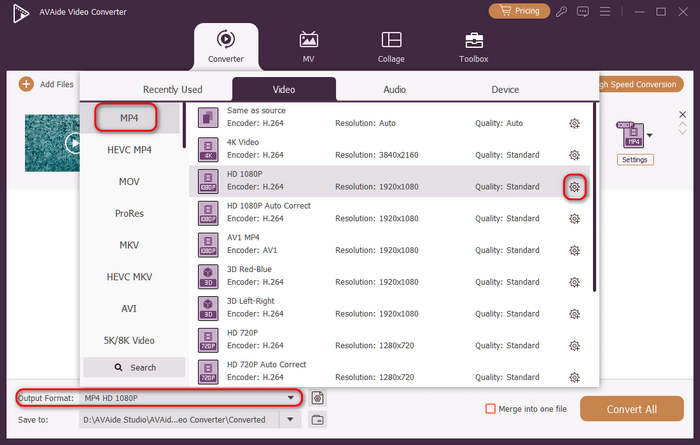
Clique no Formato de saída Botão de menu suspenso no canto inferior esquerdo. Em seguida, você pode selecionar o formato de vídeo desejado. Depois, clique em Perfil personalizado botão (com um ícone de engrenagem) na barra de predefinições de vídeo.
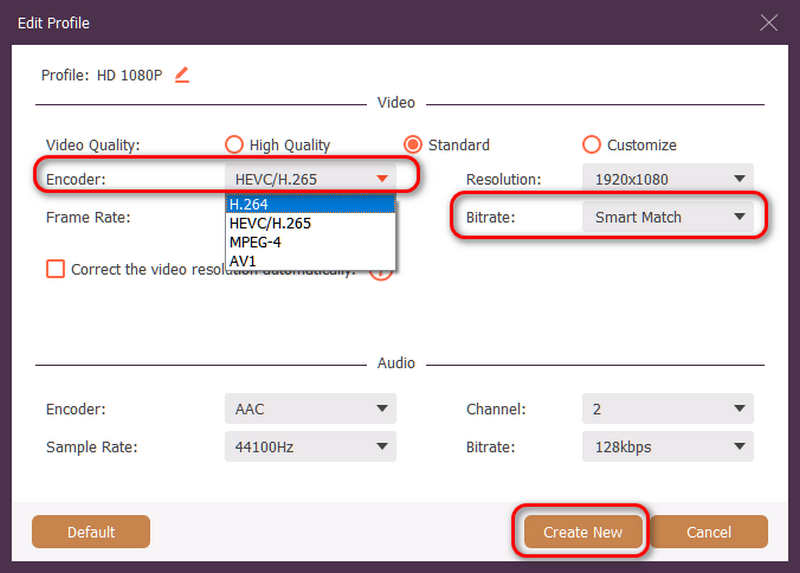
Em seguida, neste painel, você pode clicar em Codificador botão suspenso para selecionar H.264 ou HEVC/H.265 codec. Se você quiser alterar a qualidade do vídeo, pode ajustar o Taxa de bitsMas recomendamos Combinação inteligente Para garantir a compatibilidade, clique em Crie um novo Botão para salvar sua configuração.
Passo 4Iniciar a recodificação do vídeo
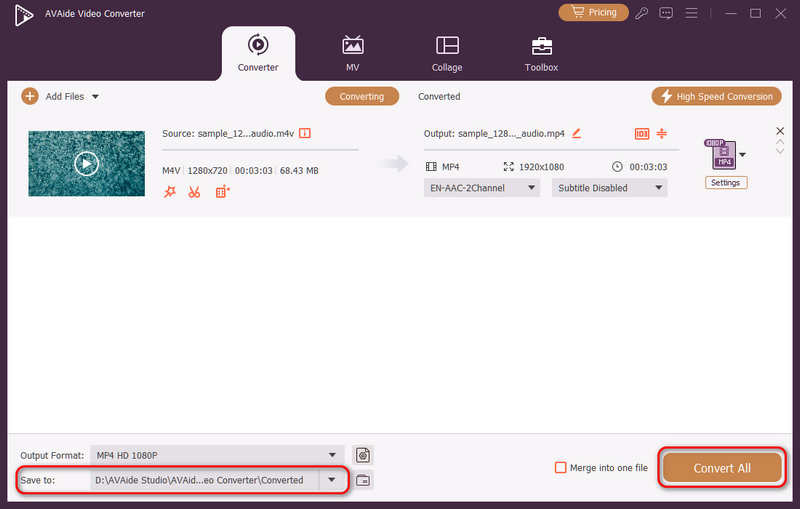
Finalmente, você pode clicar no Salvar em Botão suspenso para selecionar a pasta de saída desejada e clique em Converter tudo Botão para alterar o codec de vídeo para H.264 ou H.265.
Parte 4. Perguntas frequentes sobre H.265 e H.264
Qual é a principal diferença entre NVENC H.264 e NVENC HEVC?
A principal diferença reside na eficiência da compressão e na otimização da geração de hardware. O NVENC HEVC (H.265) oferece até 50% a mais de compressão do que o NVENC H.264 (AVC). Isso significa que ele pode produzir exatamente a mesma qualidade visual com metade da taxa de bits (e metade do tamanho do arquivo), tornando-o a escolha superior para arquivar vídeos 4K ou transmitir em largura de banda limitada.
O que é um codificador HEVC/H.264 multicanal modular?
Um codificador modular multicanal HEVC/H.264 é um dispositivo de hardware de nível empresarial projetado para comprimir e transmitir múltiplos fluxos de vídeo simultaneamente. Ao contrário dos codificadores de software para consumidores, ele apresenta um design modular (tipo lâmina), permitindo que os usuários troquem ou atualizem placas de codificação de hardware de acordo com a escala de seus projetos. Ele suporta H.264 e HEVC/H.265.
O que é H.265+?
H.265+ (também conhecido como Smart H.265+) é uma tecnologia avançada e proprietária de compressão de vídeo desenvolvida pela Hikvision, otimizada especificamente para monitoramento de segurança e vigilância.
Agora é possível usar esta análise abrangente de HEVC e H.264 para determinar qual codec melhor se adapta aos seus requisitos de vídeo. Quer você queira H.264 e se concentre na compatibilidade ou deseje HEVC e busque melhor compressão, ambos os codecs têm vantagens. O AVAide Video Converter oferece uma solução elegante e eficiente para lidar com esse problema, fornecendo saída de excelente qualidade e sendo rápido. O AVAide torna a tarefa de compressão de vídeo e sua conversão fácil com suas interfaces simples e funções avançadas.
SOBRE O AUTOR

Sua caixa de ferramentas de vídeo completa que suporta mais de 350 formatos para conversão em qualidade sem perdas.