화면에 표시된 내용을 저장하고 싶을 때가 있을 겁니다. 게임, 튜토리얼, 화상 통화 등 무엇이든 상관없죠. 나중에 다시 사용하기 쉽도록 선명하고 깔끔하게 저장하고 싶을 겁니다. 바로 그럴 때 화면 저장 기능이 유용합니다. 녹음 앱 이 글에서는 유용한 정보들을 제공할 것입니다. 각각의 기능을 자세히 살펴보면서 어떤 기능이 가장 두드러지는지 알아보겠습니다.
앱 테스트 및 평가 방법
- 녹음 품질: 최대 해상도(1080p, 4K), 프레임률(30/60 FPS) 및 비트 전송률 옵션.
- 사용 편의성: 인터페이스는 얼마나 사용하기 편리한가요? 녹음을 시작하려면 몇 번 탭해야 하나요?
- 오디오 지원: 마이크, 내부 오디오, 또는 둘 다를 동시에 녹음할 수 있나요?
- 편집 기능: 기본적인 자르기, 텍스트 추가 및 화면 그림 그리기 기능.
- 제한 사항: 워터마크, 시간 제한, 광고 또는 유료 결제.
- 플랫폼: 안드로이드, iOS, 또는 둘 다.
파트 1. 내장 화면 녹화 기능 (가장 쉬운 방법)
스마트폰에는 이미 화면 녹화 기능이 내장되어 있어 언제든지 간편하게 화면을 캡처할 수 있습니다. 별도의 녹화 앱이 필요 없으며, 앱을 열고 바로 녹화를 시작할 수 있습니다.
1. iOS 내장 화면 녹화 기능 (아이폰/아이패드)
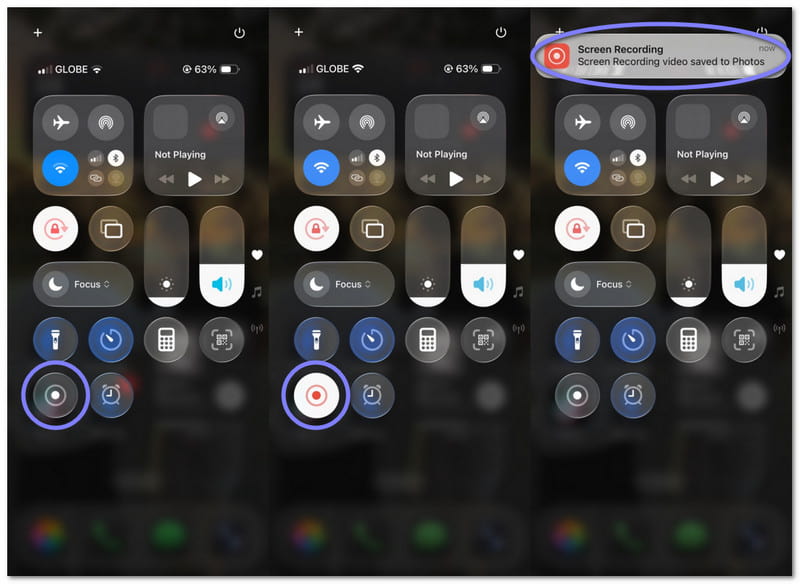
제어 센터에서 실행되며 몇 초 만에 녹화가 시작됩니다. 앱, 게임, 튜토리얼 등을 간편하게 녹화할 수 있으며, 마이크 오디오 녹음도 지원합니다. 아이폰이나 아이패드에서 빠르고 안전하게 화면을 녹화할 수 있는 간편한 방법입니다.
2. 안드로이드 내장 화면 녹화 기능
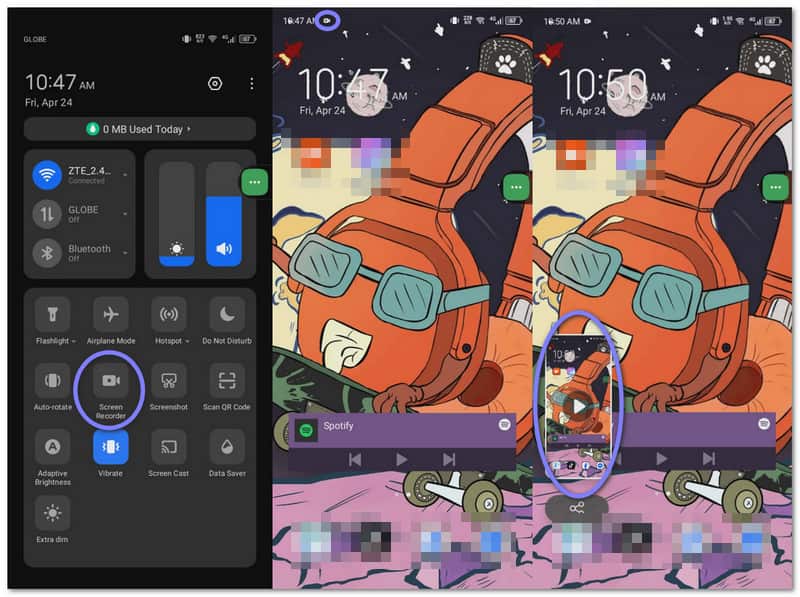
빠른 설정에서 찾을 수 있습니다. 화면을 스와이프하고 탭하면 바로 녹음을 시작할 수 있습니다. 게임이나 가이드 제작 등 일상적인 용도에 적합합니다. 일부 휴대폰은 내장 오디오 및 기본 설정도 지원합니다.
파트 2. 최고의 타사 화면 녹화 앱
내장 화면 녹화 기능은 다소 제한적일 수 있습니다. 기본적인 녹화 기능만 제공하고 추가 도구가 없기 때문입니다. 더 많은 기능과 제어 기능을 원한다면 아래의 타사 화면 녹화 앱을 사용해 보세요.
1. 화면 녹화 프로그램 - XRecorder
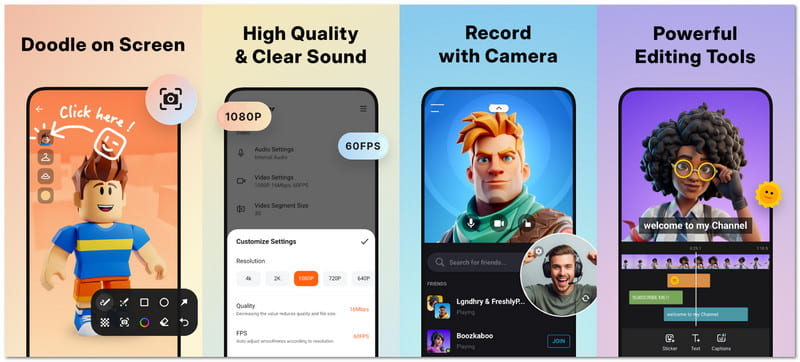
화면 녹화 앱 XRecorder는 가볍지만 강력한 성능을 자랑합니다. 게임, 통화, 튜토리얼 등을 간편하게 녹화할 수 있으며, 페이스캠이나 그림 그리기 기능도 제공합니다. XRecorder는 단연 최고의 화면 녹화 앱 중 하나로 손꼽힙니다. 안드로이드용 최고의 화면 녹화 앱 전화기.
녹음 품질: 이 제품은 해상도 조절이 가능한 안정적인 녹화 기능과 라이브 및 저장된 영상에 대한 부드러운 출력을 제공합니다.
사용 편의성: 모든 동작은 한두 번의 탭만으로 간단하게 수행할 수 있으며, 플로팅 컨트롤을 통해 빠르게 시작할 수 있습니다.
오디오 지원: 내부 오디오와 마이크 오디오를 동시에 녹음합니다.
편집 기능:
- 클립을 다듬고 분할하세요.
- 음악과 자막을 추가하세요.
- 필터와 속도 제어를 적용합니다.
- 화면에 그림을 그리세요.
제한 사항: 내장 오디오는 최신 안드로이드 기기에서만 작동하며, 일부 앱에서는 소리가 차단될 수 있습니다.
플랫폼: 기계적 인조 인간
2. 스크린 레코더 - AZ 레코더
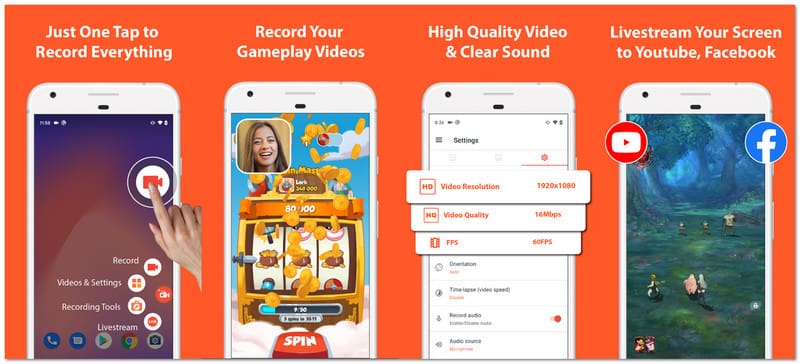
AZ Screen Recorder는 여러 IT 웹사이트에서 볼 수 있는 인기 있는 화면 녹화 앱입니다. 녹화, 편집, 라이브 스트리밍 기능을 하나의 앱에서 제공하며, 더 많은 제어 기능을 원하면서도 간단하고 깔끔한 설정을 선호하는 사용자에게 적합합니다.
녹음 품질: 이 제품은 HD 이상의 해상도를 지원하며, 부드러운 비디오 출력을 위해 다양한 프레임 속도 옵션을 제공합니다.
사용 편의성: 인터페이스가 간단하며, 몇 번의 탭만으로 녹화를 시작하거나 중지할 수 있습니다.
오디오 지원: 이 제품은 마이크와 내장 오디오를 모두 지원하여 선명한 음질로 녹음할 수 있습니다.
편집 기능:
- 동영상 자르기 및 병합.
- 자막과 배경 음악을 추가하세요.
- 클립을 자르고 회전하세요.
- 프레임을 추출합니다.
제한 사항: 많은 휴대폰에서 마이크와 내부 음성을 동시에 녹음할 수 없습니다.
플랫폼: 기계적 인조 인간
3. 모비젠 화면 녹화기
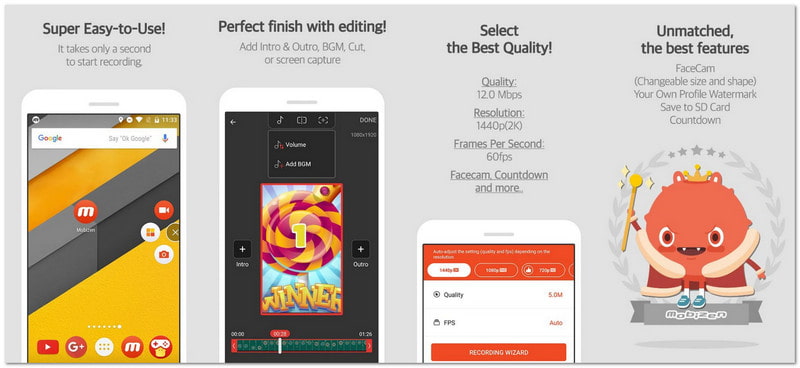
이 안드로이드 녹화 앱은 빠른 시작과 장시간 녹화 모두에 적합합니다. 사용자는 스트레스 없이 녹화를 시작할 수 있으며, 화면 동작 추가 및 GIF 제작과 같은 재미있는 도구도 포함되어 있습니다. 창의적인 기능과 간편한 조작을 원한다면 이 앱이 좋은 선택이 될 것입니다.
녹음 품질: 이 제품은 높은 비트 전송률과 부드러운 프레임 속도로 최대 2K 해상도를 지원하여 디테일한 영상을 제공합니다.
사용 편의성: 원터치 시작 기능으로 초보자와 전문가 모두 바로 사용할 수 있습니다.
오디오 지원: 마이크와 내부 소리를 함께 녹음하여 선명한 음성과 시스템 오디오를 제공합니다.
편집 기능:
- 기초 영상 편집.
- GIF를 만드세요.
- 워터마크를 추가하세요.
- 화면에 그림을 그리세요.
제한 사항: 플로팅 버튼은 녹화 중에 방해가 될 수 있습니다.
플랫폼: 기계적 인조 인간
4. DU Recorder - 스크린 레코더
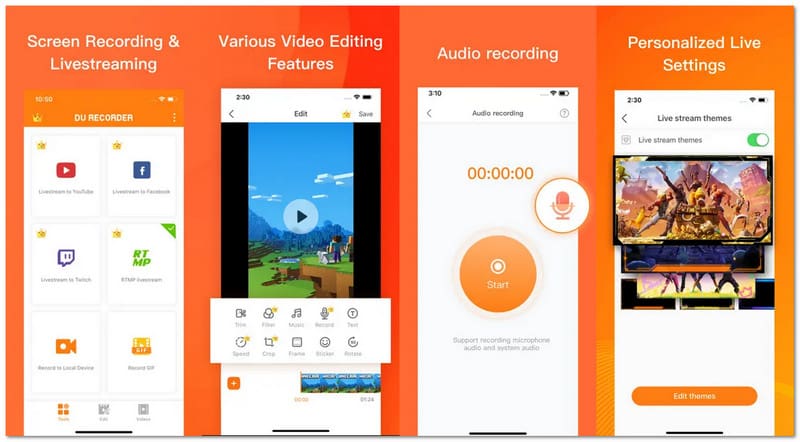
DU Recorder는 아이폰과 안드로이드 기기에서 화면을 녹화할 수 있는 앱입니다. 이 앱은 다음과 같은 목적으로 개발되었습니다. WhatsApp 영상 통화 녹화게임 플레이, 튜토리얼 및 기타 화면 활동을 스트리밍할 수 있습니다. 또한 스트리밍과 동시에 화면 녹화도 가능합니다.
녹음 품질: 이 제품은 해상도 조절이 가능한 안정적인 녹화 기능과 저장된 콘텐츠 또는 실시간 콘텐츠에 대한 부드러운 출력을 제공합니다.
사용 편의성: 플로팅 컨트롤을 사용하면 빠르게 시작할 수 있으며, 한두 번의 탭만으로 모든 작업을 수행할 수 있습니다.
오디오 지원: 지원되는 안드로이드 버전에서 내부 소리와 마이크 오디오를 함께 캡처합니다.
편집 기능:
- 클립을 잘라서 결합합니다.
- 텍스트와 음악을 포함하세요.
- 속도를 조절하세요.
- GIF를 만드세요.
제한 사항: 일부 기능은 유료로 이용 가능합니다.
플랫폼: 안드로이드, iOS
5. 화면 녹화 앱 - Go Record
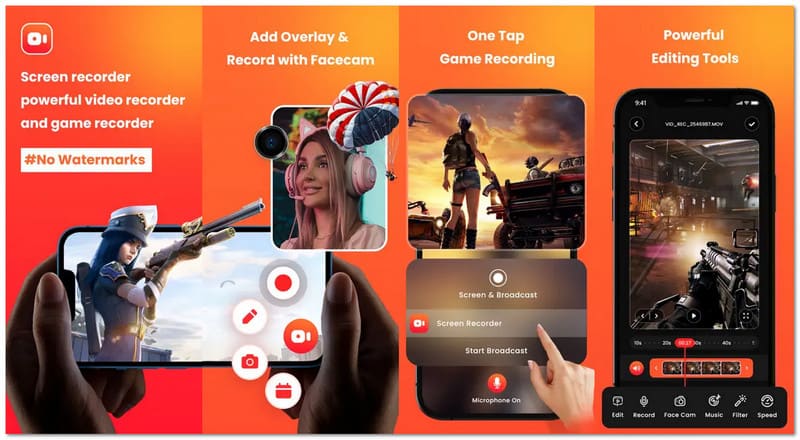
스마트폰 화면 녹화 앱으로 화면을 녹화하고 반응까지 함께 보여주고 싶으신가요? Go Record의 화면 녹화 앱은 간편하게 만들 수 있습니다. 튜토리얼 영상이나 게임 플레이 영상 제작에 적합하며, 얼굴과 목소리를 추가하여 더욱 재미있고 개성 넘치는 영상을 만들 수도 있습니다.
녹음 품질: 이 제품은 최대 1080p 해상도를 지원하며, 부드러운 프레임 속도와 선명한 영상 출력을 제공합니다.
사용 편의성: 원터치 녹음 기능 덕분에 아무런 어려움 없이 아주 간단하게 시작할 수 있습니다.
오디오 지원: 음성을 선명하게 녹음하고 녹음 중 음성 해설 기능을 지원합니다.
편집 기능:
- 클립을 다듬으세요.
- 필터를 추가하세요.
- 속도를 조절하세요.
- 동영상을 회전하세요.
제한 사항: 모든 기능을 사용하려면 비용이 필요하며, 아이폰의 내장 오디오는 제한적입니다.
플랫폼: iOS
6. 화면 녹화 (음성 및 비디오)
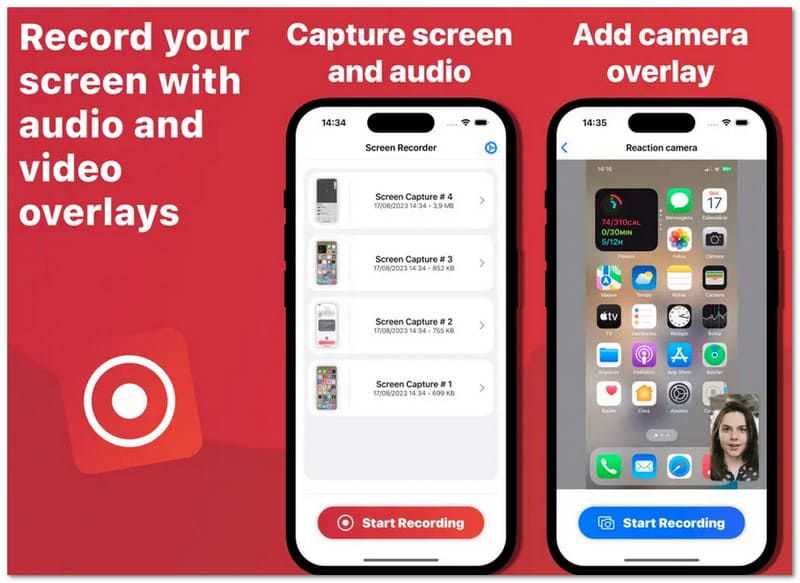
Screen Recorder Voice & Audio는 개인 정보 보호를 중요시하는 사용자를 위한 깔끔하고 간편한 iPhone 화면 녹화 앱입니다. 화면을 녹화하고 파일을 기기에 저장합니다. 튜토리얼, 데모 제작, 그리고 복잡한 설정이나 추가 작업 없이 간편하게 공유할 수 있어 유용합니다.
녹음 품질: 일반적인 녹화 요구 사항에 대해 안정적인 재생과 선명한 영상을 제공합니다.
사용 편의성: 녹음을 시작하려면 몇 번만 탭하면 되고, 디자인도 간단합니다.
오디오 지원: 이 제품은 음성 및 내레이션에 사용할 마이크 오디오를 녹음하는 데 탁월한 성능을 보여줍니다.
편집 기능:
- 클립을 다듬으세요.
- 음성 오버레이를 추가합니다.
- 페이스캠을 사용하세요.
제한 사항: 편집 도구가 부족하고 추가 기능도 제한적입니다.
플랫폼: iOS
파트 3. 비교표 – 최고의 화면 녹화 앱들을 한눈에 보기
어떤 화면 녹화 앱을 사용해야 할지 고민이신가요? 걱정하지 마세요! 아래 비교표를 통해 자신에게 맞는 앱을 쉽게 찾으실 수 있습니다.
| 화면 녹화 앱 | 플랫폼 | 무료 버전 제한 사항 | 양수표 | 최고 품질 | 페이스캠 | 최고의 대상 |
| 화면 녹화기 – XRecorder | 기계적 인조 인간 | 제한 사항은 거의 없지만, 일부 기능은 기기에 따라 다릅니다. | 워터마크가 없습니다. | 1080p | ✓ | 깨끗한 녹음과 간편한 사용. |
| 스크린 레코더 – AZ 레코더 | 기계적 인조 인간 | 광고 및 일부 기능은 업그레이드가 필요합니다. | 워터마크가 없습니다. | 4K | ✓ | 고급 제어 및 스트리밍 기능. |
| 모비즌 스크린 레코더 | 기계적 인조 인간 | 일부 모드는 워터마크를 추가하거나 제한을 둡니다. | 워터마크는 선택 사항입니다. | 1440p | ✓ | 장시간 녹화 가능, 도구도 간단합니다. |
| DU Recorder – 스크린 레코더 | 안드로이드 및 iOS | 모든 기능을 사용하려면 프리미엄 버전이 필요합니다. | 프리미엄으로 삭제되었습니다. | 1080p | ✓ | 실시간 스트리밍 및 공유. |
| 화면 녹화 - Go Record | iOS | 많은 기능이 구독을 통해서만 이용 가능합니다. | 워터마크가 없습니다. | 1080p | ✓ | 반응 영상 및 튜토리얼. |
| 화면 녹화, 음성 및 비디오 녹화 | iOS | 무료 버전의 기능은 제한적입니다. | 워터마크가 없습니다. | 1080p | ✓ | 간편하고 비공개적인 녹음. |
파트 4. 더 큰 화면으로 휴대폰 화면을 녹화하고 싶을 경우
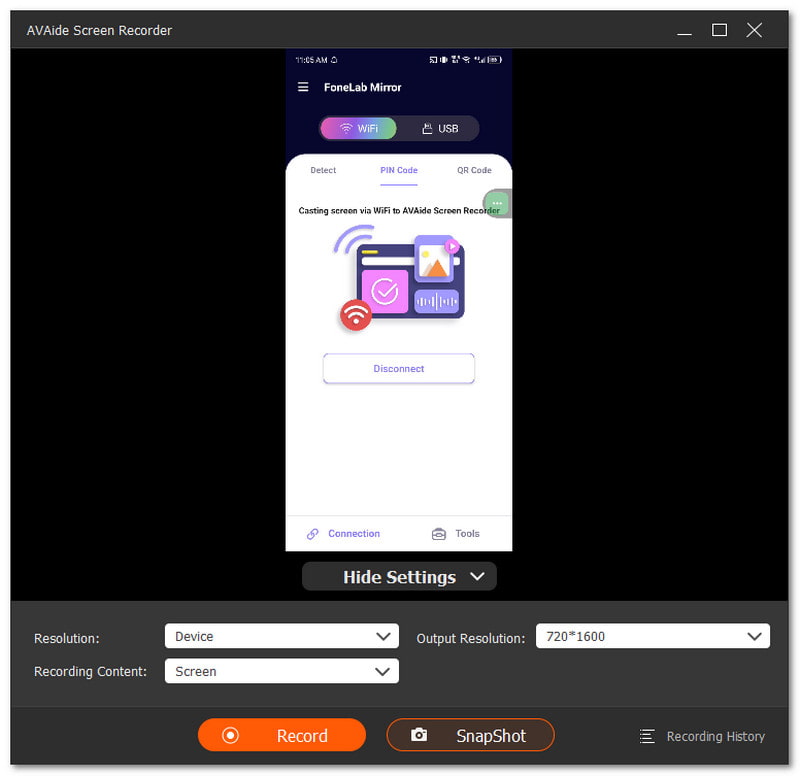
스마트폰으로 녹화하고 싶은데 화면이 너무 작게 느껴지시나요? 컴퓨터에서 더 큰 화면으로 보고 싶으신가요? 바로 그럴 때 녹화 앱이 유용합니다. AVAide 스크린 레코더도움이 될 수 있습니다. iOS와 안드로이드 모두에서 작동하는 휴대폰 녹음 기능이 있습니다. 휴대폰을 연결한 다음 컴퓨터 화면에 미러링하기만 하면 됩니다.

 안전한 다운로드
놀랍게도 AVAide 화면 녹화 앱은 최대 4K 해상도로 녹화할 수 있습니다. 덕분에 녹화된 영상은 선명하고 깨끗하며, 더 큰 화면에서 재생해도 보기 편합니다. 또한 스마트폰 마이크를 이용해 음성이나 게임 소리도 녹음할 수 있습니다. 중요한 장면을 빠르게 저장해야 할 때는 언제든지 스크린샷을 찍을 수 있어 유용합니다.
기대할 수 있는 사항:
- iOS 및 Android 녹음 지원: 아이폰과 안드로이드 기기 모두에서 작동하며, 컴퓨터로 화면을 쉽게 미러링할 수 있습니다.
- 화면 + 웹캠 + 오디오 녹화: 화면, 웹캠, 시스템 소리 및 마이크 소리를 동시에 캡처합니다.
- 부드러운 게임 플레이 녹화: 게임 영상을 최대 60FPS의 풀 HD 화질로 녹화할 수 있어 하이라이트 영상이나 튜토리얼 제작에 적합합니다.
- 녹화 후 영상 편집: 동영상 자르기, 압축, 병합, 변환, 오디오 증폭 및 추출.
- 다양한 미디어 포맷 지원: MP4, WMV, AVI, GIF, MP3 등 다양한 형식으로 파일을 저장합니다.
안드로이드를 사용하든 아이폰을 사용하든, 많은 장점이 있습니다. 화면 녹화 앱 선택 사항은 여러 가지입니다. 내장 녹음기부터 시작해 보세요. 간단하고 사용하기 쉽습니다. 더 많은 기능과 향상된 제어 기능을 원한다면 타사 도구를 사용해 볼 수도 있습니다.
휴대폰 화면을 더 큰 화면에 녹화하고 싶다면 다음 방법을 사용할 수 있습니다. AVAide 스크린 레코더더 긴 영상을 끊김 없이 녹화할 수 있습니다. 또한 워터마크 없는 출력도 지원하여 깔끔한 영상으로 바로 공유할 수 있습니다.
저자 소개

AVAide 스크린 레코더로 최고의 순간을 캡처하십시오. 몇 초 만에 스크린캐스트, 맞춤설정 및 공유할 수 있습니다.