온라인 강의는 다양한 형태로 제공됩니다. Zoom 수업을 시청할 수도 있고, Google Meet 수업에 참여할 수도 있습니다. 교육 세션이나 학교 토론에 참석할 수도 있습니다. 중요한 내용을 놓치고 싶지 않을 때도 있고, 나중에 복습하고 싶을 때도 있으며, 다른 사람들과 내용을 공유하고 싶을 때도 있습니다.
그래서 저희는 여러분께 최고의 서비스를 제공해 드리겠습니다. 강의 녹음기또한, 적합한 제품을 선택하는 데 도움이 되는 간단한 가이드도 함께 제공됩니다.
파트 1. 강의 전용 녹음기가 필요한 이유
1. 강의 녹화의 필요성
강의는 빠르게 진행되고 정보도 방대합니다. 모든 내용을 다 적어둘 수는 없죠. 녹음을 하면 강의를 다시 볼 수 있어서 공부가 더 쉽고 명확해집니다. 시험이나 복습에도 도움이 되고요.
2. 전용 녹음기 vs 스마트폰
전용 녹화 프로그램은 더 나은 오디오 및 비디오 품질을 제공합니다. 지연 시간이 적고 더욱 부드럽게 녹화할 수 있으며, 메모 및 화면 캡처와 같은 학습에 도움이 되는 도구도 갖추고 있습니다.
스마트폰은 사용하기 쉽지만 한계가 있습니다. 장시간 녹화 중에 멈출 수도 있고, 화질이 떨어질 수도 있습니다. 따라서 강의 전체를 녹화하기에는 적합하지 않습니다.
그러므로 본격적인 학습에는 전용 녹음기가 더 신뢰할 만합니다.
파트 2. 최고의 강의 녹화기 선택 방법
물론, 저희는 여러분이 최고의 강의 녹음기를 사용하시길 바랍니다. 아래 정보를 참고하시면 적합한 제품을 선택하실 수 있을 것입니다.
- 수업 시간에 모든 세부 사항을 확인하려면 HD 또는 4K와 같은 고화질 비디오를 지원해야 합니다.
- 지연 없이 깨끗한 오디오를 녹음해야 합니다. 소리와 영상은 동기화되어야 합니다.
- 지연 없이 원활하게 작동해야 하므로 긴 강의 시간 동안 도움이 됩니다.
- 화면 녹화, 음성 녹음, 주석 도구와 같은 유용한 기능이 있어야 합니다.
- 사용하기 쉬워야 합니다. 간단한 조작으로 시간과 노력을 절약할 수 있기 때문입니다.
- Windows나 Mac과 같은 기기에서 제대로 작동해야 합니다. 호환성이 중요하다는 점을 기억하세요.
- 장시간 녹음 세션 동안 안정적인 성능을 제공해야 합니다.
파트 3. 최고의 강의 녹화기 7종 - 상세 리뷰
이제 최적의 강의 녹음 프로그램을 고르는 방법에 대한 아이디어를 얻으셨으니, 사용할 수 있는 도구들을 나열해 보겠습니다.
1. 화면 녹화기
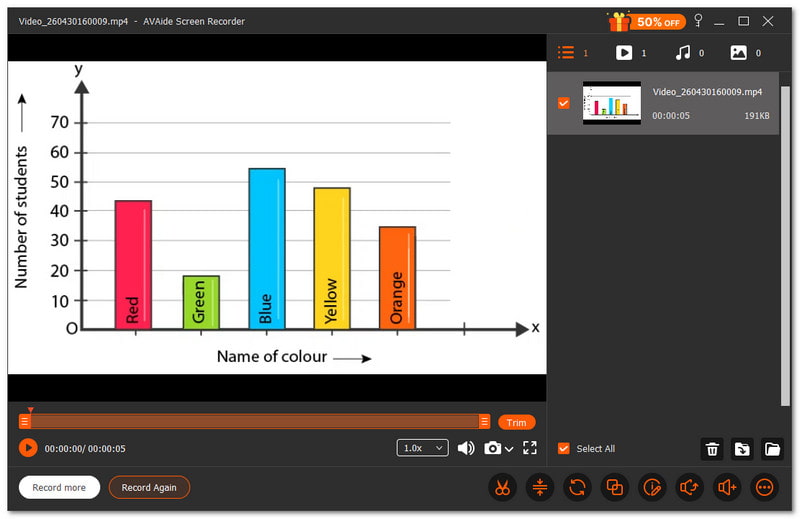
최고의 강의 녹화 프로그램은 학생과 교사가 수업 내용을 명확하게 기록할 수 있도록 도와줍니다. 교육, 학교 강의, 온라인 강좌 등 다양한 상황에서 유용하게 활용할 수 있습니다. 녹화된 내용은 모든 세부 사항을 쉽게 확인할 수 있어야 하며, 끊김 없이 매끄럽게 진행되어야 합니다.
AVAide 스크린 레코더 이 프로그램은 강의 녹화에 가장 적합한 프로그램 중 하나입니다. 전체 화면 또는 특정 영역을 선택하여 녹화할 수 있으며, 음성도 지연 없이 선명하게 녹음되어 강의 내용을 쉽게 이해할 수 있도록 도와줍니다.

 안전한 다운로드
녹화 중에 텍스트, 화이트보드, 이미지 및 초점 도구를 추가할 수 있어 강의의 중요한 부분을 강조하는 데 도움이 됩니다. 이를 통해 학습 및 복습이 훨씬 쉬워집니다. 고화질로 끊김 없이 강의 영상을 녹화할 수 있냐고요? 네, 가능합니다.
- 좋은 점:
- 강의 중에 스크린샷을 찍을 수 있습니다.
- 녹화 제어를 더욱 쉽게 하기 위해 자동 정지 기능을 지원합니다.
- ㅏ 워터마크 없는 무료 화면 녹화 프로그램 깨끗한 출력을 위해.
- 트리머, 컴프레서, 컨버터, 사운드 부스터와 같은 도구를 갖추고 있습니다.
- 화면, 오디오, 게임, 전화 녹음 등 다양한 모드를 제공합니다.
- 나쁜 점은 다음과 같습니다.
- 무료 버전에는 제한 사항이 있으므로 모든 기능을 사용하려면 업그레이드해야 합니다.
주요 판매 포인트: 이 제품은 끊김 없는 고품질 출력으로 강의를 녹화할 수 있는 올인원 솔루션으로, 매끄럽고 명확하며 따라하기 쉬운 수업을 제공합니다.
2. 오터.에이
Otter.ai는 마치 수업 시간에 똑똑한 도우미가 있는 듯한 느낌을 줍니다. 특히 강의용 음성 녹음 앱을 찾을 때 더욱 그렇습니다. Otter.ai는 사용자의 강의 내용을 듣고, 받아 적고, 정리해 줍니다. 실시간으로 음성을 텍스트로 변환하고, 언제든 복습할 수 있는 유용한 요약본을 만들어 줍니다.
가격: $19.99 (월)
- 좋은 점:
- 실시간으로 녹취되었습니다.
- 자동 메모 및 요약 기능.
- 다양한 앱과 호환됩니다.
- 녹음 파일을 검색하는 것은 간단합니다.
- 나쁜 점은 다음과 같습니다.
- 제대로 작동하려면 인터넷 연결이 필요합니다.
- 잡음의 영향으로 정확도가 달라질 수 있습니다.
주요 판매 포인트: 이 프로그램은 강의를 녹음하고 별도의 노력 없이 검색 가능한 노트와 요약으로 변환해 줍니다.
3. OBS 스튜디오
많은 사용자는 강의 녹화 시 완벽한 제어권을 원합니다. OBS Studio는 강력한 도구를 통해 이러한 제어권을 제공합니다. 비디오, 오디오 및 장면을 조합하여 더욱 세밀하고 유연한 강의 녹화 환경을 구축할 수 있습니다.
가격: 무료 오픈 소스입니다.
- 좋은 점:
- 완전히 무료로 사용할 수 있습니다.
- 뛰어난 녹음 품질.
- 독특한 레이아웃과 장면들.
- 강력한 오디오 제어 기능.
- 나쁜 점은 다음과 같습니다.
- 초보자에게는 어렵습니다.
- 설정에는 시간이 걸립니다.
주요 판매 포인트: 이 소프트웨어는 상세하고 유연한 강의 녹화를 원하는 사용자를 위해 완벽한 제어 기능과 고급 기능을 제공합니다.
4. 직조기
학생들은 빠르게 공유되는 강의를 통해 더 많은 것을 배울 수 있습니다. Loom을 사용하면 강의 영상을 신속하게 녹화하고 전송할 수 있습니다. 화면과 카메라를 캡처한 후 바로 링크를 공유하여 편리하게 시청할 수 있습니다.
가격: 기업 구독료는 월 $18부터 시작하며, 무료 플랜도 이용 가능합니다.
- 좋은 점:
- 빠른 녹화 및 공유.
- 다양한 기기에서 작동합니다.
- 내장형 동영상 편집 기능.
- 간편한 링크 공유.
- 나쁜 점은 다음과 같습니다.
- 무료 플랜은 기능이 제한적입니다.
- 공유하려면 인터넷 연결이 필요합니다.
주요 판매 포인트: 이 앱을 사용하면 몇 번의 클릭만으로 강의를 녹화하고 공유하는 것이 빠르고 간편해집니다.
5. 캠타시아
잘 만들어진 강의는 학생들이 집중력을 유지하는 데 도움이 됩니다. Camtasia는 녹화와 편집을 한 곳에서 모두 할 수 있게 해주기 때문에 학생들이 강의를 녹화하기에 가장 좋은 방법입니다. 또한 AI 도구를 사용하여 손쉽게 오디오를 깨끗하게 하고 비디오 품질을 향상시킬 수 있습니다.
가격: 무료 체험판을 이용할 수 있으며, 유료 플랜은 $39.00부터 시작합니다.
- 좋은 점:
- 내장형 비디오 편집기.
- 텍스트 기반 편집.
- 정리 작업을 위한 AI 도구.
- 전문적인 결과물.
- 나쁜 점은 다음과 같습니다.
- 일부 사용자에게는 비싸게 느껴질 수 있습니다.
- 좋은 컴퓨터 사양이 필요합니다.
주요 판매 포인트: 녹화와 편집 기능을 하나로 결합하여 깔끔하고 전문적인 강의 영상을 제작할 수 있는 도구입니다.
6. 스크린팔
간단한 도구로도 많은 것을 할 수 있습니다. ScreenPal은 강의를 쉽게 녹화, 편집, 공유할 수 있도록 도와주는 앱입니다. 학생과 교사 모두에게 원활하게 작동하는 강의 녹화 앱 중 하나이며, 자막 및 번역과 같은 AI 기능을 통해 콘텐츠 이해도를 높여줍니다.
가격: 무료 플랜이 제공되며, 프리미엄 액세스 비용은 $4.00입니다.
- 좋은 점:
- 사용하기 쉬운.
- 내장 편집기.
- AI 기반 캡션 및 요약.
- 다양한 기기에서 작동합니다.
- 나쁜 점은 다음과 같습니다.
- 일부 기능은 유료입니다.
- 편집 도구는 기본적인 것들입니다.
주요 판매 포인트: 이 앱은 유용한 AI 도구를 통해 강의를 더욱 명확하고 흥미롭게 만들어주는 간편한 녹화 기능을 제공합니다.
7. 반디캠
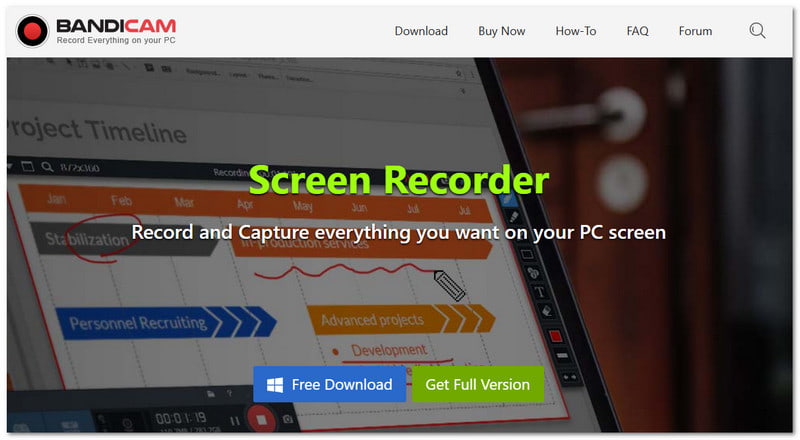
가벼운 도구는 특히 부드러운 녹음에 매우 적합합니다. 윈도우용 화면 녹화 프로그램 Bandicam처럼 고화질로 강의를 녹화하면서도 파일 크기는 작게 유지하는 프로그램도 있습니다. 웹캠과 시스템 오디오를 동시에 캡처할 수도 있습니다.
가격: 프리미엄 구독료는 월 $2.78부터 시작하며, 무료 버전도 있습니다.
- 좋은 점:
- 고품질 녹음.
- 파일 크기가 작습니다.
- 웹캠 오버레이를 지원합니다.
- 예약 녹화 옵션.
- 나쁜 점은 다음과 같습니다.
- 무료 버전의 워터마크.
- 윈도우에 특화된 도구입니다.
주요 판매 포인트: 이 제품은 낮은 파일 크기와 안정적인 성능으로 고품질 강의 녹화를 제공합니다.
제4부. 심층 비교
선택을 더욱 쉽게 하실 수 있도록 아래 비교표에서 각 강의 녹음기의 주요 차이점을 확인하실 수 있습니다.
| 강의 녹화기 | 사용의 용이성 | 호환성 | 비디오 품질 | 오디오 | 지연 | 양수표 |
| AVAide 스크린 레코더 | 쉬운 | 윈도우 및 맥에서 실행됩니다. | 4K | 선명하고 동기화된 오디오. | 지연 없는 성능. | × |
| 오터.에이 | 쉬운 | 웹, iOS 및 안드로이드. | 동영상 촬영에 초점이 맞춰져 있지 않습니다. | 강력한 음성-텍스트 변환 기능. | 클라우드 기반. | × |
| OBS 스튜디오 | 딱딱한 | 윈도우, 맥, 리눅스에서 실행됩니다. | 4K | 뛰어난 오디오 제어 기능. | 원활하게 작동하지만 설정이 필요합니다. | × |
| 직조기 | 쉬운 | 윈도우, 맥, 웹 및 모바일에서 실행됩니다. | 1080 | 선명한 오디오 캡처. | 단시간 사용에는 부드럽습니다. | × |
| 캠타시아 | 중간 | 윈도우 및 맥에서 실행됩니다. | 4K | 뛰어난 음질의 녹음. | 매끄럽지만 묵직하다. | × |
| 스크린팔 | 쉬운 | 윈도우, 맥, 웹 및 모바일에서 실행됩니다. | 4K | 선명한 음질. | 원활한 성능. | ✓ |
| 반디캠 | 중간 | 윈도우에서만 실행됩니다. | 4K | 선명한 오디오 지원. | 시스템 부하가 매우 낮습니다. | ✓ |
중요한 수업을 놓칠까 봐 더 이상 걱정하지 마세요. 이제 가능합니다. 강의를 녹음하세요 위의 도구들을 활용하면 다음과 같은 7가지 최고의 강의 녹화 프로그램을 사용할 수 있습니다. AVAide 스크린 레코더윈도우 및 맥 사용자 모두에게 잘 작동합니다. 이 프로그램을 사용하면 중요한 내용을 다시는 놓치지 않을 것입니다!
저자 소개

AVAide 스크린 레코더로 최고의 순간을 캡처하십시오. 몇 초 만에 스크린캐스트, 맞춤설정 및 공유할 수 있습니다.