大量の写真や文書をコンピュータに転送したのに、「作成日」や「更新日」の欄が完全にめちゃくちゃになってしまったらどうでしょう。バックアップの不具合やタイムゾーンの不一致など、原因は様々ですが、ファイルのタイムスタンプが間違っていると、デジタルアーカイブが台無しになり、ワークフローが混乱に陥る可能性があります。
幸いなことに、あなたは散らかったまま生活する必要はありません。 ファイルの日付変更 メタデータを完全に制御でき、数回クリックするだけでファイルのタイムスタンプを一括編集できます。このガイドでは、WindowsとMac向けのベスト5ファイル日付変更ツールを厳選し、デジタル整理のコントロールを取り戻すお手伝いをします。さっそく見ていきましょう!
パート1:ファイル日付変更ソフトベスト5の徹底レビュー
このセクションでは、信頼できる最高のファイル日付変更ツールをご紹介します。これらのツールがどのようにあなたの作業に役立つのか、ぜひ読み進めてみてください!
1.AVAideビデオコンバーター
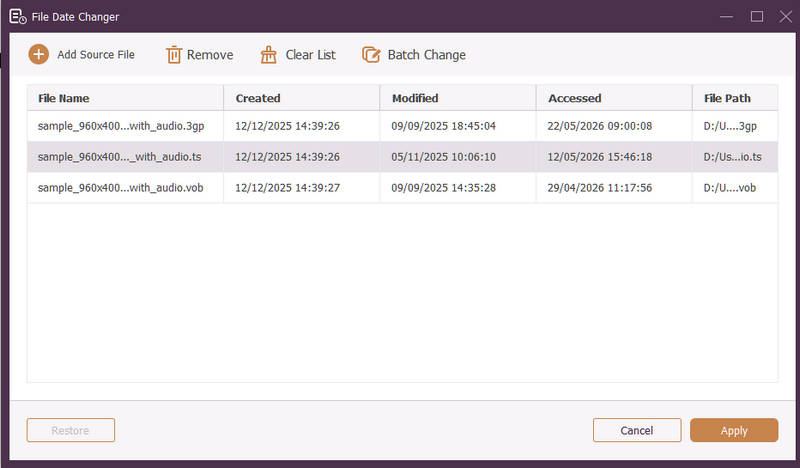
WindowsとMacの両方で利用可能、 AVAideビデオコンバーター は、強力なファイル日付変更機能を内蔵した多機能プラットフォームです。この直感的な機能により、作成日、更新日、最終アクセス日など、包括的なタイムスタンプの詳細を簡単に変更できます。
- 動画、音声、画像など、さまざまなメディア形式をシームレスに処理します。
- 複数のファイルを同時にインポートおよび更新することで、時間を節約し、ワークフローを効率化できます。
- ファイルの日付を素早く変更できる、すっきりとした使いやすいインターフェースを備えています。
- 日付変更後もファイルの整合性を維持してください。

 安全なダウンロード
2. ファイル日付変更
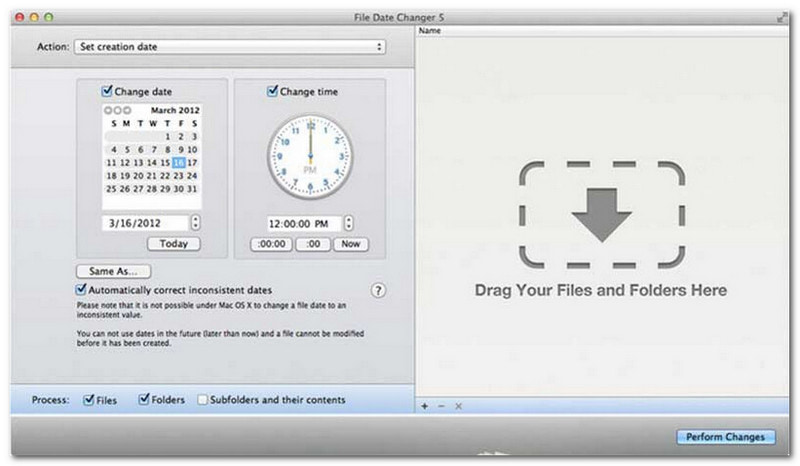
File Date Changerは、その名の通り、ファイルの作成日を変更するための専用ソリューションを提供します。シンプルなデザインなので、あらゆるレベルのユーザーが簡単に利用できます。作成日と更新日の両方の変更に対応しています。個々のファイルまたはフォルダ全体の日付を変更する必要がある場合でも、このMac用ファイル日付変更ツールは、効率的な機能でプロセスを簡素化します。
ファイル日付変更ツールは有料ツールですが、その価値はコストと機能に関する個々のニーズによって異なります。価格帯を考えると、機能がやや物足りないと感じるユーザーもいるかもしれません。しかし、効率性とスムーズなワークフローを重視するユーザーにとっては、ファイル日付変更ツールとして非常に信頼性が高く、投資する価値のあるツールと言えるでしょう。
ファイル日付変更ツールの主な機能:
- 複数のファイルの作成日時、更新日時、最終アクセス日時を変更します。
- 特定の日付、時間、分、秒を加算または減算する機能をサポートします。
- 読み取り専用や隠しファイルなどのファイルプロパティを変更し、EXIFメタデータを更新します。
- ファイル日付変更ツールは瞬時に動作し、分かりやすいインターフェースを提供します。
3. Exifツール
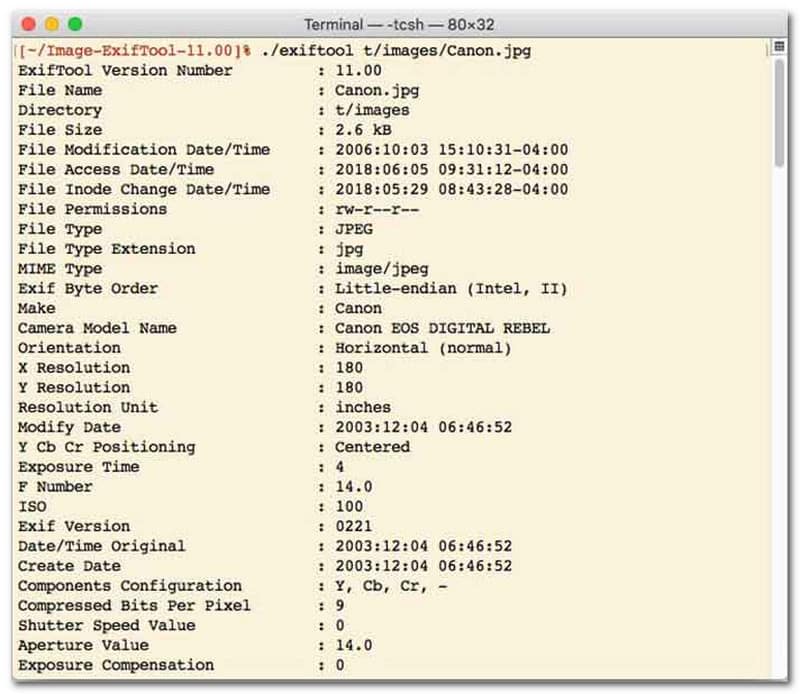
コマンドラインインターフェース(CLI)を備えたファイル日付変更ツールを好むユーザーにとって、ExifToolは極めて高精度なファイル管理の決定版と言えるでしょう。この非常に汎用性の高いファイル日付変更ツールは、写真、ビデオ、ドキュメント、オーディオなど、幅広いファイル形式に対応しています。ExifToolは、作成日や更新日を編集するだけでなく、タイムスタンプメタデータをあるファイルから別のファイルにシームレスにコピーできるため、メディアライブラリ全体を手間なく完璧に同期させることができます。
ExifToolの主な機能:
- ファイルシステムのタイムスタンプをシームレスに読み取り、変更します。
- まったく異なるメタデータ層間で日付をコピーする。
- ファイルの日付を一括変更する際に役立つ、高度な日付と時刻の計算機能をサポートしています。
- あらゆる種類のファイルから日付とメディア情報を抽出します。
4. バルクファイルチェンジャー
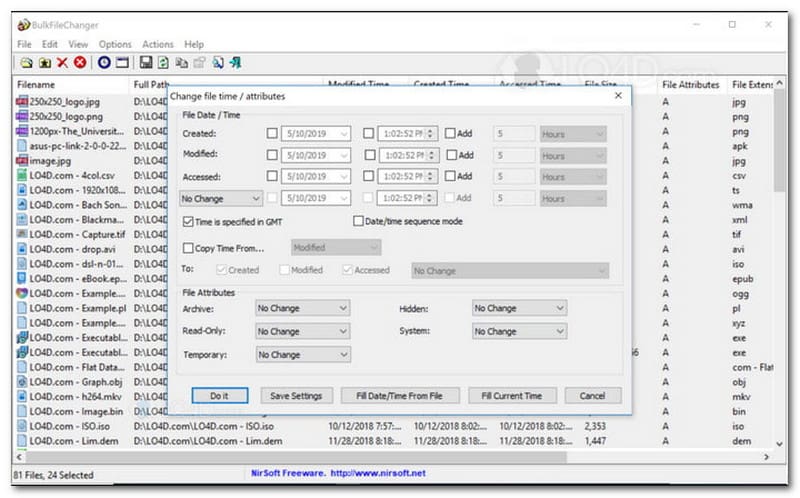
BulkFileChangerは、Windows上でファイルのタイムスタンプ管理を容易にするために設計された、軽量かつ高性能なファイル日付変更ユーティリティです。ドキュメント、画像、動画など、ほぼすべてのファイルタイプにおいて、作成日時、更新日時、最終アクセス日時といった様々な日付と時刻の属性を素早く変更できます。クロスフォーマット対応と高速処理により、デジタルアーカイブの整理に最適なファイル日付変更ツールですが、Windowsオペレーティングシステムのみに対応しているため、macOSおよびLinuxユーザーは別のツールを探す必要があります。
BulkFileChangerの主な機能:
- ファイルの作成日時、更新日時、最終アクセス日時を変更します。
- 文書、画像、動画など、ほぼすべてのファイル形式をスムーズに処理します。
- 超高速かつ一括メタデータ更新を可能にする軽量設計を採用しています。
- 特定の日付、時間、分、秒を追加または削除します。
5. アトリビュートマジック
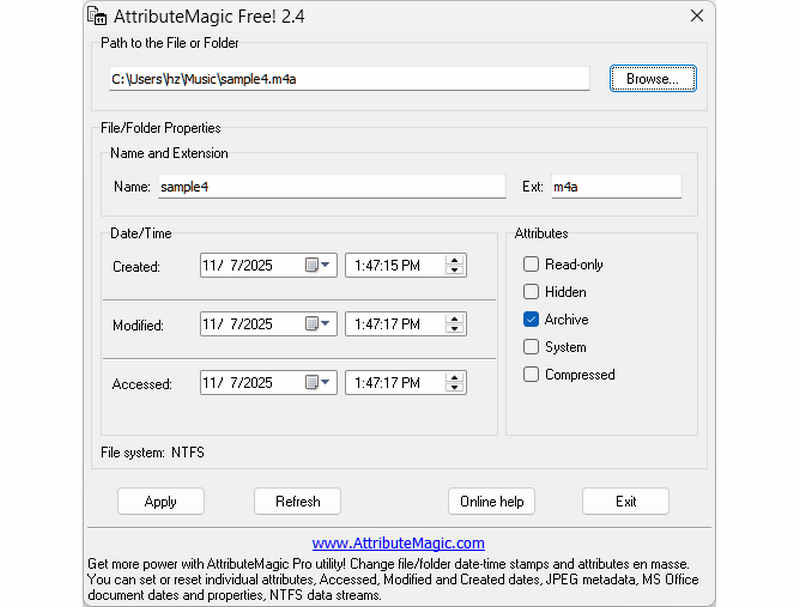
AttributeMagicは、単なるファイル日付変更ツールにとどまらず、フォルダとファイルの両方の属性を管理するための高度なソリューションを提供します。この包括的なユーティリティは、タイムスタンプの正確な変更を可能にし、作成日、更新日、最終アクセス日を簡単に書き換えることができます。AttributeMagicは、専用のファイル日付変更ツールとしての機能に加え、ファイルシステムのプロパティを詳細にカスタマイズできるため、特定のアーカイブニーズに対応できます。無料版では基本的なタイムスタンプ編集機能が利用できますが、プレミアム版にアップグレードすると、高度なメタデータ制御機能と強力な自動化機能が利用可能になります。
AttributeMagicの主な機能:
- 作成日時、変更日時、最終アクセス日時を変更または隠蔽する。
- 単一ファイルまたはファイルフォルダ全体の日付を変更できます。
- ファイルのタイムスタンプを簡単に増減したり、前後にずらしたりできます。
- 読み取り専用、隠しファイル、システムなどのコアファイルシステム属性を設定、リセット、または反転します。
パート2:5つのファイル日付変更ツールの比較
| 製品 | サポートされているプラットフォーム | ユーザーインターフェース | バッチ編集 | 追加機能 |
| AVAideビデオコンバーター | WindowsとmacOS | モダンで、清潔感があり、流れるようなデザイン | はい(超高速) | フルスイート:8Kビデオ変換、DVDリッピング、メタデータ編集、MV/スライドショー作成 |
| ファイル日付変更ツール(NirSoft) | Macのみ | 旧式(レガシーWeb/UI) | 限定 | なし(単一目的) |
| Exifツール | Windows、macOS、Linux | コマンドラインのみ(GUIなし) | はい(複雑なスクリプトが必要です) | メタデータの読み書きのみ |
| バルクファイルチェンジャー | Windowsのみ | クラシックWindowsユーティリティ | はい | Windowsの基本的なファイル属性の調整 |
| アトリビュートマジック | Windowsのみ | 厳格/複雑 | はい | ファイルシステムのフラグ管理のみ |
パート3:AVAide Video Converterでファイルデータを変更する方法
デジタルファイルを整理するために、ファイルの作成日を変更する必要があったことはありませんか? AVAideビデオコンバーター! ファイルの管理に役立つように、ファイルの作成日を変更する方法については、読み続けてください。
ステップ1完全なアクセスを得るには、公式 Web サイトから AVAide Video Converter をダウンロードしてインストールしてください。
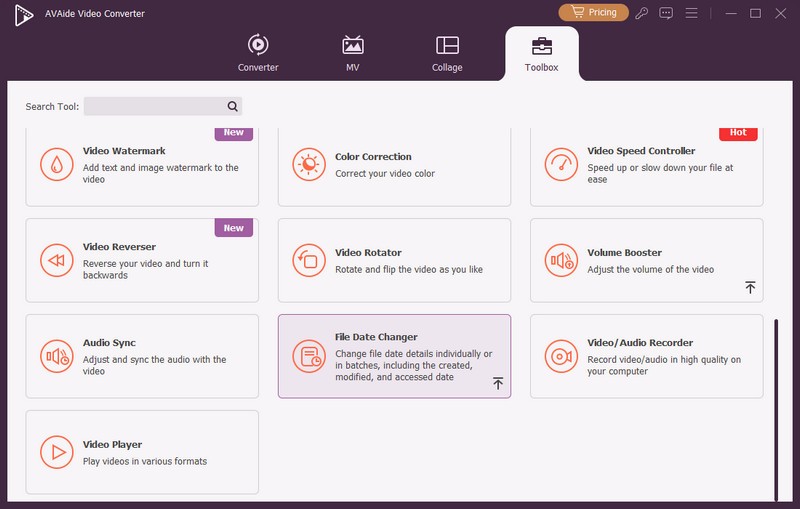
ステップ1始めるには、コンピュータでプログラムを開いてください。 ツールボックス タブをクリックしていくつかの機能にアクセスします。マウスを下にスクロールして ファイル日付変更 オプションの中から選択し、クリックします。これは、ファイルの日付の詳細を変更するために使用する機能です。
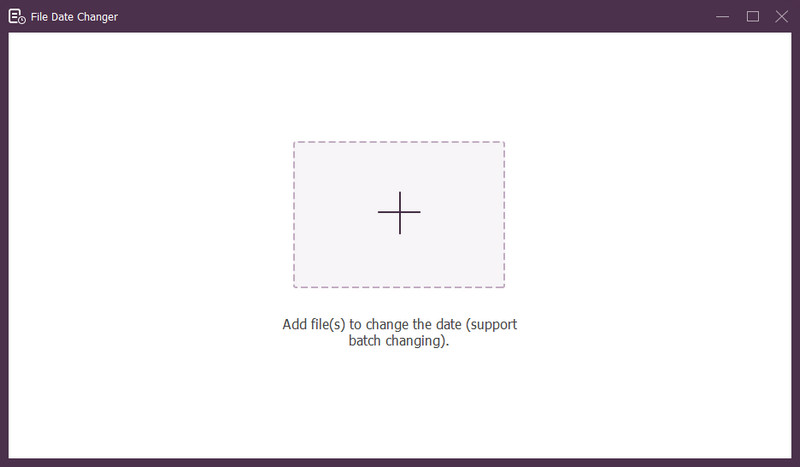
ステップ3(+) ボタンをクリックしてファイルをインポートします。オーディオ、画像、音声ファイルなどです。複数のファイルをインポートしてファイルの詳細を変更することもできます。
ステップ4すべてのファイルをインポートしたら、日付の変更を開始できます。作成日、変更日、アクセス日を適宜変更できます。これを行うには、項目をクリックして 矢印 編集可能であることを示すメッセージが表示されます。
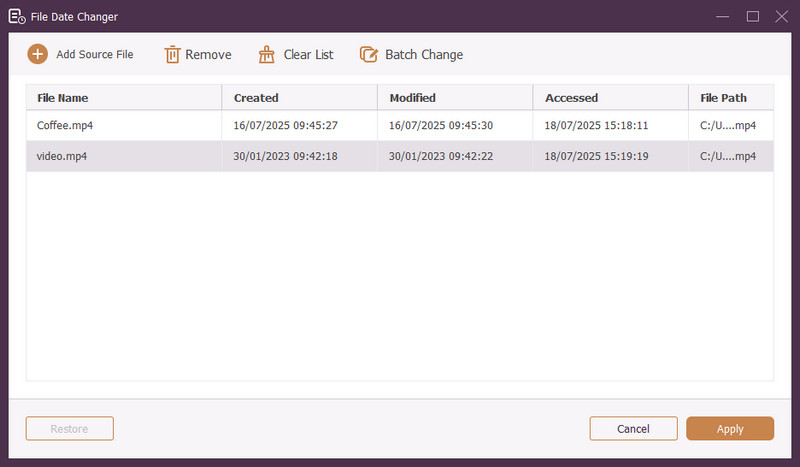
ステップ5すべてのファイルの日付を編集したら、 申し込み ボタンをクリックして変更を確定します。変更を適用したら、更新されたファイル データの詳細を確認して正確性を確認します。
パート4. Best File Date Changerに関するよくある質問
ファイルの日付情報を表示するにはどうすればいいですか?
ファイルがいつ作成されたか、または最後に変更されたかを確認したい場合は、コンピューター上で直接行うことができます。ファイルを見つけて右クリックし、[プロパティ] を選択します。すると、ファイルに関するすべての詳細が表示されます。これには、作成日と変更日が含まれます。
ファイルの日付を変更すると、誰かに分かりますか?
いいえ! ファイルの日付を変更しても痕跡は残りません。そのため、いつ変更したかは誰にもわかりません。
ファイルから日付と時刻が消えてしまう理由は何ですか?
ファイルから日付と時刻が消える理由はいくつかあります。ファイルをダウンロードしたときに、インターネット接続が不良なために一部の情報が失われた場合に発生することがあります。ファイルをダウンロードした Web サイトに原因がある場合もあります。
ファイルの変更された作成日を取得できますか?
はい。手動で初期値に戻すことで、元の日付を復元できます。これが、ファイルの作成日を取得する唯一の方法です。
ファイルの日付と時刻を変更すると、ファイルの整合性や内容に影響しますか?
いいえ! ファイルの日付と時刻を変更しても、コンテンツや整合性には影響しません。作成日や変更日などのメタデータのみが変更されます。実際のファイルは変更されません。
これで完了です! ファイルの作成日を変更する方法、これはさまざまな理由で役立ちます。より合理的で初心者に優しい体験をお求めの場合は、AVAide Video Converter をファイルの日付変更ツールとして使用することを検討してください。デジタル ファイルの管理には最適な選択肢です。ぜひお試しいただき、ご意見を以下にお寄せください。
著者について

品質を損なうことなくビデオとオーディオを変換する最も包括的なメディア コンバーター。