長尺動画を扱う場合、ストレージ容量を消費せずに動画の品質を維持するにはどうすればよいかという、悩ましいジレンマに直面することがよくあります。ここで動画圧縮規格が登場します。動画のサイズ、品質、デバイス互換性のバランスを取りたい場合、必然的に次の選択肢に直面します。 H.264(AVC)およびH.265(HEVC).
この包括的なガイドでは、H.264とHEVCの主な違いを詳しく解説し、どちらがあなたのワークフローに適しているかを判断するお手伝いをするとともに、品質を損なうことなくシームレスに変換する方法をご紹介します。
パート1. HEVCとH264:それぞれの概要
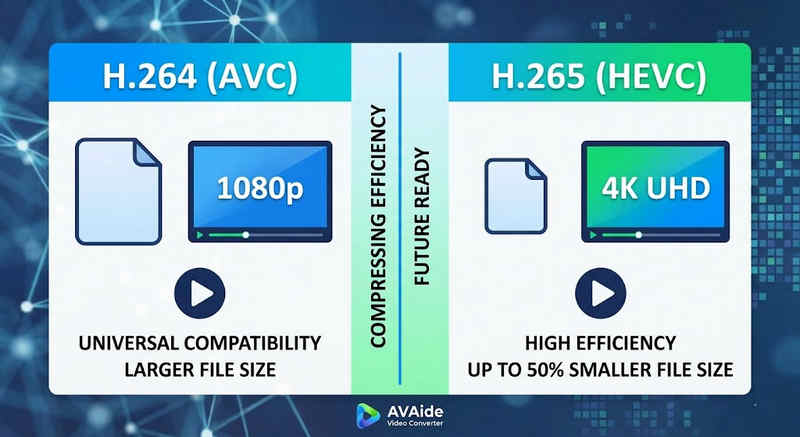
簡潔な答え: H.264(AVC)は汎用性が高く、ほぼすべてのデバイスで動作しますが、ファイルサイズが大きくなります。H.265(HEVC)は圧縮率が高く、画質は同等ながらファイルサイズを最大50%削減できますが、より高い処理能力が必要となり、古いハードウェアでのサポートは限られています。
1. H.264コーデック(AVC)とは何ですか?
アドバンスト・ビデオ・コーディング(AVC)として導入されたH.264は、ビデオ互換性の王者として君臨しています。オンラインストリーミング、モバイル録画、日常的なビデオ再生における業界標準となっています。デコードに必要な処理能力が非常に少ないため、H.264ビデオは、古いスマートフォンから最新のスマートテレビまで、考えられるほぼすべてのデジタル機器でスムーズに再生できます。
2. H.265コーデック(HEVC)とは何ですか?
高効率ビデオコーディング(HEVC)、またはH.265は、H.264の直接の後継規格です。4K、8K、VRコンテンツの膨大なデータ需要に対応するために特別に設計されました。HEVCは、より高度なアルゴリズムを使用してビデオデータを前身規格よりもはるかに効率的に圧縮し、最大50%のファイルサイズで鮮明な高解像度映像を実現します。ただし、この効率性には代償が伴います。遅延なく処理するには、最新のハードウェアが必要になります。
H.265とH.264の比較表
| 特徴 | H.264 (AVC) | H.265 (HEVC) |
| サポートされている形式 | m2ts、evo、3gp、f4v、mkv、mp4、qtff、asf、avi、mxf、ps、ts | mxf、ps、ts、3gp、mkv、mp4、qtff、asf、avi |
| 圧縮効率 | 中程度(ファイルサイズが大きい場合) | 優れた(25-50% より小さなファイル) |
| ビデオ品質 | 1080pに最適 | 4K、8K、およびHDRに最適化されています |
| デバイスの互換性 | ユニバーサル(99%のデバイス) | 限定的(旧型PCではサポートされない場合があります) |
| 処理能力 | 低(高速レンダリング/再生) | 高(最新のCPU/GPUが必要) |
| 理想的な使用例 | ウェブストリーミング、ソーシャルメディア、旧型デバイス | 4Kドローン映像、iPhoneシネマティックビデオ、省スペースアーカイブ |
パート2:HEVCとH.264のどちらを選ぶべきか
適切なコーデックの選択は、あなたの具体的な目的によって大きく異なります。以下に、どちらか一方を選択する理由を説明します。
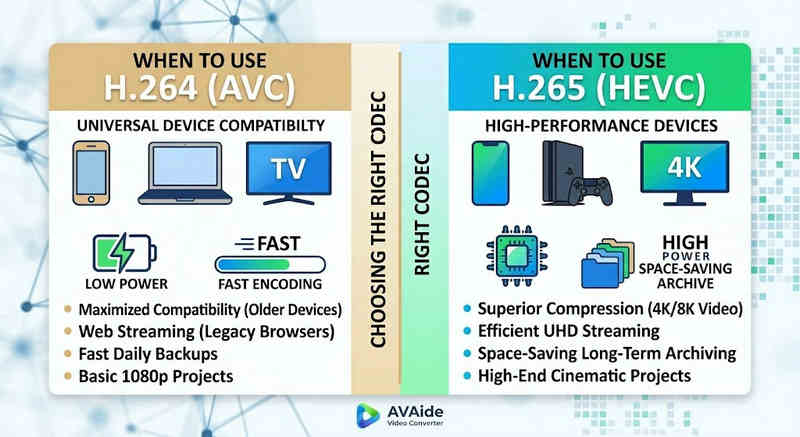
HEVC(H.265)が必要な理由:
- ストレージ容量の節約を最大限に高める: 長尺動画や膨大な4Kライブラリをバックアップする場合、HEVCは自然な動画サイズ縮小ツールとして機能し、ハードディスクの容量を半分解放します。
- 帯域幅の最適化: HEVCはストリーミングに必要な帯域幅がはるかに少ないため、バッファリングなしで低速なインターネット接続でもスムーズな4K再生を実現するのに最適です。
- 将来を見据えた対策: 業界が超高精細(UHD)コンテンツやVRコンテンツへと移行する中で、HEVCは動画の高品質を維持し、次世代プラットフォームとの互換性を確保します。
H.264(AVC)が必要な理由:
- 完璧な再生と編集: ビデオ編集ソフトウェアの動作が遅い場合、またはメディアプレーヤーが「コーデックがサポートされていません」というエラーを表示する場合
- 互換性と安心の共有: H.264は最も互換性の高いビデオコーデックです。友人、NAS、PlexやKodiなどのメディアサーバーにビデオを共有する場合でも、H.264ならスムーズな共有と再生が可能です。
パート3:HEVCとH.264間の簡単な変換方法
HEVC(H.265)とH.264形式間でビデオを転送する場合、 AVAideビデオコンバーター 他のものよりも優れています。変換の品質を損なわず、さまざまな形式をサポートする効率的で使いやすいインターフェイスを提供します。理由が HEVC の効率性の向上のためか、H264 の採用拡大のためかはわかりませんが、AVAide を使用すると、手間をかけずに 2 つを切り替えることができます。
詳細な手順:
ステップ1AVAideビデオコンバーターを入手
ダウンロード、インストール、起動 AVAideビデオコンバーター WindowsまたはMacコンピュータで。

 安全なダウンロード
ステップ2AVAideビデオコンバーターに動画を追加する
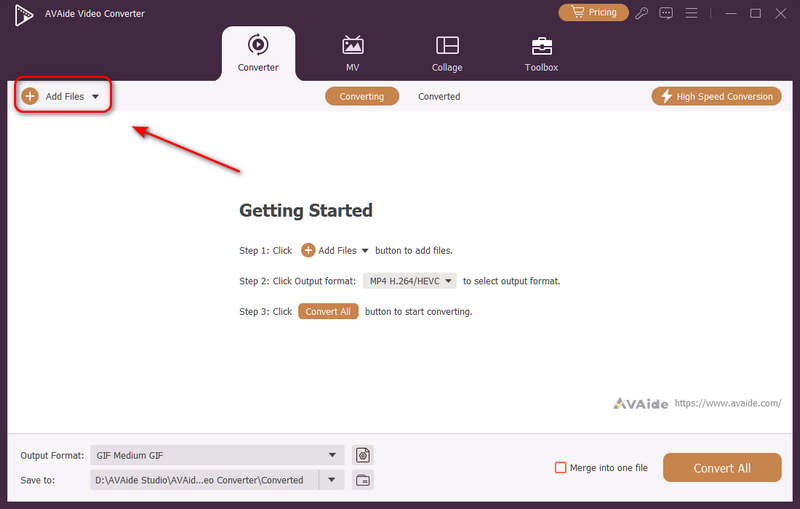
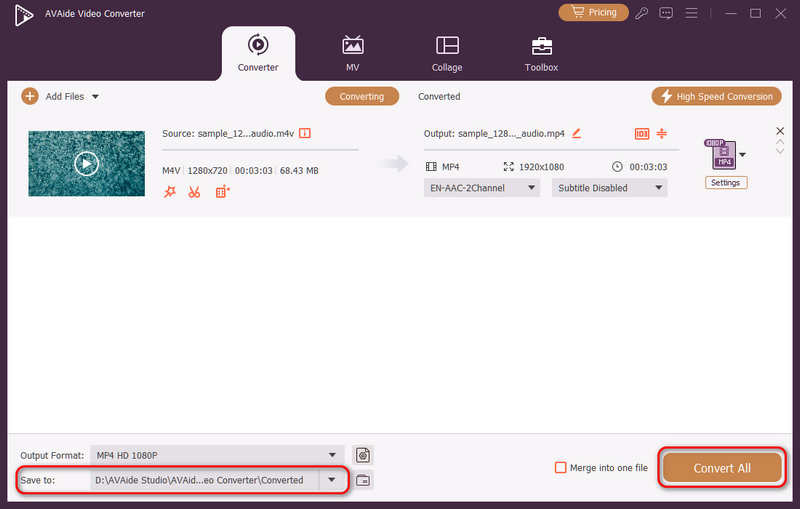
複数のビデオファイルを追加して、一括変換を実行できます。 追加ファイル 左上のボタンをクリックして、ビデオファイルをインポートしてください。
ステップ3H.264またはH.265コーデックを選択してください
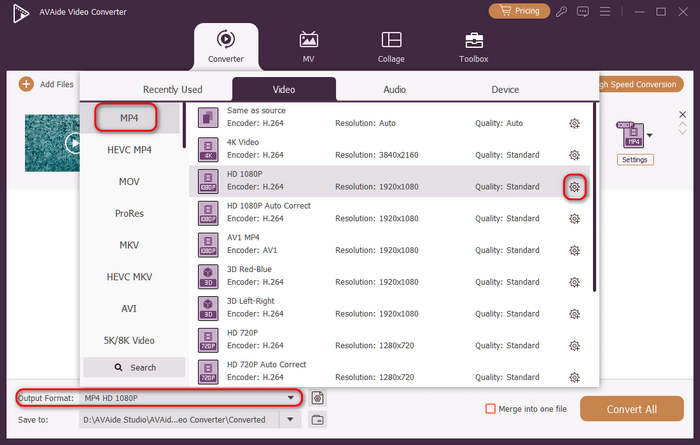
クリック 出力フォーマット 左下にあるドロップダウンメニューボタンをクリックします。次に、まず希望のビデオ形式を選択します。次に、 カスタムプロファイル ビデオプリセットバーにあるボタン(歯車アイコン付き)。
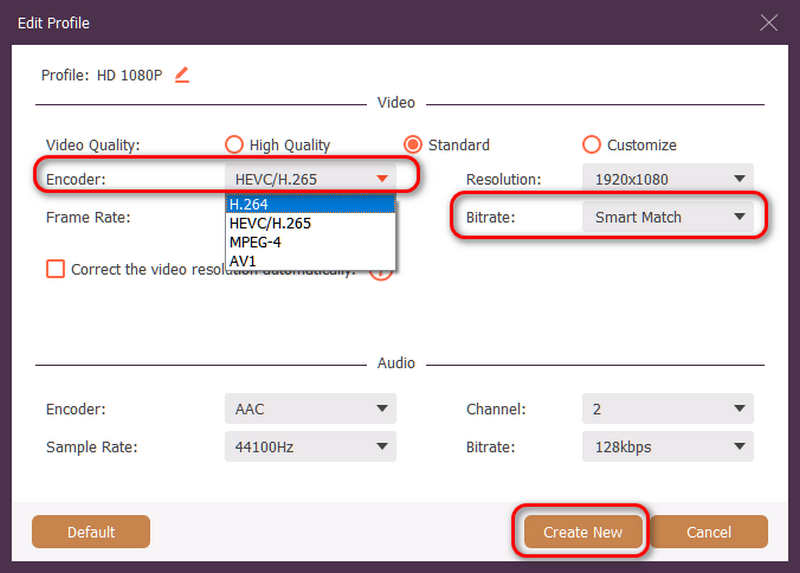
次に、このパネルで、 エンコーダー ドロップダウンボタンを選択して選択 H.264 また 動画 コーデック。ビデオ品質を変更したい場合は、 ビットレートしかし、私たちは推奨します スマートマッチ 互換性を確保するため、クリックしてください。 新しく作る 設定を保存するには、ボタンをクリックしてください。
ステップ4ビデオの再エンコードを開始します
最後に、 に保存 ドロップダウンボタンをクリックして目的の出力フォルダーを選択し、 すべて変換 ビデオコーデックをH.264またはH.265に変更するには、このボタンをクリックしてください。
パート4. H.265とH.264に関するよくある質問
NVENC H.264とNVENC HEVCの主な違いは何ですか?
主な違いは、圧縮効率とハードウェア生成の最適化にあります。NVENC HEVC(H.265)は、NVENC H.264(AVC)よりも最大50%優れた圧縮率を実現します。つまり、ビットレートを半分(ファイルサイズも半分)に抑えながら、全く同じ画質を実現できるため、4K動画のアーカイブや帯域幅が限られた環境でのストリーミングに最適です。
モジュール式マルチチャンネルHEVC/H.264エンコーダーとは何ですか?
モジュール式のマルチチャンネルHEVC/H.264エンコーダは、複数のビデオフィードを同時に圧縮・ストリーミングするために設計されたエンタープライズグレードのハードウェアデバイスです。一般消費者向けのソフトウェアエンコーダとは異なり、モジュール式(ブレード型)設計を採用しているため、プロジェクトの規模に応じてハードウェアエンコードカードをホットスワップまたはアップグレードできます。H.264とHEVC/H.265の両方をサポートしています。
H.265+とは何ですか?
H.265+(スマートH.265+とも呼ばれる)は、ハイクビジョンが開発した高度な独自のビデオ圧縮技術であり、セキュリティおよび監視モニタリング向けに特化して最適化されています。
この包括的な分析を活用すれば、 HEVC と H.264 動画の要件に最適なコーデックを決定できます。互換性を重視して H.264 を使用する場合でも、より優れた圧縮率を狙って HEVC を使用する場合でも、どちらのコーデックにも利点があります。AVAide Video Converter は、この問題に対処するためのエレガントで効率的なソリューションを提供し、高速でありながら優れた品質の出力を実現します。AVAide は、シンプルなインターフェイスと高度な機能により、動画の圧縮とその変換のタスクを容易にします。
著者について

ロスレス品質での変換のために350以上のフォーマットをサポートする完全なビデオツールボックス。