Immaginate di trasferire un'enorme quantità di foto o documenti sul vostro computer, solo per scoprire che i campi "Data di creazione" o "Data di modifica" sono completamente sballati. Che si tratti di un problema di backup o di una discrepanza di fuso orario, le date e gli orari errati dei file possono compromettere l'archiviazione digitale e mandare in tilt il vostro flusso di lavoro.
Fortunatamente, non devi convivere con il disordine. Un dedicato cambio data file Ti offre il controllo assoluto sui tuoi metadati, permettendoti di modificare in blocco i timestamp dei file con pochi clic. In questa guida, abbiamo raccolto i 5 migliori programmi per la modifica della data dei file per Windows e Mac per aiutarti a riprendere il controllo della tua organizzazione digitale. Iniziamo!
Parte 1. Analisi completa dei 5 migliori programmi per la modifica della data dei file.
In questa sezione vi presenteremo i migliori strumenti per modificare la data dei file su cui potete fare affidamento. Continuate a leggere per scoprire come questi strumenti possono aiutarvi a raggiungere il vostro obiettivo!
1. Convertitore video AVAide
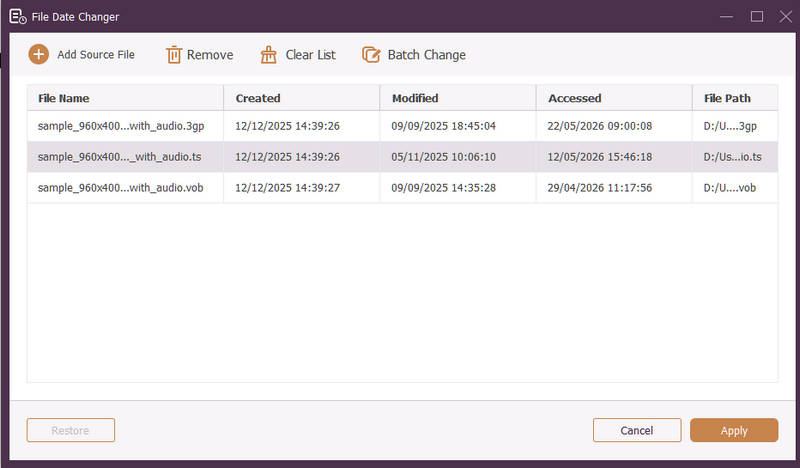
Disponibile sia per Windows che per Mac, AVAide Video Converter è una piattaforma versatile dotata di un potente strumento integrato per la modifica delle date dei file. Questa funzione intuitiva consente di modificare facilmente dettagli completi relativi ai timestamp, tra cui le date di creazione, modifica e ultimo accesso.
- Gestisci senza problemi numerosi formati multimediali, tra cui video, audio e immagini.
- Importa e aggiorna più file contemporaneamente per risparmiare tempo e ottimizzare il tuo flusso di lavoro.
- Presenta un'interfaccia pulita e intuitiva che consente di modificare rapidamente la data dei file.
- Mantieni il tuo file integro anche dopo modifiche di data.
2. Modifica data file
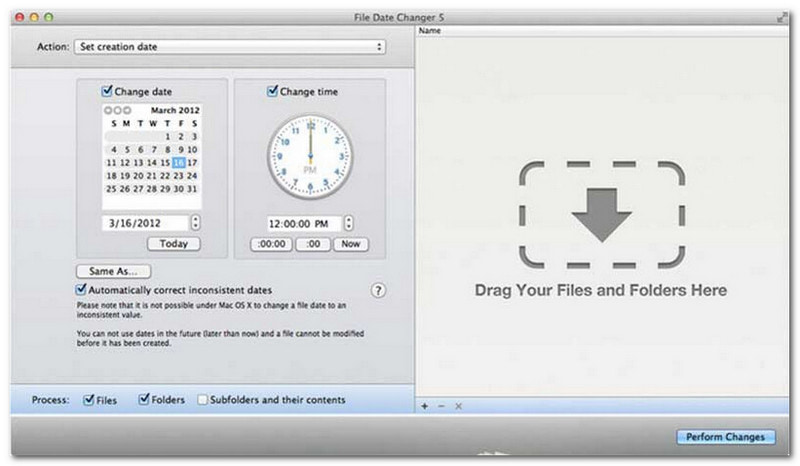
File Date Changer mantiene la promessa del suo nome offrendo una soluzione specifica per modificare le date di creazione dei file. Il suo design semplice lo rende accessibile a utenti di tutti i livelli. Supporta la modifica sia della data di creazione che di quella di modifica. Che tu debba cambiare le date di singoli file o di intere cartelle, questo strumento per Mac semplifica il processo grazie alla sua funzionalità efficiente.
Sebbene File Date Changer sia uno strumento a pagamento, il suo valore dipende dalle esigenze specifiche in termini di costo e funzionalità. Alcuni utenti potrebbero trovare le sue funzionalità un po' basilari rispetto al prezzo. Tuttavia, per coloro che danno priorità all'efficienza e a un flusso di lavoro senza intoppi, rimane un investimento estremamente affidabile e valido per la modifica della data dei file.
Caratteristiche principali di File Date Changer:
- Modifica le date e gli orari di creazione, modifica e ultimo accesso per più file.
- È possibile aggiungere o sottrarre giorni, ore, minuti o secondi specifici.
- Modifica le proprietà dei file, ad esempio impostandoli su Sola lettura o Nascosto, e aggiorna i metadati EXIF.
- Il programma per la modifica della data dei file si avvia istantaneamente e offre un'interfaccia chiara.
3. Strumento Exif
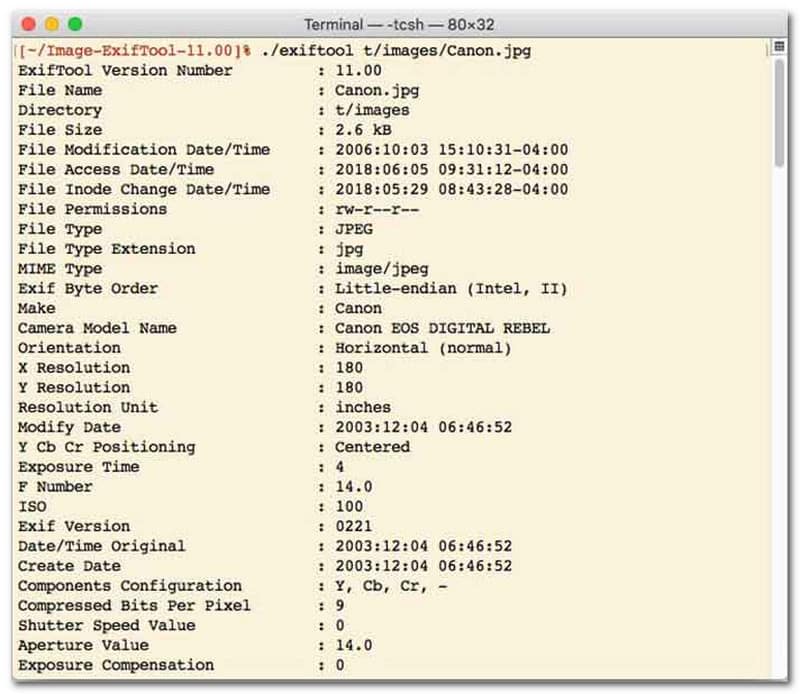
Per gli utenti che preferiscono un programma per la modifica delle date dei file con interfaccia a riga di comando (CLI), ExifTool rappresenta il punto di riferimento per una gestione dei file estremamente precisa. Questo strumento, incredibilmente versatile, supporta un'ampia gamma di tipi di file, tra cui foto, video, documenti e audio. Oltre alla semplice modifica delle date di creazione e modifica, ExifTool consente di copiare senza problemi i metadati relativi al timestamp da un file all'altro, garantendo che l'intera libreria multimediale rimanga perfettamente sincronizzata.
Caratteristiche principali di ExifTool:
- Lettura e modifica senza interruzioni dei timestamp del file system.
- Copiare le date tra livelli di metadati completamente diversi.
- Supporta calcoli avanzati su date e orari per aiutarti a modificare le date dei file in blocco.
- Estrai informazioni su data e formato da tutti i tipi di file.
4. Modifica file in blocco
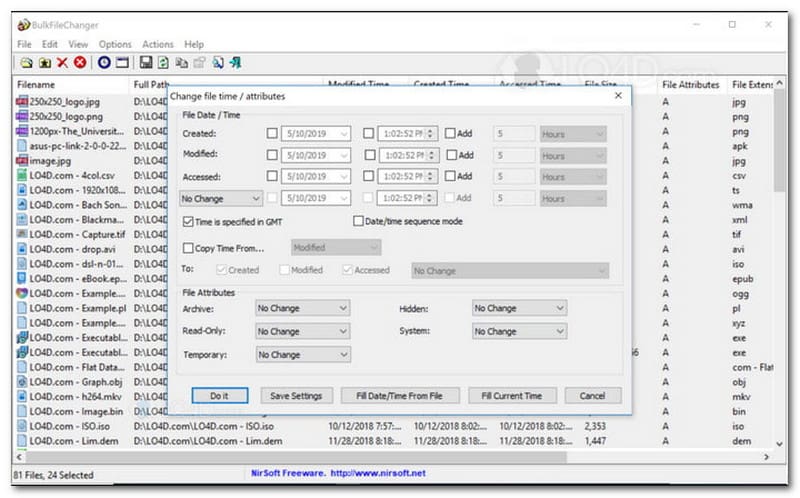
BulkFileChanger è un'utility leggera e performante per la modifica della data dei file, progettata per una gestione semplice e intuitiva dei timestamp su Windows. Consente agli utenti di modificare rapidamente diversi attributi di data e ora, tra cui data di creazione, modifica e ultimo accesso, per praticamente qualsiasi tipo di file, da documenti e immagini a video. Sebbene la sua versatilità e velocità lo rendano un ottimo strumento per organizzare archivi digitali, la sua disponibilità è strettamente limitata al sistema operativo Windows; gli utenti macOS e Linux dovranno quindi cercare alternative.
Caratteristiche principali di BulkFileChanger:
- Modifica le date di creazione, modifica e ultimo accesso dei file.
- Gestisce senza problemi quasi tutti i tipi di file, inclusi documenti, immagini e video.
- Caratterizzato da un design leggero che consente un aggiornamento massivo e ultraveloce dei metadati.
- Aggiungi o rimuovi giorni, ore, minuti e secondi specifici.
5. AttributoMagia
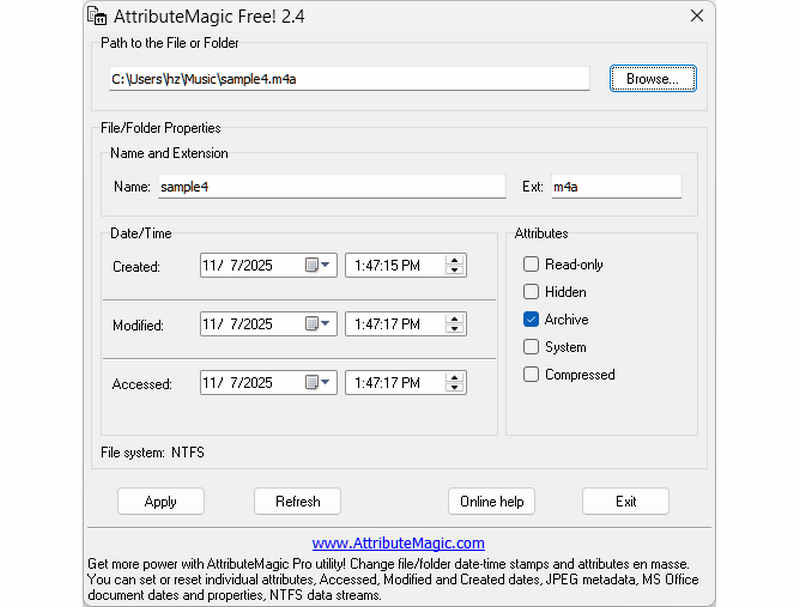
AttributeMagic va ben oltre un semplice strumento per la modifica delle date dei file, offrendo una soluzione avanzata per la gestione degli attributi di cartelle e file. Questa utility completa consente la modifica precisa dei timestamp, permettendo agli utenti di riscrivere facilmente le date di creazione, modifica e ultimo accesso. Oltre alle sue funzionalità specifiche per la modifica delle date dei file, AttributeMagic offre un'ampia personalizzazione delle proprietà del file system per soddisfare le esigenze di archiviazione specifiche. Mentre la versione gratuita offre le funzionalità essenziali di modifica dei timestamp, l'aggiornamento alla versione premium sblocca un controllo avanzato dei metadati e potenti funzionalità di automazione.
Caratteristiche principali di AttributeMagic:
- Modifica o nascondi i timestamp di creazione, modifica e ultimo accesso.
- Modifica la data di creazione di un singolo file o di un'intera cartella.
- È possibile incrementare, decrementare o spostare facilmente i timestamp dei file in avanti o indietro.
- Consente di impostare, reimpostare o invertire gli attributi principali del file system, come Sola lettura, Nascosto e Sistema.
Parte 2. Confronto dei 5 programmi per la modifica della data dei file
| Prodotto | Piattaforme supportate | Interfaccia utente | Modifica in batch | Funzionalità extra |
| AVAide Video Converter | Windows e macOS | Moderno, pulito e fluido | Sì (Ultraveloce) | Suite completa: conversione video 8K, ripping DVD, modifica metadati, creazione di video musicali/presentazioni |
| Strumento per la modifica della data dei file (NirSoft) | Solo Mac | Obsoleto (interfaccia web/interfaccia utente legacy) | Limitato | Nessuno (monouso) |
| Strumento Exif | Windows, macOS, Linux | Solo da riga di comando (nessuna interfaccia grafica) | Sì (richiede script complessi) | Solo lettura/scrittura dei metadati |
| BulkFileChanger | Solo Windows | Utilità classica di Windows | sì | Modifica di base degli attributi dei file di Windows |
| Magia degli attributi | Solo Windows | Rigido / Complesso | sì | Gestione dei flag del file system soltanto |
Parte 3. Come modificare i dati di un file in AVAide Video Converter
Hai mai avuto bisogno di modificare la data di creazione di un file per organizzare meglio i tuoi file digitali? Puoi farlo usando AVAide Video Converter! Continua a leggere per scoprire come modificare la data di creazione su un file per aiutarti a gestire il tuo file.
Passo 1Scarica e installa AVAide Video Converter dal sito ufficiale per l'accesso completo.

DOWNLOAD GRATUITO Per Windows 7 o successivo
 Download sicuro
DOWNLOAD GRATUITO Per Mac OS X 10.13 o successivo
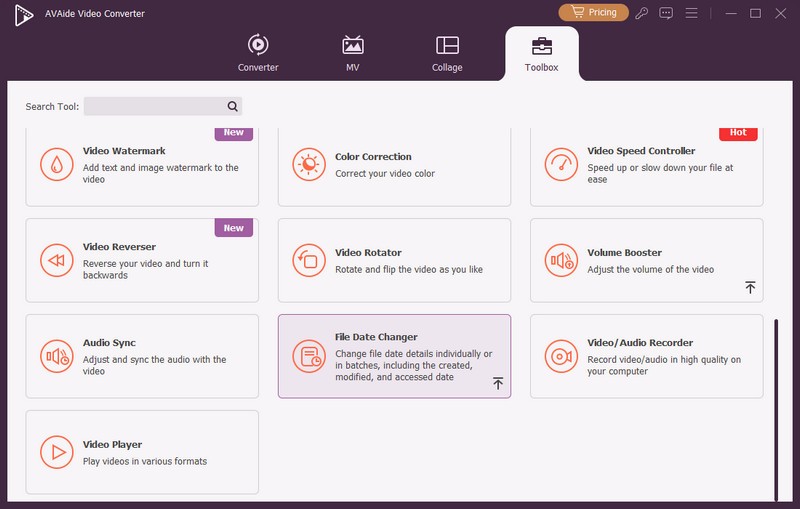
Download sicuroPasso 1Apri il programma sul tuo computer per iniziare. Dirigiti al Cassetta degli attrezzi scheda per accedere a diverse funzionalità. Scorri verso il basso con il mouse, cerca Modifica data file tra le opzioni e fare clic su di esso. È la funzione che utilizzerai per modificare i dettagli della data del file.
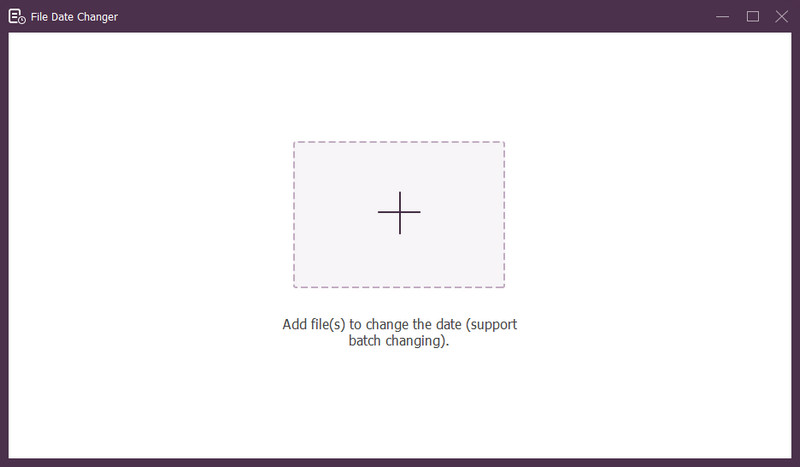
Passaggio 3Premi il (+) per importare i file. Possono trattarsi di file audio, di immagini e audio. È possibile importare più di un file per modificare i dettagli del file.
Passaggio 4Puoi iniziare a modificare le date una volta importati tutti i file. È possibile modificare di conseguenza le date di creazione, modifica e accesso. Per fare ciò, fai clic sull'elemento fino a quando non viene visualizzato il file Freccia appare, indicando la modifica.
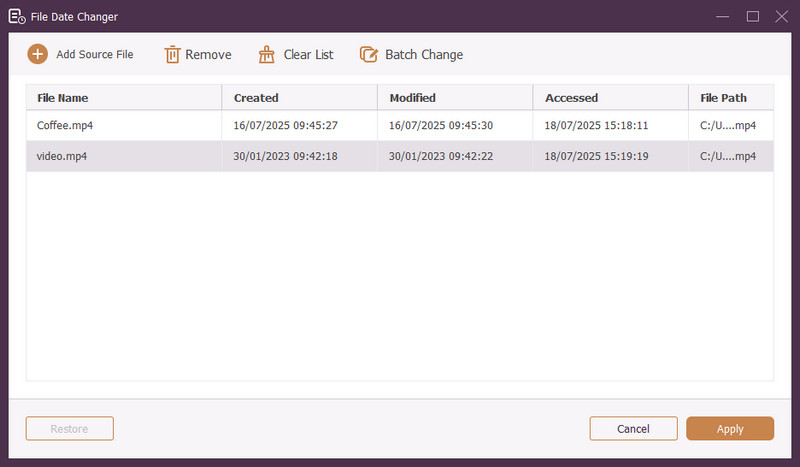
Passaggio 5Dopo aver modificato tutte le date dei file, fare clic su Applicare pulsante per confermare le modifiche. Dopo aver applicato le modifiche, rivedere i dettagli dei dati del file aggiornati per garantirne la precisione.
Parte 4. Domande frequenti su Best File Date Changer
Come posso visualizzare le informazioni sulla data di un file?
Se desideri verificare quando un file è stato creato o modificato l'ultima volta, puoi farlo direttamente sul tuo computer. Trova il file, fai clic con il pulsante destro del mouse su di esso e seleziona Proprietà. Quindi, puoi vedere tutti i dettagli sul file. Questi includono le date di creazione e modifica.
Qualcuno saprà quando cambio la data del file?
NO! La modifica della data di un file non lascerebbe alcuna traccia. Quindi nessuno saprà quando hai apportato la modifica.
Qual è il motivo per cui date e ore scompaiono dal file?
Esistono alcuni motivi per cui le date e le ore potrebbero scomparire dai file. Potrebbe accadere quando scarichi un file e perdi alcune informazioni a causa di una scarsa connessione Internet. A volte, è a causa del sito Web in cui hai scaricato il file.
Posso recuperare la data di creazione modificata del file?
SÌ! È possibile ripristinare la data originale reimpostandola manualmente sul valore iniziale. È l'unico modo per recuperare la data di creazione del file.
La modifica della data e dell'ora del file influisce sull'integrità o sul contenuto del file?
NO! La modifica delle date e degli orari di un file non influirà sul contenuto o sull'integrità. Altera solo i metadati, come le date di creazione e modifica. Lascia invariato il file effettivo.
Ecco qua! Hai imparato come modificare la data creata su un file, che può essere utile per vari motivi. Per un'esperienza più snella e adatta ai principianti, considera l'utilizzo di AVAide Video Converter come cambio data dei file. È la scelta migliore per gestire i tuoi file digitali. Provalo e condividi i tuoi pensieri qui sotto!
INFORMAZIONI SULL'AUTORE

Il convertitore multimediale più completo per convertire video e audio senza perdita di qualità.
Modifica video
- Video di alto livello con intelligenza artificiale
- Rimuovi filigrana dal video
- Rimuovi testo dal video
- Ridimensiona da 4K a 1080p/720p
- Rimuovi il rumore di fondo dal video
- Editor di metadati MP4
- Migliora la qualità del video
- Video inverso
- Correggi video di cattiva qualità
- Rimuovere i metadati da video/audio
- Video della telecamera frontale speculare/non speculare