Bayangkan Anda mentransfer sejumlah besar foto atau dokumen ke komputer Anda, hanya untuk menemukan kolom "Tanggal Dibuat" atau "Tanggal Diubah" benar-benar kacau. Baik itu kesalahan pencadangan atau ketidaksesuaian zona waktu, stempel waktu file yang salah dapat merusak pengarsipan digital Anda dan mengacaukan alur kerja Anda.
Untungnya, Anda tidak perlu hidup dengan kekacauan itu. Ada layanan khusus. pengubah tanggal file Memberikan Anda kendali penuh atas metadata, memungkinkan Anda mengedit stempel waktu file secara massal hanya dengan beberapa klik. Dalam panduan ini, kami telah mengumpulkan 5 pengubah tanggal file terbaik untuk Windows dan Mac untuk membantu Anda mendapatkan kembali kendali atas organisasi digital Anda. Mari kita mulai!
Bagian 1. Ulasan Lengkap 5 Aplikasi Pengubah Tanggal File Terbaik
Bagian ini akan menyajikan pengubah tanggal file terbaik yang dapat Anda andalkan. Teruslah membaca untuk mengetahui bagaimana alat-alat ini dapat membantu Anda menyelesaikan tugas Anda!
1. Pengonversi Video AVAide
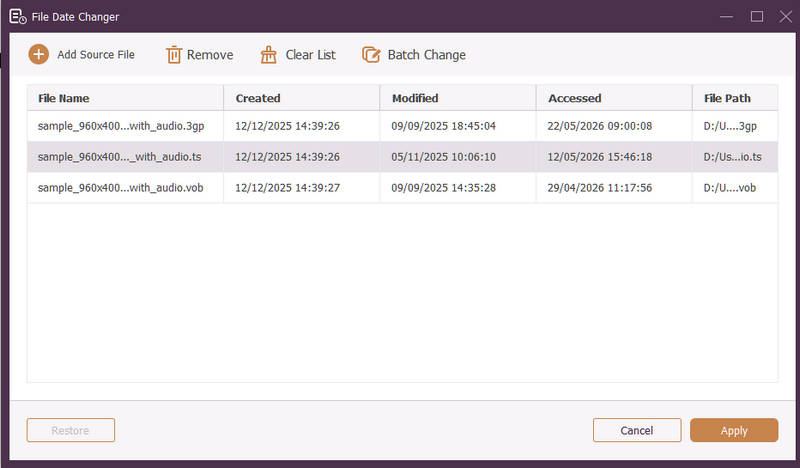
Tersedia untuk Windows dan Mac, Pengonversi Video AVAide adalah platform serbaguna yang dilengkapi dengan Pengubah Tanggal File bawaan yang canggih. Fitur intuitif ini memungkinkan Anda untuk dengan mudah memodifikasi detail stempel waktu yang komprehensif, termasuk tanggal pembuatan, modifikasi, dan akses terakhir.
- Menangani berbagai format media secara mulus, meliputi video, audio, dan gambar.
- Impor dan perbarui banyak file secara bersamaan untuk menghemat waktu dan menyederhanakan alur kerja Anda.
- Menampilkan antarmuka yang bersih dan ramah pengguna agar Anda dapat mengubah tanggal file dengan cepat.
- Jaga agar file Anda tetap rapi setelah perubahan tanggal.
2. Pengubah Tanggal File
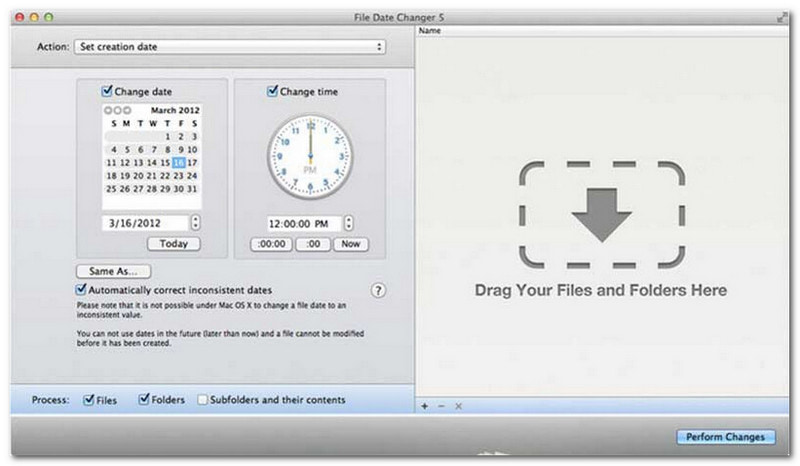
File Date Changer sesuai dengan namanya dengan menawarkan solusi khusus untuk mengubah tanggal pembuatan file. Desainnya sederhana, sehingga mudah diakses oleh pengguna dari semua tingkatan. Aplikasi ini mendukung modifikasi untuk tanggal pembuatan dan tanggal modifikasi. Baik Anda perlu mengubah tanggal untuk file individual atau seluruh folder, pengubah tanggal file di Mac ini menyederhanakan prosesnya dengan fungsionalitasnya yang efisien.
Meskipun File Date Changer adalah alat berbayar, nilainya bergantung pada kebutuhan spesifik Anda terkait biaya dan fungsionalitas. Beberapa pengguna mungkin menganggap fitur-fiturnya agak mendasar dibandingkan dengan harganya. Namun, bagi mereka yang memprioritaskan efisiensi dan alur kerja yang lancar, alat ini tetap merupakan investasi yang sangat andal dan berharga untuk pengubah tanggal file.
Fitur Utama Pengubah Tanggal File:
- Ubah tanggal dan waktu pembuatan, modifikasi, dan akses terakhir untuk beberapa file.
- Mendukung penambahan atau pengurangan hari, jam, menit, atau detik tertentu.
- Ubah properti file seperti Hanya Baca atau Tersembunyi, dan perbarui metadata EXIF.
- Pengubah tanggal file berjalan secara instan dan menawarkan antarmuka yang jelas.
3. Alat Exif
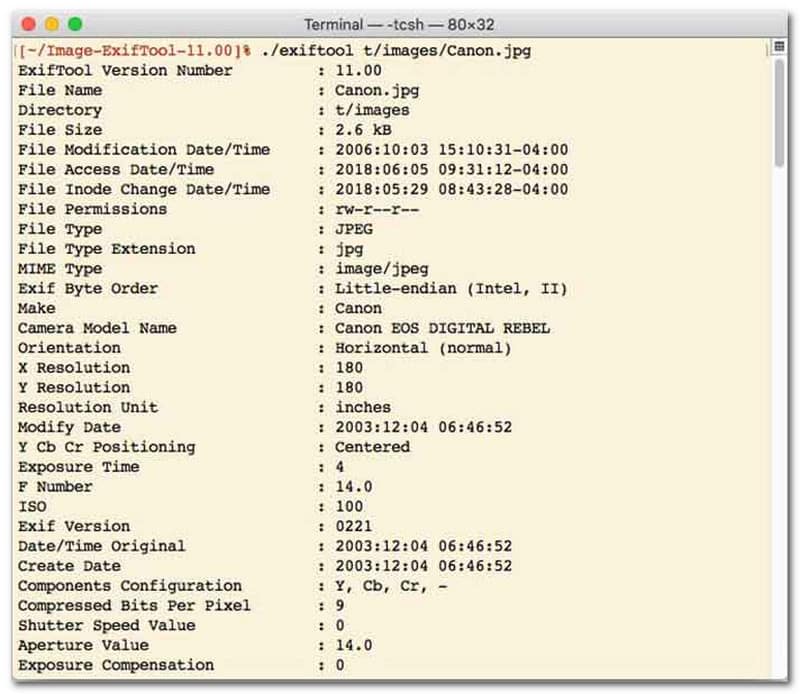
Bagi pengguna yang lebih menyukai pengubah tanggal file dengan antarmuka baris perintah (CLI), ExifTool adalah standar emas untuk manajemen file yang sangat presisi. Alat pengubah tanggal file yang sangat serbaguna ini mendukung berbagai jenis file, termasuk foto, video, dokumen, dan audio. Selain sekadar mengedit tanggal pembuatan dan modifikasi, ExifTool memungkinkan Anda untuk dengan mudah menyalin metadata stempel waktu dari satu file ke file lain, memastikan seluruh pustaka media Anda tetap sinkron sempurna tanpa kesulitan.
Fitur Utama ExifTool:
- Membaca dan memodifikasi stempel waktu sistem file dengan mudah.
- Salin tanggal antar lapisan metadata yang sama sekali berbeda.
- Mendukung perhitungan tanggal dan waktu tingkat lanjut untuk membantu Anda mengubah tanggal file secara massal.
- Ekstrak informasi tanggal dan media dari semua jenis file.
4. Pengubah File Massal
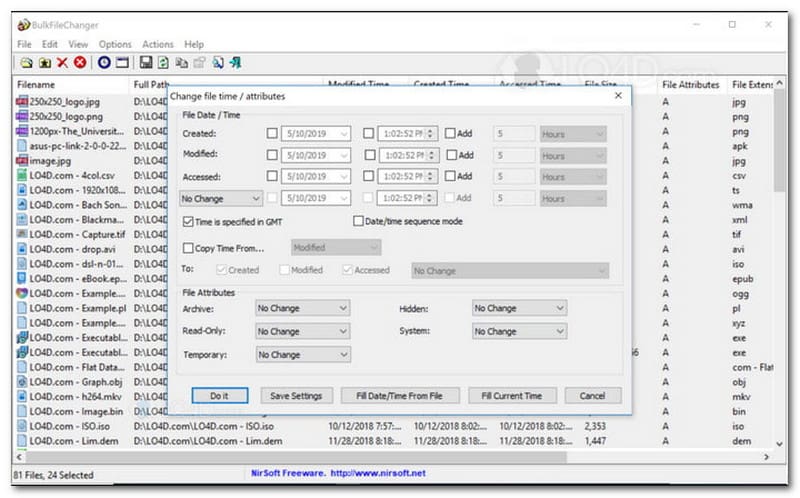
BulkFileChanger adalah utilitas pengubah tanggal file yang ringan dan berkinerja tinggi yang dirancang untuk manajemen stempel waktu file yang mudah di Windows. Aplikasi ini memungkinkan pengguna untuk dengan cepat memodifikasi berbagai atribut tanggal dan waktu, termasuk waktu pembuatan, modifikasi, dan akses terakhir, di hampir semua jenis file, mulai dari dokumen dan gambar hingga video. Meskipun fleksibilitas lintas format dan kecepatannya menjadikannya pengubah tanggal file yang sangat baik untuk mengatur arsip digital, ketersediaannya sangat terbatas pada sistem operasi Windows, yang berarti pengguna macOS dan Linux perlu mencari alternatif lain.
Fitur Utama BulkFileChanger:
- Ubah tanggal pembuatan, modifikasi, dan akses terakhir file.
- Mampu menangani hampir semua jenis file dengan lancar, termasuk dokumen, gambar, dan video.
- Menampilkan desain ringan yang memungkinkan pembaruan metadata massal dengan sangat cepat.
- Tambahkan atau hapus tanggal, jam, menit, dan detik tertentu.
5. AtributSihir
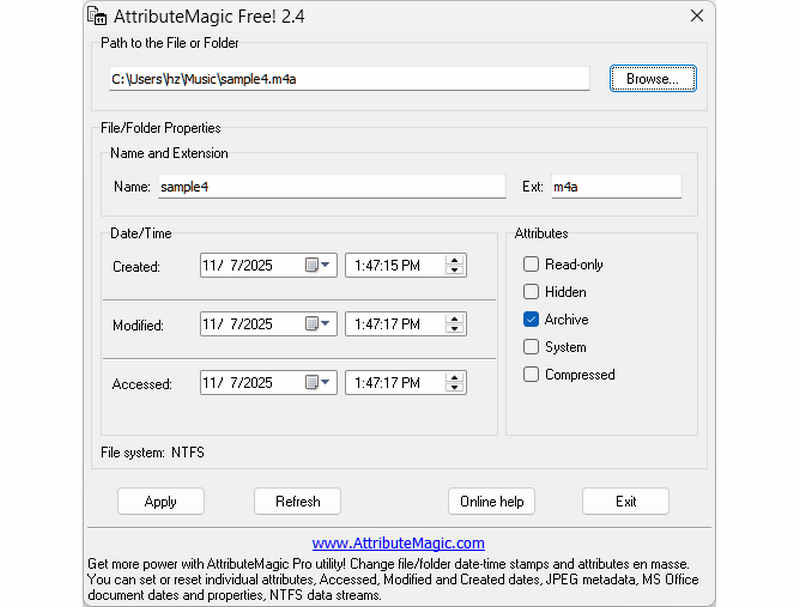
AttributeMagic jauh melampaui sekadar pengubah tanggal file sederhana dengan menawarkan solusi canggih untuk mengelola atribut folder dan file. Utilitas komprehensif ini memungkinkan modifikasi stempel waktu yang presisi, memungkinkan pengguna untuk dengan mudah menulis ulang tanggal pembuatan, modifikasi, dan akses terakhir. Di luar kemampuannya sebagai pengubah tanggal file khusus, AttributeMagic menyediakan kustomisasi mendalam atas properti sistem file untuk memenuhi kebutuhan pengarsipan spesifik Anda. Meskipun versi gratisnya menyediakan fungsionalitas pengeditan stempel waktu yang penting, peningkatan ke edisi premium membuka kontrol metadata tingkat lanjut dan fitur otomatisasi yang canggih.
Fitur Utama AttributeMagic:
- Ubah atau sembunyikan stempel waktu pembuatan, modifikasi, dan akses terakhir.
- Ubah tanggal file untuk file tunggal atau seluruh folder file.
- Anda dapat dengan mudah menambah, mengurangi, atau menggeser stempel waktu file ke depan atau ke belakang.
- Mengatur, mereset, atau membalikkan atribut sistem file inti seperti Read-Only, Hidden, dan System.
Bagian 2. Perbandingan 5 Pengubah Tanggal File
| Produk | Platform yang Didukung | Antarmuka pengguna | Pengeditan Massal | Kemampuan Tambahan |
| Pengonversi Video AVAide | Windows & macOS | Modern, Bersih & Lancar | Ya (Sangat Cepat) | Paket Lengkap: Konversi Video 8K, Pengambilan Data DVD, Pengeditan Metadata, Pembuatan MV/Tayangan Slide |
| Pengubah Tanggal File (NirSoft) | Hanya Mac | Usang (Web/UI Lama) | Terbatas | Tidak ada (Tujuan tunggal) |
| Alat Exif | Windows, macOS, Linux | Hanya Berbasis Baris Perintah (Tanpa GUI) | Ya (Membutuhkan skrip yang kompleks) | Hanya membaca/menulis metadata |
| Pengubah Berkas Massal | Hanya untuk Windows | Utilitas Windows Klasik | Ya | Pengaturan dasar atribut file Windows |
| Atribut Ajaib | Hanya untuk Windows | Kaku / Kompleks | Ya | Manajemen flag sistem file saja |
Bagian 3. Cara Mengubah Data File di AVAide Video Converter
Pernahkah Anda perlu mengubah tanggal pembuatan file untuk mengatur file digital Anda dengan lebih baik? Anda dapat melakukannya dengan menggunakan Pengonversi Video AVAide! Teruslah membaca untuk mempelajari cara mengubah tanggal pembuatan file untuk membantu Anda mengelola file.
Langkah 1Unduh dan Instal AVAide Video Converter dari situs resminya untuk akses lengkap.

UNDUH GRATIS Untuk Windows 7 atau lebih baru
 Unduh Aman
UNDUH GRATIS Untuk Mac OS X 10.13 atau lebih baru
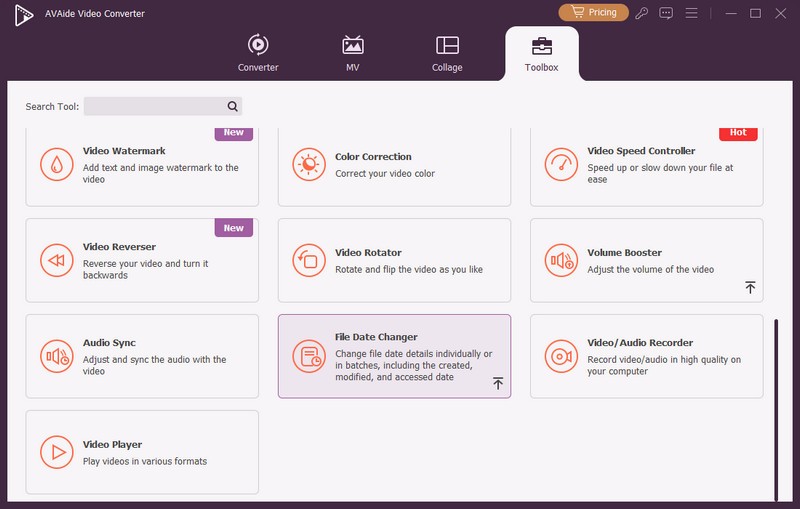
Unduh AmanLangkah 1Buka program di komputer Anda untuk memulai. Pergilah ke kotak peralatan tab untuk mengakses beberapa fitur. Gulir ke bawah mouse Anda, cari Pengubah Tanggal File di antara opsi, dan klik. Ini adalah fitur yang akan Anda gunakan untuk mengubah detail tanggal file.
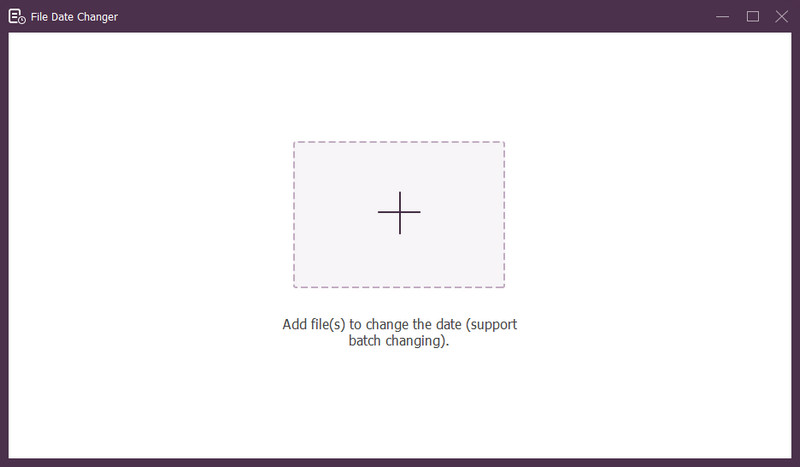
Langkah 3Tekan (+) tombol untuk mengimpor file. Ini bisa berupa file audio, gambar, dan audio. Anda dapat mengimpor lebih dari satu file untuk mengubah detail file.
Langkah 4Anda dapat mulai mengubah tanggalnya setelah semua file diimpor. Anda dapat mengubah tanggal pembuatan, modifikasi, dan akses sesuai kebutuhan. Untuk melakukannya, klik item tersebut hingga Anak panah muncul, menandakan untuk diedit.
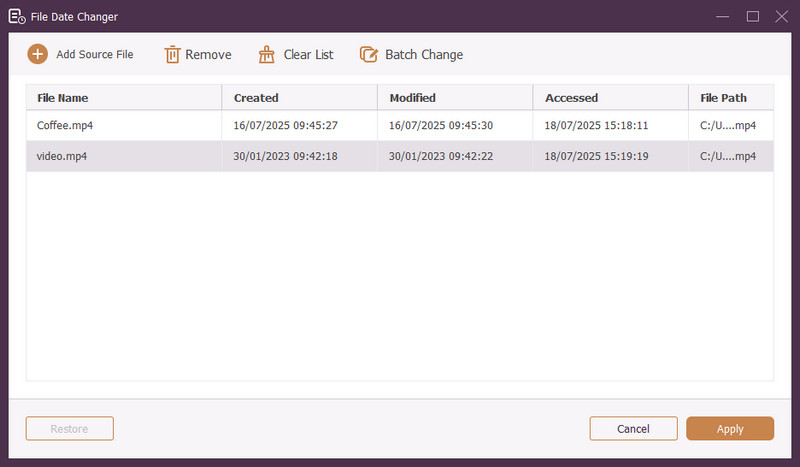
Langkah 5Setelah mengedit semua tanggal file, klik Berlaku tombol untuk mengonfirmasi perubahan. Setelah perubahan diterapkan, tinjau detail data file yang diperbarui untuk memastikan keakuratan.
Bagian 4. Pertanyaan yang Sering Diajukan tentang Pengubah Tanggal File Terbaik
Bagaimana cara melihat informasi tanggal suatu file?
Jika Anda ingin memeriksa kapan file dibuat atau terakhir diubah, Anda dapat melakukannya langsung di komputer Anda. Silakan temukan file tersebut, klik kanan padanya, dan pilih Properties. Kemudian, Anda dapat melihat semua detail tentang file tersebut. Ini termasuk tanggal pembuatan dan modifikasi.
Adakah yang tahu kapan saya mengubah tanggal file?
TIDAK! Mengubah tanggal file tidak akan meninggalkan jejak apa pun. Jadi, tidak ada yang tahu kapan Anda melakukan perubahan.
Apa alasan tanggal dan waktu hilang dari file?
Ada beberapa alasan mengapa tanggal dan waktu mungkin hilang dari file. Ini bisa terjadi ketika Anda mengunduh file dan kehilangan beberapa informasi karena koneksi internet yang buruk. Terkadang, ini disebabkan oleh situs web tempat Anda mengunduh file.
Bisakah saya mendapatkan kembali tanggal pembuatan file yang dimodifikasi?
Ya! Anda dapat memulihkan tanggal asli dengan mengaturnya kembali secara manual ke nilai awalnya. Ini adalah satu-satunya cara untuk mengetahui tanggal pembuatan file.
Apakah mengubah tanggal dan waktu file memengaruhi integritas atau konten file?
TIDAK! Mengubah tanggal dan waktu file tidak akan mempengaruhi konten atau integritasnya. Itu hanya mengubah metadata, seperti tanggal pembuatan dan modifikasi. Itu membuat file sebenarnya tidak berubah.
Itu dia! Anda telah belajar cara mengubah tanggal pembuatan file, yang dapat berguna karena berbagai alasan. Untuk pengalaman yang lebih efisien dan ramah bagi pemula, pertimbangkan untuk menggunakan AVAide Video Converter sebagai pengubah tanggal file Anda. Ini adalah pilihan terbaik untuk mengelola file digital Anda. Cobalah dan bagikan pemikiran Anda di bawah ini!
TENTANG PENULIS

Konverter media terlengkap untuk mengonversi video & audio tanpa kehilangan kualitas.
Edit Video