Mengolah video berdurasi panjang seringkali menghadirkan dilema yang membuat frustrasi: bagaimana mempertahankan kualitas video yang prima tanpa menghabiskan seluruh ruang penyimpanan? Di sinilah standar kompresi video berperan. Jika Anda ingin menyeimbangkan ukuran video, kualitas, dan kompatibilitas perangkat, Anda pasti akan dihadapkan pada pilihan antara... H.264 (AVC) dan H.265 (HEVC).
Dalam panduan komprehensif ini, kami akan menguraikan perbedaan utama antara H.264 dan HEVC, membantu Anda memutuskan mana yang sesuai dengan alur kerja Anda, dan menunjukkan kepada Anda cara mengonversi di antara keduanya dengan lancar tanpa kehilangan kualitas.
Bagian 1. HEVC vs H264: Apa Itu?
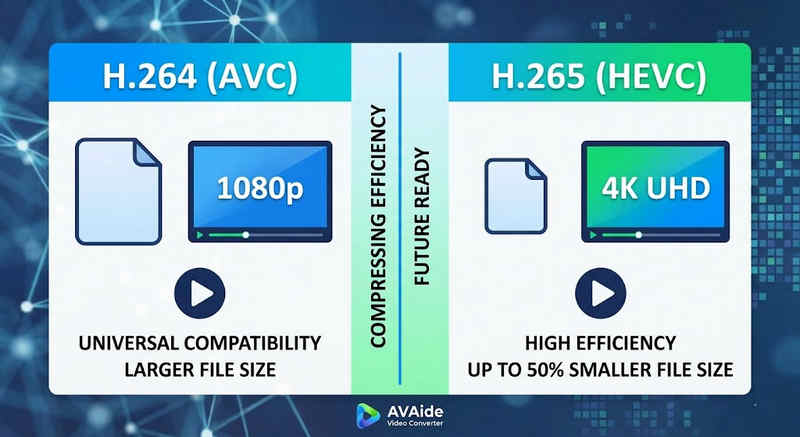
Jawaban Singkatnya: H.264 (AVC) menawarkan kompatibilitas universal dan berfungsi di hampir semua perangkat, tetapi menghasilkan ukuran file yang lebih besar. H.265 (HEVC) memberikan kompresi yang lebih unggul, mengurangi ukuran file hingga 50% dengan kualitas visual yang identik, tetapi membutuhkan daya pemrosesan yang lebih tinggi dan memiliki dukungan terbatas pada perangkat keras yang lebih lama.
1. Apa itu codec H.264 (AVC)?
Diperkenalkan sebagai Advanced Video Coding (AVC), H.264 adalah raja kompatibilitas video yang berkuasa. Ini adalah standar industri untuk streaming online, perekaman seluler, dan pemutaran video sehari-hari. Karena hanya membutuhkan sedikit daya pemrosesan untuk mendekode, video H.264 dapat diputar dengan lancar di hampir semua perangkat digital yang dapat dibayangkan, dari ponsel pintar lama hingga TV pintar modern.
2. Apa itu codec H.265 (HEVC)?
High Efficiency Video Coding (HEVC), atau H.265, adalah penerus langsung dari H.264. HEVC dirancang khusus untuk menangani kebutuhan data yang sangat besar dari konten 4K, 8K, dan VR. HEVC menggunakan algoritma yang lebih canggih untuk mengompres data video jauh lebih efisien daripada pendahulunya, menghasilkan visual yang jernih dan beresolusi tinggi dengan ukuran file hingga 50% lebih kecil. Namun, efisiensi ini datang dengan harga yang mahal: dibutuhkan perangkat keras modern untuk memprosesnya tanpa lag.
H.265 vs. H.264: Tabel Perbandingan Singkat
| Fitur | H.264 (AVC) | H.265 (HEVC) |
| Format yang Didukung | m2ts, evo, 3gp, f4v, mkv, mp4, qtff, asf, avi, mxf, ps, ts | mxf, ps, ts, 3gp, mkv, mp4, qtff, asf, avi |
| Efisiensi Kompresi | Sedang (Ukuran file lebih besar) | Unggul (file lebih kecil 25-50%) |
| Kualitas video | Sangat bagus untuk resolusi 1080p. | Dioptimalkan untuk 4K, 8K, dan HDR |
| Kompatibilitas Perangkat | Universal (99% perangkat) | Terbatas (PC lawas mungkin tidak mendukung) |
| Daya Pemrosesan | Rendah (Rendering/pemutaran cepat) | Tinggi (Membutuhkan CPU/GPU yang lebih baru) |
| Kasus Penggunaan Ideal | Streaming web, media sosial, perangkat lama | Rekaman drone 4K, video sinematik iPhone, pengarsipan hemat ruang. |
Bagian 2. Kapan Memilih HEVC vs. H.264
Memilih codec yang tepat sepenuhnya bergantung pada tujuan spesifik Anda. Berikut alasan mengapa Anda mungkin membutuhkan satu codec dibandingkan yang lain:
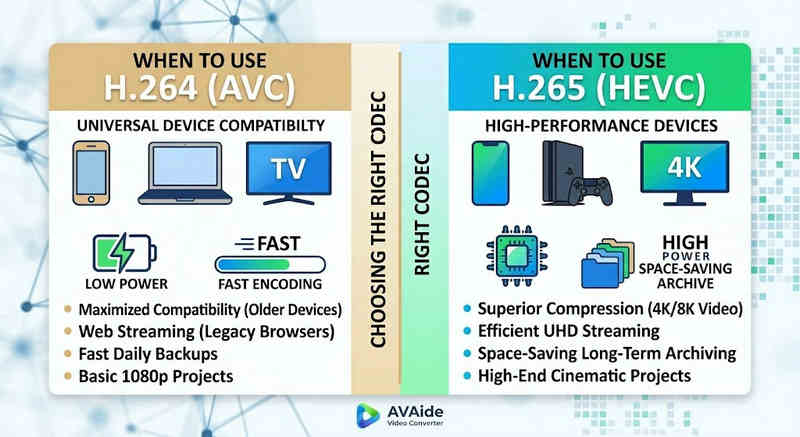
Mengapa Anda Membutuhkan HEVC (H.265):
- Penghematan Penyimpanan Maksimal: Jika Anda mencadangkan video berdurasi panjang atau pustaka 4K berukuran besar, HEVC bertindak sebagai pengurang ukuran video alami, membebaskan setengah ruang hard drive Anda.
- Optimasi Bandwidth: HEVC membutuhkan bandwidth yang jauh lebih sedikit untuk streaming, sehingga ideal untuk pemutaran 4K yang lancar bahkan pada koneksi internet yang lebih lambat tanpa buffering.
- Mempersiapkan Masa Depan: Seiring transisi industri menuju konten ultra-high-definition (UHD) dan VR, HEVC memastikan video Anda tetap berkualitas tinggi dan kompatibel dengan platform generasi berikutnya.
Mengapa Anda Membutuhkan H.264 (AVC):
- Pemutaran & Pengeditan Tanpa Cela: Jika perangkat lunak pengeditan video Anda mengalami lag atau pemutar media Anda menampilkan pesan "Codec Not Supported"
- Kompatibilitas dan Berbagi Tanpa Khawatir: H.264 adalah codec video yang paling kompatibel secara luas. Baik Anda ingin berbagi video dengan teman, NAS, server media seperti Plex atau Kodi, H.264 dapat memastikan berbagi dan pemutaran yang lancar.
Bagian 3. Cara Mudah Mengonversi Antara HEVC dan H.264
Dalam hal mentransfer video dari dan ke format HEVC (H.265) dan H.264, Pengonversi Video AVAide lebih baik daripada yang lain. Memberikan antarmuka yang efisien dan mudah digunakan yang tidak mengorbankan kualitas konversi dan mendukung berbagai format. Apa pun alasannya, bisa jadi karena efisiensi HEVC yang lebih tinggi atau adopsi H264 yang lebih luas, AVAide memungkinkan Anda untuk beralih di antara keduanya tanpa kesulitan.
Prosedur Rinci:
Langkah 1Dapatkan Pengonversi Video AVAide
Unduh, instal, dan jalankan. Pengonversi Video AVAide di komputer Windows atau Mac Anda.

UNDUH GRATIS Untuk Windows 7 atau lebih baru
 Unduh Aman
UNDUH GRATIS Untuk Mac OS X 10.13 atau lebih baru
Unduh AmanLangkah 2Tambahkan Video Anda ke AVAide Video Converter
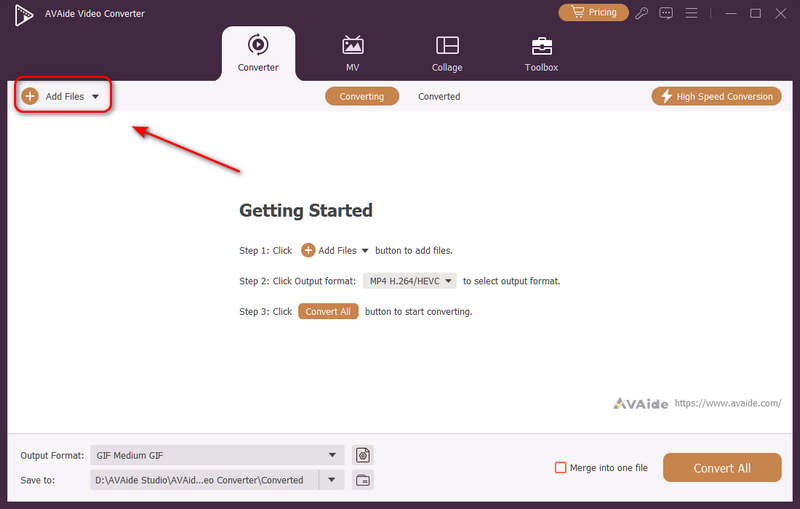
Anda dapat menambahkan beberapa file video dan melakukan konversi massal. Klik Tambahkan File Klik tombol di kiri atas untuk mengimpor file video Anda.
Langkah 3Pilih codec H.264 atau H.265
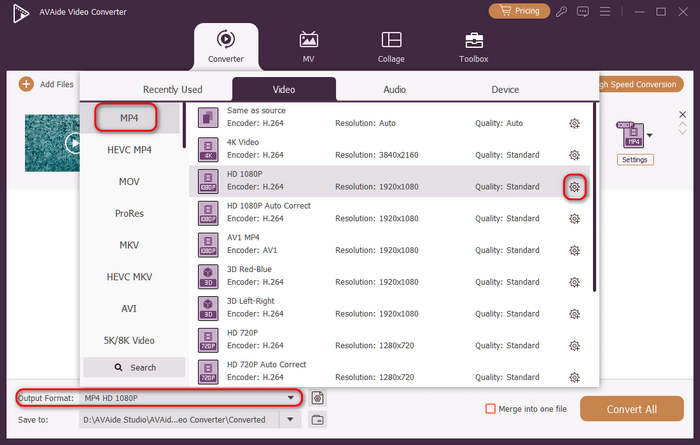
Klik Format output Tombol menu tarik-turun di sisi kiri bawah. Kemudian, Anda dapat memilih format video yang diinginkan terlebih dahulu. Setelah itu, klik Profil Kustom tombol (dengan ikon roda gigi) di bilah preset video.
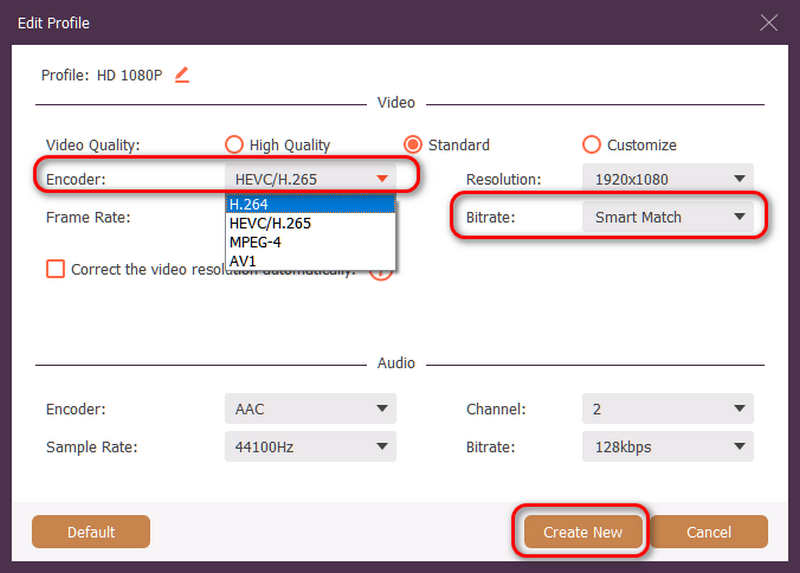
Kemudian, di panel ini, Anda dapat mengklik pembuat enkode tombol tarik-turun untuk memilih H.264 atau HEVC/H.265 codec. Jika Anda ingin mengubah kualitas video, Anda dapat menyesuaikannya. Kecepatan bitNamun kami merekomendasikan Pencocokan Cerdas untuk memastikan kompatibilitas. Klik Membuat baru tombol untuk menyimpan konfigurasi Anda.
Langkah 4Mulai Pengkodean Ulang Video
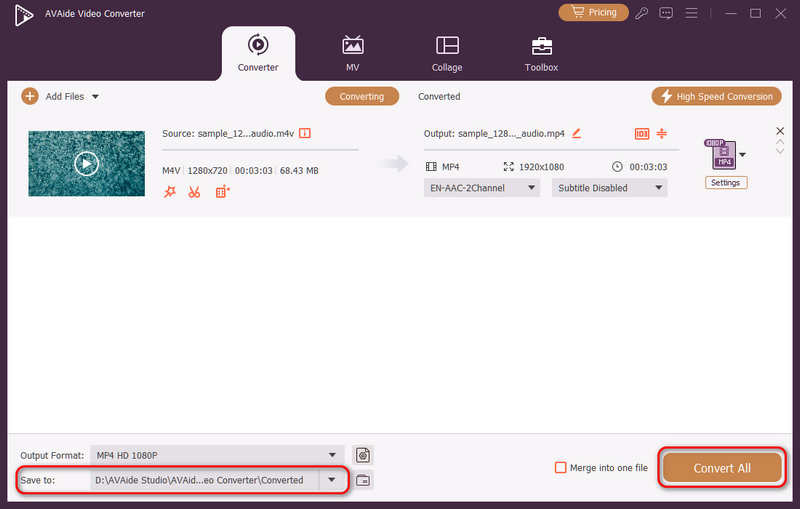
Terakhir, Anda dapat mengklik Menyimpan ke Gunakan tombol tarik-turun untuk memilih folder keluaran yang diinginkan dan klik Konversi Semua tombol untuk mengubah codec video Anda ke H.264 atau H.265.
Bagian 4. Pertanyaan yang Sering Diajukan (FAQ) tentang H.265 dan H.264
Apa perbedaan utama antara NVENC H.264 dan NVENC HEVC?
Perbedaan utamanya terletak pada efisiensi kompresi dan optimasi generasi perangkat keras. NVENC HEVC (H.265) memberikan kompresi hingga 50% lebih baik daripada NVENC H.264 (AVC). Ini berarti dapat menghasilkan kualitas visual yang sama persis dengan setengah bitrate (dan setengah ukuran file), menjadikannya pilihan yang lebih unggul untuk pengarsipan video 4K atau streaming melalui bandwidth terbatas.
Apa itu encoder HEVC/H.264 multi-channel modular?
Encoder HEVC/H.264 multi-channel modular adalah perangkat keras kelas perusahaan yang dirancang untuk mengompresi dan mengalirkan beberapa umpan video secara bersamaan. Tidak seperti encoder perangkat lunak konsumen, perangkat ini memiliki desain modular (gaya blade), memungkinkan pengguna untuk mengganti atau meningkatkan kartu encoding perangkat keras sesuai dengan skala proyek mereka. Perangkat ini mendukung H.264 dan HEVC/H.265.
Apa itu H.265+?
H.265+ (juga dikenal sebagai Smart H.265+) adalah teknologi kompresi video canggih dan eksklusif yang dikembangkan oleh Hikvision, yang secara khusus dioptimalkan untuk pemantauan keamanan dan pengawasan.
Sekarang kita dapat menggunakan analisis komprehensif ini HEVC dan H.264 untuk menentukan codec mana yang paling sesuai dengan kebutuhan video Anda. Apakah Anda menginginkan H.264 dan berfokus pada kompatibilitas atau menginginkan HEVC dan bertujuan pada kompresi yang lebih baik, kedua codec tersebut memiliki keunggulan. AVAide Video Converter memberikan solusi yang elegan dan efisien untuk mengatasi masalah tersebut, memberikan hasil berkualitas sangat baik sekaligus cepat. AVAide mempermudah tugas kompresi video dan konversinya dengan antarmuka yang sederhana dan fungsi-fungsi yang canggih.
TENTANG PENULIS

Kotak peralatan video lengkap Anda yang mendukung 350+ format untuk konversi dalam kualitas lossless.