Zamislite da prenosite ogromnu količinu fotografija ili dokumenata na svoje računalo, samo da biste otkrili da su im polja "Datum stvaranja" ili "Datum izmjene" potpuno pomiješana. Bilo da se radi o pogrešci u sigurnosnoj kopiji ili neusklađenosti vremenskih zona, netočne vremenske oznake datoteka mogu uništiti vašu digitalnu arhivu i baciti vaš tijek rada u kaos.
Srećom, ne morate živjeti s neredom. Posvećeni izmjenjivač datuma datoteke daje vam apsolutnu kontrolu nad vašim metapodacima, omogućujući vam skupno uređivanje vremenskih oznaka datoteka u samo nekoliko klikova. U ovom smo vodiču zaokružili 5 najboljih programa za promjenu datuma datoteka za Windows i Mac kako bismo vam pomogli da ponovno preuzmete kontrolu nad svojom digitalnom organizacijom. Krenimo!
1. dio. Glavni pregled 5 najboljih programa za promjenu datuma datoteka
Ovaj odjeljak predstavit će vam najbolji program za promjenu datuma datoteka na koji se možete osloniti. Nastavite čitati kako biste saznali kako vam ovi alati mogu pomoći u ostvarenju vašeg zadatka!
1. AVAide Video Converter
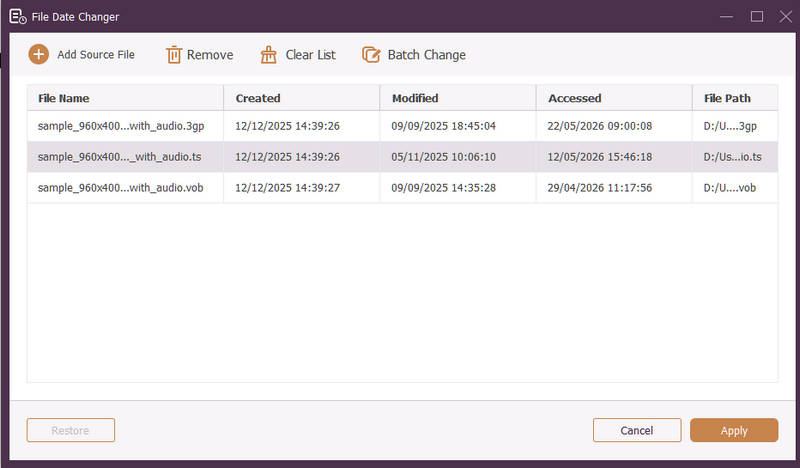
Dostupno za Windows i Mac, AVAide Video Converter je svestrana platforma opremljena moćnim, ugrađenim alatom za promjenu datuma datoteke. Ova intuitivna značajka omogućuje vam jednostavno mijenjanje sveobuhvatnih detalja vremenskih oznaka, uključujući datume stvaranja, izmjene i zadnjeg pristupa.
- Besprijekorno obrađuje mnoge medijske formate, uključujući video, audio i slike.
- Istovremeno uvozite i ažurirajte više datoteka kako biste uštedjeli vrijeme i pojednostavili tijek rada.
- Ima čisto, korisničko sučelje za brzu promjenu datuma datoteke.
- Održavajte besprijekoran rad datoteke nakon promjene datuma.
2. Izmjenjivač datuma datoteke
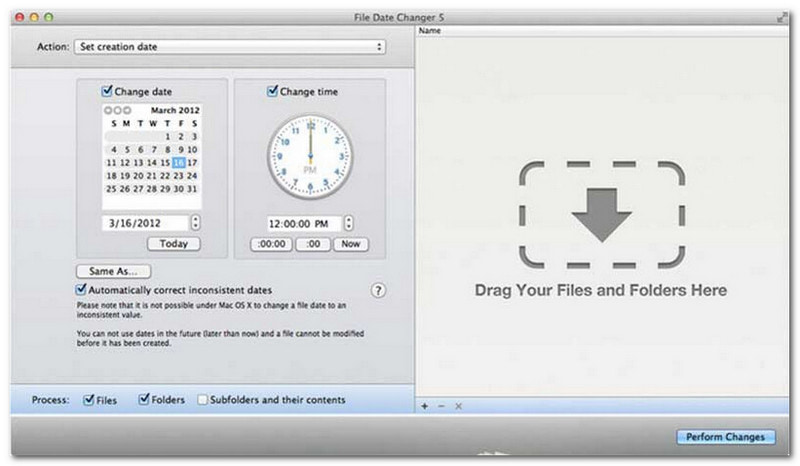
Promjena datuma datoteka opravdava svoje ime nudeći namjensko rješenje za promjenu datuma stvaranja datoteka. Pruža jednostavan dizajn, što ga čini dostupnim korisnicima svih razina. Podržava modifikaciju i za datum stvaranja i za datum modifikacije. Bez obzira trebate li promijeniti datume za pojedinačne datoteke ili cijele mape, ovaj mjenjač datuma datoteka na Macu pojednostavljuje proces svojom učinkovitom funkcionalnošću.
Iako je alat za promjenu datuma datoteka plaćeni alat, njegova vrijednost ovisi o vašim specifičnim potrebama u pogledu cijene i funkcionalnosti. Neki korisnici mogu smatrati da su njegove značajke donekle osnovne u odnosu na cijenu. Međutim, za one koji daju prioritet učinkovitosti i besprijekornom tijeku rada, on ostaje vrlo pouzdana i vrijedna investicija za alat za promjenu datuma datoteka.
Ključne značajke programa za promjenu datuma datoteke:
- Izmijenite datume i vremena stvaranja, izmjene i zadnjeg pristupa za više datoteka.
- Podrška za dodavanje ili oduzimanje određenih dana, sati, minuta ili sekundi.
- Promijenite svojstva datoteke poput Samo za čitanje ili Skriveno i ažurirajte EXIF metapodatke.
- Program za promjenu datuma datoteke pokreće se trenutno i nudi jasno sučelje.
3. ExifTool
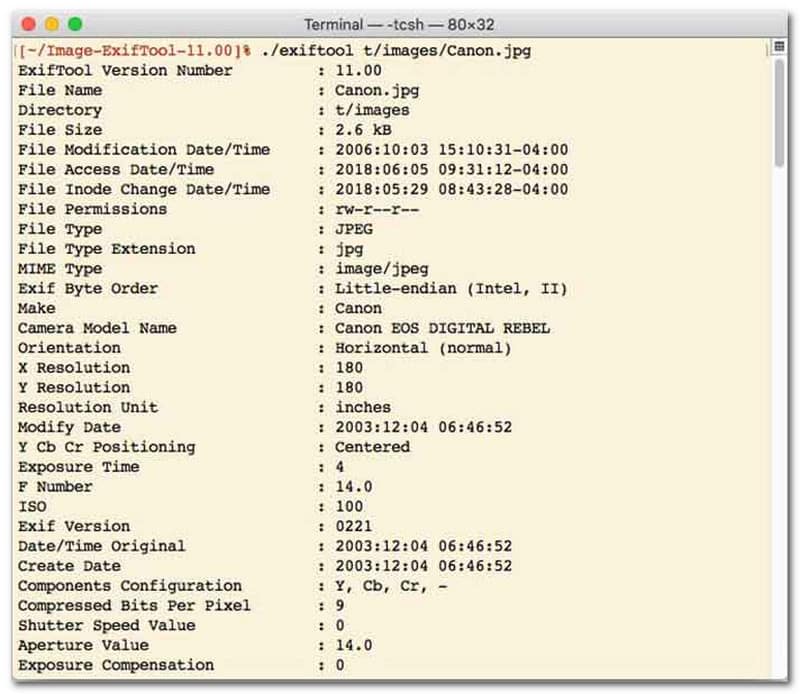
Za korisnike koji preferiraju program za promjenu datuma datoteka s sučeljem naredbenog retka (CLI), ExifTool je zlatni standard za ultra precizno upravljanje datotekama. Ovaj iznimno svestran alat za promjenu datuma datoteka podržava širok raspon vrsta datoteka, uključujući fotografije, videozapise, dokumente i audiozapise. Osim jednostavnog uređivanja datuma stvaranja i izmjene, ExifTool vam omogućuje besprijekorno kopiranje metapodataka vremenskih oznaka iz jedne datoteke u drugu, osiguravajući da cijela vaša medijska biblioteka ostane savršeno sinkronizirana bez ikakvih problema.
Ključne značajke ExifToola:
- Besprijekorno čita i mijenja vremenske oznake datotečnog sustava.
- Kopirajte datume između potpuno različitih slojeva metapodataka.
- Podržite naprednu matematiku datuma i vremena kako biste lakše mijenjali datume datoteka u serijama.
- Izdvojite datum i informacije o medijima iz svih vrsta datoteka.
4. BulkFileChanger
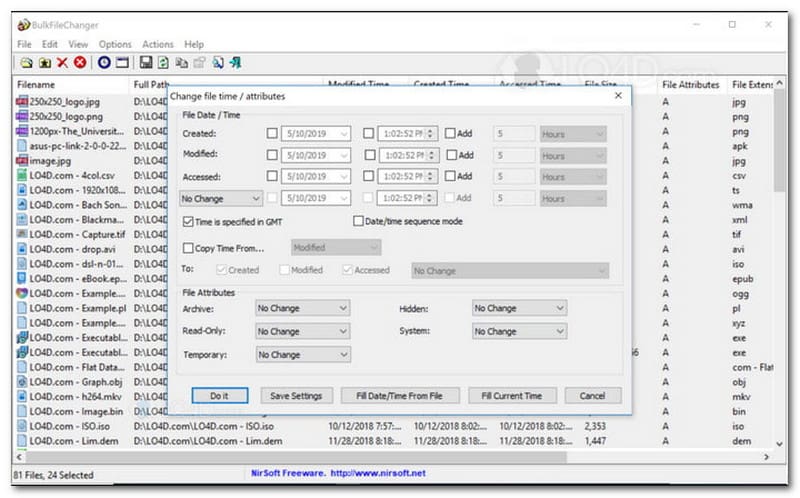
BulkFileChanger je lagani, visokoučinkoviti uslužni program za promjenu datuma datoteka dizajniran za jednostavno upravljanje vremenskim oznakama datoteka u sustavu Windows. Omogućuje korisnicima brzu izmjenu različitih atributa datuma i vremena, uključujući vrijeme stvaranja, izmjene i zadnjeg pristupa, u gotovo svakoj vrsti datoteke, od dokumenata i slika do videozapisa. Iako ga njegova svestranost i brzina u različitim formatima čine izvrsnim programom za promjenu datuma datoteka za organiziranje digitalnih arhiva, njegova dostupnost je strogo ograničena na operativni sustav Windows, što znači da će korisnici macOS-a i Linuxa morati potražiti negdje drugdje.
Ključne značajke BulkFileChangera:
- Izmijenite datume stvaranja, izmjene i zadnjeg pristupa datotekama.
- Besprijekorno obrađuje gotovo sve vrste datoteka, uključujući dokumente, slike i videozapise.
- Ima lagani dizajn koji omogućuje ultra brzo, skupno ažuriranje metapodataka.
- Dodajte ili izdvojite određene dane, sate, minute i sekunde.
5. AttributeMagic
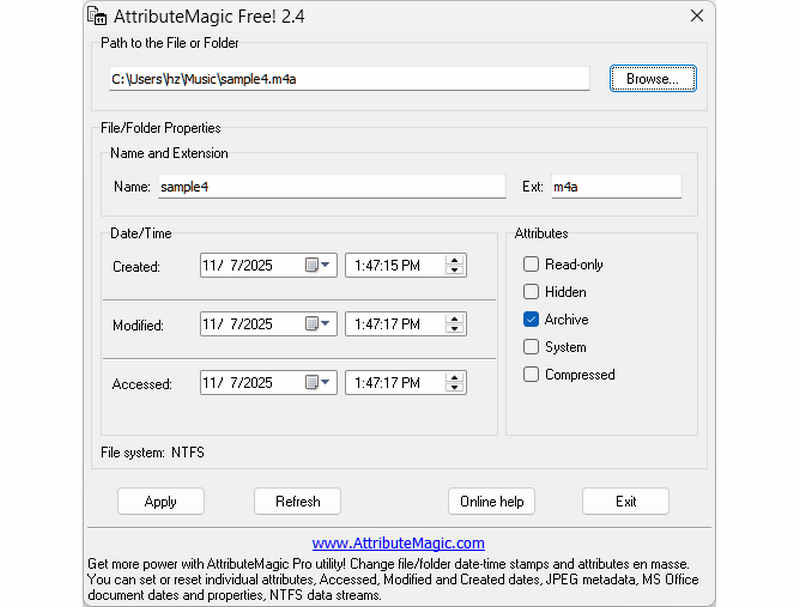
AttributeMagic ide daleko dalje od jednostavnog programa za promjenu datuma datoteke nudeći napredno rješenje za upravljanje atributima mapa i datoteka. Ovaj sveobuhvatni uslužni program omogućuje preciznu izmjenu vremenskih oznaka, omogućujući korisnicima da bez napora prepisuju datume stvaranja, izmjene i zadnjeg pristupa. Osim svojih mogućnosti kao namjenskog programa za promjenu datuma datoteke, AttributeMagic pruža duboku prilagodbu svojstava datotečnog sustava kako bi odgovarao vašim specifičnim potrebama arhiviranja. Dok besplatna verzija pruža osnovnu funkcionalnost uređivanja vremenskih oznaka, nadogradnja na premium izdanje otključava naprednu kontrolu metapodataka i moćne značajke automatizacije.
Ključne značajke AttributeMagica:
- Izmijenite ili maskirajte vremenske oznake stvaranja, izmjene i zadnjeg pristupa.
- Promijenite datum datoteke za jednu datoteku ili za cijelu mapu datoteka.
- Jednostavno povećavajte, smanjivajte ili pomičite vremenske oznake datoteka naprijed ili natrag.
- postaviti, resetirati ili invertirati atribute osnovnog datotečnog sustava kao što su Samo za čitanje, Skriveno i Sistem.
Dio 2. Usporedba 5 programa za promjenu datuma datoteka
| Proizvod | Podržane platforme | Korisničko sučelje | Skupno uređivanje | Dodatne mogućnosti |
| AVAide Video Converter | Windows i macOS | Moderno, čisto i fluidno | Da (ultra brzo) | Puni paket: 8K video konverzija, DVD ripanje, uređivanje metapodataka, izrada video zapisa/slajdova |
| Program za promjenu datuma datoteke (NirSoft) | Samo Mac | Zastarjelo (zastarjelo web/sučelje) | Ograničeno | Nijedno (jednonamjensko) |
| ExifTool | Windows, macOS, Linux | Samo komandna linija (bez GUI-ja) | Da (Zahtijeva složene skripte) | Samo čitanje/pisanje metapodataka |
| BulkFileChanger | Samo za Windows | Klasični Windows uslužni program | Da | Osnovno podešavanje atributa datoteka u sustavu Windows |
| AtributnaMagija | Samo za Windows | Kruto / Složeno | Da | Samo upravljanje zastavicama datotečnog sustava |
Dio 3. Kako promijeniti podatke datoteke u AVAide Video Converteru
Jeste li ikada trebali promijeniti datum stvaranja datoteke kako biste bolje organizirali svoje digitalne datoteke? To možete učiniti pomoću AVAide Video Converter! Nastavite čitati da biste saznali kako promijeniti datum kreiranja datoteke da biste lakše upravljali datotekom.
Korak 1Preuzmite i instalirajte AVAide Video Converter sa službene web stranice za potpuni pristup.

BESPLATNO PREUZIMANJE Za Windows 7 ili noviji
 Sigurno preuzimanje
BESPLATNO PREUZIMANJE Za Mac OS X 10.13 ili noviji
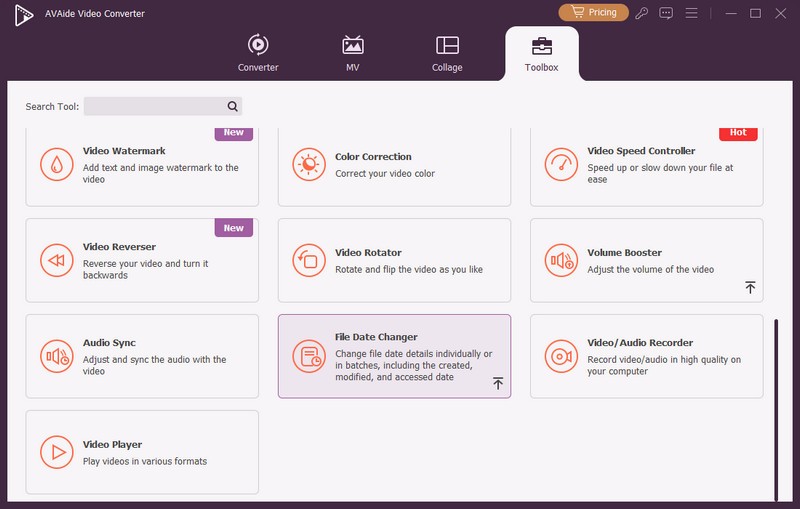
Sigurno preuzimanjeKorak 1Otvorite program na računalu da biste započeli. Krenite prema Kutija s alatima za pristup nekoliko značajki. Pomaknite se mišem prema dolje, potražite Promjena datuma datoteke među opcijama i kliknite na nju. To je značajka koju ćete koristiti za promjenu pojedinosti o datumu datoteke.
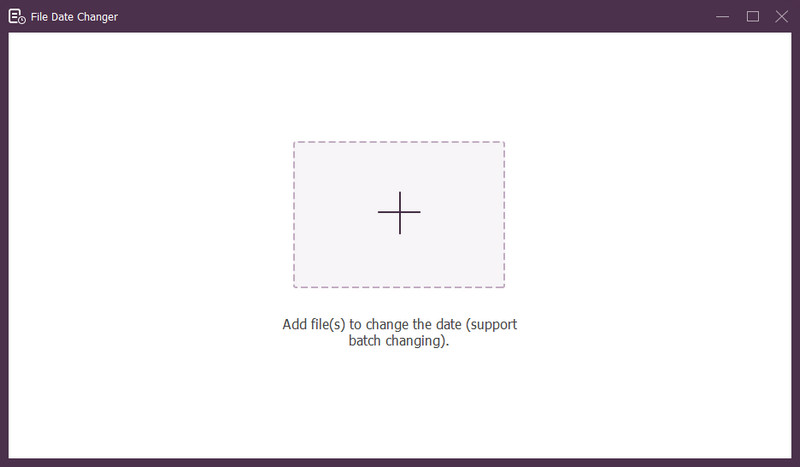
Korak 3Pritisni (+) za uvoz datoteka. To mogu biti audio, slikovne i audio datoteke. Možete uvesti više od jedne datoteke da biste promijenili detalje datoteke.
4. korakMožete početi mijenjati njihove datume kada se sve datoteke uvezu. Možete promijeniti kreirane, modificirane i pristupačne datume u skladu s tim. Da biste to učinili, kliknite na stavku dok se ne pojavi Strijela pojavljuje se, označavajući za uređivanje.
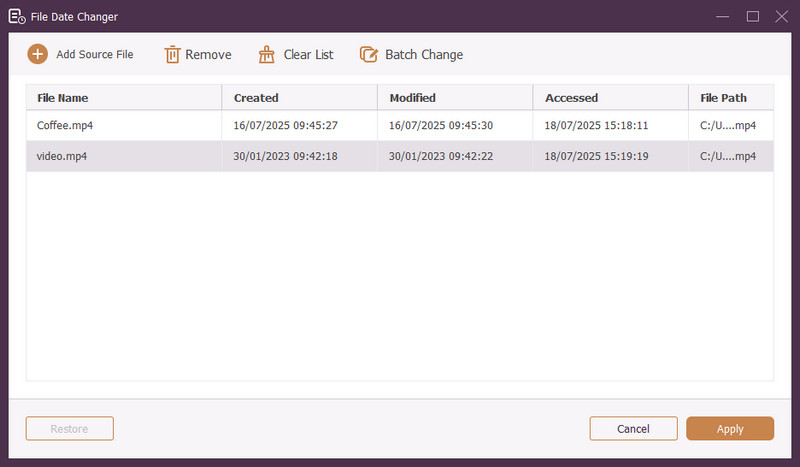
Korak 5Nakon uređivanja svih datuma datoteka, kliknite Prijavite se gumb za potvrdu promjena. Nakon primjene promjena, pregledajte ažurirane podatke o datoteci kako biste osigurali točnost.
Dio 4. Često postavljana pitanja o najboljem programu za promjenu datuma datoteka
Kako mogu vidjeti podatke o datumu datoteke?
Ako želite provjeriti kada je datoteka stvorena ili zadnji put izmijenjena, možete to učiniti izravno na računalu. Pronađite datoteku, kliknite je desnom tipkom miša i odaberite Svojstva. Zatim možete vidjeti sve pojedinosti o datoteci. Oni uključuju datume stvaranja i izmjene.
Hoće li itko znati kada promijenim datum datoteke?
Ne! Promjena datuma datoteke ne bi ostavila nikakav trag. Dakle, nitko neće znati kada ste izvršili promjenu.
Koji je razlog zašto datumi i vremena nestaju iz datoteke?
Postoji nekoliko razloga zašto datumi i vremena mogu nestati iz datoteka. To se može dogoditi kada preuzmete datoteku i izgubite neke podatke zbog loše internetske veze. Ponekad je to zbog web stranice na kojoj ste preuzeli datoteku.
Mogu li dohvatiti izmijenjeni datum stvaranja datoteke?
Da! Izvorni datum možete vratiti ručnim postavljanjem na početnu vrijednost. To je jedini način da dohvatite datum stvaranja datoteke.
Utječe li promjena datuma i vremena datoteke na integritet ili sadržaj?
Ne! Promjena datuma i vremena datoteke ne bi utjecala na sadržaj ili cjelovitost. Mijenja samo metapodatke, poput datuma izrade i izmjene. Stvarnu datoteku ostavlja nepromijenjenom.
Eto ga! Naučili ste kako promijeniti datum kreiranja datoteke, što može biti od pomoći iz raznih razloga. Za jednostavnije iskustvo prilagođeno početnicima, razmislite o korištenju programa AVAide Video Converter kao svog glavnog programa za promjenu datuma datoteke. To je najbolji izbor za upravljanje vašim digitalnim datotekama. Isprobajte i podijelite svoje mišljenje u nastavku!
O AUTORU

Najopsežniji medijski pretvarač za pretvaranje videa i zvuka bez gubitka kvalitete.
Uredi video
- AI vrhunski video
- Ukloni vodeni žig s videa
- Ukloni tekst iz videa
- Smanjenje 4K na 1080p/720p
- Uklanjanje pozadinske buke iz videa
- MP4 uređivač metapodataka
- Izoštrite kvalitetu videa
- Obrnuti video
- Popravi video loše kvalitete
- Uklanjanje metapodataka iz videa/audiozapisa
- Prednja kamera s zrcalnim/nezrcalnim videom