सीखना है स्नैपचैट पर बिना किसी को पता चले स्क्रीनशॉट कैसे लेंदरअसल, ऐप में स्क्रीनशॉट भेजने वाले को तुरंत सूचित करने के लिए डिज़ाइन किए गए हैं, जिससे बातचीत, स्नैप या स्टोरी को सेव करना मुश्किल हो जाता है। लेकिन अच्छी बात यह है कि ऐसे तरीके हैं जिनसे आप अलर्ट ट्रिगर किए बिना स्नैपचैट पर अपनी बातचीत को प्रभावी ढंग से कैप्चर कर सकते हैं। इस ट्यूटोरियल को देखें और स्क्रीनशॉट लेने के सभी प्रभावी तरीके सीखें।
भाग 1. स्नैपचैट की नोटिफिकेशन प्रणाली को समझना
क्या आप स्नैपचैट के नोटिफिकेशन सिस्टम के बारे में और अधिक जानने में रुचि रखते हैं? यदि हां, तो आपको नीचे दी गई सभी जानकारी मिल जाएगी।
किस कारण से नोटिफिकेशन आता है?
स्नैपचैट ऐप तब नोटिफिकेशन भेजता है जब उपयोगकर्ता किसी बातचीत, स्नैप या स्टोरी का स्क्रीनशॉट लेता है। साथ ही, अगर स्नैपचैट के अंदर सीधे स्क्रीन रिकॉर्डिंग की जाती है, तो यह भेजने वाले को भी सूचित करता है। इससे पता चलता है कि ऐप का पता लगाने का तरीका कितना बढ़िया है। स्नैपचैट एंड्रॉइड और आईओएस दोनों पर ऑपरेटिंग सिस्टम के कैप्चर कमांड को मॉनिटर कर सकता है और ऐप लेवल पर तुरंत उस गतिविधि को रिकॉर्ड कर लेता है।
सामान्य तरीके से स्क्रीनशॉट लेने पर क्या होता है?
स्नैपचैट प्लेटफॉर्म का उपयोग करते समय, भेजने वाले को एक सूचना मिलेगी जिससे उन्हें पता चलेगा कि कोई अन्य उपयोगकर्ता किसी विशेष सामग्री का स्क्रीनशॉट ले रहा है। अगले चैट में एक चैट आइकन या तीर का निशान दिखाई देगा, जिससे यह स्पष्ट हो जाएगा कि स्क्रीनशॉट लिया गया है। यह प्रक्रिया पारदर्शिता सुनिश्चित करती है और साझा की गई सामग्री के गुप्त रूप से कैप्चर किए जाने से रोककर उपयोगकर्ताओं की गोपनीयता की रक्षा करती है।
भाग 2. स्नैपचैट पर स्क्रीनशॉट का पता न चलना
बिना नोटिफिकेशन के स्नैपचैट चैट का स्क्रीनशॉट कैसे लें? अगर आप सभी बेहतरीन तरीके सीखना चाहते हैं, तो इस सेक्शन में दिए गए ट्यूटोरियल देखें।
विधि 1. स्नैपचैट पर एयरप्लेन मोड चालू रखते हुए स्क्रीनशॉट लें।
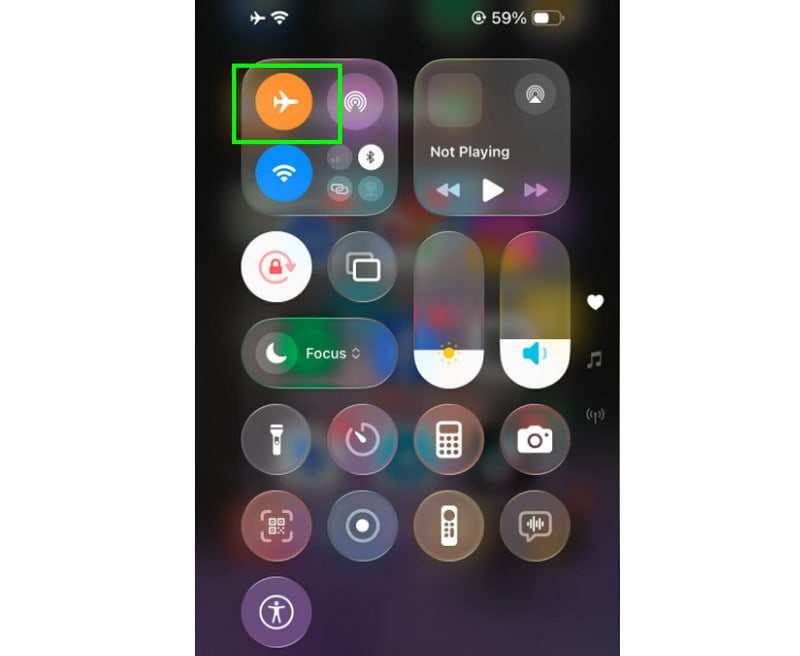
स्नैपचैट पर भेजने वाले को सूचित किए बिना स्क्रीनशॉट लेने का सबसे आम तरीका है एयरप्लेन मोड का इस्तेमाल करना। इस कारगर ट्रिक से आप बिना किसी परेशानी के किसी भी बातचीत, स्नैप या स्टोरी को कैप्चर कर सकते हैं। बस आपको स्नैपचैट प्लेटफॉर्म पर जाना है और चैट या कोई भी कंटेंट खोलना है। फिर, वाई-फाई बंद करें और एयरप्लेन मोड चालू करें। इसके बाद, आप स्क्रीनशॉट लेना शुरू कर सकते हैं।
विधि 2. किसी अन्य डिवाइस का उपयोग करके स्नैपचैट पर स्क्रीनशॉट लें।
स्नैपचैट से कोई भी कंटेंट कैप्चर करने का एक और कारगर तरीका किसी दूसरे डिवाइस का इस्तेमाल करना है। चैट सेव करते समय, स्नैप लेते समय और स्टोरी बनाते समय पकड़े जाने से बचने के लिए यह भरोसेमंद तरीकों में से एक है। चूंकि स्नैपचैट प्लेटफॉर्म बाहरी डिवाइसों को मॉनिटर नहीं कर सकता, इसलिए कोई नोटिफिकेशन नहीं आएगा। आपको बस दूसरे डिवाइस का कैमरा खोलना है और कंटेंट की फोटो खींच लेनी है।
विधि 3. कंप्यूटर पर स्नैपचैट वेब का उपयोग करें
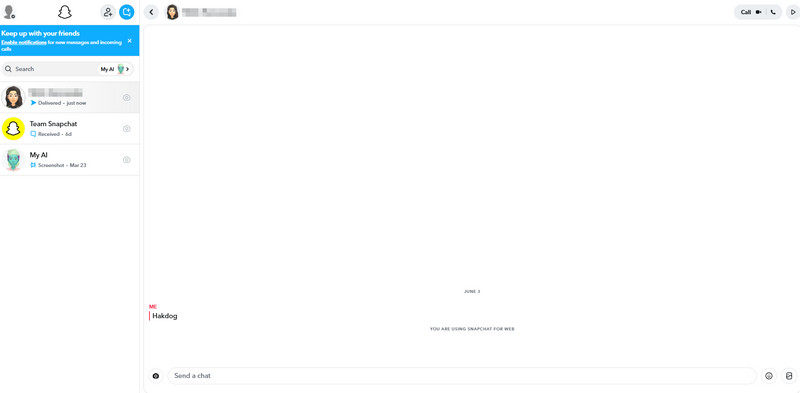
Snapchat सिर्फ iOS और Android पर ही उपलब्ध नहीं है। आप अपने ब्राउज़र पर भी अपने अकाउंट में लॉग इन कर सकते हैं, क्योंकि यह प्लेटफॉर्म अपना वेब वर्जन भी देता है। इस वर्जन से आप अपना Snapchat खोल सकते हैं, वह कंटेंट ढूंढ सकते हैं जिसे आप कैप्चर करना चाहते हैं, और अपने डेस्कटॉप के स्क्रीनशॉट फीचर का इस्तेमाल कर सकते हैं। इस तरह, आप भेजने वाले को बिना बताए Snapchat पर स्क्रीनशॉट ले सकते हैं। Windows पर स्क्रीन को कैप्चर या स्क्रीनशॉट करने के लिए, आप टैप कर सकते हैं। पीआरटीएससी इसकी कुंजी मैक पर इमेज कैप्चर ढूंढें, दबाओ बदलाव + आदेश + 3 चांबियाँ।
विधि 4. स्क्रीन मिररिंग + कंप्यूटर रिकॉर्डिंग
स्क्रीन मिररिंग और कंप्यूटर रिकॉर्डिंग चैट, स्टोरी और स्नैप्स को कैप्चर करने के दो बेहतरीन तरीके हैं। इसलिए, अपनी स्क्रीन को प्रभावी ढंग से रिकॉर्ड करने के लिए, हम निम्नलिखित का उपयोग करने का सुझाव देते हैं: AVAide स्क्रीन रिकॉर्डरयह प्रोग्राम फ़ोन रिकॉर्डर की सुविधा प्रदान करता है। इसकी खास बात यह है कि रिकॉर्डिंग करते समय आप स्नैपशॉट फ़ीचर का उपयोग करके सभी सामग्री को कैप्चर कर सकते हैं। इससे आपको बेहतर व्यूइंग अनुभव के लिए उत्कृष्ट गुणवत्ता वाली रिकॉर्डिंग भी मिलती है। आप प्रीव्यू सेक्शन में जाकर रिकॉर्डिंग को सेव और एक्सपोर्ट करने से पहले देख सकते हैं। स्नैपचैट पर रिकॉर्डिंग और कैप्चर करने का तरीका जानने के लिए नीचे दिए गए चरणों को देखें।
स्टेप 1डाउनलोड AVAide स्क्रीन रिकॉर्डर अपने कंप्यूटर पर इसे खोलें। फिर, कैप्चरिंग प्रक्रिया शुरू करने के लिए इसे लॉन्च करें।

निःशुल्क डाउनलोड विंडोज 7 या बाद के संस्करण के लिए
 सुरक्षित डाऊनलोड
निःशुल्क डाउनलोड Mac OS X 10.13 या बाद के संस्करण के लिए
सुरक्षित डाऊनलोडचरण दोइंटरफ़ेस से, क्लिक करें तीर-नीचे बटन और चुनें फोन रिकॉर्डर फिर, अपने फोन को कनेक्ट करें और स्नैपचैट ऐप खोलें।
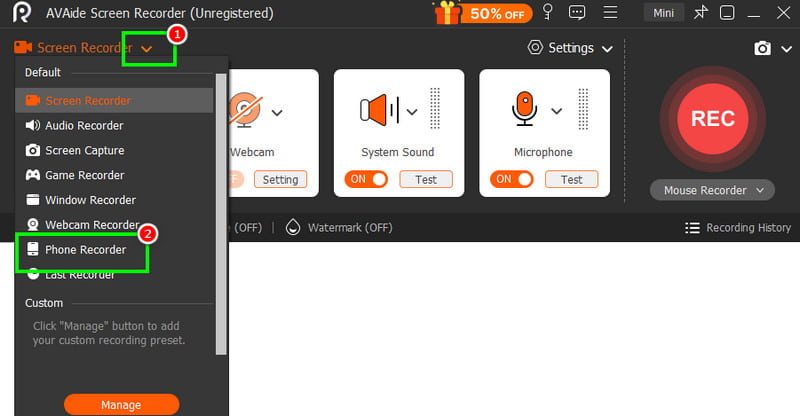
चरण 3अब आप हिट कर सकते हैं अभिलेख अपने फ़ोन की रिकॉर्डिंग शुरू करने के लिए बटन दबाएँ। स्क्रीनशॉट लेने के लिए, आप टैप कर सकते हैं। स्नैपशॉट विशेषता।
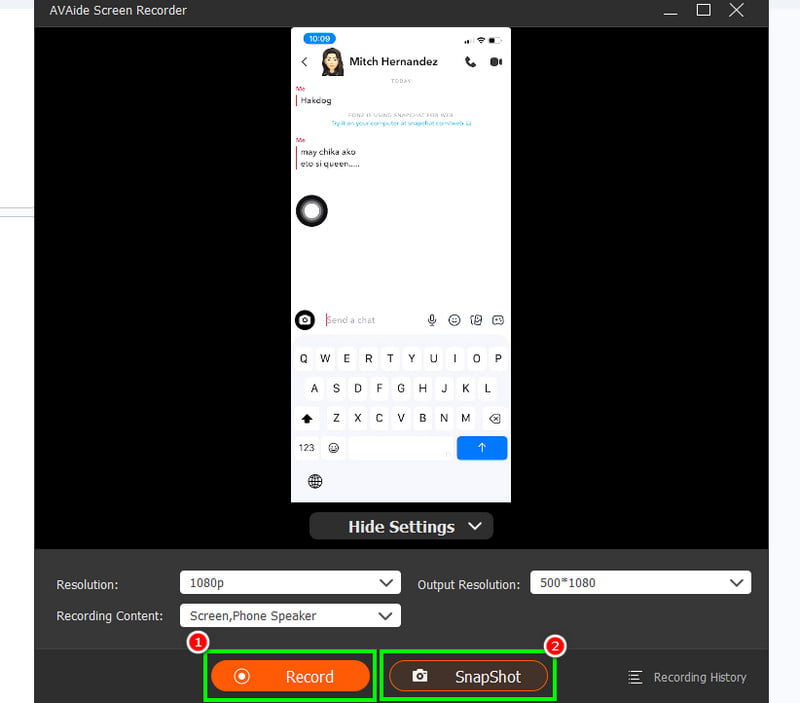
इस विधि से आप स्नैपचैट पर स्क्रीनशॉट लेना सुनिश्चित कर सकते हैं। आप अपने फोन पर मौजूद किसी भी कंटेंट को एक्सेस कर सकते हैं। रिकॉर्ड iPhone कॉलसंदेश, वीडियो और अन्य बहुत कुछ रिकॉर्ड करने की क्षमता के कारण, यह रिकॉर्डर सभी उपयोगकर्ताओं के लिए आदर्श है।
विधि 5. गूगल असिस्टेंट के माध्यम से स्नैपचैट पर स्क्रीनशॉट लें
क्या आपको नहीं पता कि आप भरोसा कर सकते हैं गूगल असिस्टेंट क्या आप Snapchat पर बिना अलर्ट पाए स्क्रीनशॉट लेना चाहते हैं? जी हां, आपने सही पढ़ा। यह टूल Snapchat के डिटेक्शन सिस्टम को ट्रिगर किए बिना स्क्रीनशॉट कैप्चर कर सकता है। यह इसलिए प्रभावी ढंग से काम करता है क्योंकि कैप्चर करने की प्रक्रिया फोन के बिल्ट-इन फंक्शन के बजाय असिस्टेंट के माध्यम से होती है। आपको बस Google असिस्टेंट को एक्टिवेट करना है और कहना है "कोई स्क्रीनशॉट लेंस्नैपचैट प्लेटफॉर्म पर स्क्रीनशॉट लें। स्क्रीनशॉट लेने के बाद, आप इसे अपनी गैलरी या फ़ोटो ऐप में देख सकते हैं। स्नैपचैट पर स्क्रीनशॉट लेने का तरीका जानने के लिए, ताकि यह अन्य उपयोगकर्ताओं को दिखाई न दे, इस विधि का उपयोग करें।
विधि 6. किसी तृतीय-पक्ष स्क्रीन रिकॉर्डर का उपयोग करके स्नैपचैट पर स्क्रीनशॉट लें
स्क्रीनशॉट लेने के एक और प्रभावी तरीके के लिए, आप विभिन्न थर्ड-पार्टी स्क्रीनशॉट रिकॉर्डर का उपयोग कर सकते हैं। इन रिकॉर्डर की मदद से आप अपनी ज़रूरत का सारा कंटेंट रिकॉर्ड कर सकते हैं। आप बातचीत, स्टोरीज़, स्नैप और अन्य पोस्ट रिकॉर्ड कर सकते हैं। रिकॉर्डिंग के बाद, आप वीडियो चला सकते हैं और स्क्रीनशॉट लेकर इमेज फ़ाइल प्राप्त कर सकते हैं। यदि आप सबसे अच्छे और भरोसेमंद थर्ड-पार्टी स्क्रीन रिकॉर्डर की तलाश में हैं, तो आप Screen Recorder Online, Screen Recorder - V Recorder, Record It आदि देख सकते हैं।
भाग 3. स्नैपचैट पर स्क्रीनशॉट के बारे में अक्सर पूछे जाने वाले प्रश्न
क्या स्नैपचैट पर स्क्रीनशॉट लेना कानूनी है?
आम तौर पर, स्नैपचैट पर स्क्रीनशॉट लेना गैरकानूनी नहीं है, लेकिन महत्वपूर्ण यह है कि आप कैप्चर किए गए कंटेंट का उपयोग कैसे करते हैं। यदि आप इसका उपयोग दूसरे व्यक्ति की सहमति के बिना करते हैं, तो उन्हें आप पर मुकदमा करने का अधिकार है। स्क्रीनशॉट का बिना किसी समस्या के उपयोग करने के लिए, संबंधित व्यक्ति की अनुमति लेना सबसे अच्छा है।
किन चीजों से नोटिफिकेशन नहीं मिलता?
कुछ ऐसी सामग्री है जिसे आप बिना नोटिफिकेशन ट्रिगर किए कैप्चर कर सकते हैं। आप उनकी जानकारी के बिना उनके प्रोफाइल, स्नैप मैप और सेटिंग्स को कैप्चर और देख सकते हैं।
स्नैपचैट पर स्क्रीनशॉट लेने का सबसे अच्छा तरीका क्या है?
अगर आप बिना किसी को पता चले सारी जानकारी रिकॉर्ड करना चाहते हैं, तो AVAide Screen Recorder सबसे अच्छा टूल है। इसके Phone Recorder और Snapshot फ़ीचर की मदद से आप आसानी से स्क्रीनशॉट ले सकते हैं, जो इसे सभी उपयोगकर्ताओं के लिए एक आदर्श टूल बनाता है।
यदि आप सीखना चाहते हैं स्नैपचैट पर बिना पता चले कैप्चर कैसे करेंइस ट्यूटोरियल में दिए गए तरीकों पर आप भरोसा कर सकते हैं। इनके बिना भी आप बिना किसी समस्या के अपना सारा आवश्यक डेटा प्राप्त कर सकते हैं। साथ ही, यदि आप एक तेज़ और सरल डेटा कैप्चरिंग प्रक्रिया चाहते हैं, तो बेझिझक इसका उपयोग करें। AVAide स्क्रीन रिकॉर्डरयह प्रोग्राम आपको स्नैपचैट पर वीडियो रिकॉर्ड करने और स्क्रीनशॉट लेने की सुविधा देता है। आप इमेज को बेहतरीन क्वालिटी में सेव भी कर सकते हैं, जिससे आपको बेहतर और स्पष्ट इमेज आउटपुट मिलेगा।
लेखक के बारे में

अपने कंप्यूटर पर स्क्रीन, ऑडियो, वेब कैमरा, गेमप्ले, ऑनलाइन मीटिंग, साथ ही iPhone/Android स्क्रीन रिकॉर्ड करें।
स्क्रीन रिकॉर्डिंग
- विंडोज़ पर स्क्रीन रिकॉर्ड
- इंस्टाग्राम लाइव रिकॉर्ड करें
- टुबी से वीडियो रिप करें
- YouTube वीडियो को MP3 में बदलें
- Fansly से वीडियो डाउनलोड करें
- JW प्लेयर वीडियो डाउनलोड करना
- बिलिबिली वीडियो डाउनलोड करें
- Patreon वीडियो डाउनलोड करें
- SpankBang वीडियो डाउनलोड करें
- डिस्कॉर्ड वीडियो डाउनलोड करें
- DoodSream वीडियो डाउनलोड करें