कल्पना कीजिए कि आपने बड़ी संख्या में फ़ोटो या दस्तावेज़ अपने कंप्यूटर पर स्थानांतरित किए हैं, और फिर पाया कि उनके "बनाने की तिथि" या "संशोधित करने की तिथि" वाले फ़ील्ड पूरी तरह से गड़बड़ हो गए हैं। चाहे यह बैकअप की गड़बड़ी हो या समय क्षेत्र का अंतर, गलत फ़ाइल टाइमस्टैम्प आपके डिजिटल संग्रह को बर्बाद कर सकते हैं और आपके कार्यप्रवाह को अस्त-व्यस्त कर सकते हैं।
सौभाग्य से, आपको इस गंदगी के साथ रहने की ज़रूरत नहीं है। एक समर्पित फ़ाइल दिनांक परिवर्तक यह आपको अपने मेटाडेटा पर पूर्ण नियंत्रण देता है, जिससे आप कुछ ही क्लिक में फ़ाइल टाइमस्टैम्प को बैच में संपादित कर सकते हैं। इस गाइड में, हमने विंडोज और मैक के लिए 5 सर्वश्रेष्ठ फ़ाइल दिनांक परिवर्तकों को संकलित किया है ताकि आप अपने डिजिटल संगठन पर फिर से नियंत्रण प्राप्त कर सकें। आइए शुरू करते हैं!
भाग 1. 5 सर्वश्रेष्ठ फ़ाइल दिनांक परिवर्तकों की व्यापक समीक्षा
इस सेक्शन में हम आपको भरोसेमंद और बेहतरीन फाइल डेट चेंजर के बारे में बताएंगे। ये टूल्स आपके काम को पूरा करने में कैसे मदद कर सकते हैं, यह जानने के लिए आगे पढ़ते रहिए!
1. AVAide वीडियो कन्वर्टर
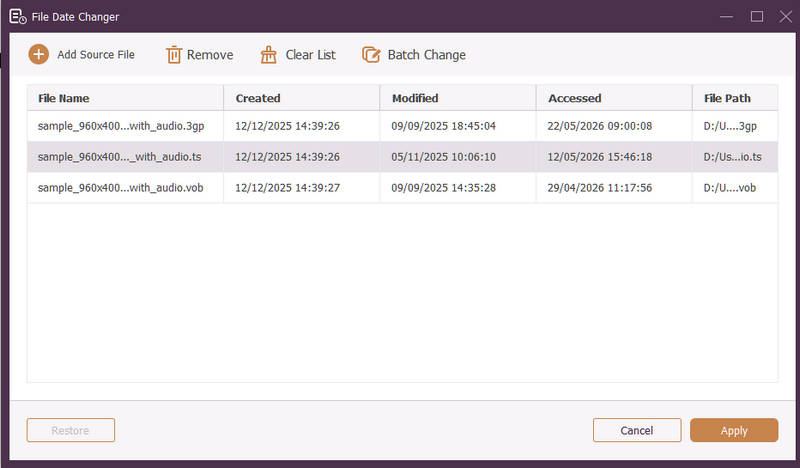
विंडोज और मैक दोनों के लिए उपलब्ध है। AVAide वीडियो कन्वर्टर यह एक बहुमुखी प्लेटफॉर्म है जिसमें एक शक्तिशाली, अंतर्निर्मित फ़ाइल दिनांक परिवर्तक सुविधा मौजूद है। यह सहज सुविधा आपको निर्माण, संशोधन और अंतिम बार उपयोग की गई तिथियों सहित व्यापक टाइमस्टैम्प विवरणों को आसानी से संशोधित करने की अनुमति देती है।
- वीडियो, ऑडियो और छवियों सहित कई मीडिया प्रारूपों को सहजता से संभालें।
- समय बचाने और अपने वर्कफ़्लो को सुव्यवस्थित करने के लिए एक साथ कई फ़ाइलों को आयात और अपडेट करें।
- इसमें एक साफ-सुथरा और उपयोगकर्ता के अनुकूल इंटरफेस है जिससे आप फाइल की तारीख को जल्दी से बदल सकते हैं।
- दिनांक परिवर्तन के बाद भी अपनी फ़ाइल को निर्बाध बनाए रखें।
2. फ़ाइल दिनांक परिवर्तक
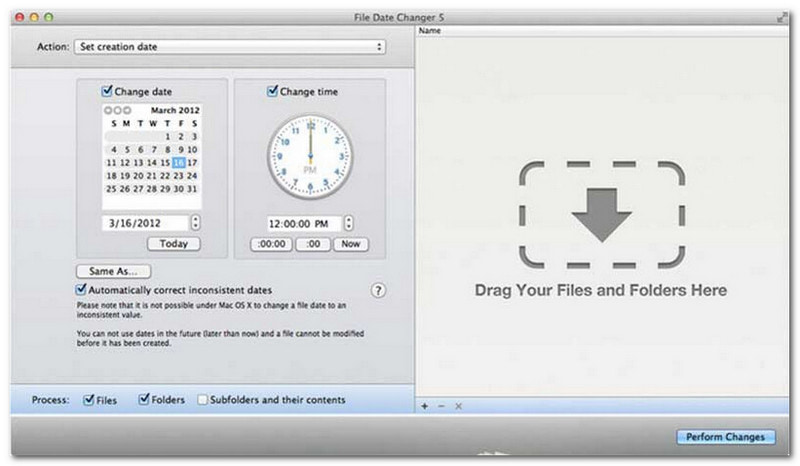
फ़ाइल दिनांक परिवर्तक अपने नाम के अनुरूप फ़ाइल निर्माण तिथियों को बदलने का एक समर्पित समाधान प्रदान करता है। इसका सरल डिज़ाइन इसे सभी स्तरों के उपयोगकर्ताओं के लिए सुलभ बनाता है। यह निर्माण और संशोधन दोनों तिथियों में संशोधन का समर्थन करता है। चाहे आपको व्यक्तिगत फ़ाइलों या पूरे फ़ोल्डरों की तिथियां बदलनी हों, मैक पर यह फ़ाइल दिनांक परिवर्तक अपनी कुशल कार्यक्षमता के साथ प्रक्रिया को सरल बनाता है।
हालांकि फाइल डेट चेंजर एक सशुल्क टूल है, लेकिन इसकी उपयोगिता लागत और कार्यक्षमता के संबंध में आपकी विशिष्ट आवश्यकताओं पर निर्भर करती है। कुछ उपयोगकर्ताओं को इसकी विशेषताएं कीमत के हिसाब से कुछ हद तक बुनियादी लग सकती हैं। हालांकि, जो लोग दक्षता और सुचारू कार्यप्रवाह को प्राथमिकता देते हैं, उनके लिए यह फाइल डेट चेंजर के रूप में एक अत्यंत विश्वसनीय और सार्थक निवेश बना हुआ है।
फ़ाइल दिनांक परिवर्तक की मुख्य विशेषताएं:
- कई फाइलों के निर्माण, संशोधन और अंतिम बार उपयोग किए जाने की तिथियों और समय को बदलें।
- विशिष्ट दिनों, घंटों, मिनटों या सेकंडों को जोड़ने या घटाने का समर्थन करता है।
- फ़ाइल की प्रॉपर्टीज़ जैसे कि रीड-ओनली या हिडन बदलें और EXIF मेटाडेटा को अपडेट करें।
- फाइल डेट चेंजर तुरंत काम करता है और एक स्पष्ट इंटरफेस प्रदान करता है।
3. एक्सिफटूल
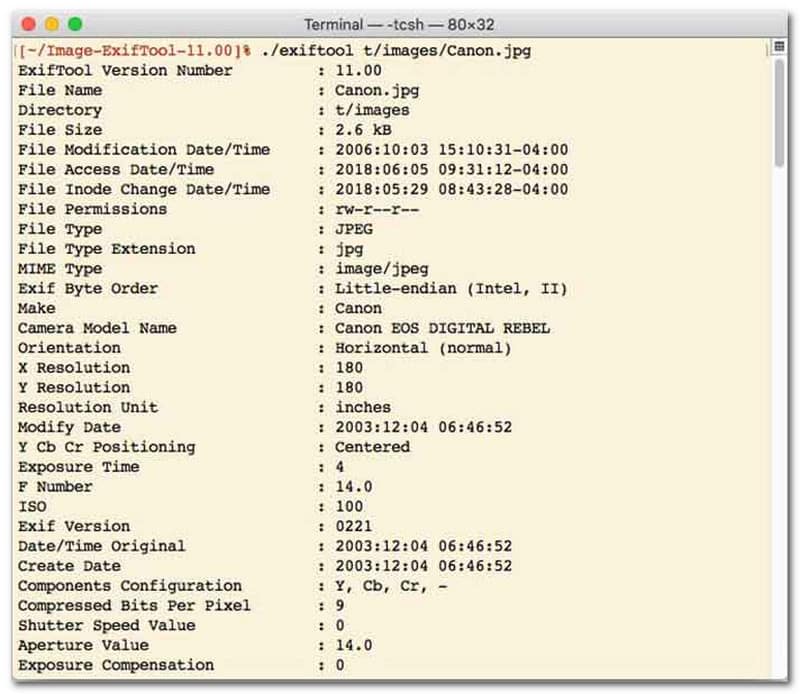
जो उपयोगकर्ता कमांड-लाइन इंटरफ़ेस (CLI) वाले फ़ाइल दिनांक परिवर्तक को प्राथमिकता देते हैं, उनके लिए ExifTool अति सटीक फ़ाइल प्रबंधन के लिए सर्वश्रेष्ठ विकल्प है। यह असाधारण रूप से बहुमुखी फ़ाइल दिनांक परिवर्तक टूल फ़ोटो, वीडियो, दस्तावेज़ और ऑडियो सहित कई प्रकार की फ़ाइलों का समर्थन करता है। निर्माण और संशोधन तिथियों को संपादित करने के अलावा, ExifTool आपको एक फ़ाइल से दूसरी फ़ाइल में टाइमस्टैम्प मेटाडेटा को आसानी से कॉपी करने की सुविधा देता है, जिससे यह सुनिश्चित होता है कि आपकी पूरी मीडिया लाइब्रेरी बिना किसी परेशानी के पूरी तरह से सिंक्रनाइज़ रहे।
ExifTool की प्रमुख विशेषताएं:
- फाइल सिस्टम टाइमस्टैम्प को आसानी से पढ़ें और संशोधित करें।
- मेटाडेटा की बिल्कुल अलग-अलग परतों के बीच तिथियों को कॉपी करें।
- फ़ाइल की तारीखों को बैचों में बदलने में आपकी सहायता के लिए उन्नत दिनांक और समय गणना का समर्थन करता है।
- सभी प्रकार की फाइलों से तिथि और मीडिया संबंधी जानकारी निकालें।
4. बल्कफाइलचेंजर
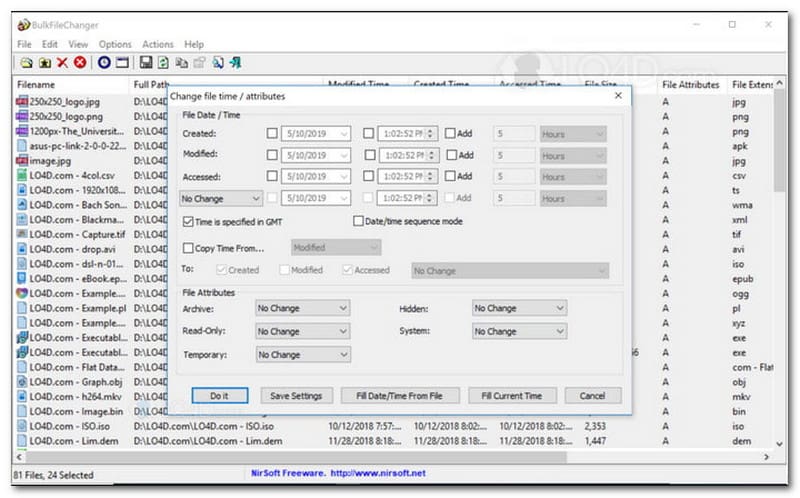
BulkFileChanger एक हल्का और उच्च-प्रदर्शन वाला फ़ाइल दिनांक परिवर्तक टूल है जिसे विंडोज़ पर फ़ाइल टाइमस्टैम्प प्रबंधन को आसान बनाने के लिए डिज़ाइन किया गया है। यह उपयोगकर्ताओं को दस्तावेज़ों, छवियों से लेकर वीडियो तक, लगभग किसी भी फ़ाइल प्रकार में निर्माण, संशोधन और अंतिम बार उपयोग किए जाने के समय सहित विभिन्न दिनांक और समय विशेषताओं को तेज़ी से संशोधित करने की अनुमति देता है। इसकी क्रॉस-फ़ॉर्मेट बहुमुखी प्रतिभा और गति इसे डिजिटल अभिलेखागार को व्यवस्थित करने के लिए एक उत्कृष्ट फ़ाइल दिनांक परिवर्तक बनाती है, लेकिन इसकी उपलब्धता केवल विंडोज़ ऑपरेटिंग सिस्टम तक ही सीमित है, जिसका अर्थ है कि macOS और Linux उपयोगकर्ताओं को कहीं और देखना होगा।
BulkFileChanger की प्रमुख विशेषताएं:
- फ़ाइल निर्माण, संशोधन और अंतिम बार उपयोग की गई तिथियों को संशोधित करें।
- यह दस्तावेज़ों, छवियों और वीडियो सहित लगभग सभी प्रकार की फ़ाइलों को आसानी से संभालता है।
- इसमें एक हल्का डिज़ाइन है जो अल्ट्रा-फास्ट, बल्क मेटाडेटा अपडेट करने की सुविधा देता है।
- विशिष्ट दिन, घंटे, मिनट और सेकंड जोड़ें या निकालें।
5. एट्रिब्यूटमैजिक
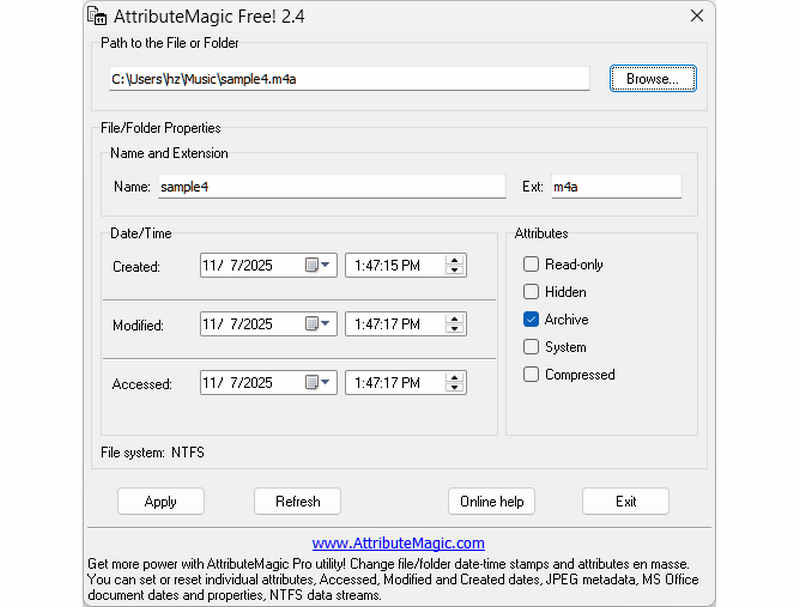
एट्रीब्यूटमैजिक एक साधारण फ़ाइल दिनांक परिवर्तक से कहीं अधिक उन्नत समाधान प्रदान करता है, जिससे फ़ोल्डर और फ़ाइल दोनों के एट्रीब्यूट्स को प्रबंधित किया जा सकता है। यह व्यापक उपयोगिता सटीक टाइमस्टैम्प संशोधन को सक्षम बनाती है, जिससे उपयोगकर्ता निर्माण, संशोधन और अंतिम-पहुँच तिथियों को आसानी से बदल सकते हैं। एक समर्पित फ़ाइल दिनांक परिवर्तक के रूप में अपनी क्षमताओं के अलावा, एट्रीब्यूटमैजिक आपकी विशिष्ट संग्रह आवश्यकताओं के अनुरूप फ़ाइल सिस्टम गुणों पर गहन अनुकूलन प्रदान करता है। जबकि निःशुल्क संस्करण आवश्यक टाइमस्टैम्प संपादन कार्यक्षमता प्रदान करता है, प्रीमियम संस्करण में अपग्रेड करने से उन्नत मेटाडेटा नियंत्रण और शक्तिशाली स्वचालन सुविधाएँ अनलॉक हो जाती हैं।
एट्रीब्यूटमैजिक की प्रमुख विशेषताएं:
- निर्माण, संशोधन और अंतिम बार उपयोग किए जाने के समय को संशोधित या छिपाएँ।
- किसी एक फ़ाइल या पूरे फ़ाइल फ़ोल्डर के लिए फ़ाइल की तिथि बदलें।
- फ़ाइल टाइमस्टैम्प को आसानी से बढ़ाएं, घटाएं या आगे या पीछे शिफ्ट करें।
- रीड-ओनली, हिडन और सिस्टम जैसी कोर फाइल-सिस्टम विशेषताओं को सेट, रीसेट या उलटना।
भाग 2. 5 फ़ाइल दिनांक परिवर्तकों की तुलना
| उत्पाद | समर्थित प्लेटफार्म | प्रयोक्ता इंटरफ़ेस | बैच संपादन | अतिरिक्त क्षमताएँ |
| AVAide वीडियो कन्वर्टर | विंडोज और मैकओएस | आधुनिक, स्वच्छ और सुगम | हाँ (अल्ट्रा-फास्ट) | संपूर्ण सेवा पैकेज: 8K वीडियो रूपांतरण, डीवीडी रिपिंग, मेटाडेटा संपादन, एमवी/स्लाइडशो निर्माण |
| फ़ाइल दिनांक परिवर्तक (निरसॉफ्ट) | केवल मैक | अप्रचलित (पुरानी वेब/यूआई) | सीमित | कोई नहीं (एकल-उद्देशीय) |
| एक्सिफ़टूल | विंडोज, मैकओएस, लिनक्स | केवल कमांड लाइन द्वारा (कोई जीयूआई नहीं) | हाँ (इसके लिए जटिल स्क्रिप्ट की आवश्यकता होती है) | केवल मेटाडेटा पढ़ना/लिखना |
| बल्कफ़ाइलचेंजर | केवल विंडोज़ | क्लासिक विंडोज यूटिलिटी | हाँ | विंडोज फ़ाइल एट्रिब्यूट में बुनियादी बदलाव |
| विशेषता जादू | केवल विंडोज़ | कठोर / जटिल | हाँ | केवल फ़ाइल सिस्टम फ़्लैग प्रबंधन |
भाग 3. AVAide वीडियो कन्वर्टर में फ़ाइल डेटा कैसे बदलें
क्या आपको कभी अपनी डिजिटल फ़ाइलों को बेहतर ढंग से व्यवस्थित करने के लिए फ़ाइल की निर्माण तिथि बदलने की ज़रूरत पड़ी है? आप इसका उपयोग करके ऐसा कर सकते हैं AVAide वीडियो कन्वर्टर! अपनी फ़ाइल को प्रबंधित करने में सहायता के लिए फ़ाइल पर बनाई गई तिथि को बदलने का तरीका जानने के लिए पढ़ते रहें।
स्टेप 1पूर्ण पहुँच के लिए आधिकारिक वेबसाइट से AVAide वीडियो कनवर्टर डाउनलोड और इंस्टॉल करें।

निःशुल्क डाउनलोड विंडोज 7 या बाद के संस्करण के लिए
 सुरक्षित डाऊनलोड
निःशुल्क डाउनलोड Mac OS X 10.13 या बाद के संस्करण के लिए
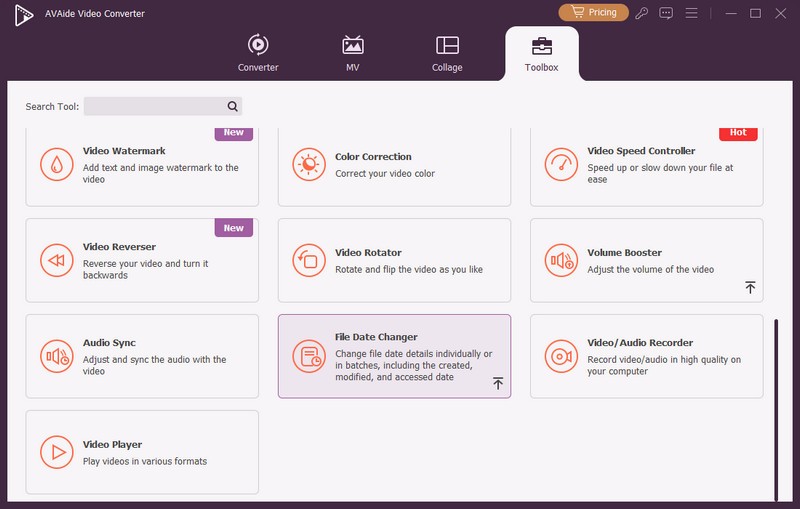
सुरक्षित डाऊनलोडस्टेप 1आरंभ करने के लिए अपने कंप्यूटर पर प्रोग्राम खोलें। उपकरण बॉक्स कई सुविधाओं तक पहुँचने के लिए टैब पर क्लिक करें। अपने माउस को नीचे स्क्रॉल करें, देखें फ़ाइल दिनांक परिवर्तक विकल्पों में से चुनें और उस पर क्लिक करें। यह वह सुविधा है जिसका उपयोग आप फ़ाइल दिनांक विवरण बदलने के लिए करेंगे।
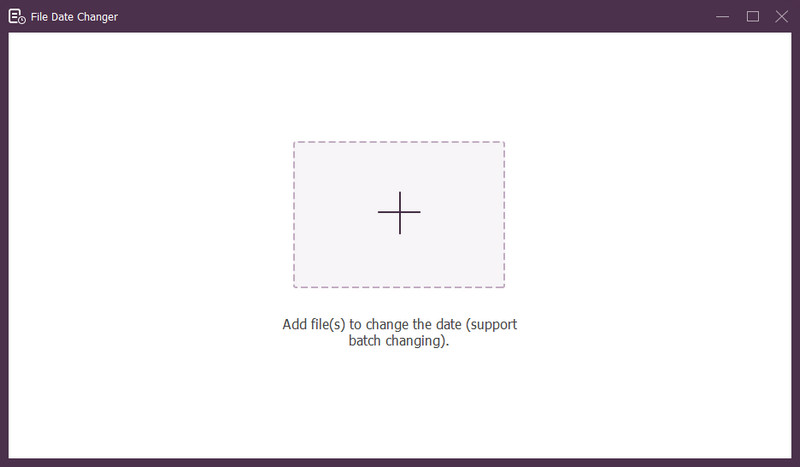
चरण 3दबाओ (+) बटन पर क्लिक करके फ़ाइलें आयात करें। यह ऑडियो, छवि और ऑडियो फ़ाइलें हो सकती हैं। आप फ़ाइल विवरण बदलने के लिए एक से अधिक फ़ाइलें आयात कर सकते हैं।
चरण 4एक बार सभी फ़ाइलें आयात हो जाने के बाद आप उनकी तिथियाँ बदलना शुरू कर सकते हैं। आप तदनुसार बनाई गई, संशोधित और एक्सेस की गई तिथियाँ बदल सकते हैं। ऐसा करने के लिए, आइटम पर तब तक क्लिक करें जब तक कि तीर संपादन हेतु संकेत देते हुए प्रकट होता है।
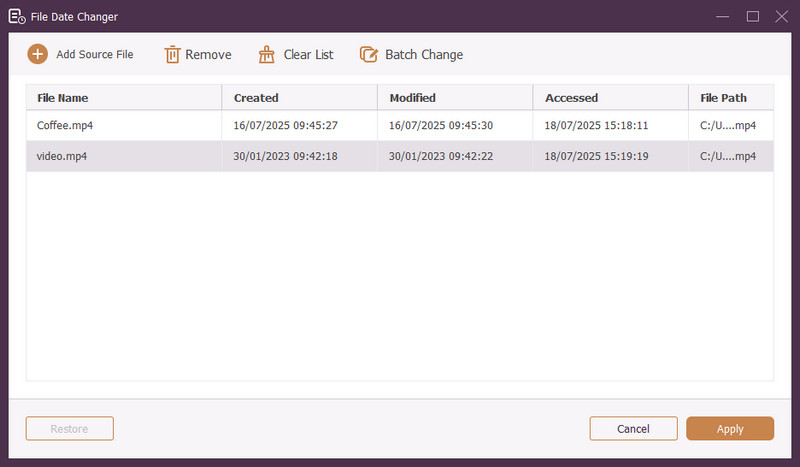
चरण 5सभी फ़ाइल तिथियों को संपादित करने के बाद, क्लिक करें लागू करना परिवर्तनों की पुष्टि करने के लिए बटन दबाएँ। परिवर्तन लागू होने के बाद, सटीकता सुनिश्चित करने के लिए अपडेट किए गए फ़ाइल डेटा विवरण की समीक्षा करें।
भाग 4. सर्वश्रेष्ठ फ़ाइल दिनांक परिवर्तक के बारे में अक्सर पूछे जाने वाले प्रश्न
मैं किसी फ़ाइल की दिनांक जानकारी कैसे देख सकता हूँ?
यदि आप यह जांचना चाहते हैं कि फ़ाइल कब बनाई गई थी या आखिरी बार संशोधित की गई थी, तो आप इसे अपने कंप्यूटर पर ही कर सकते हैं। कृपया फ़ाइल ढूँढें, उस पर राइट-क्लिक करें, और गुण चुनें। फिर, आप फ़ाइल के बारे में सभी विवरण देख सकते हैं। इनमें निर्माण और संशोधन की तिथियाँ शामिल हैं।
क्या किसी को पता चलेगा कि मैं फ़ाइल की तारीख कब बदलूंगा?
नहीं! फ़ाइल की तारीख बदलने से कोई निशान नहीं रह जाएगा। इसलिए, किसी को पता नहीं चलेगा कि आपने कब बदलाव किया।
फ़ाइल से दिनांक और समय गायब होने का क्या कारण है?
कुछ कारण हैं जिनकी वजह से फ़ाइलों से तारीखें और समय गायब हो सकते हैं। ऐसा तब हो सकता है जब आप कोई फ़ाइल डाउनलोड करते हैं और खराब इंटरनेट कनेक्शन के कारण कुछ जानकारी खो देते हैं। कभी-कभी, ऐसा उस वेबसाइट के कारण होता है जहाँ से आपने फ़ाइल डाउनलोड की थी।
क्या मैं फ़ाइल की संशोधित निर्माण तिथि पुनः प्राप्त कर सकता हूँ?
हाँ! आप मैन्युअल रूप से इसे उसके प्रारंभिक मान पर वापस सेट करके मूल तिथि को पुनर्स्थापित कर सकते हैं। फ़ाइल की निर्माण तिथि को पुनः प्राप्त करने का यह एकमात्र तरीका है।
क्या फ़ाइल दिनांक और समय बदलने से फ़ाइल की अखंडता या सामग्री प्रभावित होती है?
नहीं! फ़ाइल की तिथि और समय बदलने से उसकी सामग्री या अखंडता पर कोई असर नहीं पड़ेगा। यह केवल मेटाडेटा को बदलता है, जैसे निर्माण और संशोधन तिथियाँ। यह वास्तविक फ़ाइल को अपरिवर्तित छोड़ देता है।
बस, अब आप सीख गए! किसी फ़ाइल पर निर्माण की तारीख कैसे बदलें, जो कई कारणों से मददगार हो सकता है। अधिक सुव्यवस्थित और शुरुआती लोगों के अनुकूल अनुभव के लिए, अपने फ़ाइल तिथि परिवर्तक के रूप में AVAide वीडियो कनवर्टर का उपयोग करने पर विचार करें। यह आपकी डिजिटल फ़ाइलों को प्रबंधित करने के लिए सबसे अच्छा विकल्प है। इसे आज़माएँ और नीचे अपने विचार साझा करें!
लेखक के बारे में

गुणवत्ता हानि के बिना वीडियो और ऑडियो परिवर्तित करने के लिए सबसे व्यापक मीडिया कनवर्टर।
वीडियो संपादित करें