Travailler avec des vidéos longues pose souvent un dilemme frustrant : comment conserver une qualité vidéo irréprochable sans saturer l’espace de stockage ? C’est là qu’interviennent les normes de compression vidéo. Si vous souhaitez trouver un équilibre entre la taille de la vidéo, sa qualité et sa compatibilité avec différents appareils, vous serez inévitablement confronté à un choix : H.264 (AVC) et H.265 (HEVC).
Dans ce guide complet, nous détaillerons les principales différences entre H.264 et HEVC, vous aiderons à choisir celui qui convient le mieux à votre flux de travail et vous montrerons comment convertir l'un en l'autre sans perte de qualité.
Partie 1. HEVC vs H264 : que sont-ils ?
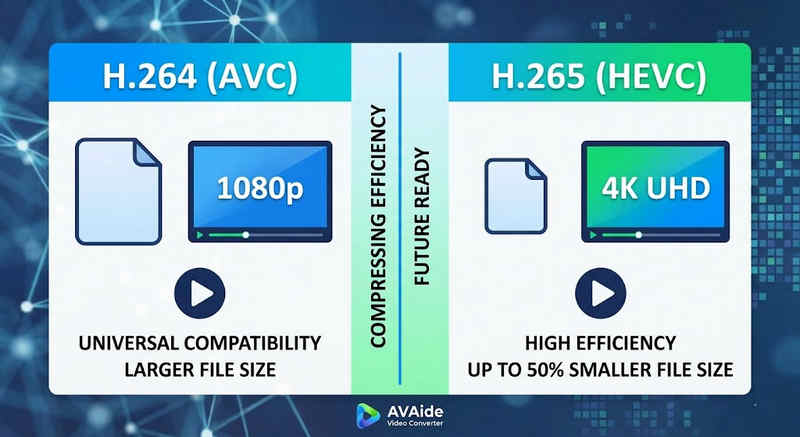
Réponse courte : Le H.264 (AVC) offre une compatibilité universelle et fonctionne sur la quasi-totalité des appareils, mais génère des fichiers plus volumineux. Le H.265 (HEVC) offre une compression supérieure, réduisant la taille des fichiers jusqu'à 501 Tbit/s avec une qualité visuelle identique, mais nécessite une puissance de traitement plus élevée et sa compatibilité est limitée avec les matériels plus anciens.
1. Qu'est-ce que le codec H.264 (AVC) ?
Initialement connu sous le nom d'Advanced Video Coding (AVC), le H.264 est la référence en matière de compatibilité vidéo. Il constitue la norme du secteur pour le streaming en ligne, l'enregistrement mobile et la lecture vidéo quotidienne. Grâce à sa faible consommation de ressources de traitement, les vidéos H.264 sont lues de manière fluide sur quasiment tous les appareils numériques, des anciens smartphones aux téléviseurs connectés les plus récents.
2. Qu'est-ce que le codec H.265 (HEVC) ?
Le codage vidéo haute efficacité (HEVC), ou H.265, succède directement au H.264. Il a été spécialement conçu pour gérer les volumes de données considérables requis par les contenus 4K, 8K et VR. Le HEVC utilise des algorithmes plus avancés pour compresser les données vidéo bien plus efficacement que son prédécesseur, offrant ainsi des images nettes et haute résolution avec des fichiers jusqu'à 501 Tpx plus petits. Cependant, cette efficacité a un coût : elle nécessite un matériel moderne pour un traitement sans latence.
Tableau comparatif rapide H.265 vs H.264
| Caractéristiques | H.264 (AVC) | H.265 (HEVC) |
| Formats pris en charge | m2ts, evo, 3gp, f4v, mkv, mp4, qtff, asf, avi, mxf, ps, ts | mxf, ps, ts, 3gp, mkv, mp4, qtff, asf, avi |
| Efficacité de compression | Modéré (Fichiers plus volumineux) | Supérieur (fichiers plus petits 25-50%) |
| Qualité vidéo | Excellent pour le 1080p | Optimisé pour la 4K, la 8K et le HDR |
| Compatibilité des appareils | Universel (99% d'appareils) | Limité (peut ne pas être compatible avec les anciens PC) |
| Puissance de traitement | Faible (Rendu/lecture rapide) | Élevée (Nécessite des processeurs/cartes graphiques récents) |
| Cas d'utilisation idéaux | Diffusion Web, médias sociaux, appareils anciens | Images de drone 4K, vidéos cinématographiques iPhone, archivage compact |
Partie 2. Quand choisir HEVC plutôt que H.264
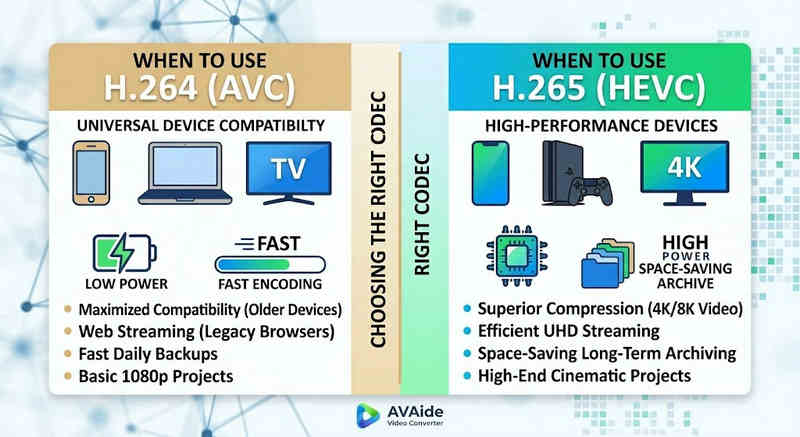
Le choix du codec approprié dépend entièrement de vos objectifs spécifiques. Voici pourquoi vous pourriez avoir besoin de l'un plutôt que de l'autre :
Pourquoi vous avez besoin du HEVC (H.265) :
- Optimisation des économies de stockage : Si vous sauvegardez des vidéos longues ou d'importantes bibliothèques 4K, le format HEVC agit comme un réducteur de taille vidéo naturel, libérant ainsi la moitié de l'espace de votre disque dur.
- Optimisation de la bande passante : Le format HEVC nécessite beaucoup moins de bande passante pour la diffusion en continu, ce qui le rend idéal pour une lecture 4K fluide même sur des connexions Internet plus lentes, sans mise en mémoire tampon.
- Préparer l'avenir : Alors que l'industrie évolue vers l'ultra-haute définition (UHD) et les contenus VR, la norme HEVC garantit que vos vidéos restent de haute qualité et compatibles avec les plateformes de nouvelle génération.
Pourquoi vous avez besoin du H.264 (AVC) :
- Lecture et montage impeccables : Si votre logiciel de montage vidéo rame ou si votre lecteur multimédia affiche un message d'erreur « Codec non pris en charge »,
- Compatibilité et partage sans souci : Le H.264 est le codec vidéo le plus largement compatible. Que vous souhaitiez partager vos vidéos avec vos amis, votre NAS, ou des serveurs multimédias comme Plex ou Kodi, le H.264 garantit un partage et une lecture fluides.
Partie 3. Comment convertir facilement entre HEVC et H.264
Dans le cas du transfert de vidéos depuis et vers les formats HEVC (H.265) et H.264, AVAide Convertisseur vidéo AVAide fait mieux que les autres. Il offre une interface efficace et facile à utiliser qui ne compromet pas la qualité de la conversion et prend en charge divers formats. Quelle que soit la raison, qu'il s'agisse de la plus grande efficacité du HEVC ou de l'adoption plus large du H264, AVAide vous permet de basculer entre les deux sans problème.
Procédure détaillée :
Étape 1Obtenez le convertisseur vidéo AVaide
Téléchargez, installez et lancez AVAide Convertisseur vidéo sur votre ordinateur Windows ou Mac.

TÉLÉCHARGEMENT GRATUIT Pour Windows 7 ou version ultérieure
 Téléchargement sécurisé
TÉLÉCHARGEMENT GRATUIT Pour Mac OS X 10.13 ou version ultérieure
Téléchargement sécuriséÉtape 2Ajoutez vos vidéos à AVAide Video Converter
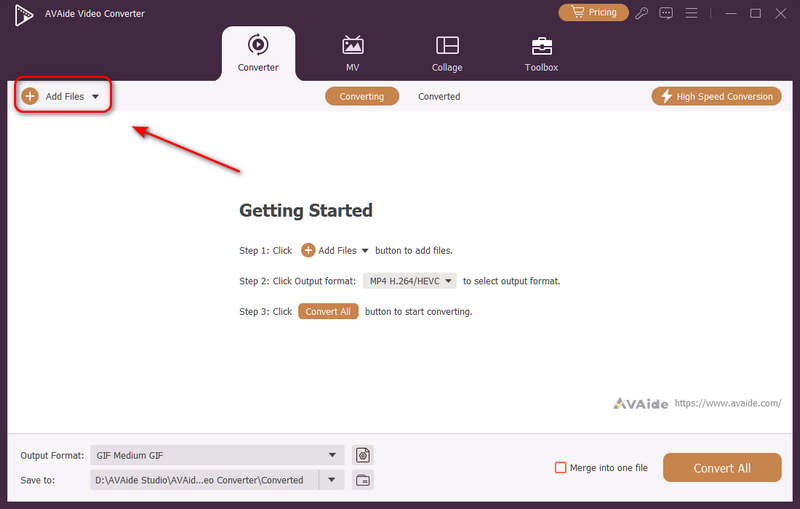
Vous pouvez ajouter plusieurs fichiers vidéo et effectuer une conversion par lots. Cliquez sur Ajouter des fichiers Cliquez sur le bouton en haut à gauche pour importer vos fichiers vidéo.
Étape 3Choisissez le codec H.264 ou H.265
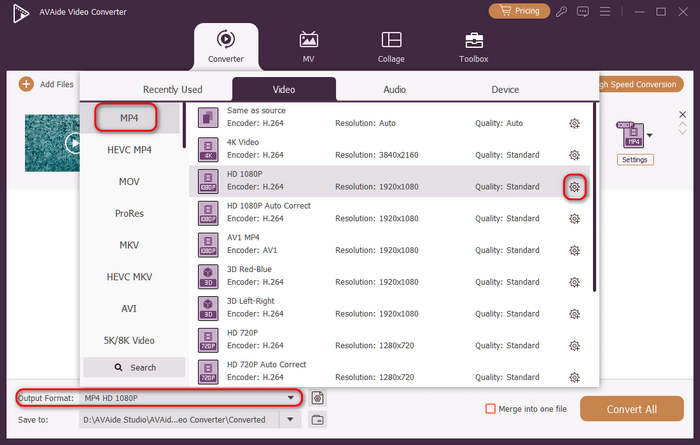
Clique le Format de sortie Cliquez sur le bouton de menu déroulant en bas à gauche. Vous pouvez ensuite sélectionner le format vidéo souhaité. Cliquez ensuite sur Profil personnalisé bouton (avec une icône d'engrenage) dans la barre de préréglages vidéo.
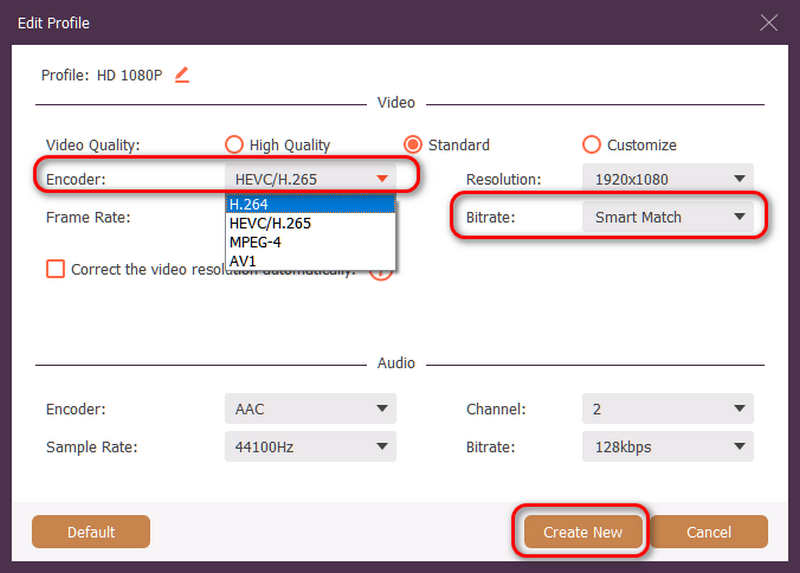
Ensuite, dans ce panneau, vous pouvez cliquer sur Encodeur bouton déroulant pour sélectionner H.264 ou HEVC/H.265 codec. Si vous souhaitez modifier la qualité vidéo, vous pouvez ajuster le DébitMais nous recommandons Match intelligent pour garantir la compatibilité. Cliquez sur Créer un nouveau bouton pour enregistrer votre configuration.
Étape 4Lancer le réencodage vidéo
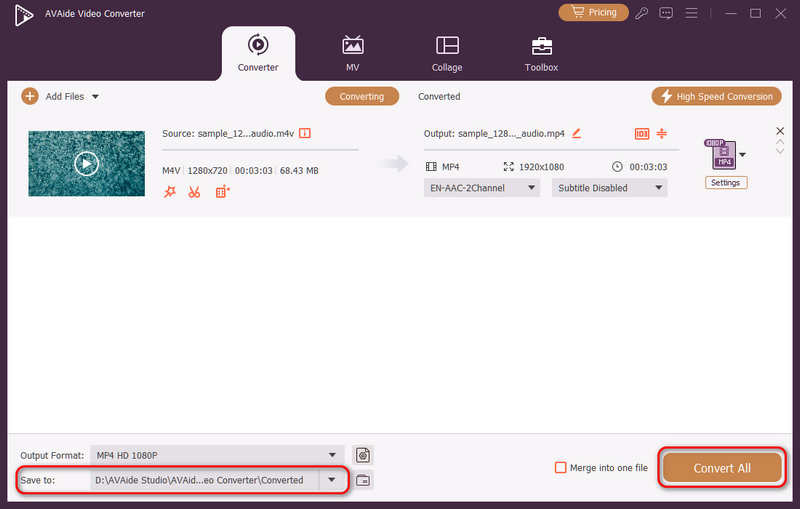
Enfin, vous pouvez cliquer sur le Enregistrer dans bouton déroulant pour sélectionner le dossier de sortie souhaité et cliquez sur Tout convertir bouton pour changer votre codec vidéo en H.264 ou H.265.
Partie 4. FAQ sur les normes H.265 et H.264
Quelle est la principale différence entre NVENC H.264 et NVENC HEVC ?
La principale différence réside dans l'efficacité de la compression et l'optimisation matérielle. NVENC HEVC (H.265) offre une compression jusqu'à 50% supérieure à celle de NVENC H.264 (AVC). Cela signifie qu'il permet d'obtenir une qualité visuelle identique avec un débit binaire deux fois moindre (et une taille de fichier deux fois plus petite), ce qui en fait le choix idéal pour l'archivage de vidéos 4K ou la diffusion en continu sur des réseaux à bande passante limitée.
Qu'est-ce qu'un encodeur HEVC/H.264 modulaire multicanal ?
Un encodeur HEVC/H.264 multicanal modulaire est un périphérique matériel professionnel conçu pour compresser et diffuser simultanément plusieurs flux vidéo. Contrairement aux encodeurs logiciels grand public, il présente une conception modulaire (à lames) permettant aux utilisateurs de remplacer ou de mettre à niveau à chaud les cartes d'encodage en fonction de l'envergure de leur projet. Il prend en charge les formats H.264 et HEVC/H.265.
Qu'est-ce que le H.265+ ?
H.265+ (également connu sous le nom de Smart H.265+) est une technologie de compression vidéo avancée et propriétaire développée par Hikvision, spécifiquement optimisée pour la surveillance et la sécurité.
On peut maintenant utiliser cette analyse complète de HEVC et H.264 pour déterminer quel codec correspond le mieux à vos besoins vidéo. Que vous souhaitiez du H.264 et que vous vous concentriez sur la compatibilité ou que vous souhaitiez du HEVC et que vous visiez une meilleure compression, les deux codecs ont des avantages. AVAide Video Converter offre une solution élégante et efficace pour résoudre ce problème, en fournissant une sortie d'excellente qualité tout en étant rapide. AVAide facilite la tâche de compression vidéo et sa conversion grâce à ses interfaces simples et ses fonctions avancées.
À PROPOS DE L'AUTEUR

Votre boîte à outils vidéo complète prenant en charge plus de 350 formats pour une conversion en qualité sans perte.