Working with long videos often presents a frustrating dilemma: how do you maintain pristine video quality without eating up all your storage space? This is where video compression standards come in. If you want to balance video size, quality, and device compatibility, you’ll inevitably face the choice between H.264 (AVC) and H.265 (HEVC).
In this comprehensive guide, we’ll break down the core differences between H.264 and HEVC, help you decide which one fits your workflow, and show you how to convert between them seamlessly without losing quality.
Part 1. HEVC vs H264: What Are They?
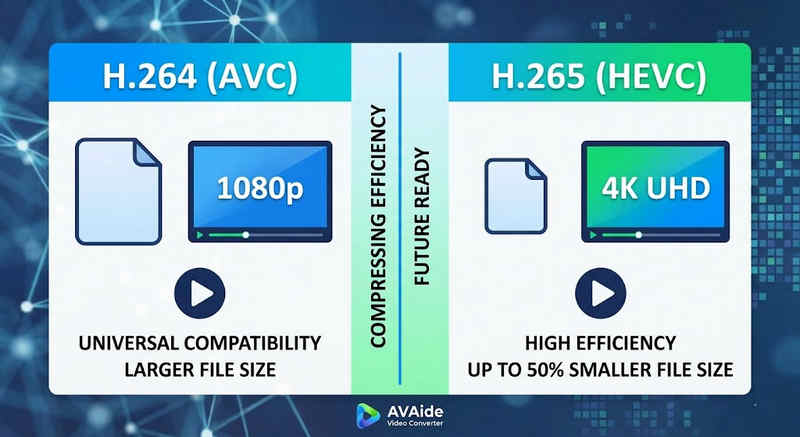
The Short Answer: H.264 (AVC) offers universal compatibility and works on almost any device, but creates larger files. H.265 (HEVC) provides superior compression, cutting file sizes by up to 50% with identical visual quality, but requires higher processing power and has limited support on older hardware.
1. What is the H.264 Codec (AVC)?
Introduced as Advanced Video Coding (AVC), H.264 is the reigning king of video compatibility. It is the industry standard for online streaming, mobile recording, and daily video playback. Because it requires very little processing power to decode, H.264 videos play smoothly on almost any digital device imaginable, from old smartphones to modern smart TVs.
2. What is the H.265 Codec (HEVC)?
High Efficiency Video Coding (HEVC), or H.265, is the direct successor to H.264. It was specifically engineered to handle the massive data demands of 4K, 8K, and VR content. HEVC uses more advanced algorithms to compress video data far more efficiently than its predecessor, delivering crisp, high-resolution visuals at up to 50% smaller file sizes. However, this efficiency comes at a cost: it requires modern hardware to process without lagging.
H.265 vs. H.264: Quick Comparison Table
| Características | H.264 (AVC) | H.265 (HEVC) |
| Formatos admitidos | m2ts, evo, 3gp, f4v, mkv, mp4, qtff, asf, avi, mxf, ps, ts | mxf, ps, ts, 3gp, mkv, mp4, qtff, asf, avi |
| Eficiencia de compresión | Moderate (Larger file sizes) | Superior (25-50% smaller files) |
| Calidad de video | Excellent for 1080p | Optimized for 4K, 8K, and HDR |
| Compatibilidad del dispositivo | Universal (99% of devices) | Limited (Legacy PCs may not support) |
| Poder de procesamiento | Low (Fast rendering/playback) | High (Requires newer CPUs/GPUs) |
| Casos de uso ideales | Web streaming, social media, legacy devices | 4K drone footage, iPhone cinematic video, space-saving archiving |
Part 2. When to Choose HEVC vs. H.264
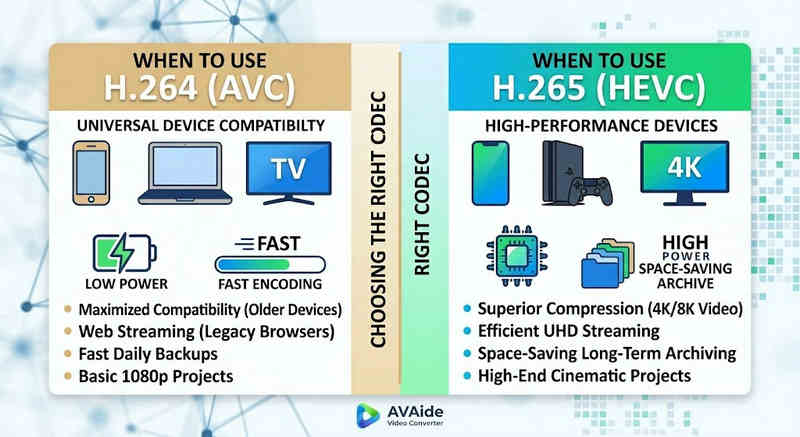
Choosing the right codec depends entirely on your specific goals. Here is why you might need one over the other:
Why You Need HEVC (H.265):
- Maximized Storage Savings: If you back up long-form videos or massive 4K libraries, HEVC acts as a natural video size reducer, freeing up half your hard drive space.
- Bandwidth Optimization: HEVC requires much less bandwidth to stream, making it ideal for smooth 4K playback even on slower internet connections without buffering.
- Future-Proofing: As the industry transitions toward ultra-high-definition (UHD) and VR content, HEVC ensures your videos remain high-quality and compatible with next-generation platforms.
Why You Need H.264 (AVC):
- Flawless Playback & Editing: If your video editing software lags or your media player throws a Codec Not Supported
- Compatibility and Worry-Free Sharing: H.264 is the most widely compatible video codec. Whether you want to share your videos to your friends, NAS, media servers like Plex or Kodi, H.264 can ensure seamless sharing and playback.
Part 3. How to Convert Easily Between HEVC and H.264
En el caso de transferir vídeos desde y hacia los formatos HEVC (H.265) y H.264, Convertidor de video AVAide Lo hace mejor que el resto. Ofrece una interfaz eficiente y fácil de usar que no compromete la calidad de la conversión y admite varios formatos. Cualquiera sea el motivo, ya sea por la mayor eficiencia de HEVC o por la adopción más amplia de H264, AVAide le permite cambiar entre ambos sin problemas.
Procedimiento detallado:
Paso 1Obtenga AVAide Video Converter
Descarga, instala y ejecuta Convertidor de video AVAide on your windows or Mac computer.

DESCARGA GRATUITA Para Windows 7 o posterior
 Descarga segura
DESCARGA GRATUITA Para Mac OS X 10.13 o posterior
Descarga seguraPaso 2Add Your Videos to AVAide Video Converter
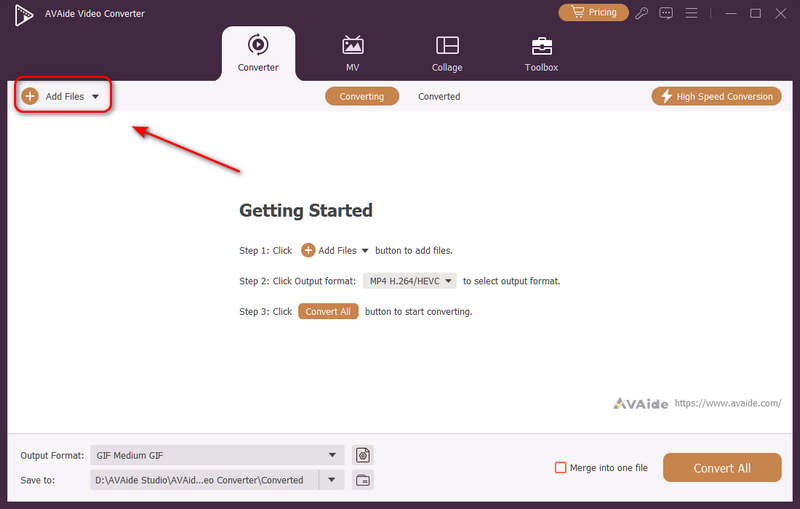
You can add multiple video files and do a batch conversion. Click the Agregar archivos button on the top left to import your video files.
Paso 3Choose H.264 or H.265 Codec
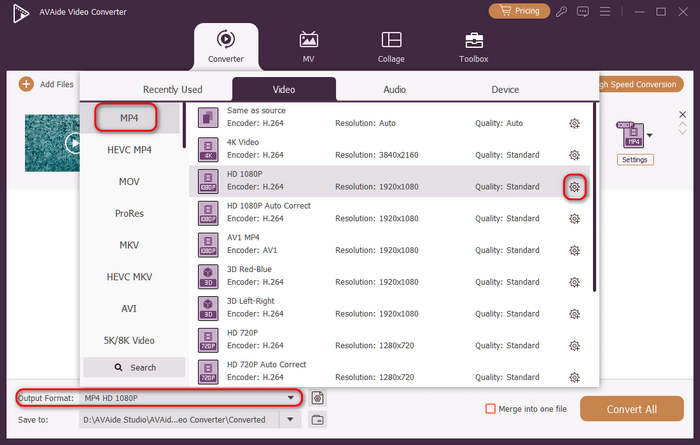
Haga clic en el Formato de salida dropdown menu button on the bottom left side. Then, you can select a desired video format first. Then, click the Perfil personalizado button (with a Gear icon) in the video preset bar.
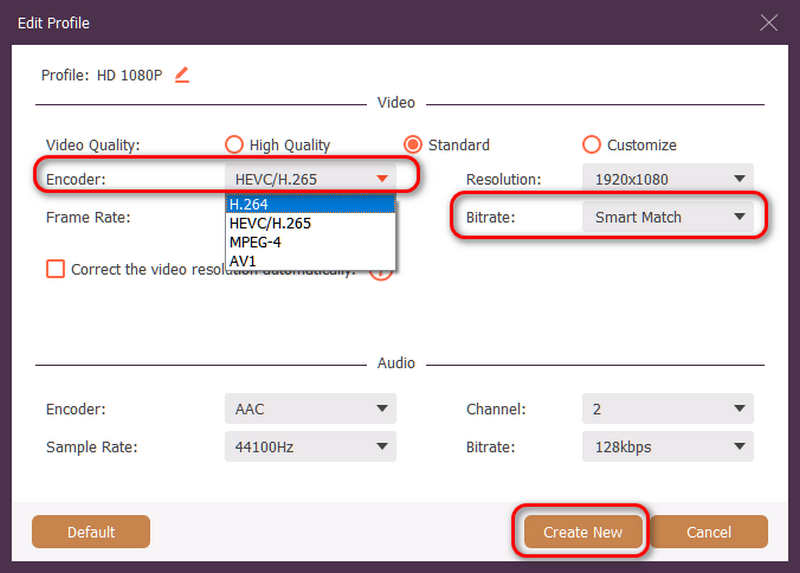
Then, in this panel, you can click the codificador dropdown button to select H.264 o HEVC/H.265 codec. If you want to change the video quality, you can adjust the tasa de bits. But we recommend Smart Match to ensure compatibility. Click the Crear nuevo button to save your configuration.
Etapa 4Start Video Re-encoding
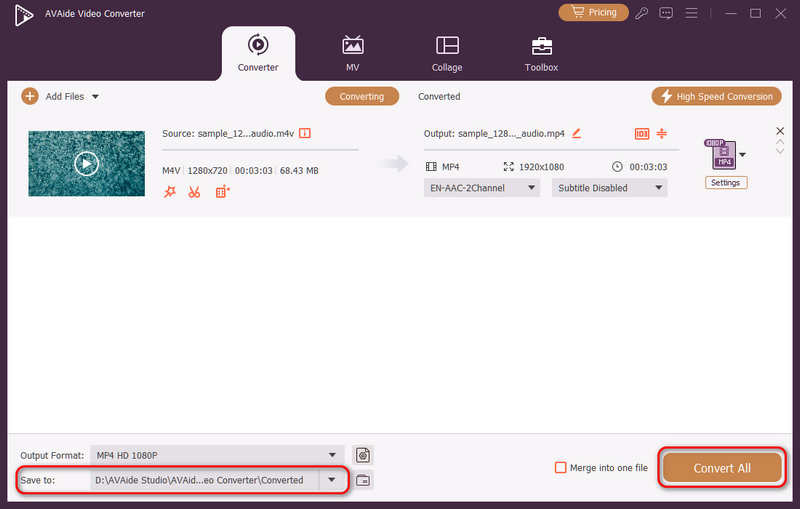
Finalmente, puedes hacer clic en el Salvar a dropdown button to select a desired output folder and click the Convertir todo button to change your video codec to H.264 or H.265.
Part 4. FAQs of H.265 and H.264
What is the main difference between NVENC H.264 and NVENC HEVC?
The primary difference lies in compression efficiency and hardware generation optimization. NVENC HEVC (H.265) delivers up to 50% better compression than NVENC H.264 (AVC). This means it can produce the exact same visual quality at half the bitrate (and half the file size), making it the superior choice for archiving 4K videos or streaming over limited bandwidth.
What is a modular multi-channel HEVC/H.264 encoder?
A modular multi-channel HEVC/H.264 encoder is an enterprise-grade hardware device designed to compress and stream multiple video feeds simultaneously. Unlike consumer software encoders, it features a modular (blade-style) design, allowing users to hot-swap or upgrade hardware encoding cards based on their project scales. It supports both H.264 and HEVC/H.265.
What is H.265+?
H.265+ (also known as Smart H.265+) is an advanced, proprietary video compression technology developed by Hikvision, specifically optimized for security and surveillance monitoring.
Ahora se puede utilizar este análisis exhaustivo de HEVC y H.264 para determinar qué códec se adapta mejor a sus requisitos de vídeo. Tanto si desea H.264 y se centra en la compatibilidad como si desea HEVC y apunta a una mejor compresión, ambos códecs tienen ventajas. AVAide Video Converter ofrece una solución elegante y eficiente para abordar ese problema, proporcionando una salida de excelente calidad a la vez que es rápido. AVAide facilita la tarea de compresión de vídeo y su conversión con sus interfaces sencillas y funciones avanzadas.
SOBRE EL AUTOR

Su caja de herramientas de video completa que admite más de 350 formatos para conversión en calidad sin pérdidas.
Convertir vídeo