Η εργασία με βίντεο μεγάλης διάρκειας συχνά παρουσιάζει ένα απογοητευτικό δίλημμα: πώς διατηρείτε την άψογη ποιότητα βίντεο χωρίς να καταναλώνετε όλο τον αποθηκευτικό σας χώρο; Εδώ μπαίνουν στο παιχνίδι τα πρότυπα συμπίεσης βίντεο. Αν θέλετε να εξισορροπήσετε το μέγεθος, την ποιότητα και τη συμβατότητα συσκευών του βίντεο, αναπόφευκτα θα αντιμετωπίσετε την επιλογή μεταξύ... H.264 (AVC) και H.265 (HEVC).
Σε αυτόν τον ολοκληρωμένο οδηγό, θα αναλύσουμε τις βασικές διαφορές μεταξύ H.264 και HEVC, θα σας βοηθήσουμε να αποφασίσετε ποιο ταιριάζει στη ροή εργασίας σας και θα σας δείξουμε πώς να κάνετε μετατροπή μεταξύ τους απρόσκοπτα χωρίς να χάσετε την ποιότητα.
Μέρος 1. HEVC vs H264: Τι είναι αυτά;
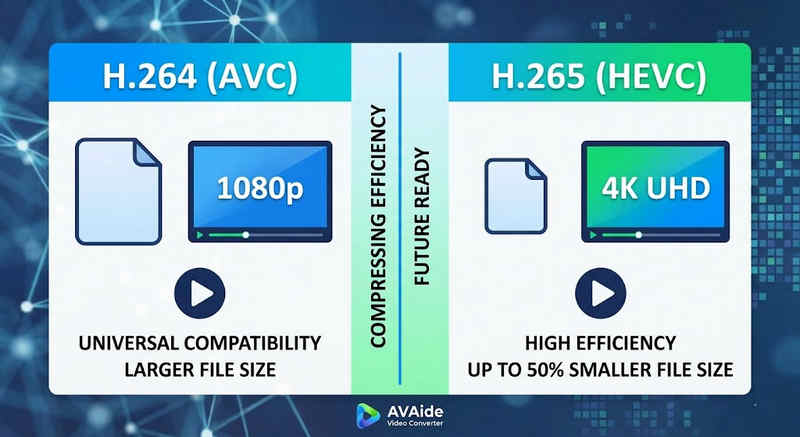
Η σύντομη απάντηση: Το H.264 (AVC) προσφέρει καθολική συμβατότητα και λειτουργεί σχεδόν σε οποιαδήποτε συσκευή, αλλά δημιουργεί μεγαλύτερα αρχεία. Το H.265 (HEVC) παρέχει ανώτερη συμπίεση, μειώνοντας το μέγεθος των αρχείων έως και 50% με την ίδια οπτική ποιότητα, αλλά απαιτεί υψηλότερη ισχύ επεξεργασίας και έχει περιορισμένη υποστήριξη σε παλαιότερο υλικό.
1. Τι είναι ο κωδικοποιητής H.264 (AVC);
Παρουσιασμένο ως Advanced Video Coding (AVC), το H.264 είναι ο κυρίαρχος βασιλιάς της συμβατότητας βίντεο. Είναι το βιομηχανικό πρότυπο για online streaming, εγγραφή σε κινητές συσκευές και καθημερινή αναπαραγωγή βίντεο. Επειδή απαιτεί πολύ μικρή επεξεργαστική ισχύ για την αποκωδικοποίησή του, τα βίντεο H.264 αναπαράγονται ομαλά σχεδόν σε οποιαδήποτε ψηφιακή συσκευή που μπορείτε να φανταστείτε, από παλιά smartphones έως σύγχρονες smart TV.
2. Τι είναι ο κωδικοποιητής H.265 (HEVC);
Η Κωδικοποίηση Βίντεο Υψηλής Απόδοσης (HEVC), ή H.265, είναι ο άμεσος διάδοχος του H.264. Σχεδιάστηκε ειδικά για να χειρίζεται τις τεράστιες απαιτήσεις δεδομένων περιεχομένου 4K, 8K και VR. Το HEVC χρησιμοποιεί πιο προηγμένους αλγόριθμους για τη συμπίεση δεδομένων βίντεο πολύ πιο αποτελεσματικά από τον προκάτοχό του, παρέχοντας ευκρινή γραφικά υψηλής ανάλυσης σε μικρότερα μεγέθη αρχείων έως και 50%. Ωστόσο, αυτή η απόδοση έχει ένα κόστος: απαιτεί σύγχρονο υλικό για επεξεργασία χωρίς καθυστέρηση.
H.265 vs. H.264: Σύντομος Συγκριτικός Πίνακας
| Χαρακτηριστικά | H.264 (AVC) | H.265 (HEVC) |
| Υποστηριζόμενες μορφές | m2ts, evo, 3gp, f4v, mkv, mp4, qtff, asf, avi, mxf, ps, ts | mxf, ps, ts, 3gp, mkv, mp4, qtff, asf, avi |
| Αποδοτικότητα συμπίεσης | Μέτριο (Μεγαλύτερα μεγέθη αρχείων) | Superior (μικρότερα αρχεία 25-50%) |
| Ποιότητα βίντεο | Εξαιρετικό για 1080p | Βελτιστοποιημένο για 4K, 8K και HDR |
| Συμβατότητα συσκευής | Universal (99% συσκευών) | Περιορισμένο (Οι παλαιότεροι υπολογιστές ενδέχεται να μην υποστηρίζουν) |
| Ισχύς επεξεργασίας | Χαμηλή (Γρήγορη απόδοση/αναπαραγωγή) | Υψηλή (Απαιτεί νεότερες CPU/GPU) |
| Ιδανικές θήκες χρήσης | Ροή ιστού, μέσα κοινωνικής δικτύωσης, παλαιότερες συσκευές | Πλάνα 4K από drone, κινηματογραφικό βίντεο iPhone, αρχειοθέτηση που εξοικονομεί χώρο |
Μέρος 2. Πότε να επιλέξετε HEVC έναντι H.264
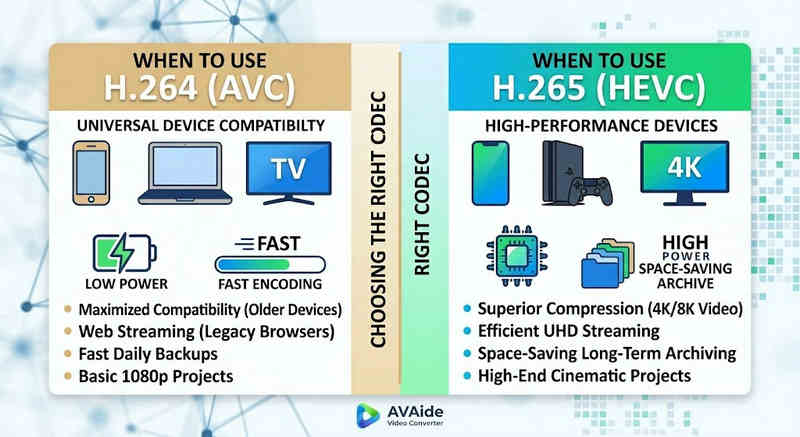
Η επιλογή του σωστού κωδικοποιητή εξαρτάται αποκλειστικά από τους συγκεκριμένους στόχους σας. Δείτε γιατί μπορεί να χρειαστείτε τον έναν αντί του άλλου:
Γιατί χρειάζεστε HEVC (H.265):
- Μέγιστη εξοικονόμηση χώρου αποθήκευσης: Αν δημιουργείτε αντίγραφα ασφαλείας βίντεο μεγάλης διάρκειας ή τεράστιων βιβλιοθηκών 4K, το HEVC λειτουργεί ως φυσικός μειωτής μεγέθους βίντεο, απελευθερώνοντας τον μισό χώρο στον σκληρό σας δίσκο.
- Βελτιστοποίηση εύρους ζώνης: Το HEVC απαιτεί πολύ λιγότερο εύρος ζώνης για streaming, καθιστώντας το ιδανικό για ομαλή αναπαραγωγή 4K ακόμα και σε πιο αργές συνδέσεις στο διαδίκτυο χωρίς buffering.
- Προετοιμασία για το μέλλον: Καθώς η βιομηχανία μεταβαίνει σε περιεχόμενο εξαιρετικά υψηλής ευκρίνειας (UHD) και VR, το HEVC διασφαλίζει ότι τα βίντεό σας παραμένουν υψηλής ποιότητας και συμβατά με τις πλατφόρμες επόμενης γενιάς.
Γιατί χρειάζεστε H.264 (AVC):
- Άψογη Αναπαραγωγή & Επεξεργασία: Εάν το λογισμικό επεξεργασίας βίντεο που χρησιμοποιείτε παρουσιάζει καθυστερήσεις ή το πρόγραμμα αναπαραγωγής πολυμέσων παρουσιάζει σφάλματα, η ένδειξη Codec δεν υποστηρίζεται.
- Συμβατότητα και Κοινή Χρήση Χωρίς Προβλήματα: Το H.264 είναι ο πιο ευρέως συμβατός κωδικοποιητής βίντεο. Είτε θέλετε να μοιραστείτε τα βίντεό σας με τους φίλους σας, είτε μέσω NAS, είτε μέσω διακομιστών πολυμέσων όπως το Plex ή το Kodi, το H.264 μπορεί να διασφαλίσει την απρόσκοπτη κοινή χρήση και αναπαραγωγή.
Μέρος 3. Πώς να μετατρέψετε εύκολα μεταξύ HEVC και H.264
Σε περίπτωση μεταφοράς βίντεο από και προς μορφές HEVC(H.265) και H.264, Μετατροπέας βίντεο AVAide το κάνει καλύτερα από τα υπόλοιπα. Παρέχει μια αποτελεσματική και εύχρηστη διεπαφή που δεν θέτει σε κίνδυνο την ποιότητα της μετατροπής και υποστηρίζει διάφορες μορφές. Όποιος και αν είναι ο λόγος, θα μπορούσε να είναι για τη μεγαλύτερη αποτελεσματικότητα του HEVC ή την ευρύτερη υιοθέτηση του H264, το AVAide σάς επιτρέπει να κάνετε εναλλαγή μεταξύ των δύο χωρίς ταλαιπωρία.
Αναλυτική Διαδικασία:
Βήμα 1Αποκτήστε το AVAide Video Converter
Λήψη, εγκατάσταση και εκκίνηση Μετατροπέας βίντεο AVAide στον υπολογιστή σας με Windows ή Mac.

ΔΩΡΕΑΝ ΛΗΨΗ Για Windows 7 ή νεότερη έκδοση
 Ασφαλής λήψη
ΔΩΡΕΑΝ ΛΗΨΗ Για Mac OS X 10.13 ή νεότερη έκδοση
Ασφαλής λήψηΒήμα 2Προσθέστε τα βίντεό σας στο AVAide Video Converter
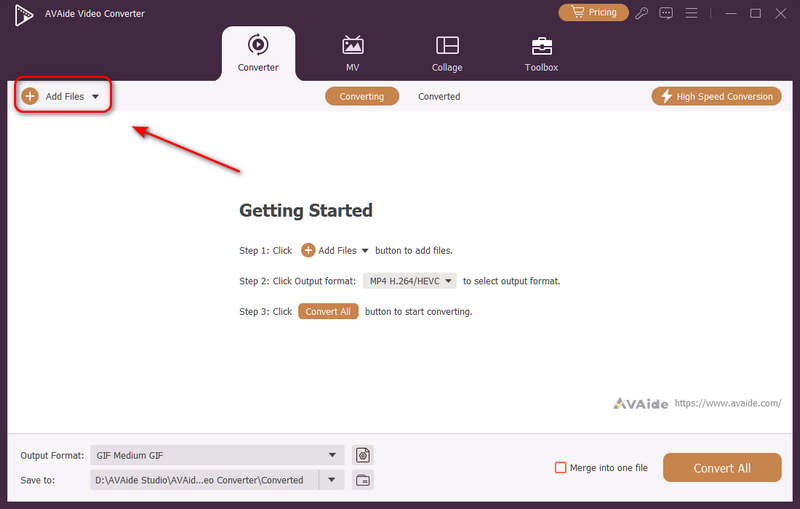
Μπορείτε να προσθέσετε πολλά αρχεία βίντεο και να κάνετε μαζική μετατροπή. Κάντε κλικ στο Πρόσθεσε αρχεία κουμπί επάνω αριστερά για να εισαγάγετε τα αρχεία βίντεο.
Βήμα 3Επιλέξτε κωδικοποιητή H.264 ή H.265
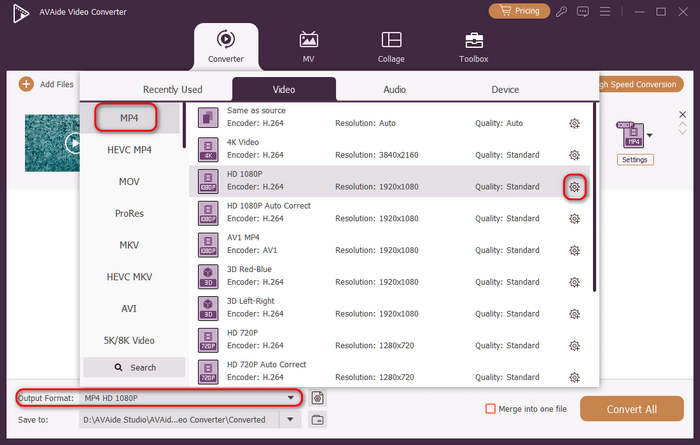
Κάντε κλικ στο Μορφή εξόδου κουμπί αναπτυσσόμενου μενού στην κάτω αριστερή πλευρά. Στη συνέχεια, μπορείτε πρώτα να επιλέξετε την επιθυμητή μορφή βίντεο. Στη συνέχεια, κάντε κλικ στο Προσαρμοσμένο προφίλ κουμπί (με εικονίδιο γραναζιού) στη γραμμή προεπιλογών βίντεο.
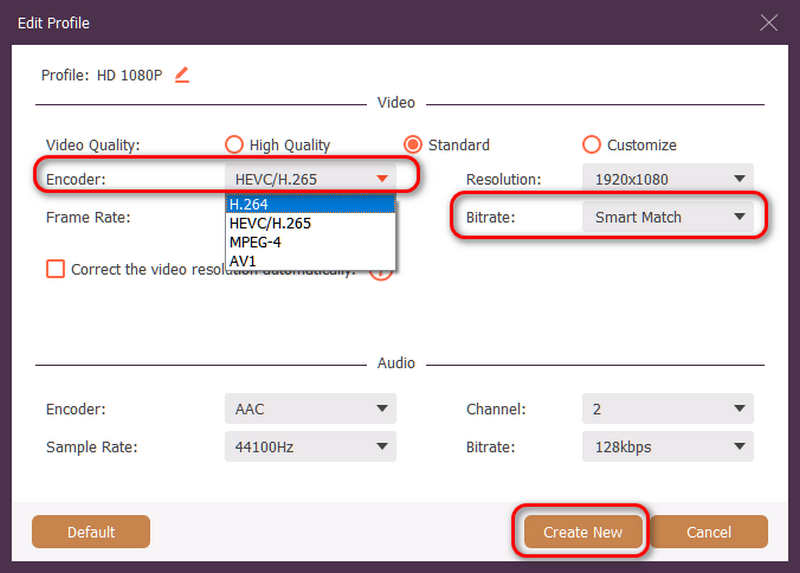
Στη συνέχεια, σε αυτόν τον πίνακα, μπορείτε να κάνετε κλικ στο Κωδικοποιητής αναπτυσσόμενο κουμπί για επιλογή H.264 ή HEVC/H.265 κωδικοποιητή. Αν θέλετε να αλλάξετε την ποιότητα βίντεο, μπορείτε να προσαρμόσετε την Ρυθμός bit. Αλλά συνιστούμε Έξυπνο ταίριασμα για να διασφαλίσετε τη συμβατότητα. Κάντε κλικ στο Δημιουργία νέου κουμπί για να αποθηκεύσετε τη διαμόρφωσή σας.
Βήμα 4Έναρξη επανακωδικοποίησης βίντεο
Τέλος, μπορείτε να κάνετε κλικ στο Αποθήκευση σε αναπτυσσόμενο κουμπί για να επιλέξετε τον επιθυμητό φάκελο εξόδου και κάντε κλικ στο Μετατροπή όλων για να αλλάξετε τον κωδικοποιητή βίντεο σε H.264 ή H.265.
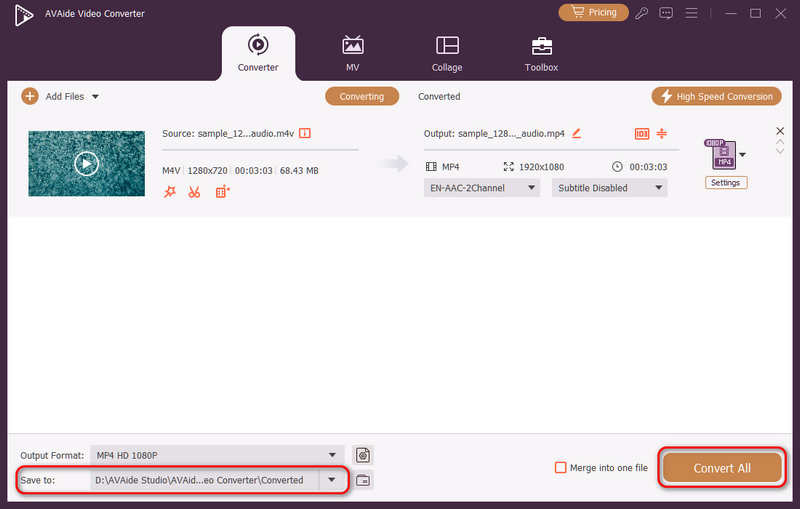
Μέρος 4. Συχνές ερωτήσεις για τα H.265 και H.264
Ποια είναι η κύρια διαφορά μεταξύ του NVENC H.264 και του NVENC HEVC;
Η κύρια διαφορά έγκειται στην αποτελεσματικότητα της συμπίεσης και στη βελτιστοποίηση της δημιουργίας υλικού. Το NVENC HEVC (H.265) προσφέρει έως και 50% καλύτερη συμπίεση από το NVENC H.264 (AVC). Αυτό σημαίνει ότι μπορεί να παράγει ακριβώς την ίδια οπτική ποιότητα στο μισό ρυθμό μετάδοσης bit (και στο μισό μέγεθος αρχείου), καθιστώντας το την καλύτερη επιλογή για αρχειοθέτηση βίντεο 4K ή streaming σε περιορισμένο εύρος ζώνης.
Τι είναι ένας αρθρωτός πολυκαναλικός κωδικοποιητής HEVC/H.264;
Ένας αρθρωτός πολυκαναλικός κωδικοποιητής HEVC/H.264 είναι μια συσκευή υλικού εταιρικού επιπέδου που έχει σχεδιαστεί για τη συμπίεση και τη ροή πολλαπλών ροών βίντεο ταυτόχρονα. Σε αντίθεση με τους κωδικοποιητές λογισμικού για καταναλωτές, διαθέτει αρθρωτό σχεδιασμό (τύπου blade), επιτρέποντας στους χρήστες να εναλλάσσουν ή να αναβαθμίζουν κάρτες κωδικοποίησης υλικού με βάση τις κλίμακες του έργου τους. Υποστηρίζει τόσο H.264 όσο και HEVC/H.265.
Τι είναι το H.265+;
Το H.265+ (γνωστό και ως Smart H.265+) είναι μια προηγμένη, ιδιόκτητη τεχνολογία συμπίεσης βίντεο που αναπτύχθηκε από την Hikvision, ειδικά βελτιστοποιημένη για παρακολούθηση ασφάλειας και επιτήρησης.
Τώρα μπορεί κανείς να χρησιμοποιήσει αυτή τη συνολική ανάλυση του HEVC και H.264 για να προσδιορίσετε ποιος κωδικοποιητής ταιριάζει καλύτερα στις απαιτήσεις βίντεο. Είτε θέλετε H.264 και εστιάσετε στη συμβατότητα είτε επιθυμείτε HEVC και στοχεύετε σε καλύτερη συμπίεση, και οι δύο κωδικοποιητές έχουν πλεονεκτήματα. Το AVAide Video Converter προσφέρει μια κομψή και αποτελεσματική λύση για την αντιμετώπιση αυτού του προβλήματος, παρέχοντας εξαιρετική ποιότητα απόδοσης ενώ είναι γρήγορο. Το AVAide διευκολύνει τη συμπίεση βίντεο και τη μετατροπή του με τις απλές διεπαφές και τις προηγμένες λειτουργίες του.
ΣΧΕΤΙΚΑ ΜΕ ΤΟΝ ΣΥΓΓΡΑΦΕΑ

Η πλήρης εργαλειοθήκη βίντεο που υποστηρίζει 350+ μορφές για μετατροπή σε ποιότητα χωρίς απώλειες.