Představte si, že přenesete obrovské množství fotografií nebo dokumentů do počítače a zjistíte, že jejich pole „Datum vytvoření“ nebo „Datum úpravy“ jsou zcela přeřešená. Ať už se jedná o chybu zálohy nebo nesoulad časového pásma, nesprávná časová razítka souborů mohou zničit vaši digitální archivaci a uvrhnout váš pracovní postup do chaosu.
Naštěstí s tím nepořádkem žít nemusíte. Oddaný měnič data souboru vám dává absolutní kontrolu nad vašimi metadaty a umožňuje vám dávkově upravovat časová razítka souborů jen několika kliknutími. V této příručce jsme shrnuli 5 nejlepších měničů data souborů pro Windows a Mac, které vám pomohou znovu získat kontrolu nad vaší digitální organizací. Pojďme se na to pustit!
Část 1. Hlavní přehled 5 nejlepších měničů data souborů
Tato sekce vám představí nejlepší měnič data souborů, na který se můžete spolehnout. Čtěte dál a zjistěte, jak vám tyto nástroje mohou pomoci s vaším úkolem!
1. AVAide Video Converter
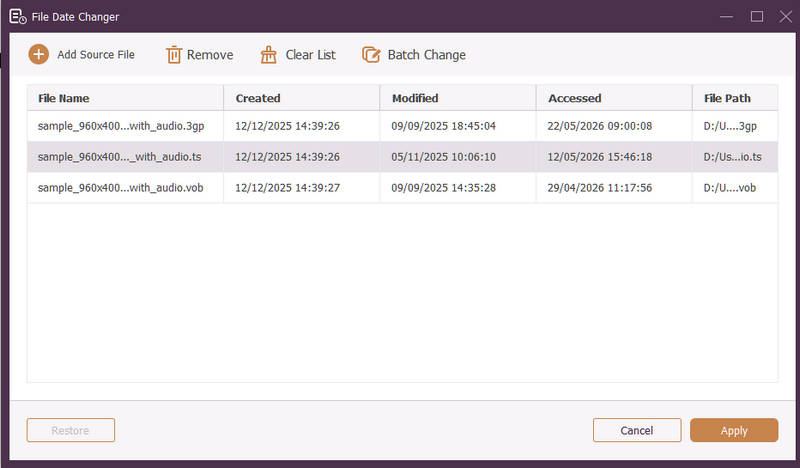
K dispozici pro Windows i Mac, AVAide Video konvertor je všestranná platforma vybavená výkonným vestavěným nástrojem pro změnu data souborů. Tato intuitivní funkce vám umožňuje bez námahy upravovat komplexní informace o časových razítkách, včetně data vytvoření, úpravy a posledního přístupu.
- Bezproblémově zpracovává mnoho mediálních formátů, jako je video, audio a obrázky.
- Importujte a aktualizujte více souborů současně, abyste ušetřili čas a zefektivnili svůj pracovní postup.
- Nabízí čisté a uživatelsky přívětivé rozhraní pro rychlou změnu data souboru.
- Udržujte svůj soubor bez problémů i po změně data.
2. Změna data souboru
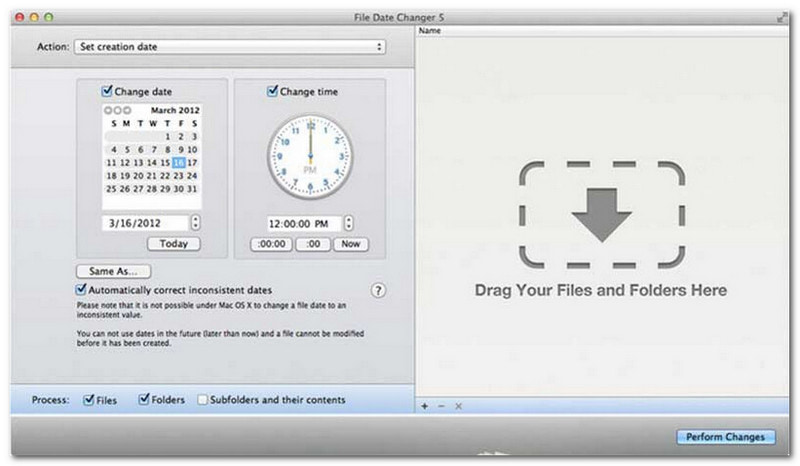
Měnič data souborů dostál svému názvu tím, že nabízí specializované řešení pro změnu data vytvoření souborů. Nabízí jednoduchý design, díky kterému je přístupný uživatelům všech úrovní. Podporuje úpravy data vytvoření i úprav. Ať už potřebujete změnit datum pro jednotlivé soubory nebo celé složky, tento měnič data souborů na Macu zjednodušuje proces díky své efektivní funkcionalitě.
Přestože je File Date Changer placený nástroj, jeho hodnota závisí na vašich specifických potřebách ohledně ceny a funkčnosti. Někteří uživatelé mohou shledat jeho sadu funkcí poněkud základní v porovnání s cenou. Pro ty, kteří upřednostňují efektivitu a bezproblémový pracovní postup, však zůstává vysoce spolehlivou a užitečnou investicí do měniče data souborů.
Klíčové vlastnosti programu File Date Changer:
- Upravte data a časy vytvoření, úprav a posledního přístupu pro více souborů.
- Podpora přidávání nebo odečítání konkrétních dnů, hodin, minut nebo sekund.
- Změňte vlastnosti souboru, například Pouze pro čtení nebo Skrytý, a aktualizujte metadata EXIF.
- Měnič data souborů se spustí okamžitě a nabízí přehledné rozhraní.
3. ExifTool
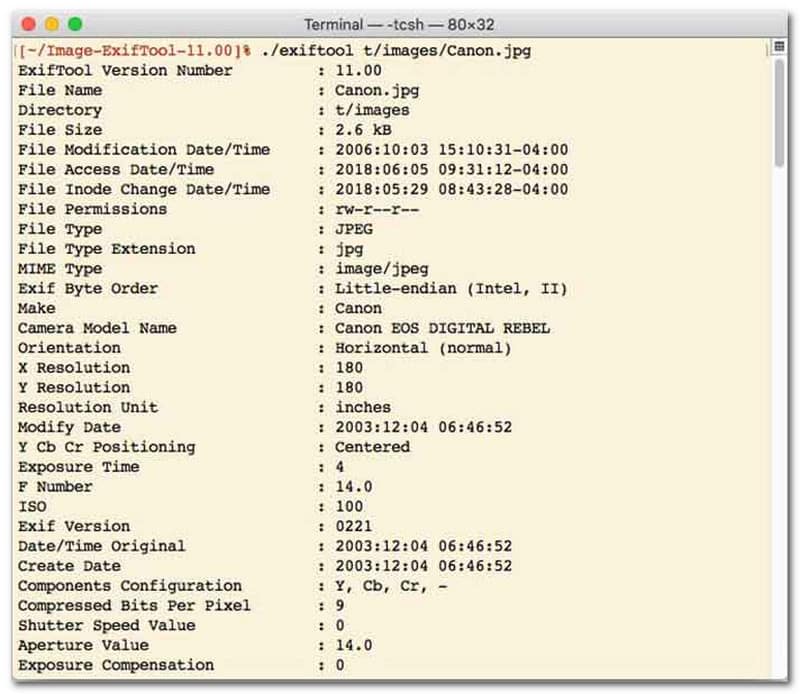
Pro uživatele, kteří preferují měnič data souborů s rozhraním příkazového řádku (CLI), je ExifTool zlatým standardem pro ultra přesnou správu souborů. Tento mimořádně všestranný nástroj pro změnu data souborů podporuje širokou škálu typů souborů, včetně fotografií, videí, dokumentů a zvuku. Kromě pouhé úpravy data vytvoření a úprav umožňuje ExifTool bezproblémově kopírovat metadata časového razítka z jednoho souboru do druhého, čímž zajišťuje, že celá vaše mediální knihovna zůstane dokonale synchronizovaná bez problémů.
Klíčové vlastnosti ExifToolu:
- Bezproblémové čtení a úprava časových razítek souborového systému.
- Kopírujte data mezi zcela odlišnými vrstvami metadat.
- Podpora pokročilé matematiky data a času pro dávkovou změnu data souborů.
- Extrahujte data a informace o médiích ze všech typů souborů.
4. BulkFileChanger
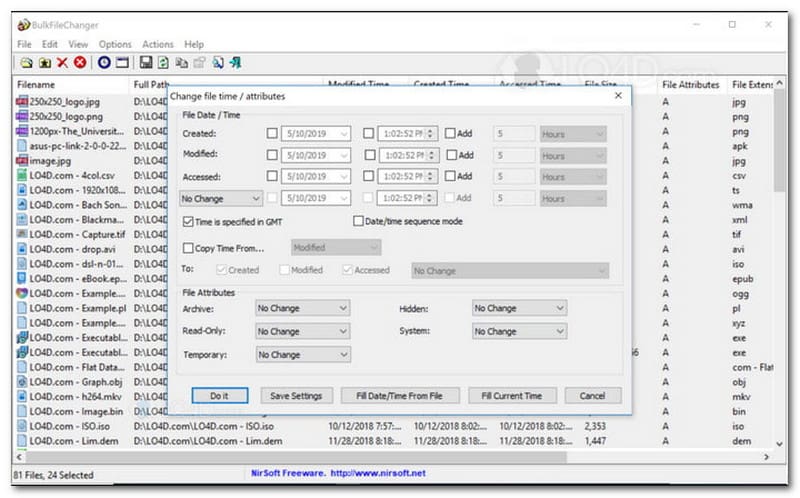
BulkFileChanger je lehký a vysoce výkonný nástroj pro změnu data souborů určený pro snadnou správu časových razítek souborů ve Windows. Umožňuje uživatelům rychle upravovat různé atributy data a času, včetně časů vytvoření, úpravy a posledního přístupu, prakticky u jakéhokoli typu souboru, od dokumentů a obrázků až po videa. Jeho všestrannost a rychlost napříč formáty z něj činí vynikající nástroj pro změnu data souborů pro organizaci digitálních archivů, ale jeho dostupnost je striktně omezena na operační systém Windows, což znamená, že uživatelé macOS a Linuxu budou muset hledat jinde.
Klíčové vlastnosti BulkFileChangeru:
- Upravit data vytvoření, úpravy a posledního přístupu k souboru.
- Bezproblémově zpracovává téměř všechny typy souborů, včetně dokumentů, obrázků a videí.
- Vyznačují se odlehčeným designem, který umožňuje ultrarychlou a hromadnou aktualizaci metadat.
- Přidat nebo odebrat konkrétní dny, hodiny, minuty a sekundy.
5. AttributeMagic
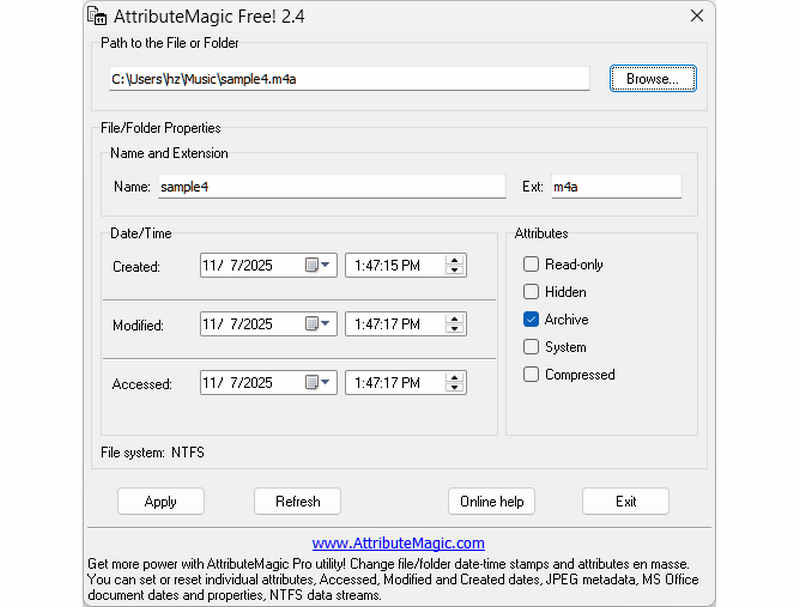
AttributeMagic jde daleko za rámec jednoduchého nástroje pro změnu data souboru a nabízí pokročilé řešení pro správu atributů složek i souborů. Tento komplexní nástroj umožňuje přesnou úpravu časového razítka, což uživatelům umožňuje bez námahy přepisovat data vytvoření, úpravy a posledního přístupu. Kromě svých možností specializovaného nástroje pro změnu data souboru nabízí AttributeMagic rozsáhlé přizpůsobení vlastností souborového systému tak, aby vyhovoval vašim specifickým potřebám archivace. Zatímco bezplatná verze nabízí základní funkce pro úpravu časového razítka, upgrade na prémiovou verzi odemkne pokročilou správu metadat a výkonné funkce automatizace.
Klíčové vlastnosti AttributeMagic:
- Upravit nebo maskovat časová razítka vytvoření, úpravy a posledního přístupu.
- Změňte datum souboru pro jeden soubor nebo pro celou složku souborů.
- Snadno zvyšujte, snižujte nebo posouvejte časová razítka souborů dopředu nebo dozadu.
- nastavit, resetovat nebo invertovat atributy základního souborového systému, jako například Pouze pro čtení, Skrytý a Systémový.
Část 2. Porovnání 5 měničů data souborů
| Produkt | Podporované platformy | Uživatelské rozhraní | Dávková úprava | Další možnosti |
| AVAide Video konvertor | Windows a macOS | Moderní, čisté a plynulé | Ano (ultra rychlé) | Kompletní sada: Konverze 8K videa, ripování DVD, úprava metadat, tvorba videoklipů/prezentací |
| Měnič data souborů (NirSoft) | Pouze Mac | Zastaralé (starší web/uživatelské rozhraní) | Omezený | Žádné (jednoúčelové) |
| ExifTool | Windows, macOS, Linux | Pouze příkazový řádek (bez grafického uživatelského rozhraní) | Ano (Vyžaduje složité skripty) | Pouze čtení/zápis metadat |
| BulkFileChanger | Pouze pro Windows | Klasický nástroj pro Windows | Ano | Základní úprava atributů souborů ve Windows |
| AttributeMagic | Pouze pro Windows | Pevné / Komplexní | Ano | Pouze správa příznaků souborového systému |
Část 3. Jak změnit data souborů v AVAide Video Converteru
Potřebovali jste někdy změnit datum vytvoření souboru, abyste si lépe uspořádali své digitální soubory? Můžete to udělat pomocí AVAide Video konvertor! Pokračujte ve čtení a zjistěte, jak změnit datum vytvoření souboru, abyste mohli soubor spravovat.
Krok 1Pro úplný přístup si stáhněte a nainstalujte AVAide Video Converter z oficiálních stránek.

STAŽENÍ ZDARMA Pro Windows 7 nebo novější
 Bezpečné stahování
STAŽENÍ ZDARMA Pro Mac OS X 10.13 nebo novější
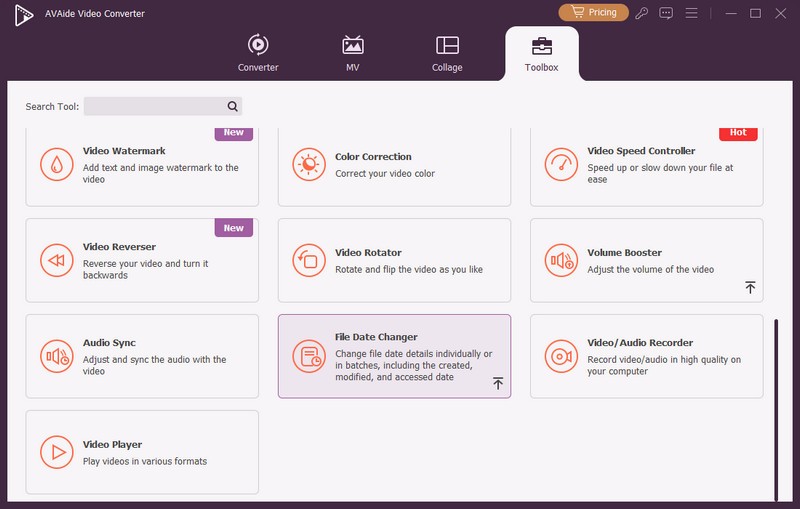
Bezpečné stahováníKrok 1Začněte otevřením programu v počítači. Zamiřte do Toolbox kartu pro přístup k několika funkcím. Přejděte myší dolů a hledejte Měnič data souboru mezi možnostmi a klikněte na něj. Je to funkce, kterou použijete ke změně údajů o datu souboru.
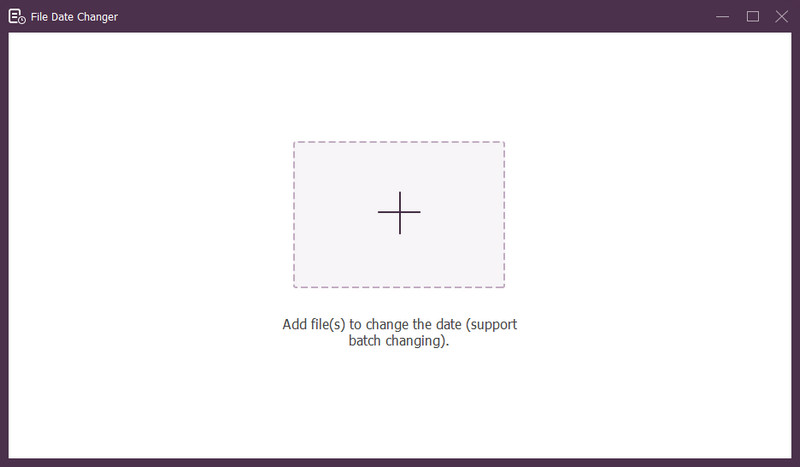
Krok 3Zmáčkni (+) pro import souborů. Mohou to být zvukové, obrazové a zvukové soubory. Chcete-li změnit podrobnosti souboru, můžete importovat více než jeden soubor.
Krok 4Po importu všech souborů můžete začít měnit jejich data. Vytvořená, upravená a přístupná data můžete odpovídajícím způsobem změnit. Chcete-li to provést, klepněte na položku, dokud se nezobrazí Šipka se objeví indikující úpravu.
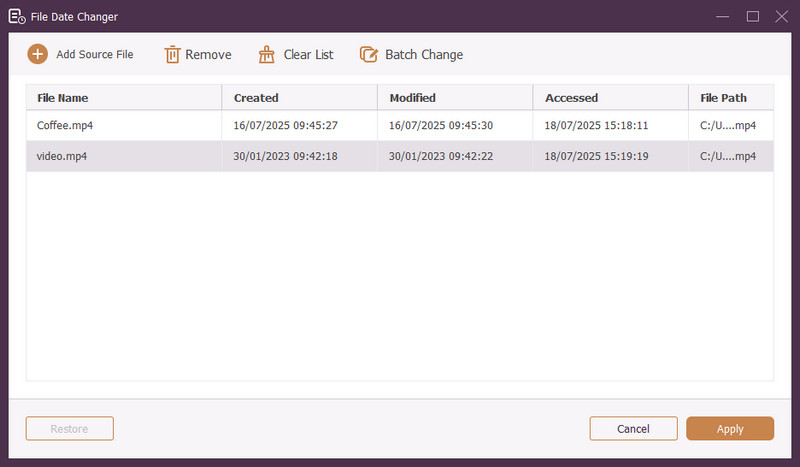
Krok 5Po úpravě všech dat souboru klepněte na Aplikovat tlačítko pro potvrzení změn. Po použití změn zkontrolujte podrobnosti o aktualizovaných datech souboru, abyste zajistili přesnost.
Část 4. Nejčastější dotazy k nejlepšímu měniči data souborů
Jak mohu zobrazit informace o datu souboru?
Pokud chcete zkontrolovat, kdy byl soubor vytvořen nebo naposledy upraven, můžete to udělat přímo ve svém počítači. Najděte soubor, klikněte na něj pravým tlačítkem a vyberte Vlastnosti. Poté můžete vidět všechny podrobnosti o souboru. Patří mezi ně data vytvoření a modifikace.
Bude někdo vědět, kdy změním datum souboru?
Ne! Změna data souboru nezanechá žádnou stopu. Takže nikdo nebude vědět, kdy jste provedli změnu.
Jaký je důvod, proč data a časy ze souboru mizí?
Existuje několik důvodů, proč mohou data a časy ze souborů zmizet. Může se to stát, když stáhnete soubor a ztratíte některé informace kvůli špatnému připojení k internetu. Někdy je to kvůli webu, ze kterého jste soubor stáhli.
Mohu načíst upravené datum vytvoření souboru?
Ano! Původní datum můžete obnovit ručním nastavením zpět na původní hodnotu. Je to jediný způsob, jak získat datum vytvoření souboru.
Má změna data a času souboru vliv na integritu nebo obsah souboru?
Ne! Změna data a času souboru neovlivní obsah ani integritu. Mění pouze metadata, jako jsou data vytvoření a modifikace. Skutečný soubor ponechá beze změny.
Tady to máš! Naučili jste se jak změnit datum vytvoření v souboru, což může být užitečné z různých důvodů. Pro efektivnější a pro začátečníky přívětivější zážitek zvažte použití AVAide Video Converter jako vašeho hlavního měniče data souboru. Je to nejlepší volba pro správu vašich digitálních souborů. Vyzkoušejte to a podělte se o své myšlenky níže!
O AUTOROVI

Nejkomplexnější převodník médií pro převod videa a zvuku bez ztráty kvality.
Upravit video