Chcete si vytvořit vlastní personalizovaný vyzváněcí tón. Ne nějaký odnikud. Něco, co jste si sami vytvořili pro hovory a upozornění.
Jsme tu, abychom vám s tím pomohli. Ukážeme vám různé způsoby, jak nahrát vyzváněcí tón na různých systémech. Podělíme se také o jednoduché tipy pro lepší výsledky. Připravte si tedy svůj hlas nebo zvuk na vlastní vyzváněcí tón.
Část 1. Jak nahrát vyzváněcí tón na iPhone
1. Hlasová poznámka jako vyzváněcí tón (nejjednodušší způsob)
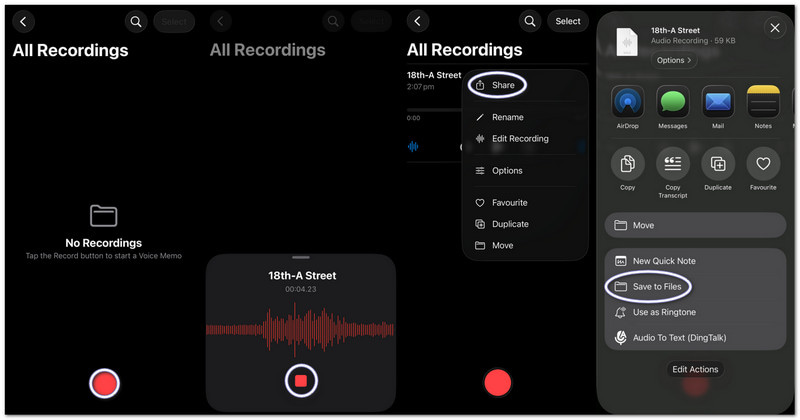
Hlasové poznámky nahrávají zvuk a okamžitě jej přemění na použitelný vlastní vyzváněcí tón pomocí základních nástrojů pro ořezávání. Tato část vás přesně naučí, jak vytvořit vyzváněcí tón z hlasové nahrávky na iPhonu.
Krok 1Spusťte na iPhonu aplikaci Hlasové poznámky.
Krok 2Klepněte na červenou Záznam tlačítko a mluvte nebo přehrajte zvuk.
Krok 3Klepněte Stop až budete hotovi.
Krok 4Klepněte na tři tečky (...) na vaší nahrávce.
Krok 5Vybrat Uložit do souborů uložit si zvuk a později jej použít jako vyzváněcí tón.
2. Jakýkoli zvukový soubor (MP3/M4A) jako vyzváněcí tón
Uložené zvukové soubory MP3 nebo M4A ze stažených souborů nebo hudebních aplikací lze vybrat a nastavit jako vyzváněcí tón na iPhonu.
Krok 1Stáhněte si soubor MP3 nebo M4A a uložte jej do Soubory aplikace
Krok 2Běh GarageBand a vybrat Záznamník zvuku.
Krok 3Vyhledejte si svůj zvukový záznam Souborya poté jej přetáhněte na časovou osu.
Krok 4Jít do Soubory, najděte svůj zvuk a přetáhněte jej na časovou osu.
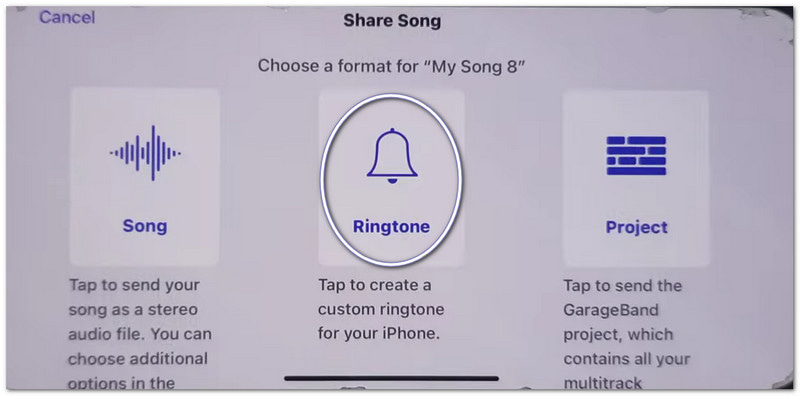
Krok 5Zkraťte to na méně než 30 sekund a poté klepněte na Podíl > Vyzváněcí tón > Vývozní.
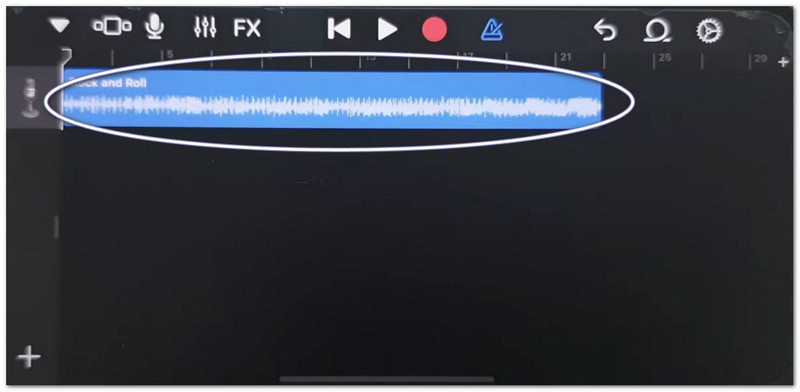
3. Používání GarageBandu (pro starší verze iOS)
GarageBand upravuje zvukové klipy s přesným ovládáním, což uživatelům umožňuje snadno stříhat, uspořádávat a exportovat vlastní vyzváněcí tóny, což usnadňuje pochopení toho, jak nastavit hlasovou nahrávku jako vyzváněcí tón na iPhonu.
Krok 1Otevřeno GarageBand a vyberte Záznamník zvuku.
Krok 2Klepněte na Zobrazení stop, poté otevřete Prohlížeč smyček.
Krok 3Importujte uloženou hlasovou poznámku nebo zvukový soubor.
Krok 4Přetáhněte jej na časovou osu a ořízněte jej na 30 sekund nebo méně.
Krok 5Klepněte Moje písně, pak Podíl > Vyzváněcí tón > Vývozní.
Odstraňování problémů „Sdílení poznámek na iPhonu nefunguje“
Pokud se při sdílení hlasových poznámek nebo souborů GarageBandu aplikace Sdílení zasekává, padá nebo se v ní nezobrazují aplikace, vyzkoušejte tato řešení.
Rychlé opravy:
- Vynucení restartu: Stiskněte Zvýšení hlasitosti a Snížení hlasitostiPoté podržte tlačítko napájení, dokud se neobjeví symbol Apple.
- Aktualizace iOS: Přejděte na Nastavení > Všeobecné > Aktualizace softwaruNainstalujte si veškeré aktualizace. Opraví systémové chyby.
- Přepnout AirDrop: Otevřít Kontrolní centrum Vypněte AirDrop. Vypněte a znovu zapněte AirDrop. Sdílení se obnoví.
Opravy systému
- Uvolnění úložiště: Ponechte alespoň 2 gigabajty volného místa. Smažte nepoužívané soubory nebo videa. Nedostatek úložiště může znemožnit fungování aplikace Sdílení.
Konečná oprava
- Obnovit všechna nastavení: Přejděte na Nastavení > Všeobecné > Převod nebo Resetovat iPhone > Obnovit všechna nastaveníNeodstraní vaše data. Pouze resetuje nastavení systému a může opravit problémy se sdíleným listem.
Část 2. Jak nahrát vyzváněcí tón v systému Android
1. Použití aplikace pro tvorbu vyzváněcích tónů (nejvíce doporučeno)
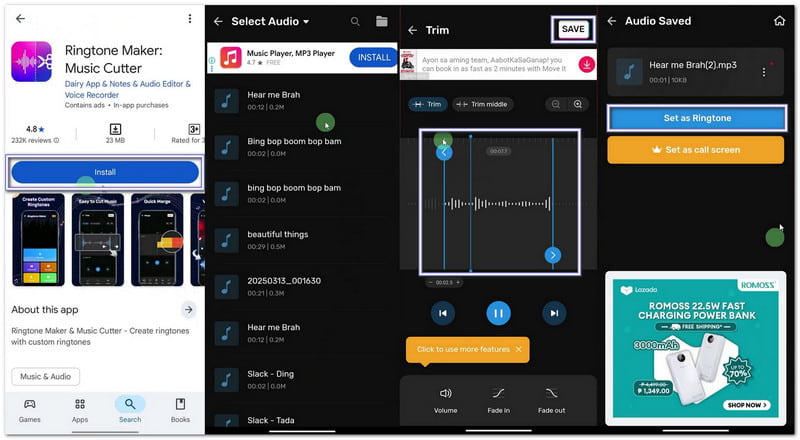
Pokud se chcete naučit, jak si nahrát vlastní vyzváněcí tón, můžete v Obchodě Google Play použít aplikaci Maker: Music Cutter. Jejím hlavním cílem je pomoci vám ořezávat skladby, stříhat přesné zvukové části a okamžitě je nastavit jako vlastní vyzváněcí tóny na telefonech s Androidem.
Krok 1Otevřete Obchod Google Play. Vyhledejte Tvůrce vyzvánění: Řezačka hudby. Nainstalujte jej. Poté stiskněte Otevřeno.
Krok 2Klepněte Začít. Vybrat Oříznout zvukPovolte aplikaci oprávnění, aby měla přístup k vašim souborům.
Krok 3Vyberte skladbu nebo zvukový soubor z telefonu. Posuňte posuvníky a vyberte počáteční a koncovou část vyzváněcího tónu.
Krok 4 Klepněte Střih nebo UložitV případě potřeby vyberte čistotu. Stiskněte Potvrdit. Poté klikněte Nastavit jako vyzváněcí tónPovolte přístup k nastavení systému a vyberte výchozí vyzváněcí tón.
2. Vestavěná nastavení (pro stažený zvuk)
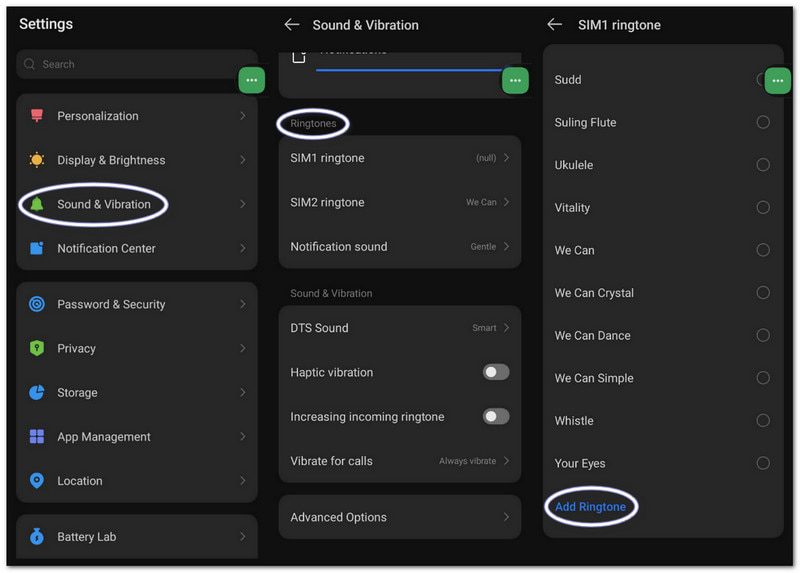
Nastavení systému Android umožňuje přímý výběr uložených zvukových souborů a jejich přiřazení jako vyzváněcích tónů bez nutnosti stahování dalších aplikací nebo nástrojů.
Krok 1Přejděte do nastavení telefonu. Klepněte na Zvuk a vibrace nebo Zvuk.
Krok 2Klepněte Vyzváněcí tón telefonu abyste viděli dostupné možnosti.
Krok 3Klepněte na Plus tlačítko nebo Přidat vyzváněcí tón tlačítko nahoře.
Krok 4Procházejte úložiště. Vyberte zvukový soubor. Klepněte na HotovoPoté potvrďte nastavení jako výchozího vyzváněcího tónu.
Část 3. Jak proměnit nahrávku obrazovky ve vyzváněcí tón
Záznam obrazovky můžete také proměnit v vyzváněcí tón v počítači se systémem Windows nebo Mac pomocí AVAide záznamník obrazovkyMá režim nahrávání zvuku, který zachycuje zvuk z vašeho systému a váš hlas, což usnadňuje nahrávání vyzváněcího tónu.
Nabízí také nastavení zvuku, kde můžete snížit nebo zvýšit hlasitost, zapnout potlačení šumu a zobrazit varování, pokud není detekován žádný zvuk. Vyzváněcí tón si samozřejmě můžete exportovat do podporovaných formátů, jako jsou MP3 a M4A, které fungují dobře pro mobilní zařízení.
Krok 1Stáhněte si a nastavte program AVAide Screen Recorder na svém počítači se systémem Windows nebo Mac.

STAŽENÍ ZDARMA Pro Windows 7 nebo novější
 Bezpečné stahování
STAŽENÍ ZDARMA Pro Mac OS X 10.13 nebo novější
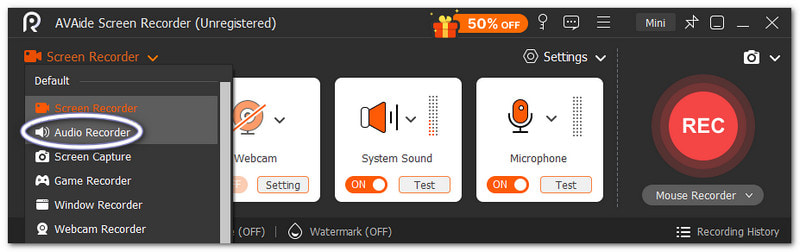
Bezpečné stahováníKrok 2Spustí se v režimu Záznamník obrazovky. Klikněte na rozbalovací nabídku. Vyberte Záznamník zvuku pro lepší zachycení zvuku.
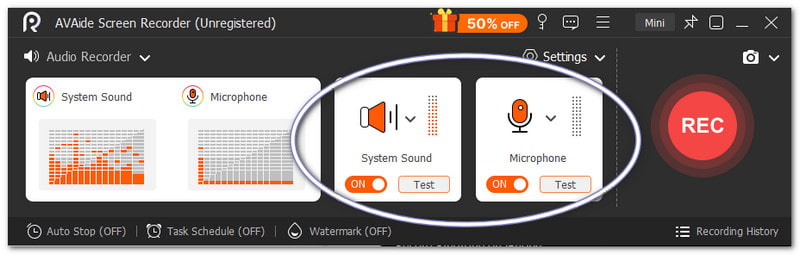
Krok 3Zapnout Systémový zvuk pro nahrávání interního zvuku. Zapněte Mikrofon pokud chcete, aby byl přidán váš hlas. V případě potřeby můžete také jemně doladit hlasitost.
Krok 4Udeřil REC pro spuštění a počkejte na odpočet. Jakmile začne, přehrajte požadovaný zvuk. Stiskněte Stop tlačítko po dokončení. Poté se soubor automaticky uloží. Můžete jej však také oříznout nebo upravit, než jej použijete jako vyzváněcí tón.
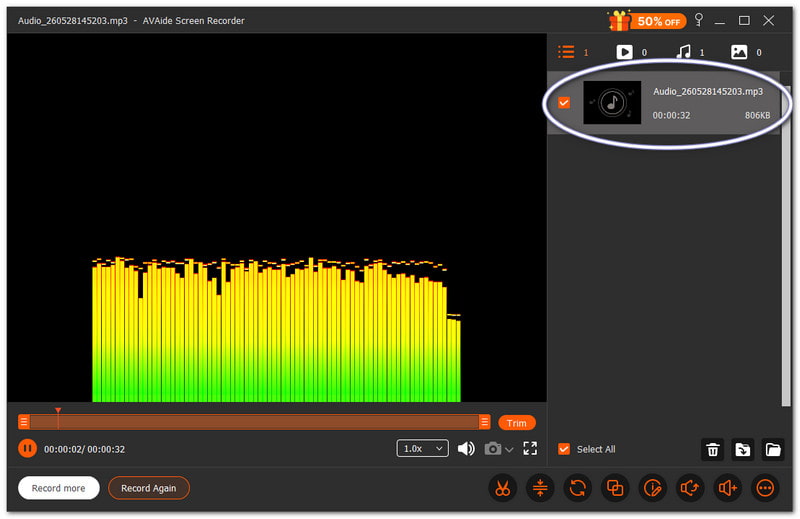
Není pochyb o tom, že tento Mac a Záznamník zvuku ve Windows vám může pomoci vytvořit vyzváněcí tón, který si osobně přejete a který se vám pro vaše zařízení líbí.
Část 4. Kroky specifické pro Samsung
1. Používání vestavěného záznamníku obrazovky
Samsung Screen Recorder zachycuje zvuk z videí a pomáhá převádět nahrané zvuky na použitelné vyzváněcí tóny.
Krok 1V Rychlý panel, přejeďte prstem dolů. Stiskněte Screen Recorder tlačítko. Před zahájením vyberte Zvuky médií.
Krok 2Přehrajte video nebo hudbu, kterou chcete nahrát. Nechte nahrávání obrazovky nahrát se zvukem.
Krok 3Po dokončení nahrávání zastavte. Soubor bude uložen ve vaší galerii. Pro extrahování zvuku použijte aplikaci pro převod videa do MP3.
Krok 4Přesuňte soubor MP3 do Interní úložiště > Složka vyzváněcích tónů aby se to dalo použít později.
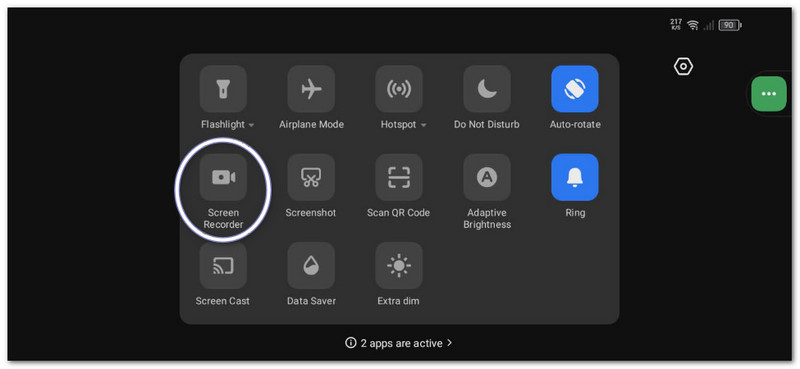
Tato metoda ukazuje Nahrávání obrazovky SamsunguProto se prosím ujistěte, že nahrané video převádíte pouze na zvuk, aby ho bylo možné použít jako vyzváněcí tón.
2. Vestavěný nástroj pro tvorbu vyzváněcích tónů
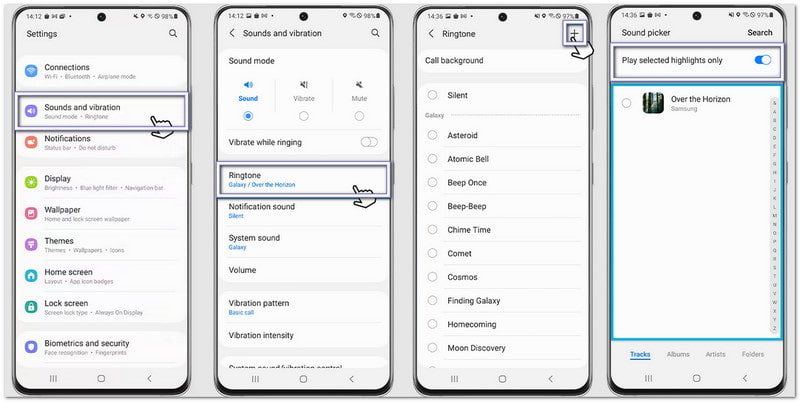
Nastavení vyzváněcích tónů Samsung umožňuje uživatelům vybrat skladby, oříznout nejdůležitější momenty a okamžitě je nastavit jako výchozí vyzváněcí tón telefonu.
Krok 1Otevřete telefon a přejděte na Nastavení. Klepněte Zvuky a vibrace. Poté vyberte Vyzváněcí tón.
Krok 2Klepněte na Přidat a vyberte uloženou skladbu nebo nahrávku z telefonu.
Krok 3Umožnit Přehrát pouze vybrané sestřihy pokud je k dispozici. Společnost Samsung automaticky ořízne nejlepší část zvuku.
Krok 4Potvrďte svůj výběr a zvuk bude nyní nastaven jako výchozí vyzváněcí tón.
3. Metoda správce souborů
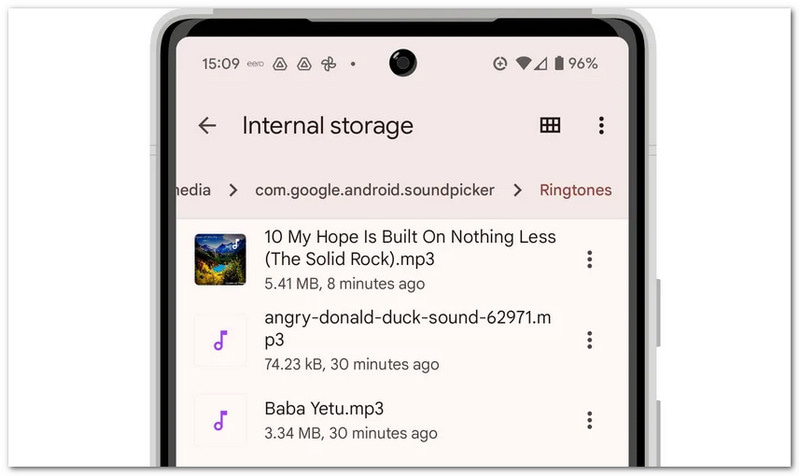
Samsung File Manager organizuje zvukové soubory a umožňuje přímé kopírování do složky Vyzváněcí tóny pro automatickou detekci vyzváněcího tónu.
Krok 1Spusťte Moje soubory aplikace ve vašem telefonu Samsung.
Krok 2Jít do Stahování nebo Zvuk složku. Vyhledejte nahraný nebo stažený zvuk.
Krok 3Dlouze stiskněte soubor. Klepněte na kopírovatPak přejděte na Interní úložiště > Vyzváněcí tóny.
Krok 4Vložte soubor do složky Vyzváněcí tóny. Poté se vraťte do nastavení Zvuk. Soubor se nyní zobrazí v seznamu vyzváněcích tónů.
Část 5. Tipy od profesionálů pro dosažení nejlepších výsledků
Než si nastavíte vyzváněcí tón, je užitečné řídit se několika jednoduchými tipy. Díky nim bude váš vyzváněcí tón znít čistěji a lépe fungovat v telefonu.
Tip #1: Pište stručně.
Vytvořte si vyzvánění na 30 až 40 sekund. Zůstane plynulé a plně kompatibilní s telefony Android.
Tip #2: Použijte správný formát.
Pokud je to možné, používejte soubory MP3 nebo M4A. Tyto formáty fungují na většině zařízení Android bez chyb.
Tip #3: Nejprve zkontrolujte hlasitost.
Před nastavením vyzváněcího tónu si jej přehrajte. Ujistěte se, že není příliš hlasitý ani příliš tichý. Pomůže vám to vyhnout se překvapením, když vám někdo volá.
Naučili jste se jak nahrát vyzváněcí tón na iPhonu, Android a stolní počítač. Takže bez ohledu na to, jaké zařízení používáte, si můžete kdykoli vytvořit vlastní vyzváněcí tón.
Pro uživatele Windows a Macu, AVAide záznamník obrazovky usnadňuje celý proces. Můžete si nahrát vlastní hlas nebo zachytit zvuk ze systému. Soubor můžete také po nahrávání oříznout. Pomůže vám to zachovat pouze tu nejlepší část pro vyzvánění.
O AUTOROVI

Zachyťte aktivity na obrazovce pomocí zvuku, online schůzek, herních videí, hudby, webové kamery atd.