تخيل أنك تنقل مجموعة كبيرة من الصور أو المستندات إلى جهاز الكمبيوتر الخاص بك، لتجد أن خانتي "تاريخ الإنشاء" أو "تاريخ التعديل" مشوشتان تمامًا. سواء كان ذلك بسبب خلل في النسخ الاحتياطي أو عدم تطابق المنطقة الزمنية، فإن الطوابع الزمنية غير الصحيحة للملفات قد تُفسد أرشفة ملفاتك الرقمية وتُسبب فوضى في سير عملك.
لحسن الحظ، لست مضطرًا للتعايش مع هذه الفوضى. شخص متفانٍ مغير تاريخ الملف يمنحك هذا البرنامج تحكمًا كاملًا في بياناتك الوصفية، مما يسمح لك بتعديل طوابع الملفات دفعةً واحدة ببضع نقرات فقط. في هذا الدليل، جمعنا لك أفضل 5 برامج لتغيير تاريخ الملفات لأنظمة ويندوز وماك لمساعدتك على استعادة السيطرة على تنظيم ملفاتك الرقمية. هيا بنا نبدأ!
الجزء الأول: مراجعة شاملة لأفضل 5 برامج لتغيير تاريخ الملفات
سيعرض هذا القسم أفضل برنامج لتغيير تاريخ الملفات يمكنك الاعتماد عليه. تابع القراءة لتتعرف على كيفية مساعدة هذه الأدوات في إنجاز مهمتك!
1. محول الفيديو AVAide
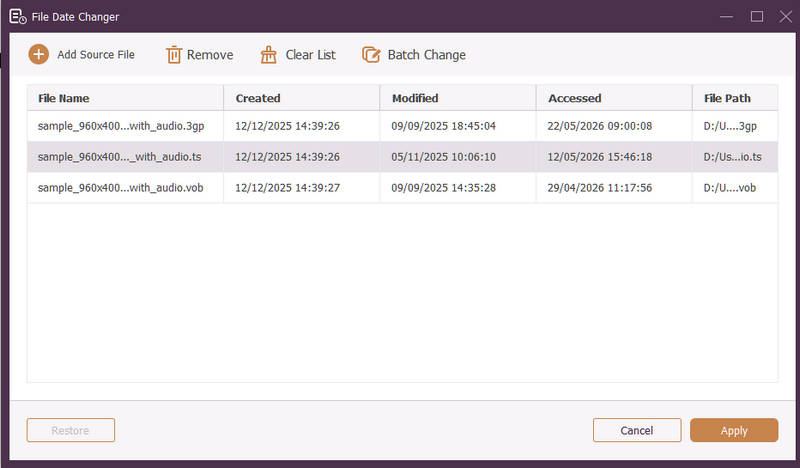
متوفر لأنظمة ويندوز وماك، افايد محول الفيديو هي منصة متعددة الاستخدامات مزودة بأداة قوية مدمجة لتغيير تاريخ الملفات. تتيح لك هذه الميزة البديهية تعديل تفاصيل الطابع الزمني الشاملة بسهولة، بما في ذلك تواريخ الإنشاء والتعديل وآخر وصول.
- التعامل بسلاسة مع العديد من تنسيقات الوسائط عبر الفيديو والصوت والصور.
- قم باستيراد وتحديث ملفات متعددة في وقت واحد لتوفير الوقت وتبسيط سير العمل.
- يتميز بواجهة مستخدم نظيفة وسهلة الاستخدام لتغيير تاريخ الملف بسرعة.
- حافظ على ملفك سليمًا بعد تغييرات التاريخ.
2. مغير تاريخ الملف
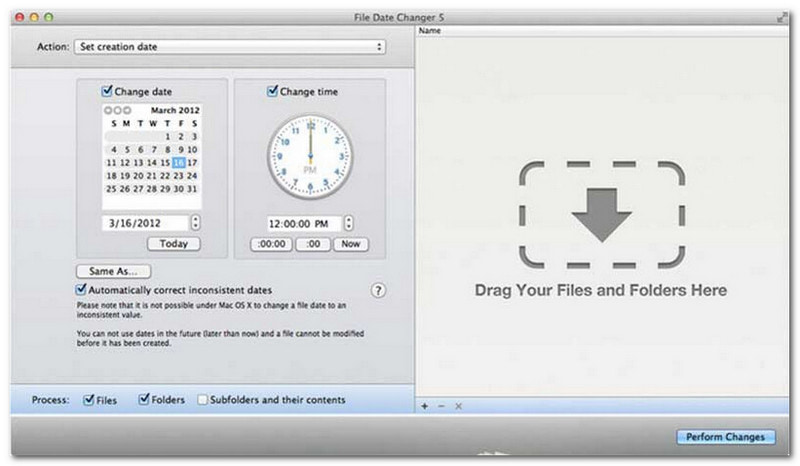
يُقدّم برنامج تغيير تاريخ الملفات حلاً مُخصصاً لتغيير تواريخ إنشاء الملفات، وهو يرقى إلى مستوى اسمه. يتميز بتصميم بسيط يجعله سهل الاستخدام لجميع المستخدمين، بغض النظر عن مستوى خبرتهم. يدعم البرنامج تعديل تواريخ الإنشاء والتعديل على حد سواء. سواء كنت ترغب في تغيير تواريخ ملفات مُحددة أو مجلدات كاملة، فإن هذا البرنامج على نظام ماك يُبسّط العملية بفضل وظائفه الفعّالة.
على الرغم من أن برنامج تغيير تاريخ الملفات أداة مدفوعة، إلا أن قيمته تعتمد على احتياجاتك الخاصة من حيث التكلفة والوظائف. قد يجد بعض المستخدمين أن ميزاته بسيطة نوعًا ما مقارنةً بسعره. مع ذلك، بالنسبة لمن يُعطون الأولوية للكفاءة وسلاسة سير العمل، يظل البرنامج استثمارًا موثوقًا وجديرًا بالاهتمام لتغيير تاريخ الملفات.
الميزات الرئيسية لبرنامج تغيير تاريخ الملف:
- قم بتعديل تواريخ وأوقات إنشاء وتعديل وآخر وصول لعدة ملفات.
- يدعم إضافة أو طرح أيام أو ساعات أو دقائق أو ثواني محددة.
- قم بتغيير خصائص الملف مثل "للقراءة فقط" أو "مخفي"، وقم بتحديث بيانات EXIF الوصفية.
- يعمل برنامج تغيير تاريخ الملف على الفور ويقدم واجهة واضحة.
3. أداة Exif
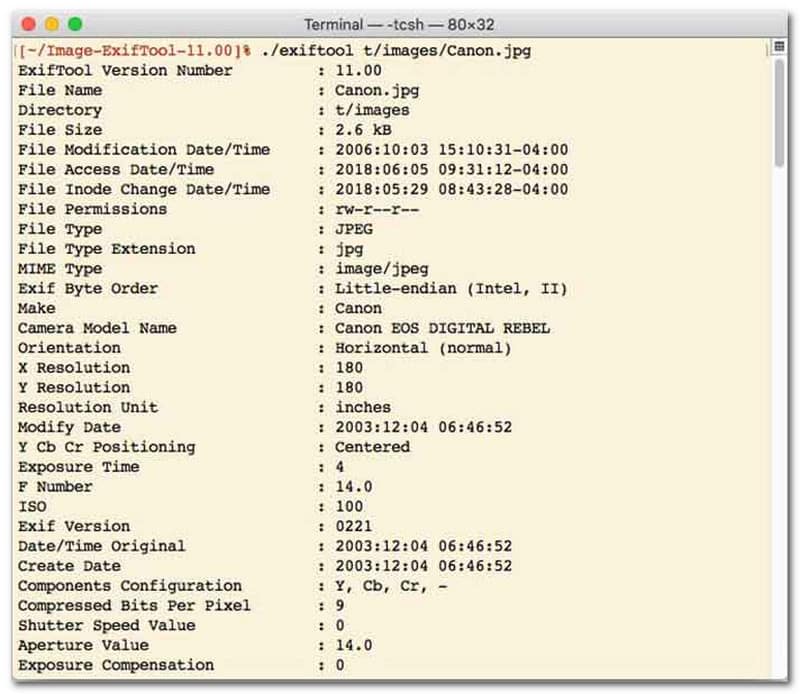
بالنسبة للمستخدمين الذين يفضلون تغيير تاريخ الملفات عبر واجهة سطر الأوامر (CLI)، يُعدّ ExifTool الخيار الأمثل لإدارة الملفات بدقة فائقة. تدعم هذه الأداة متعددة الاستخدامات نطاقًا واسعًا من أنواع الملفات، بما في ذلك الصور والفيديوهات والمستندات والملفات الصوتية. إلى جانب تعديل تواريخ الإنشاء والتعديل، يتيح لك ExifTool نسخ بيانات الطابع الزمني بسلاسة من ملف إلى آخر، مما يضمن مزامنة مكتبة الوسائط الخاصة بك بالكامل دون أي عناء.
الميزات الرئيسية لبرنامج ExifTool:
- قراءة وتعديل الطوابع الزمنية لنظام الملفات بسلاسة.
- نسخ التواريخ بين طبقات مختلفة تمامًا من البيانات الوصفية.
- يدعم هذا النظام عمليات حسابية متقدمة للتاريخ والوقت لمساعدتك في تغيير تواريخ الملفات على دفعات.
- استخرج معلومات التاريخ والوسائط من جميع أنواع الملفات.
4. BulkFileChanger
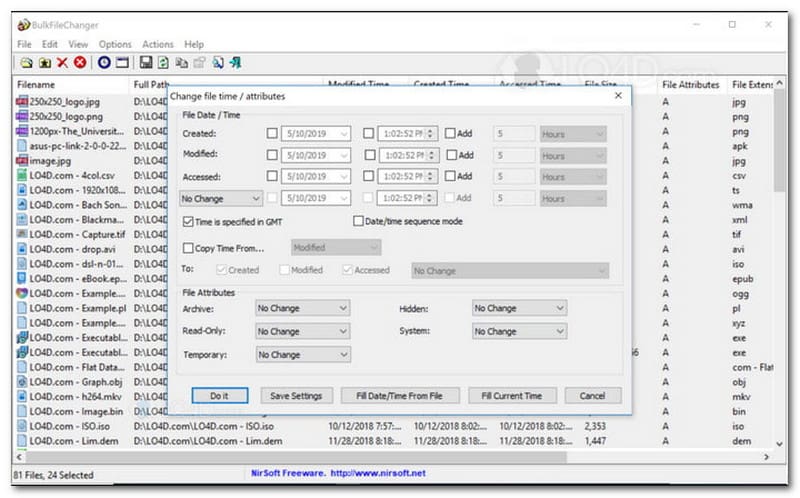
BulkFileChanger أداة خفيفة الوزن وعالية الأداء لتغيير تاريخ الملفات، مصممة لتسهيل إدارة الطوابع الزمنية للملفات على نظام ويندوز. تتيح للمستخدمين تعديل خصائص التاريخ والوقت المختلفة بسرعة، بما في ذلك وقت الإنشاء والتعديل وآخر وصول، لأي نوع من الملفات تقريبًا، من المستندات والصور إلى مقاطع الفيديو. على الرغم من أن تنوعها وسرعتها في التعامل مع مختلف الصيغ تجعلها أداة ممتازة لتغيير تاريخ الملفات وتنظيم الأرشيفات الرقمية، إلا أن توفرها يقتصر على نظام التشغيل ويندوز، مما يعني أن مستخدمي macOS وLinux سيحتاجون إلى البحث عن بدائل أخرى.
الميزات الرئيسية لبرنامج BulkFileChanger:
- قم بتعديل تواريخ إنشاء الملفات وتعديلها وآخر وصول إليها.
- يتعامل بسلاسة مع جميع أنواع الملفات تقريبًا، بما في ذلك المستندات والصور ومقاطع الفيديو.
- يتميز بتصميم خفيف الوزن يسمح بتحديث البيانات الوصفية بكميات كبيرة وبسرعة فائقة.
- أضف أو استخرج أيامًا وساعات ودقائق وثوانٍ محددة.
5. سمة ماجيك
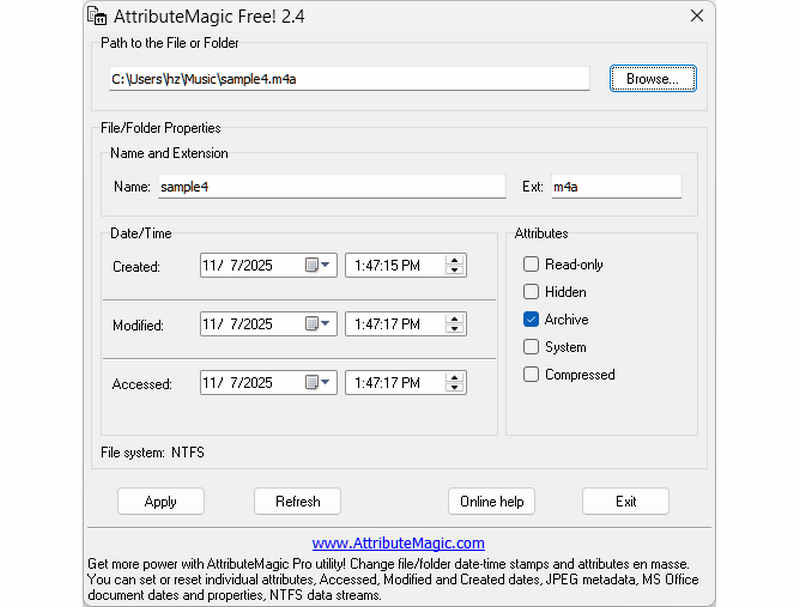
يتجاوز برنامج AttributeMagic كونه مجرد أداة لتغيير تاريخ الملفات، إذ يقدم حلاً متقدماً لإدارة خصائص المجلدات والملفات. تُمكّن هذه الأداة الشاملة من تعديل الطوابع الزمنية بدقة، مما يسمح للمستخدمين بإعادة كتابة تواريخ الإنشاء والتعديل وآخر وصول بسهولة. إضافةً إلى قدراته كأداة لتغيير تاريخ الملفات، يوفر AttributeMagic إمكانية تخصيص متقدمة لخصائص نظام الملفات لتناسب احتياجات الأرشفة الخاصة بك. بينما توفر النسخة المجانية وظائف تحرير الطوابع الزمنية الأساسية، يتيح الترقية إلى النسخة المدفوعة التحكم المتقدم في البيانات الوصفية وميزات التشغيل الآلي القوية.
الميزات الرئيسية لبرنامج AttributeMagic:
- تعديل أو إخفاء الطوابع الزمنية للإنشاء والتعديل وآخر وصول.
- قم بتغيير تاريخ الملف سواء لملف واحد أو لمجلد ملفات كامل.
- يمكنك بسهولة زيادة أو إنقاص أو تحريك الطوابع الزمنية للملفات للأمام أو للخلف.
- تعيين أو إعادة ضبط أو عكس سمات نظام الملفات الأساسية مثل القراءة فقط، والمخفي، والنظام.
الجزء الثاني: مقارنة بين برامج تغيير تاريخ الملفات الخمسة
| منتج | المنصات المدعومة | واجهة المستخدم | التحرير الجماعي | قدرات إضافية |
| افايد محول الفيديو | ويندوز وماك أو إس | عصري، نظيف وانسيابي | نعم (سريع للغاية) | مجموعة كاملة: تحويل الفيديو بدقة 8K، نسخ أقراص DVD، تحرير البيانات الوصفية، إنشاء مقاطع فيديو موسيقية/عروض شرائح |
| برنامج تغيير تاريخ الملف (NirSoft) | ماك فقط | قديم (واجهة مستخدم/ويب قديمة) | محدود | لا شيء (لغرض واحد) |
| أداة إكسيف | ويندوز ، ماك ، لينوكس | سطر الأوامر فقط (بدون واجهة رسومية) | نعم (يتطلب نصوصًا برمجية معقدة) | قراءة/كتابة البيانات الوصفية فقط |
| مُبدِّل الملفات المجمعة | نظام التشغيل ويندوز فقط | أداة ويندوز الكلاسيكية | نعم | تعديل خصائص ملفات ويندوز الأساسية |
| سحر السمات | نظام التشغيل ويندوز فقط | صلب / معقد | نعم | إدارة علامات نظام الملفات فقط |
الجزء 3. كيفية تغيير بيانات الملف في برنامج AVAide Video Converter
هل سبق لك أن احتجت إلى تغيير تاريخ إنشاء ملف لتنظيم ملفاتك الرقمية بشكل أفضل؟ يمكنك القيام بذلك باستخدام افايد محول الفيديو! استمر في القراءة لتتعرف على كيفية تغيير التاريخ الذي تم إنشاؤه على الملف لمساعدتك في إدارة ملفك.
الخطوة 1قم بتنزيل وتثبيت AVAide Video Converter من الموقع الرسمي للوصول الكامل.

تنزيل مجاني لنظام التشغيل Windows 7 أو أحدث
 تحميل آمن
تنزيل مجاني لنظام التشغيل Mac OS X 10.13 أو الإصدارات الأحدث
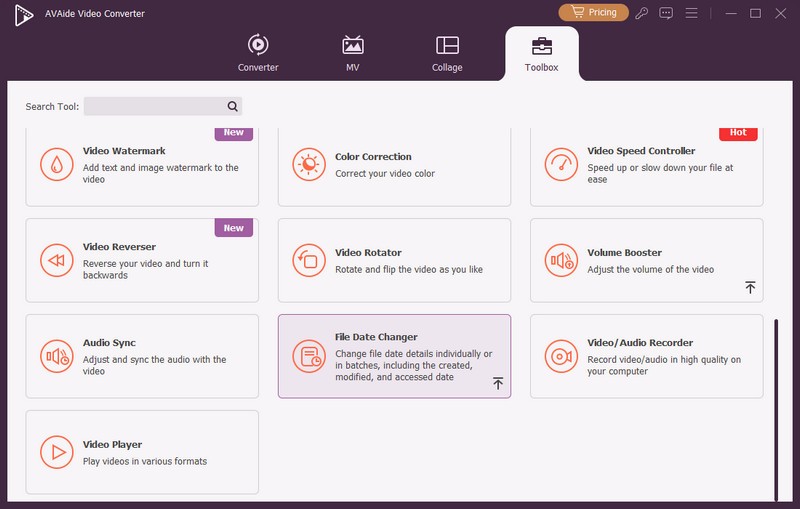
تحميل آمنالخطوة 1افتح البرنامج على جهاز الكمبيوتر الخاص بك للبدء. توجه إلى صندوق الأدوات علامة التبويب للوصول إلى العديد من الميزات. قم بالتمرير لأسفل بالماوس، وابحث عن مغير تاريخ الملف من بين الخيارات ثم اضغط عليه إنها الميزة التي ستستخدمها لتغيير تفاصيل تاريخ الملف.
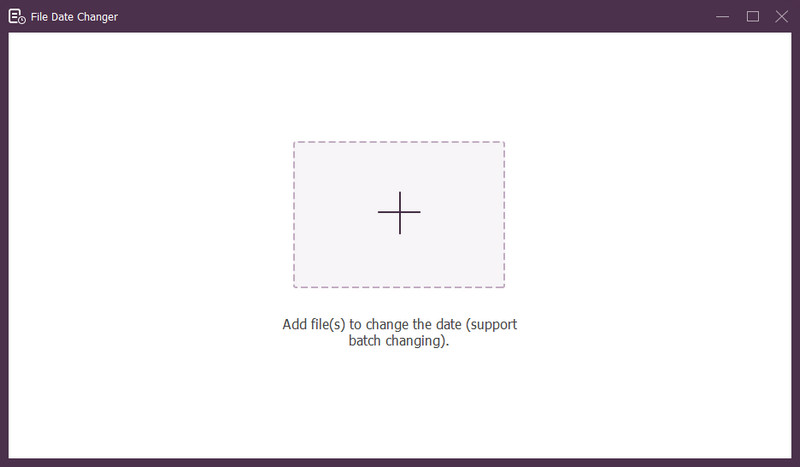
الخطوه 3اضغط على (+) لاستيراد الملفات. يمكن أن يكون هذا ملفات صوتية وصورة وملفات صوتية. يمكنك استيراد أكثر من ملف لتغيير تفاصيل الملف.
الخطوة 4يمكنك البدء في تغيير تواريخها بمجرد استيراد جميع الملفات. يمكنك تغيير التواريخ التي تم إنشاؤها وتعديلها والوصول إليها وفقًا لذلك. للقيام بذلك، انقر فوق العنصر حتى سهم يظهر للإشارة إلى التحرير.
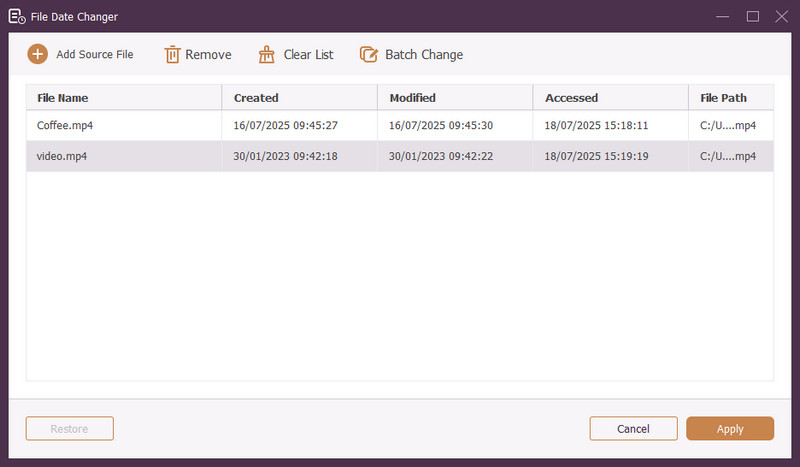
الخطوة الخامسةبعد تحرير جميع تواريخ الملف، انقر فوق تطبيق زر لتأكيد التغييرات. بعد تطبيق التغييرات، قم بمراجعة تفاصيل بيانات الملف المحدثة للتأكد من دقتها.
الجزء 4. الأسئلة الشائعة حول أفضل برنامج لتغيير تاريخ الملفات
كيف يمكنني عرض معلومات التاريخ للملف؟
إذا كنت تريد التحقق من وقت إنشاء ملف أو تعديله آخر مرة، فيمكنك القيام بذلك مباشرة على جهاز الكمبيوتر الخاص بك. الرجاء العثور على الملف، ثم انقر بزر الماوس الأيمن عليه، ثم اختر خصائص. وبعد ذلك، يمكنك رؤية كافة التفاصيل حول الملف. وتشمل هذه تواريخ الإنشاء والتعديل.
هل سيعرف أحد عندما أقوم بتغيير تاريخ الملف؟
لا! تغيير تاريخ الملف لن يترك أي أثر. لذلك، لن يعرف أحد متى أجريت التغيير.
ما هو سبب اختفاء التواريخ والأوقات من الملف؟
هناك عدة أسباب وراء اختفاء التواريخ والأوقات من الملفات. يمكن أن يحدث ذلك عندما تقوم بتنزيل ملف وتفقد بعض المعلومات بسبب ضعف الاتصال بالإنترنت. في بعض الأحيان، يكون ذلك بسبب موقع الويب الذي قمت بتنزيل الملف منه.
هل يمكنني استرجاع تاريخ الإنشاء المعدل للملف؟
نعم! يمكنك استعادة التاريخ الأصلي عن طريق ضبطه يدويًا على قيمته الأولية. هذه هي الطريقة الوحيدة لاسترداد تاريخ إنشاء الملف.
هل يؤثر تغيير تاريخ الملف ووقته على سلامة الملف أو محتواه؟
لا! لن يؤثر تغيير تواريخ وأوقات الملف على المحتوى أو التكامل. فهو يغير فقط البيانات الوصفية، مثل تواريخ الإنشاء والتعديل. ويترك الملف الفعلي دون تغيير.
ها أنت ذا! لقد تعلمت كيفية تغيير التاريخ الذي تم إنشاؤه في الملف، والتي يمكن أن تكون مفيدة لأسباب مختلفة. للحصول على تجربة أكثر انسيابية ومناسبة للمبتدئين، فكر في استخدام AVAide Video Converter كمغير لتاريخ الملف. إنه الخيار الأفضل لإدارة ملفاتك الرقمية. جربه وشارك أفكارك أدناه!
نبذة عن المؤلف

محول الوسائط الأكثر شمولاً لتحويل الفيديو والصوت دون فقدان الجودة.
تحرير الفيديو
- فيديو راقي بالذكاء الاصطناعي
- إزالة العلامة المائية من الفيديو
- إزالة النص من الفيديو
- تصغير 4K إلى 1080p / 720p
- إزالة الضوضاء الخلفية من الفيديو
- MP4 محرر البيانات الوصفية
- شحذ جودة الفيديو
- إرجاع الفيديو
- إصلاح جودة الفيديو الرديئة
- إزالة البيانات الوصفية من الفيديو/الصوت
- فيديو الكاميرا الأمامية المرآة/غير المرآة