Canon cameras record images in CR2, a raw image format designed to capture maximum image detail. Although handy for editing, it cannot be used in day-to-day applications due to its large file size and limited compatibility. When converting CR2 to JPG, it can be shared more easily, uploaded faster, and supported on a wider range of devices. It is also a process that minimizes storage requirements without requiring high-level technical expertise. This guide is divided into reasons, methods, and tools based on common image-handling practices to help you manage your files in a clear, controlled manner.

Part 1. Canon CR2: Why You Need to Convert It

Canon CR2 is a raw file format that records raw information from the camera sensor. Although it is extremely detailed, it may be necessary to convert the CR2 file format to JPG, as many devices and applications do not support raw files.

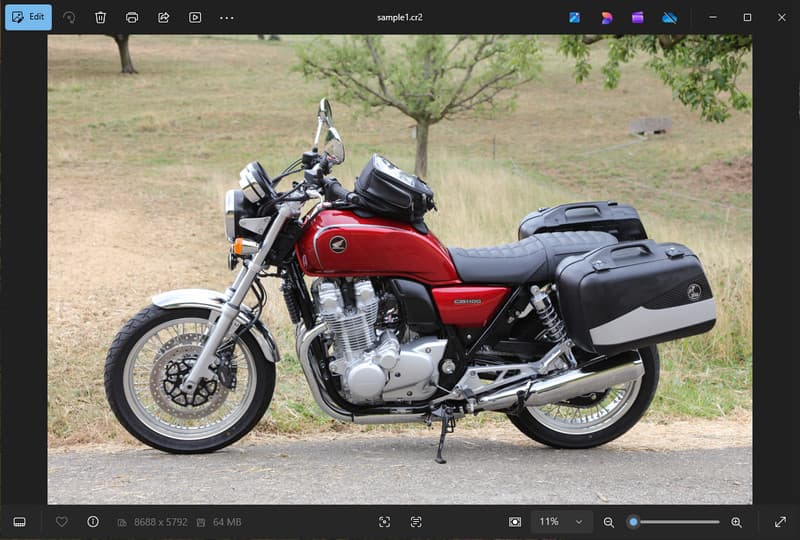
Sample CR2 Image

1. Limited Compatibility

Many standard tools do not support CR2 files, making it difficult to view images. Converting a CR2 file to JPG ensures your photos open smoothly across devices, browsers, and basic image viewers.

2. Large File Size

Raw files are very large since they preserve more image data. This affects storage and performance. Changing CR2 pictures to JPG reduces file size, making it easier to store and transfer images efficiently.

3. 更方便的分享與上傳

Many platforms do not accept raw formats or are slow to process. Switching from CR2 to JPG is a quick and easy way to upload your pictures and ensure your photos show up in the right format on social media, email, and other websites.

4. No Need for Specialized Software

CR2 files need editing software capable of processing the raw. When you convert CR2 to JPG, you eliminate the usage of sophisticated programs and easily obtain images to use in everyday life.

5. Faster Workflow

Working with raw files can slow down your process, especially in bulk. Using a reliable CR2-to-JPG converter helps speed up image processing and improve overall productivity.

6. Simpler Process for Beginners

Raw formats can feel complex for new users. Learning how to convert CR2 to JPG simplifies your workflow and makes image management easier without technical barriers.

Understanding these points explains why conversion is often the practical choice. In the next section, you will explore the best methods to convert CR2 to JPG efficiently.

Part 2. 5 Best Ways to Convert CR2 to JPG

1. AVAide Image Converter (Best Free Online Option)

AVAide 影像轉換器 is a fast, browser-based solution designed for users who need quick results without installing software. It is especially useful when you need to convert CR2 to JPG in bulk while maintaining image quality.

主要特徵:

  • Converts to and from batch CR2 files.
  • Maintains a high image quality and natural color.
  • Fully online with no installation required
  • Accepts JPG, PNG, and others.
  • Easy-to-use interface to accelerated processing.

平台:

  • Web-based, which works on Windows, Mac, Linux, and mobile browsers

步驟1訪問官方網站

Go to your browser and access the official AVAide Image Converter page. Once loaded, you can start converting immediately without signing up or installing anything.

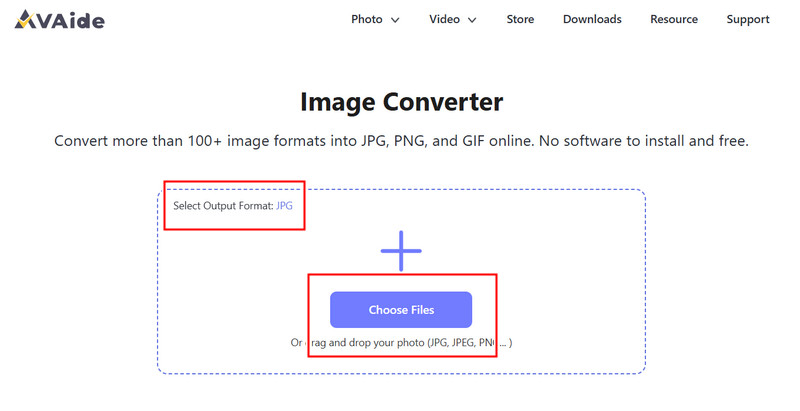
第2步Set Output and Upload

Select JPG as your desired output format. Then, click the + button or drag and drop your CR2 files into the upload area to begin.

Select Output and Import

第 3 步Start Converting CR2

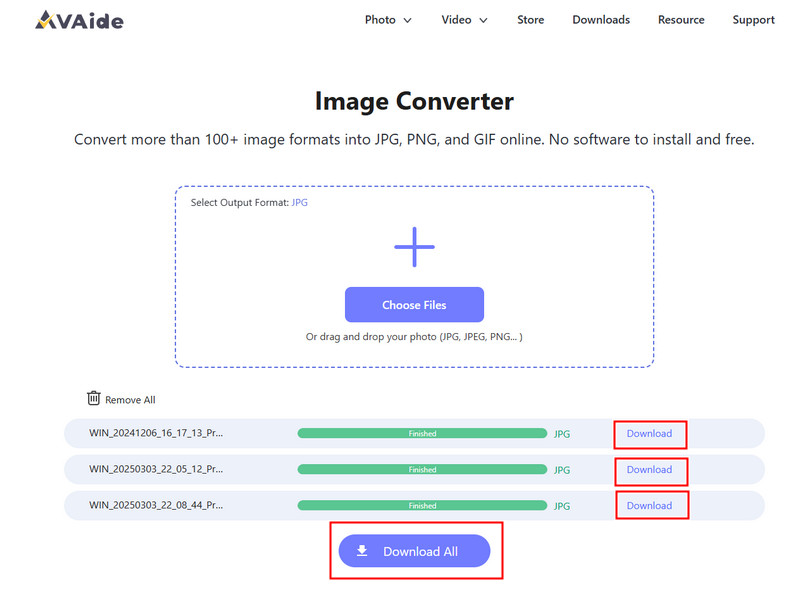
Wait for the tool to finish processing your files. Once done, click 下載 for a single file or 全部下載 if you converted multiple images.

Download Converted CR2
優點
Easy and fast to use
No setup or installation needed
Efficient batch processing support
Maintains consistent output quality
缺點
Requires an internet connection
進階編輯工具有限

2. Adobe Photoshop

Adobe Photoshop is an effective application that allows one to make edits on raw files prior to exporting. It is typically used when you need to convert CR2 to JPG and have complete control over image modifications.

主要特徵:

  • Advanced CR2 editing via Camera Raw
  • High-quality export options
  • Professional-grade editing tools

平台:

  • Windows 和 Mac

步驟1Launch Photoshop and open your CR2 file, which will load in Camera Raw automatically.

第2步Adjust exposure, white balance, or color as needed, then click 打開 接著說。

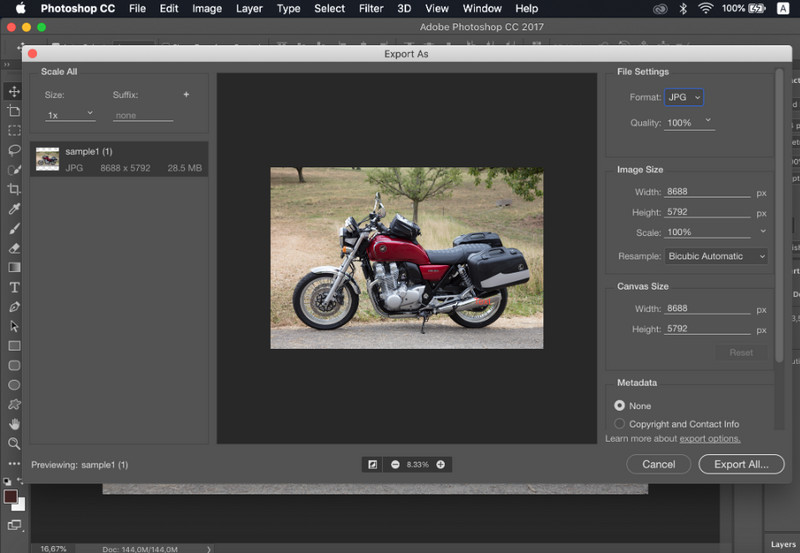
第 3 步文件, 選擇 另存為, 選擇 JPG format, set the quality, and save the image.

Export JPG Photoshop
優點
Excellent image control and precision
Industry-standard software
缺點
需要訂閱
學習曲線陡峭

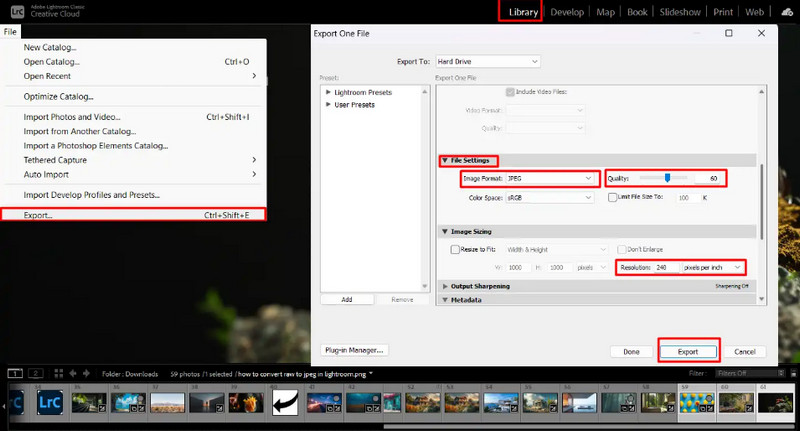
3. Lightroom

燈室 is ideal for photographers managing large image libraries, and even if you want to remove the background in Lightroom. It simplifies batch editing and exporting, making it easy to use a CR2-to-JPG converter workflow for multiple images at once.

主要特徵:

  • Batch editing and export
  • Non-destructive editing system
  • Organized photo management

平台:

  • Windows、Mac 和行動裝置

步驟1Open Lightroom and add your CR2 files to the library.

第2步Choose the pictures and make edits, if necessary.

第 3 步點擊 出口, 選擇 JPG format, set settings, and select where to save.

Export JPG Lightroom
優點
Efficient for bulk image processing
Consistent output quality
缺點
Subscription required
Requires learning for beginners

4. GIMP

GIMP 照片編輯器 is a free, open-source editor that can handle raw images using plugins. It is an effective option if you are learning how to convert CR2 to JPG without spending on paid software.

主要特徵:

  • 自由開源軟體
  • Supports multiple image formats
  • Basic editing and conversion features

平台:

  • 視窗、Mac、Linux

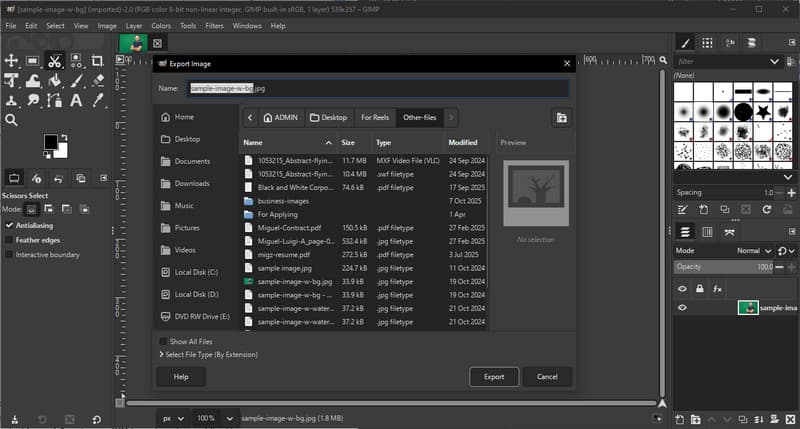
步驟1Open GIMP and load your CR2 file using a RAW plugin.

第2步Adjust the image settings in the import window and confirm.

第 3 步文件, 選擇 導出為, 選擇 JPG format, and export the file.

Export JPG GIMP
優點
Completely free to use
Flexible with plugins and extensions
缺點
Setup can be technical
Less polished interface

5. 轉換

轉換 is a well-known web-based tool that allows users to convert files quickly without installation. It is a practical choice when users ask how to convert CR2 to JPG using a simple online platform.

主要特徵:

  • Supports multiple file formats, including CR2 and JPG
  • Works directly in the browser
  • Allows file upload from device, cloud, or URL
  • Simple and fast conversion process

平台:

  • 基於網絡

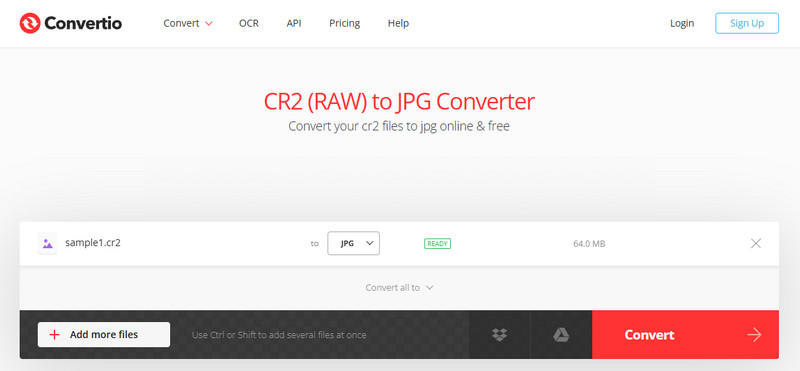
步驟1Open Convertio in your browser and upload your CR2 file.

第2步選擇 JPG 作為輸出格式。

第 3 步Start the conversion and download the file once finished

Export JPG Convertio
優點
Easy to access and use
無需安裝
Supports various file sources
缺點
File size limits on the free version
Requires an internet connection

Part 3. Comparison of the 5 CR2 to JPG Converters

特徵 AVAide 影像轉換器 Adobe Photoshop 燈室 GIMP 轉換
使用方便 Very-easy 緩和 緩和 緩和 簡單
批量轉換 是的 有限的 有限的 有限的 限5個
畫面質量 最高 高的 高的 高的 高的
速度 快速地 緩和 快速地 緩和 快速地
File Size Limitation 是的

Part 4. FAQs of Converting CR2 to JPG

What to do with CR2 files?

CR2 files are raw images that contain unprocessed data from a Canon camera. They are useful if you want full control over editing, such as adjusting brightness, color, and sharpness. However, they are not easy to use for everyday tasks like sharing or uploading.

What apps open CR2 files?

CR2 files can be opened using several photo editing applications. Adobe Photoshop and Lightroom are the most common choices because they fully support raw formats and provide advanced editing tools. GIMP can also open CR2 files with a plugin.

How to convert raw to JPG all at once?

To convert multiple raw files simultaneously, you need a tool that supports batch conversion. Programs like Lightroom or online tools such as AVAide Image Converter allow you to import or upload several CR2 files at once. You simply select JPG as the output format and start the process.

結論

Converting CR2 files to JPG makes images easier to share, view, and store. While CR2 is great for editing, JPG is more practical for everyday use. If you are wondering how to change the file type from CR2 to JPG, you can use tools like Photoshop, Lightroom, or online converters such as AVAide 影像轉換器. The goal is simple: turn large raw files into smaller, usable JPG images without losing important quality.

經過 簡·皮內達 on 5 月 19, 2026

關於作者

簡·皮內達
簡·皮內達

簡·皮內達是一位認證數位影像專家,過去七年來一直為攝影工作室和創意製作團隊提供支援。她的日常工作專注於照片增強和編輯。作為一名獲得Adobe Photoshop認證的專業人士,她非常注重大型影像工作流程中的色彩準確性和輸出品質的一致性。

推薦

AVAide 影像轉換器

您可以輕鬆地將照片從任何圖像格式轉換為流行的 JPG、PNG 或 GIF,而不會造成品質損失。

立即處理

轉換照片

相關文章