“图像不应该那么模糊。当你放大图像时,PowerPoint 会自动模糊,看起来很糟糕。有没有什么办法可以让它不模糊?”-Reddit
好吧,如果你想解决你的问题,我们会帮助你。在这篇文章中,我们将为你提供如何在 PowerPoint 上去除图片模糊的详细说明。这样,你仍然可以获得最佳的图像质量。除此之外,你还将了解软件上图像变得模糊的各种原因。我们鼓励你阅读这篇文章的所有内容,并了解更多关于去除图片模糊的最有效方法。 在 PowerPoint 上取消模糊图像.
第 1 部分。为什么 PowerPoint 中的图像会变得模糊
在解决问题之前,了解 PowerPoint 为何会降低视觉效果会有所帮助:
- 自动压缩: 为了减小演示文稿文件的大小,PowerPoint 会在保存过程中自动压缩图像。
- 低源分辨率: 将小尺寸或低分辨率图像拉伸到大尺寸幻灯片上,会强制引入像素化现象。
- 复制粘贴导致的性能下降: 直接从网页拖放图片到 PowerPoint 时,通常会复制质量较低的缓存文件,而不是原始源文件。
- 有损格式: JPEG等格式每次保存都会降低图像质量。而无损格式(例如PNG)则能更好地保持清晰度。
第 2 部分。如何在 PowerPoint 上取消模糊图像
如果您想在 PowerPoint 上去除图像模糊,可以使用多种方法。因此,要找到实现目标的最佳解决方案,请参阅本节中的所有教程。
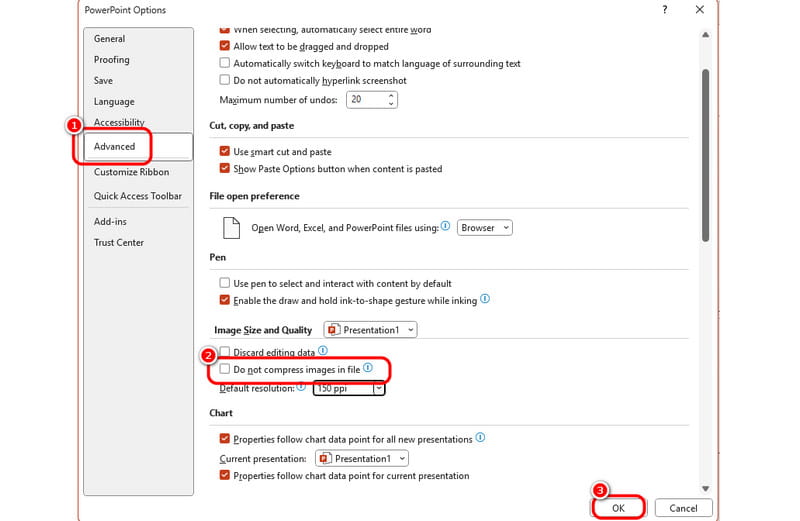
方法 1:禁用“不压缩”选项
正如我们之前讨论过的,PowerPoint 程序可以自动压缩您插入的图片。因此,如果您想阻止这种行为,就应该阻止它压缩图片。为此,您可以按照以下简单步骤操作。
第1步打开你的 微软幻灯片软件 软件并继续 文件 > 选项 部分。之后, PowerPoint 选项 窗口将显示在您的屏幕上。
第2步之后,前往 先进的 > 图像大小和质量 选项。然后,启用 不压缩图像 选项。
第 3 步勾选 好的 下面的按钮保存并应用最终流程的更改。
方法 2:更改默认分辨率
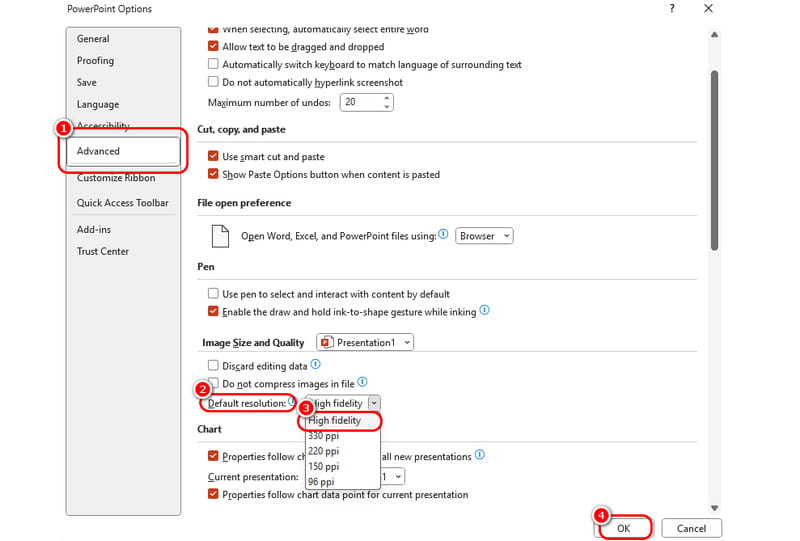
第二种去除 PowerPoint 图像模糊的方法是更改默认分辨率。要去除 PowerPoint 中照片的模糊,最好的方法是将分辨率设置为“高保真”选项。如果您想继续操作,请参阅以下方法。
第1步启动 PowerPoint 软件后,单击 文件 点击左上角的按钮并选择 选项 从左侧界面。
第2步当 PowerPoint 选项 窗口出现后,点击 先进的 按钮并选择 图像大小和质量 选项。
第 3 步点击 默认分辨率 按钮并选择“高保真”选项。完成后,点击 好的 按下按钮应用更改。如果您想 提高图像的分辨率,则可以用这个方法。
方法3:调整图像清晰度
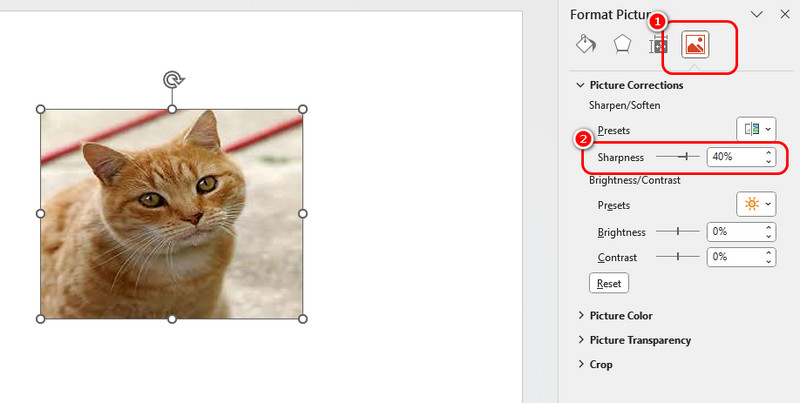
最后一种方法是使用锐化功能来改善模糊的图像。操作简单,非常适合初学者。请按照以下步骤开始在 PowerPoint 中修复模糊图像。
第1步首先,需要将图片插入到 PowerPoint 中。找到您的演示文稿,然后转到…… 插入 > 图片 > 这个设备 添加图像的选项。
第2步右键单击图像并点击 格式化图片 选项,右侧界面会出现各项功能。
第 3 步点击 图片 按下按钮并继续。 图片校正 部分。然后,选择 锐度 功能并使用滑块调整图像的清晰度。完成后,您可以将演示文稿保存到 文件 > 另存为 选项。
保持演示画面清晰的专业技巧
- 使用无损格式: 总是倾向于 PNG 或者 TIFF 文件处理需要透明度和清晰线条的情况。
- 插入,不要粘贴: 采用 插入 > 图片 > 这个设备 而不是从浏览器中使用 Ctrl+C / Ctrl+V 来保留原始元数据和质量。
- 匹配宽高比: 避免使用侧边控制柄手动拉伸图像。按住Shift键并拖动角点即可按比例缩放。
- 添加前请进行增强: 你可以使用一个 AI像素增强器 在将照片添加到 PowerPoint 之前对其进行增强处理,这样可以使视觉效果更好。
第 3 部分。免费在线去除图像模糊的方法
如果图片本身太小或模糊怎么办?即使你在 PowerPoint 中调整所有设置,也无法修复缺失的像素。而且,在 PowerPoint 中逐一调整每张照片也过于繁琐。
就是那里 AVAide 图像升频器 这时,一款名为 Online 的工具就派上了用场。它是一款免费的、基于浏览器的工具,利用人工智能技术即时修复 PowerPoint 中的模糊照片。
AVAide 图像升级器的主要特点:
- 8倍增强: 它不只是拉伸你的照片;它使用 AI 放大技术将其放大到原始尺寸的 2 倍、4 倍、6 倍或 8 倍。
- 100% 免费且无水印: 您可以获得干净、高分辨率的下载内容,没有任何隐藏费用或烦人的水印。
- 超级简单: 你不需要任何照片编辑技巧。人工智能只需一键即可完成繁重的后期处理。
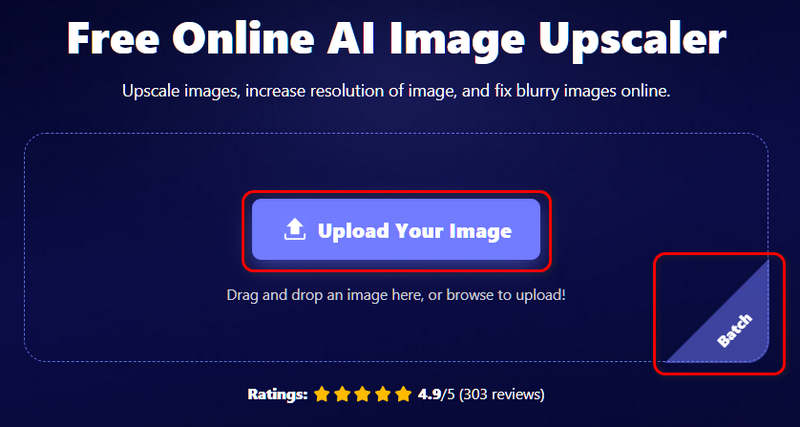
第1步使用权 AVAide 在线图像升级器 在您的浏览器上。点击 上传您的图片 点击按钮即可将照片添加到此在线工具。您也可以点击 批 按下按钮即可添加多张照片。
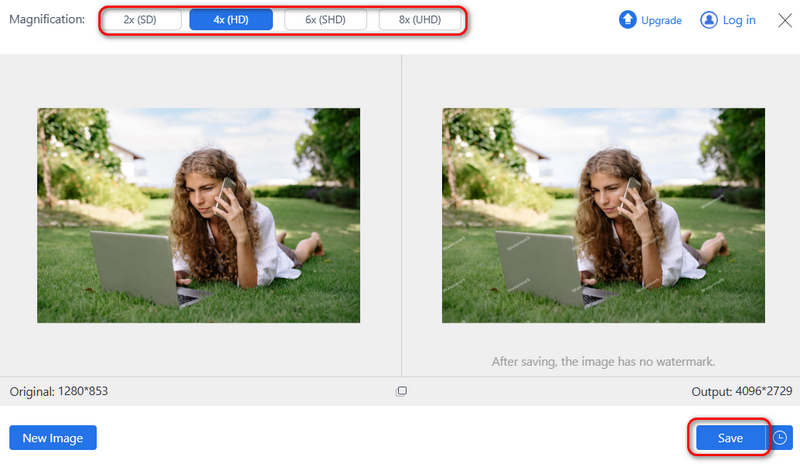
第2步现在,您可以选择所需的放大倍率,例如 2 倍、4 倍、6 倍甚至 8 倍。然后,点击 保存 按下按钮即可修复 PowerPoint 中的模糊照片,并将照片保存到本地存储。
第四部分:PowerPoint图像去模糊常见问题解答
如何在 PowerPoint 中解压缩图片?
启动 PowerPoint 软件,然后单击 文件 > 选项 > 先进的 > 图像大小和质量然后,启用 不要压缩文件中的图像.
模糊的照片可以恢复清晰吗?
如果照片是手动模糊的,就很难将其恢复清晰。简单地提高分辨率或增强锐度可能无济于事,您可能需要使用人工智能工具为照片“创建”新的像素。
如何在 PowerPoint 中柔化图像?
点击图片进行选择。前往 图片格式 点击屏幕顶部的选项卡。点击“图片效果”(在“图片样式”组中),将鼠标悬停在“柔化边缘”上,然后选择预设百分比(例如,5 点、10 点等),即可立即看到混合效果。
这篇文章将向您展示三种官方途径 修复 PowerPoint 中的模糊图像您还可以学习一些保持照片高质量的技巧。但是,如果您的照片太小,PowerPoint 中的这些功能就帮不了您了,所以您可以…… AVAide 图像升频器 在将照片添加到演示文稿之前,直接对其进行放大。
关于作者