Working with long videos often presents a frustrating dilemma: how do you maintain pristine video quality without eating up all your storage space? This is where video compression standards come in. If you want to balance video size, quality, and device compatibility, you’ll inevitably face the choice between H.264 (AVC) and H.265 (HEVC).

In this comprehensive guide, we’ll break down the core differences between H.264 and HEVC, help you decide which one fits your workflow, and show you how to convert between them seamlessly without losing quality.

Part 1. HEVC vs H264: What Are They?

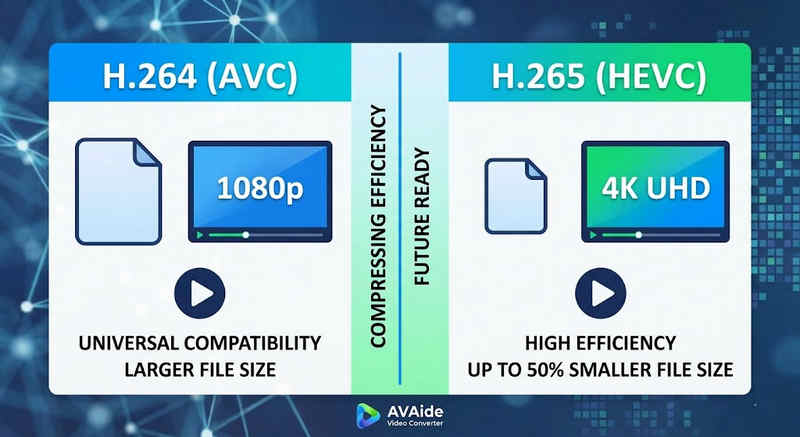
The Short Answer: H.264 (AVC) offers universal compatibility and works on almost any device, but creates larger files. H.265 (HEVC) provides superior compression, cutting file sizes by up to 50% with identical visual quality, but requires higher processing power and has limited support on older hardware.

H.264 vs H.265 in Video Quality

1. What is the H.264 Codec (AVC)?

Introduced as Advanced Video Coding (AVC), H.264 is the reigning king of video compatibility. It is the industry standard for online streaming, mobile recording, and daily video playback. Because it requires very little processing power to decode, H.264 videos play smoothly on almost any digital device imaginable, from old smartphones to modern smart TVs.

2. What is the H.265 Codec (HEVC)?

High Efficiency Video Coding (HEVC), or H.265, is the direct successor to H.264. It was specifically engineered to handle the massive data demands of 4K, 8K, and VR content. HEVC uses more advanced algorithms to compress video data far more efficiently than its predecessor, delivering crisp, high-resolution visuals at up to 50% smaller file sizes. However, this efficiency comes at a cost: it requires modern hardware to process without lagging.

H.265 vs. H.264: Quick Comparison Table

特征 H.264(AVC) H.265 (HEVC)
支持的格式 m2ts, evo, 3gp, f4v, mkv, mp4, qtff, asf, avi, mxf, ps, ts mxf, ps, ts, 3gp, mkv, mp4, qtff, asf, avi
压缩效率 Moderate (Larger file sizes) Superior (25-50% smaller files)
视频质量 Excellent for 1080p Optimized for 4K, 8K, and HDR
设备兼容性 Universal (99% of devices) Limited (Legacy PCs may not support)
处理能力 Low (Fast rendering/playback) High (Requires newer CPUs/GPUs)
理想用例 Web streaming, social media, legacy devices 4K drone footage, iPhone cinematic video, space-saving archiving

Part 2. When to Choose HEVC vs. H.264

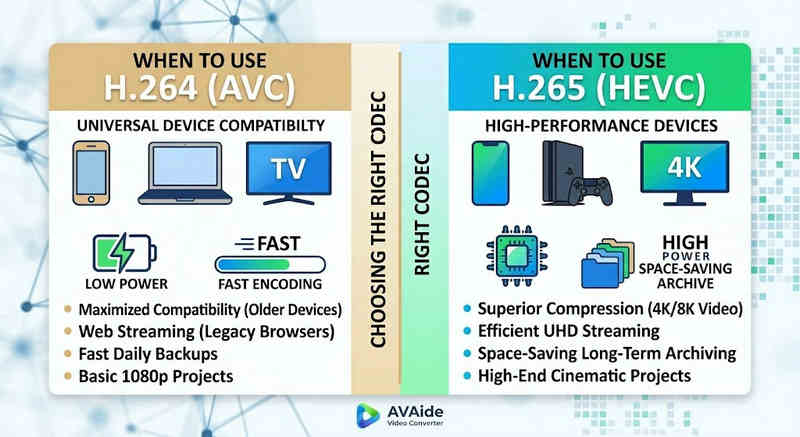
Choosing the right codec depends entirely on your specific goals. Here is why you might need one over the other:

H.264 vs H.265 in Usage

Why You Need HEVC (H.265):

  • Maximized Storage Savings: If you back up long-form videos or massive 4K libraries, HEVC acts as a natural video size reducer, freeing up half your hard drive space.
  • Bandwidth Optimization: HEVC requires much less bandwidth to stream, making it ideal for smooth 4K playback even on slower internet connections without buffering.
  • Future-Proofing: As the industry transitions toward ultra-high-definition (UHD) and VR content, HEVC ensures your videos remain high-quality and compatible with next-generation platforms.

Why You Need H.264 (AVC):

  • Flawless Playback & Editing: If your video editing software lags or your media player throws a Codec Not Supported
  • Compatibility and Worry-Free Sharing: H.264 is the most widely compatible video codec. Whether you want to share your videos to your friends, NAS, media servers like Plex or Kodi, H.264 can ensure seamless sharing and playback.

Part 3. How to Convert Easily Between HEVC and H.264

在将视频从 HEVC(H.265) 和 H.264 格式转换时, AVAide 视频转换 比其他产品做得更好。它提供了一个高效且易于使用的界面,不会影响转换质量并支持各种格式。无论出于何种原因,可能是因为 HEVC 效率更高或 H264 更广泛采用,AVAide 都允许您在两者之间轻松切换。

详细流程:

第1步获取 AVAide 视频转换器

下载、安装并启动 AVAide 视频转换 on your windows or Mac computer.

第2步Add Your Videos to AVAide Video Converter

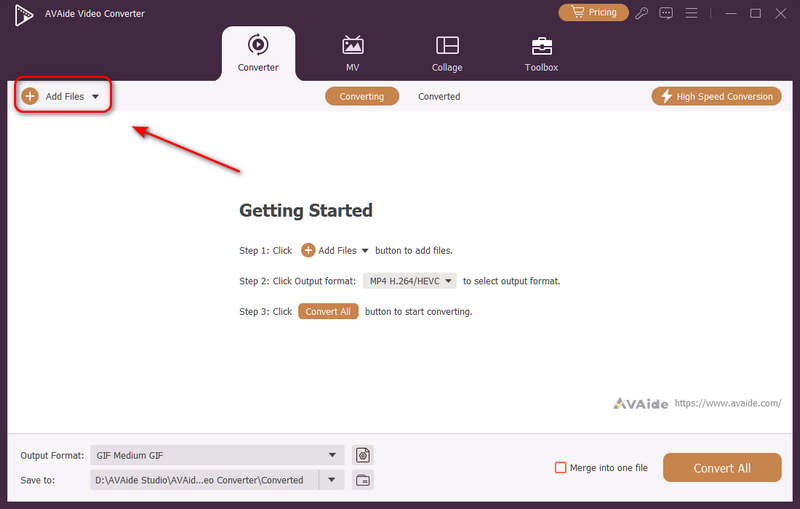
You can add multiple video files and do a batch conversion. Click the 添加文件 button on the top left to import your video files.

Add Videos to AVAide Video Converter

第 3 步Choose H.264 or H.265 Codec

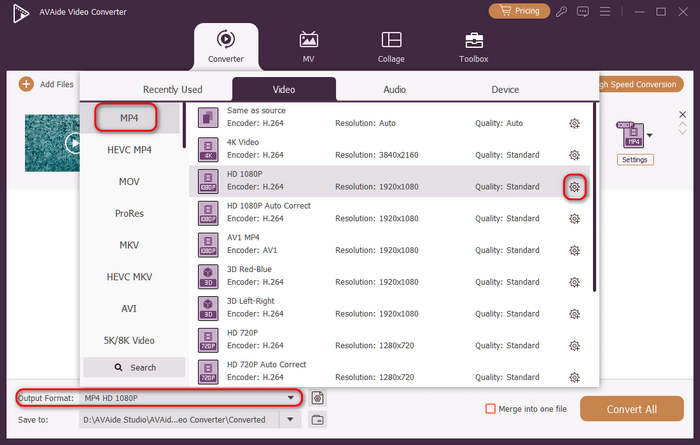
点击 输出格式 dropdown menu button on the bottom left side. Then, you can select a desired video format first. Then, click the 自定义配置文件 button (with a Gear icon) in the video preset bar.

选择视频格式

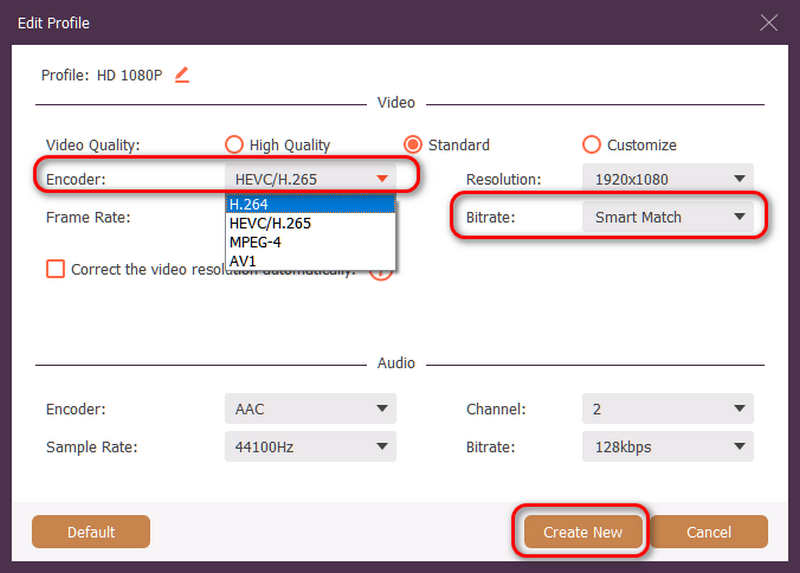
Then, in this panel, you can click the 编码器 dropdown button to select H.264 或者 HEVC/H.265 codec. If you want to change the video quality, you can adjust the 比特率. But we recommend Smart Match to ensure compatibility. Click the 创建新的 button to save your configuration.

Choose H.264 or H.265 Codec

第四步Start Video Re-encoding

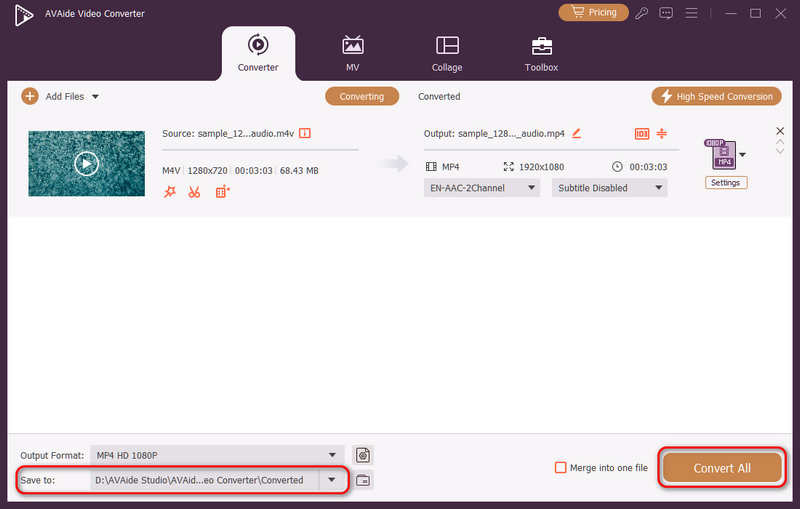
最后,您可以点击 存到 dropdown button to select a desired output folder and click the 全部转换 button to change your video codec to H.264 or H.265.

Change Video Codec to H.264 or H.265 with AVAide Video Converter

Part 4. FAQs of H.265 and H.264

What is the main difference between NVENC H.264 and NVENC HEVC?

The primary difference lies in compression efficiency and hardware generation optimization. NVENC HEVC (H.265) delivers up to 50% better compression than NVENC H.264 (AVC). This means it can produce the exact same visual quality at half the bitrate (and half the file size), making it the superior choice for archiving 4K videos or streaming over limited bandwidth.

What is a modular multi-channel HEVC/H.264 encoder?

A modular multi-channel HEVC/H.264 encoder is an enterprise-grade hardware device designed to compress and stream multiple video feeds simultaneously. Unlike consumer software encoders, it features a modular (blade-style) design, allowing users to hot-swap or upgrade hardware encoding cards based on their project scales. It supports both H.264 and HEVC/H.265.

What is H.265+?

H.265+ (also known as Smart H.265+) is an advanced, proprietary video compression technology developed by Hikvision, specifically optimized for security and surveillance monitoring.

结论

现在可以利用这种全面的分析 HEVC 和 H.264 确定哪种编解码器最适合您的视频要求。无论您想要 H.264 并注重兼容性,还是想要 HEVC 并追求更好的压缩,这两种编解码器都有优势。AVAide 视频转换器为处理该问题提供了一种优雅而有效的解决方案,在快速的同时提供出色的质量输出。AVAide 凭借其简单的界面和高级功能使视频压缩及其转换任务变得简单。

经过 西尔维·海德 on 6 月 05, 2026

关于作者

西尔维·海德
西尔维·海德

Sylvie Hyde 是一位多媒体格式工程师,专注于跨设备播放的视频和音频转码。她拥有丰富的媒体资源准备经验,涵盖在线发布和流媒体环境。她的工作通常涉及编解码器优化、容器故障排除以及更新旧版媒体文件,使其在现代系统上稳定运行。

s

相关文章