You want your own personalized ringtone. Not something from anywhere. Something you made your own for calls and alerts.

We are here to help you with that. We will show different ways to record a ringtone on different systems. We will also share simple tips for better results. So, get your voice or sound ready for a custom ringtone.

Part 1. How to Record a Ringtone on iPhone

1. Voice Memo to Ringtone (The Easiest Way)

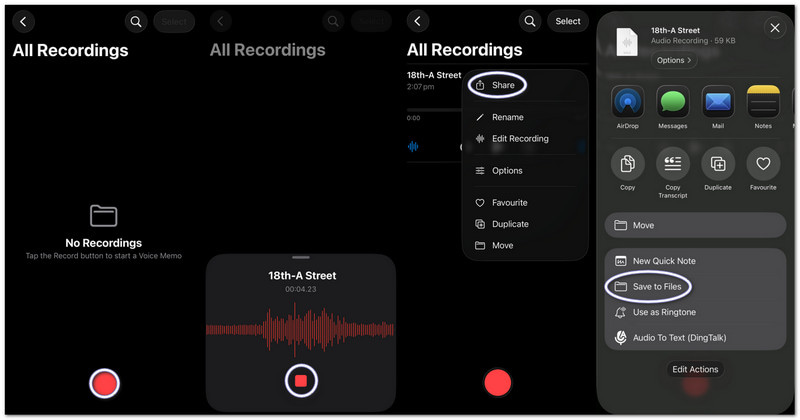
Voice Memos records sound and immediately turns it into a usable custom ringtone with basic trimming tools, and this part will teach you exactly how to make a voice recording into a ringtone on an iPhone.

第1步Launch Voice Memos on your iPhone.

第2步Tap the red 记录 button and speak or play your audio.

第 3 步轻敲 停止 当你完成时。

第四步点击 three dots (...) on your recording.

第 5 步选择 保存到文件 to store your audio and use it later as a ringtone.

Using Voice Memo to Ringtone on iPhone

2. Any Audio File (MP3/M4A) to Ringtone

Stored MP3 or M4A audio files from downloads or music apps can be selected and set as a ringtone on an iPhone.

第1步Download your MP3 or M4A file and save it in the 文件 应用程序。

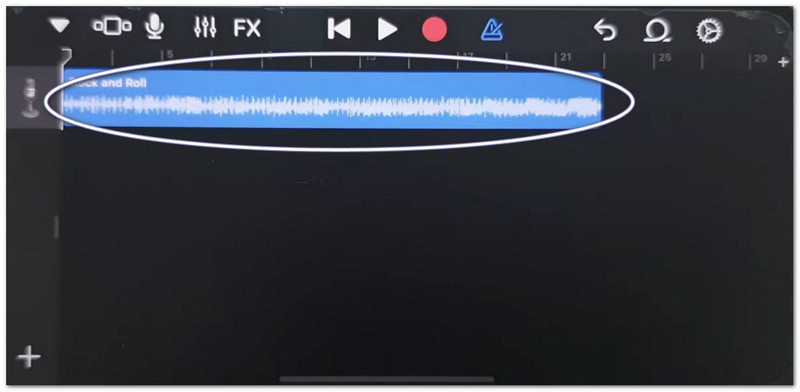
第2步跑步 车库乐队 并选择 录音机.

第 3 步Locate your audio in 文件, then drag it to the timeline.

第四步文件, find your audio, and drag it to the timeline.

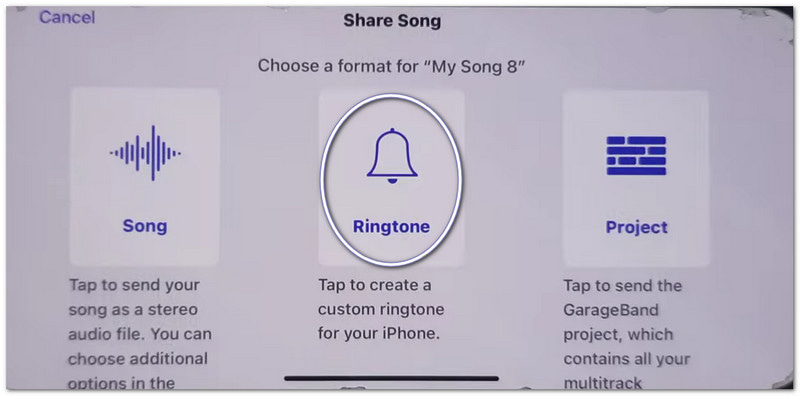
第 5 步Trim it to under 30 seconds, then tap 分享 > 铃声 > 出口.

Using Any Audio File to Ringtone on iPhone

3. Using GarageBand (For Older iOS Versions)

GarageBand edits audio clips with precise controls, allowing users to cut, arrange, and export custom ringtones easily, which makes it simple to understand how to set a voice recording as a ringtone on an iPhone.

第1步打开 车库乐队 并选择 录音机.

第2步点击 Tracks view, then open the Loop Browser.

第 3 步Import your saved Voice Memo or audio file.

第四步Drag it to the timeline and trim it to 30 seconds or less.

第 5 步轻敲 我的歌曲, 然后 分享 > 铃声 > 出口.

Using GarageBand for Older iOS Versions

Troubleshooting "Share Notes on iPhone Not Working"

If the Share Sheet freezes, crashes, or does not show apps when sharing Voice Memos or GarageBand files, try these fixes.

Quick Fixes:

  • Force Restart: Press 音量调高音量调低. Then, hold the Power button until the Apple symbol appears.
  • Update iOS: Go to 设置 > 一般的 > 软件更新. Install any updates. It fixes system errors.
  • Toggle AirDrop: Open 控制中心 to turn off AirDrop. Switch AirDrop off and back on. Sharing is refreshed.

System Fixes

  • Free Up Storage: Keep at least 2 gigabytes of free space. Delete unused files or videos. Low storage can stop Share Sheet from working.

Final Fix

  • Reset All Settings: Go to 设置 > 一般的 > Transfer 或者 Reset iPhone > Reset All Settings. It does not delete your data. It only resets system settings and can fix Share Sheet issues.

Part 2. How to Record a Ringtone on Android

1. Using a Ringtone Maker App (Most Recommended)

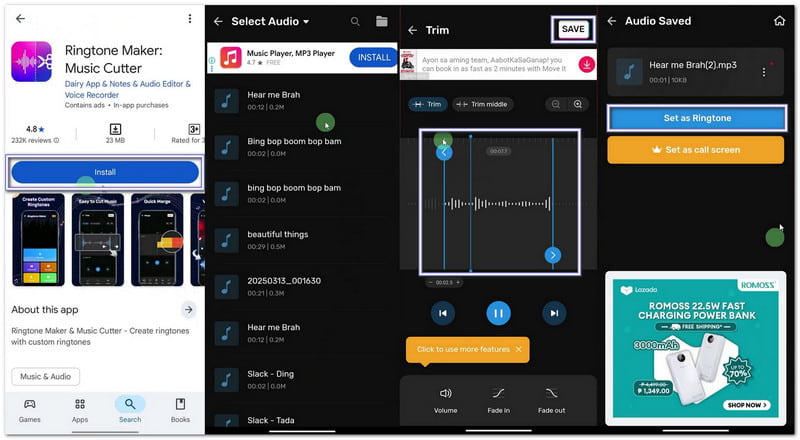
If you want to learn how to record your own ringtone, you can use Maker: Music Cutter on the Google Play Store. Its main goal is to help you trim songs, cut exact audio parts, and instantly set them as custom ringtones on Android phones.

第1步Open the Google Play Store. Search for Ringtone Maker: Music Cutter. Install it. Then, press 打开.

第2步轻敲 开始。选择 Trim Audio. Allow permissions so the app can access your files.

第 3 步Pick a song or audio file from your phone. Move the sliders to choose the start and end parts of your ringtone.

第四步 轻敲 或者 保存. Pick the clarity if needed. Press 确认。然后,单击 Set as ringtone. Allow system settings access and choose the default ringtone.

Using a Ringtone Maker App on Android

2. Built-in Settings (For Downloaded Audio)

Android settings allow direct selection of saved audio files and assign them as ringtones without needing extra apps or tools.

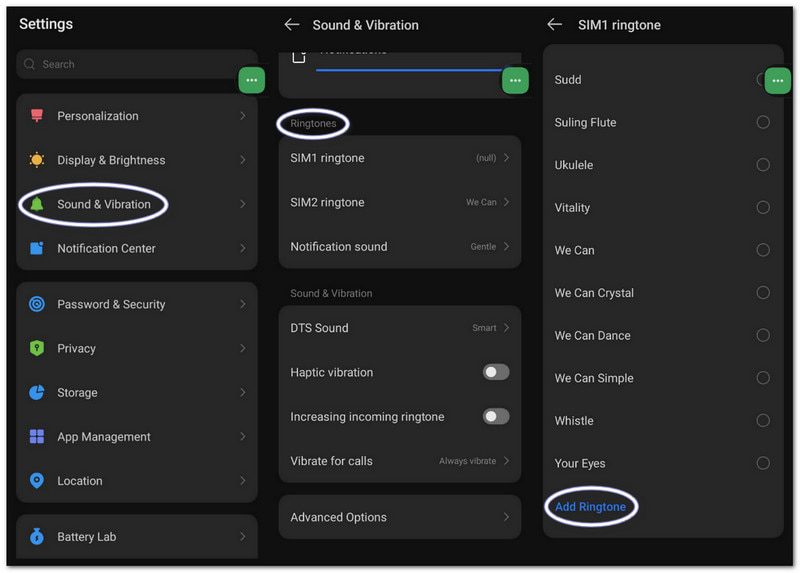
第1步Go to your phone's settings. Tap Sound and vibration 或者 声音.

第2步轻敲 Phone ringtone to see available options.

第 3 步点击 按钮或 Add ringtone 顶部的按钮。

第四步Browse your storage. Select your audio file. Tap 完毕. Then, confirm to set it as your default ringtone.

Using the Built-in Settings for Downloaded Audio on Android

Part 3. How to Turn a Screen Recording into a Ringtone

You can also turn a screen recording into a ringtone on a Windows or Mac computer using AVAide 屏幕录像. It has an audio recorder mode that captures sound from your system and your voice, which makes it easy to record a ringtone.

It also offers sound settings, where you can lower or boost volume, enable noise cancellation, and show a warning when no audio is detected. Of course, you can export your ringtone in supported formats like MP3 and M4A, which work well for mobile devices.

第1步Get and set up AVAide Screen Recorder on your Windows or Mac computer.

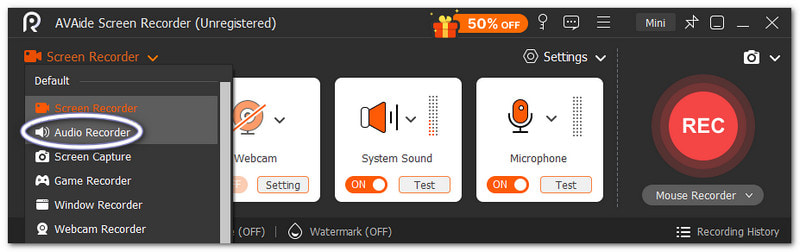
第2步It starts in Screen Recorder mode. Click the drop-down. Select 录音机 for better sound capture.

Switch to Audio Mode

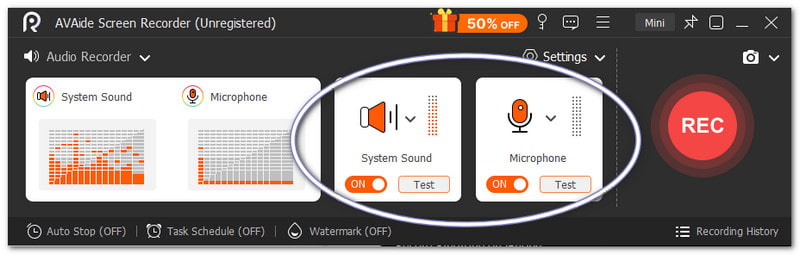
第 3 步打开 系统声音 to record internal audio. Turn on the 麦克风 if you want your voice to be added. You can also fine-tune the volume if needed.

Set Audio Source

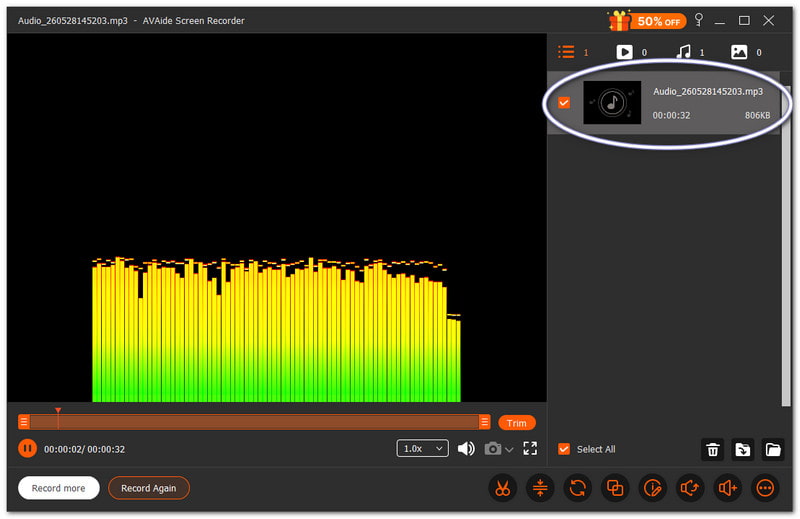
第四步录音 to start, and please wait for the countdown. Once begun, play the sound you want. Press the 停止 button once done. After that, the file saves automatically. But you can also trim or edit it before using it as a ringtone.

Record and Save Ringtone

There is no doubt that this Mac and Windows audio recorder can help you create a ringtone that you personally want and like for your device.

Part 4. Samsung-Specific Steps

1. Using the Built-in Screen Recorder

Samsung Screen Recorder captures audio from videos and helps turn recorded sounds into usable ringtones.

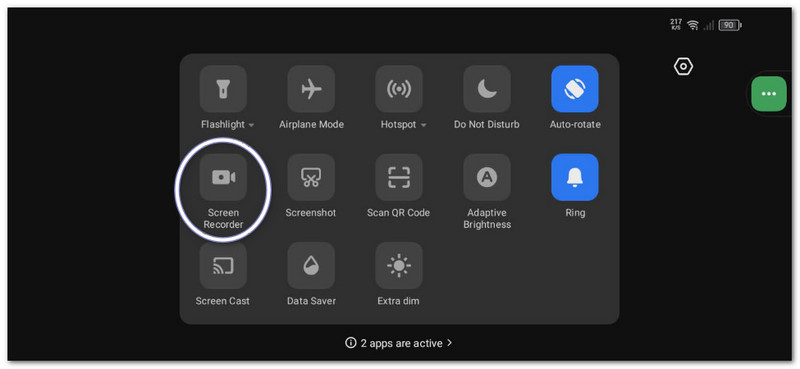
第1步在里面 快速面板, swipe down. Press the 屏幕录像 button. Prior to beginning, select the Media sounds.

第2步Play the video or music you want to capture. Let the screen recorder record it with sound.

第 3 步Stop recording once done. The file will be stored in your gallery. Use a video-to-MP3 app to extract the audio.

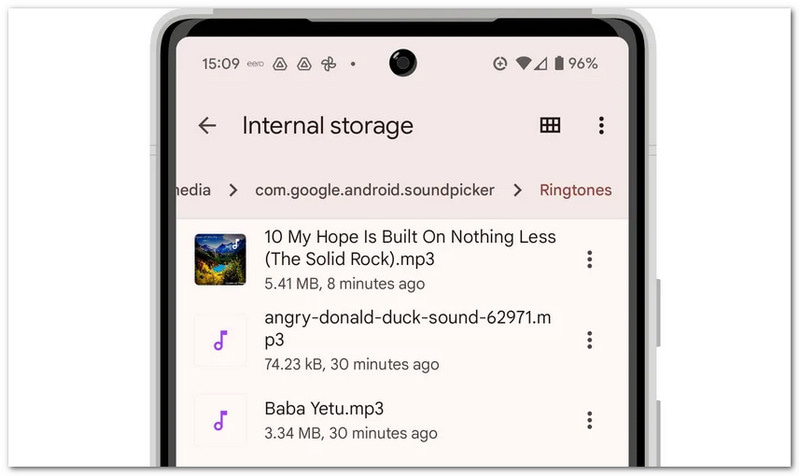
第四步Move the MP3 file to your Internal Storage > Ringtones folder so it can be used later.

Using the Built-in Screen Recorder on Samsung

This method shows Samsung screen recording. So, please make sure to convert the recorded video into audio only so it can be used as a ringtone.

2. Built-in Ringtone Maker

Samsung ringtone settings let users pick songs, trim highlights, and instantly assign them as the default phone ringtone.

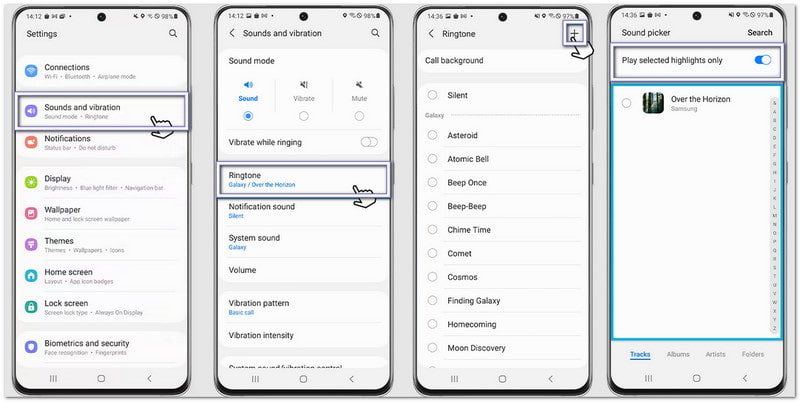
第1步Open your phone and go to 设置。 轻敲 Sounds and vibration。然后选择 铃声.

第2步点击 添加 button and select a saved song or recording from your phone.

第 3 步使能够 Play selected highlights only if available. Samsung will automatically trim the best part of the audio.

第四步Confirm your selection, and the sound will now be set as your default ringtone.

Using the Built-in Ringtone Maker on Samsung

3. File Manager Method

Samsung File Manager organizes audio files and allows direct copying into the Ringtones folder for automatic ringtone detection.

第1步启动 My Files app on your Samsung phone.

第2步下载 或者 声音的 folder. Locate your recorded or downloaded sound.

第 3 步Long-press the file. Tap 复制然后,前往 内部存储 > Ringtones.

第四步Paste the file inside the Ringtones folder. Then, go back to Sound settings. Your file will now appear in the ringtone list.

Using the File Manager Method on Samsung

Part 5. Pro Tips for Best Results

Before you set your ringtone, it helps to follow a few simple tips. These will make your ringtone sound clear and work better on your phone.

Tip #1: Keep it short.

Make your ringtone 30 to 40 seconds only. It keeps it smooth and fully compatible with Android phones.

Tip #2: Use the right format.

Use MP3 or M4A files when possible. These formats work well on most Android devices without errors.

Tip #3: Check the volume first.

Play your ringtone before setting it. Make sure it is not too loud or too soft. It helps you avoid surprises when someone calls.

结论

你已经学会了 how to record a ringtone on an iPhone, Android, and a desktop. So, no matter what device you use, you can create your own custom ringtone anytime.
For Windows and Mac users, AVAide 屏幕录像 makes the process easy. You can record your own voice or capture audio from your system. You can also trim the file after recording. It helps you keep only the best part for your ringtone.

经过 艾莎·约翰逊 on 6 月 10, 2026

关于作者

艾莎·约翰逊
艾莎·约翰逊

艾莎·约翰逊是一位多媒体制作技术员,专长于屏幕录制和音频采集工作流程。她曾帮助教育工作者、培训师和播客团队搭建稳定的录制环境,并解决常见的硬件和配置问题。她的实践经验能够帮助创作者提升录制清晰度,制作出更可靠的内容。

相关文章