Wyobraź sobie, że przesyłasz ogromną partię zdjęć lub dokumentów na komputer, a okazuje się, że ich pola „Data utworzenia” lub „Data modyfikacji” są kompletnie pomieszane. Niezależnie od tego, czy to błąd kopii zapasowej, czy niezgodność strefy czasowej, nieprawidłowe znaczniki czasu plików mogą zrujnować Twoje cyfrowe archiwum i wprowadzić chaos w Twoim przepływie pracy.
Na szczęście nie musisz żyć z tym bałaganem. Dedykowany zmiana daty pliku Daje Ci pełną kontrolę nad metadanymi, umożliwiając zbiorczą edycję znaczników czasu plików za pomocą zaledwie kilku kliknięć. W tym przewodniku zebraliśmy 5 najlepszych programów do zmiany dat plików dla systemów Windows i Mac, które pomogą Ci odzyskać kontrolę nad Twoją cyfrową organizacją. Zaczynajmy!
Część 1. Przegląd 5 najlepszych zmieniaczy dat plików
W tej sekcji zaprezentujemy najlepszy program do zmiany dat plików, na jaki możesz liczyć. Czytaj dalej, aby dowiedzieć się, jak te narzędzia pomogą Ci zrealizować zadanie!
1. Konwerter wideo AVAide
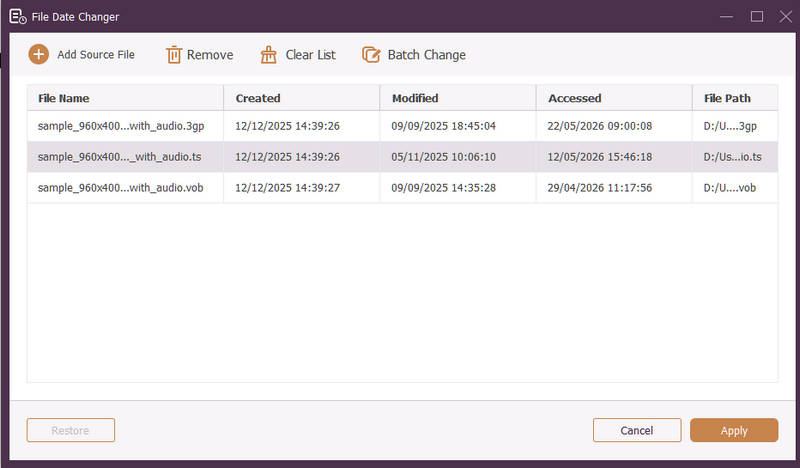
Dostępne dla systemów Windows i Mac, Konwerter wideo AVAide to wszechstronna platforma wyposażona w potężny, wbudowany zmieniacz dat plików. Ta intuicyjna funkcja pozwala na łatwą modyfikację szczegółowych danych znaczników czasu, w tym daty utworzenia, modyfikacji i ostatniego dostępu.
- Bezproblemowa obsługa wielu formatów multimedialnych, w tym wideo, audio i obrazów.
- Importuj i aktualizuj wiele plików jednocześnie, aby zaoszczędzić czas i usprawnić swój przepływ pracy.
- Posiada przejrzysty i przyjazny dla użytkownika interfejs umożliwiający szybką zmianę daty pliku.
- Utrzymuj porządek w pliku pomimo zmiany daty.
2. Zmiana daty pliku
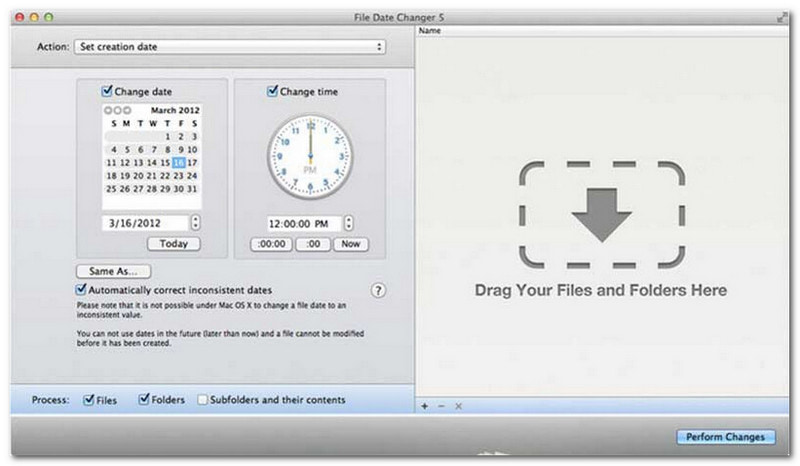
Aplikacja File Date Changer, jak sama nazwa wskazuje, oferuje dedykowane rozwiązanie do zmiany dat utworzenia plików. Jej prosta konstrukcja sprawia, że jest dostępna dla użytkowników na każdym poziomie zaawansowania. Obsługuje ona zarówno modyfikację dat utworzenia, jak i modyfikacji. Niezależnie od tego, czy chcesz zmienić daty pojedynczych plików, czy całych folderów, ta aplikacja do zmiany dat plików na Macu upraszcza ten proces dzięki swojej wydajnej funkcjonalności.
Chociaż File Date Changer jest narzędziem płatnym, jego wartość zależy od indywidualnych potrzeb w zakresie kosztów i funkcjonalności. Niektórzy użytkownicy mogą uznać zestaw funkcji za dość podstawowy w stosunku do ceny. Jednak dla osób, które cenią sobie wydajność i płynny przepływ pracy, pozostaje on wysoce niezawodną i opłacalną inwestycją w zmieniacz dat plików.
Główne funkcje programu File Date Changer:
- Modyfikuj daty i godziny utworzenia, modyfikacji i ostatniego dostępu do wielu plików.
- Obsługa dodawania lub odejmowania konkretnych dni, godzin, minut lub sekund.
- Zmień właściwości pliku, np. Tylko do odczytu lub Ukryty, i zaktualizuj metadane EXIF.
- Zmieniacz dat plików działa natychmiastowo i oferuje przejrzysty interfejs.
3. Narzędzie Exif
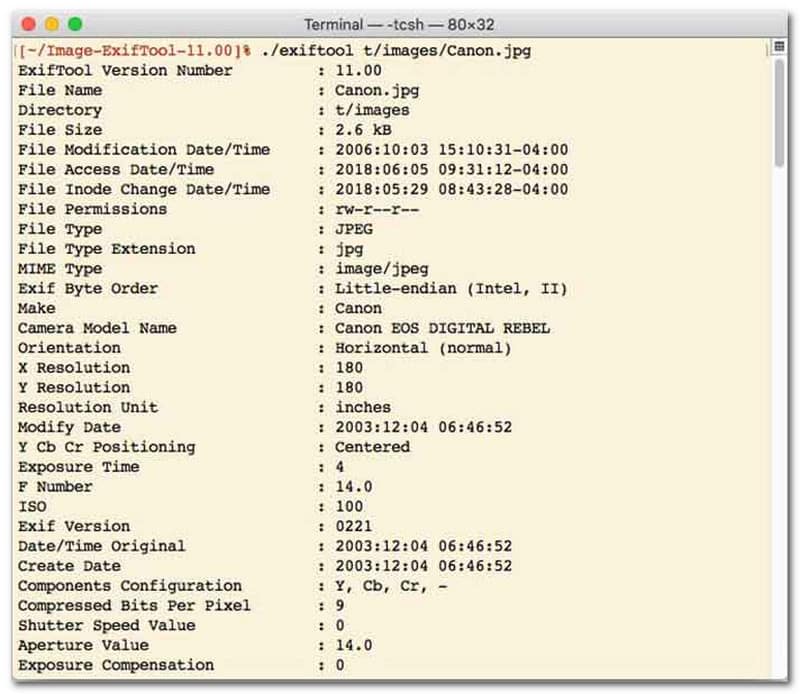
Dla użytkowników preferujących zmieniacz dat plików z interfejsem wiersza poleceń (CLI), ExifTool to złoty standard w zakresie ultraprecyzyjnego zarządzania plikami. To niezwykle wszechstronne narzędzie do zmieniania dat plików obsługuje szeroką gamę typów plików, w tym zdjęcia, filmy, dokumenty i pliki audio. Oprócz prostej edycji dat utworzenia i modyfikacji, ExifTool umożliwia płynne kopiowanie metadanych znaczników czasu z jednego pliku do drugiego, zapewniając idealną synchronizację całej biblioteki multimediów bez żadnych problemów.
Główne cechy ExifTool:
- Bezproblemowe odczytywanie i modyfikowanie znaczników czasu w systemie plików.
- Kopiuj daty pomiędzy zupełnie różnymi warstwami metadanych.
- Obsługa zaawansowanych obliczeń daty i czasu ułatwia zmianę dat plików partiami.
- Wyodrębnij datę i informacje multimedialne ze wszystkich typów plików.
4. Zmieniacz plików zbiorczych
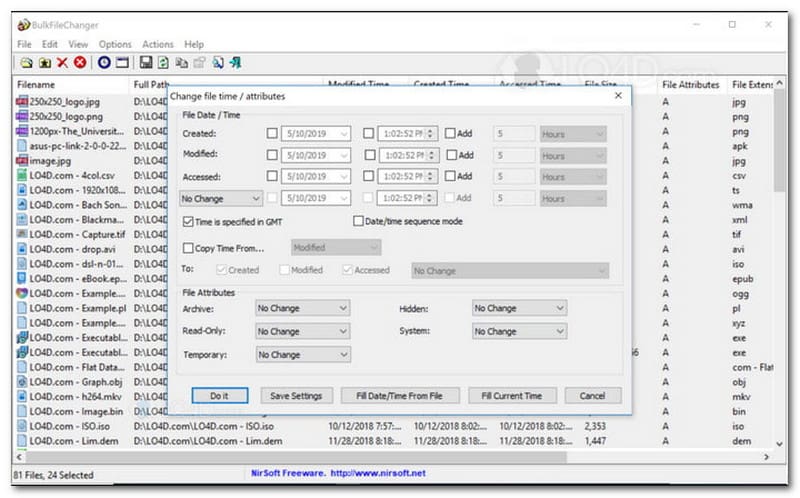
BulkFileChanger to lekkie, wydajne narzędzie do zmiany dat plików, zaprojektowane z myślą o łatwym zarządzaniu znacznikami czasu plików w systemie Windows. Umożliwia użytkownikom szybką modyfikację różnych atrybutów daty i czasu, w tym czasu utworzenia, modyfikacji i ostatniego dostępu, praktycznie w każdym typie pliku, od dokumentów i obrazów po filmy. Chociaż jego wszechstronność i szybkość w obsłudze wielu formatów sprawiają, że doskonale nadaje się do porządkowania archiwów cyfrowych, jego dostępność jest ograniczona wyłącznie do systemu operacyjnego Windows, co oznacza, że użytkownicy systemów macOS i Linux będą musieli poszukać innego rozwiązania.
Główne cechy BulkFileChanger:
- Modyfikuj datę utworzenia i modyfikacji pliku oraz datę ostatniego dostępu.
- Bezproblemowo obsługuje niemal wszystkie typy plików, w tym dokumenty, obrazy i filmy.
- Cechuje się lekką konstrukcją umożliwiającą ultraszybką, masową aktualizację metadanych.
- Dodaj lub wyodrębnij konkretne dni, godziny, minuty i sekundy.
5. Magia atrybutów
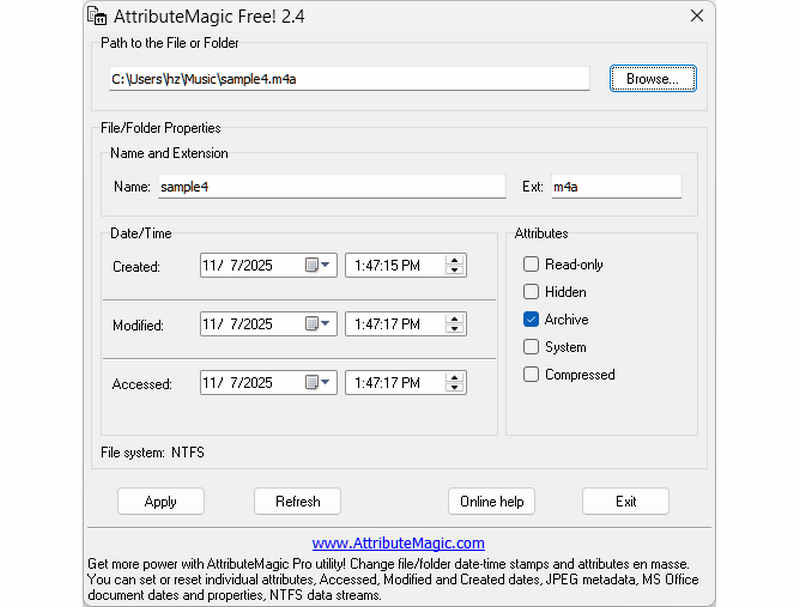
AttributeMagic wykracza daleko poza prostą zmianę dat plików, oferując zaawansowane rozwiązanie do zarządzania atrybutami folderów i plików. To kompleksowe narzędzie umożliwia precyzyjną modyfikację znaczników czasu, pozwalając użytkownikom na łatwe przepisywanie dat utworzenia, modyfikacji i ostatniego dostępu. Oprócz możliwości dedykowanej zmiany dat plików, AttributeMagic oferuje również dogłębną personalizację właściwości systemu plików, dostosowując je do konkretnych potrzeb archiwizacji. Wersja darmowa oferuje podstawowe funkcje edycji znaczników czasu, natomiast aktualizacja do wersji premium odblokowuje zaawansowaną kontrolę metadanych i zaawansowane funkcje automatyzacji.
Główne cechy AttributeMagic:
- Modyfikuj lub maskuj znaczniki czasu utworzenia, modyfikacji i ostatniego dostępu.
- Zmień datę pliku zarówno dla pojedynczego pliku, jak i całego folderu plików.
- Łatwe zwiększanie, zmniejszanie lub przesuwanie znaczników czasu plików do przodu lub do tyłu.
- ustawiać, resetować lub odwracać podstawowe atrybuty systemu plików, takie jak Tylko do odczytu, Ukryty i Systemowy.
Część 2. Porównanie 5 zmieniaczy dat plików
| Produkt | Obsługiwane platformy | Interfejs użytkownika | Edycja wsadowa | Dodatkowe możliwości |
| Konwerter wideo AVAide | Windows i macOS | Nowoczesny, czysty i płynny | Tak (ultraszybko) | Pełny pakiet: konwersja wideo 8K, zgrywanie płyt DVD, edycja metadanych, tworzenie klipów wideo/pokazów slajdów |
| Zmieniacz dat plików (NirSoft) | Tylko Mac | Nieaktualne (starsza wersja sieci/interfejsu użytkownika) | Ograniczony | Brak (jednorazowego użytku) |
| Narzędzie ExifTool | Windows, macOS, Linux | Tylko wiersz poleceń (bez interfejsu graficznego) | Tak (wymaga skomplikowanych skryptów) | Tylko odczyt/zapis metadanych |
| BulkFileChanger | Tylko Windows | Klasyczne narzędzie systemu Windows | tak | Podstawowe modyfikowanie atrybutów plików systemu Windows |
| AtrybutMagiczny | Tylko Windows | Sztywny / Złożony | tak | Tylko zarządzanie flagami systemu plików |
Część 3. Jak zmienić dane pliku w programie AVAide Video Converter
Czy kiedykolwiek musiałeś zmienić datę utworzenia pliku, aby lepiej uporządkować pliki cyfrowe? Można to zrobić za pomocą Konwerter wideo AVAide! Czytaj dalej, aby dowiedzieć się, jak zmienić datę utworzoną w pliku, aby ułatwić zarządzanie plikiem.
Krok 1Pobierz i zainstaluj AVAide Video Converter z oficjalnej strony internetowej, aby uzyskać pełny dostęp.

BEZPŁATNE POBIERANIE W systemie Windows 7 lub nowszym
 Bezpieczne pobieranie
BEZPŁATNE POBIERANIE Dla systemu Mac OS X 10.13 i nowszych
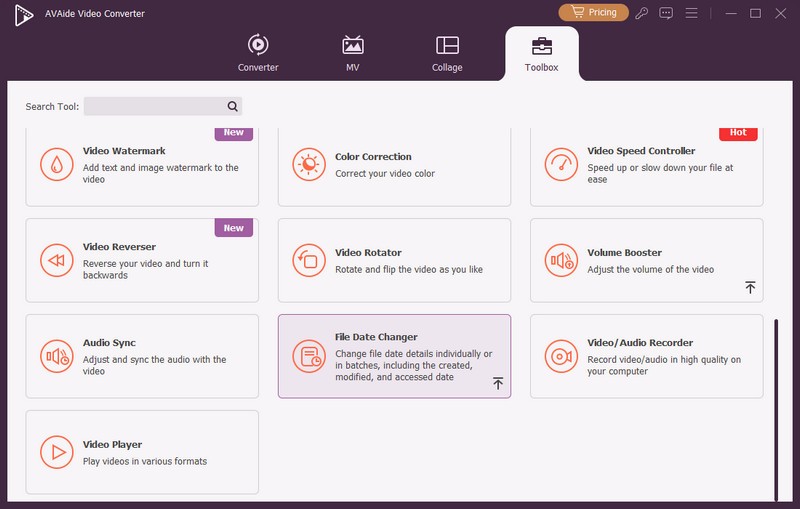
Bezpieczne pobieranieKrok 1Aby rozpocząć, otwórz program na swoim komputerze. Udaj się do Przybornik aby uzyskać dostęp do kilku funkcji. Przewiń myszką, poszukaj Zmiana daty pliku wśród opcji i kliknij ją. Jest to funkcja, której będziesz używać do zmiany szczegółów daty pliku.
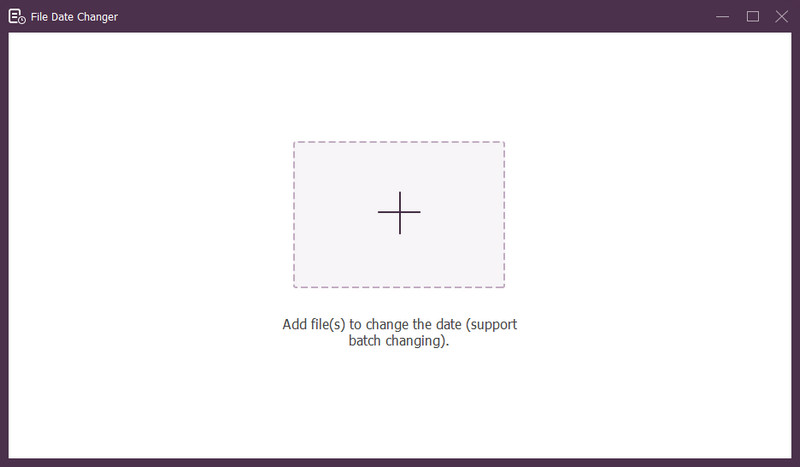
Krok 3Wciśnij (+), aby zaimportować pliki. Mogą to być pliki audio, obrazy i pliki audio. Możesz zaimportować więcej niż jeden plik, aby zmienić szczegóły pliku.
Krok 4Zmienianie ich dat można rozpocząć po zaimportowaniu wszystkich plików. Możesz odpowiednio zmienić daty utworzenia, modyfikacji i dostępu. Aby to zrobić, kliknij element, aż Strzałka pojawia się, wskazując możliwość edycji.
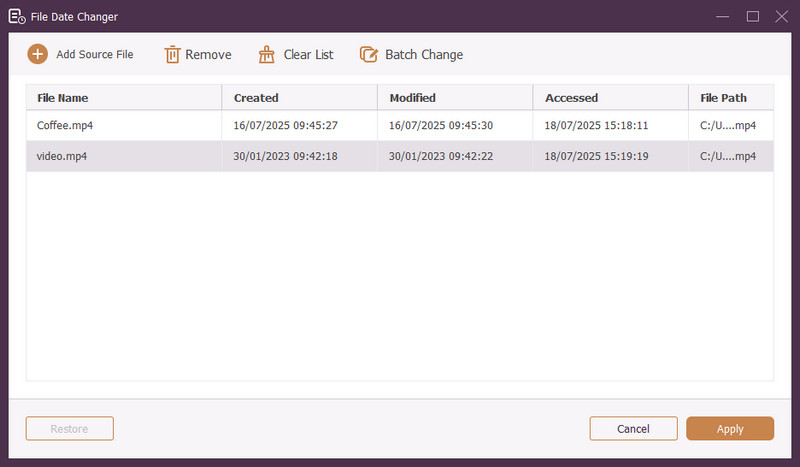
Krok 5Po edycji wszystkich dat plików kliknij przycisk Zastosować przycisk, aby zatwierdzić zmiany. Po zastosowaniu zmian przejrzyj szczegóły zaktualizowanych danych pliku, aby zapewnić dokładność.
Część 4. Najczęściej zadawane pytania dotyczące Best File Date Changer
Jak mogę wyświetlić informacje o dacie pliku?
Jeżeli chcesz sprawdzić kiedy plik został utworzony lub kiedy był ostatnio modyfikowany, możesz to zrobić bezpośrednio na swoim komputerze. Znajdź plik, kliknij go prawym przyciskiem myszy i wybierz Właściwości. Następnie możesz zobaczyć wszystkie szczegóły dotyczące pliku. Należą do nich daty utworzenia i modyfikacji.
Czy ktoś będzie wiedział kiedy zmienię datę pliku?
NIE! Zmiana daty pliku nie pozostawi żadnych śladów. Dzięki temu nikt nie będzie wiedział, kiedy dokonałeś zmiany.
Jaki jest powód, dla którego daty i godziny znikają z pliku?
Istnieje kilka powodów, dla których daty i godziny mogą zniknąć z plików. Może się to zdarzyć, gdy pobierzesz plik i utracisz część informacji z powodu słabego połączenia internetowego. Czasami przyczyną jest strona internetowa, z której pobrałeś plik.
Czy mogę odzyskać zmodyfikowaną datę utworzenia pliku?
Tak! Możesz przywrócić pierwotną datę, ręcznie ustawiając ją z powrotem do wartości początkowej. Jest to jedyny sposób na pobranie daty utworzenia pliku.
Czy zmiana daty i godziny pliku wpływa na integralność lub zawartość pliku?
NIE! Zmiana dat i godzin pliku nie ma wpływu na zawartość ani integralność. Zmienia jedynie metadane, takie jak daty utworzenia i modyfikacji. Pozostawia rzeczywisty plik niezmieniony.
Masz to! Nauczyłeś się jak zmienić datę utworzoną w pliku, które mogą być pomocne z różnych powodów. Aby uzyskać bardziej usprawnione i przyjazne dla początkujących doświadczenie, rozważ użycie AVAide Video Converter jako narzędzia do zmiany dat plików. Jest to najlepszy wybór do zarządzania plikami cyfrowymi. Wypróbuj i podziel się swoimi przemyśleniami poniżej!
O AUTORZE

Najbardziej wszechstronny konwerter multimedialny umożliwiający konwersję plików wideo i audio bez utraty jakości.
Edytuj wideo
- Ekskluzywne wideo AI
- Usuń znak wodny z wideo
- Usuń tekst z wideo
- Zmniejszanie rozdzielczości 4K do 1080p/720p
- Usuń szum tła z wideo
- Edytor metadanych MP4
- Wyostrz jakość wideo
- Odwróć wideo
- Napraw wideo o złej jakości
- Usuń metadane z wideo/audio
- Odbicie lustrzane/odbicie lustrzane obrazu z przedniej kamery