Praca z długimi filmami często wiąże się z frustrującym dylematem: jak zachować nieskazitelną jakość wideo, nie marnując przy tym całego miejsca na dysku? W tym miejscu z pomocą przychodzą standardy kompresji wideo. Jeśli chcesz znaleźć równowagę między rozmiarem, jakością i kompatybilnością z urządzeniami, nieuchronnie staniesz przed wyborem między… H.264 (AVC) i H.265 (HEVC).
W tym kompleksowym przewodniku przedstawimy podstawowe różnice między formatami H.264 i HEVC, pomożemy Ci wybrać ten, który najlepiej pasuje do Twojego sposobu pracy, i pokażemy, jak bezproblemowo konwertować je bez utraty jakości.
Część 1. HEVC kontra H264: czym są?
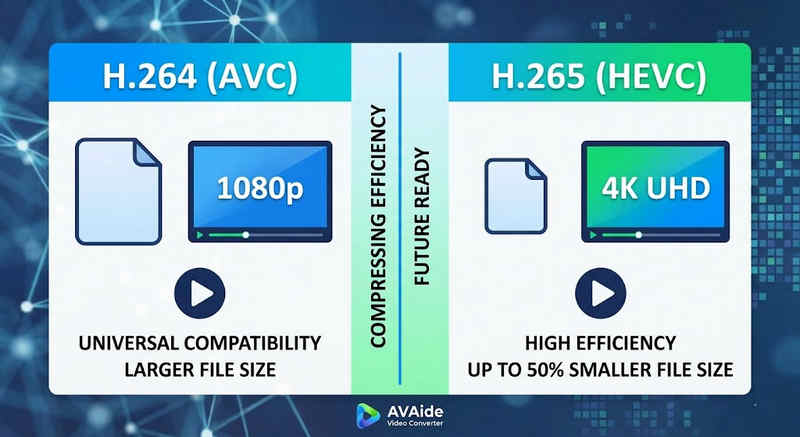
Krótka odpowiedź: Kodek H.264 (AVC) oferuje uniwersalną kompatybilność i działa na niemal każdym urządzeniu, ale generuje większe pliki. Kodek H.265 (HEVC) zapewnia lepszą kompresję, zmniejszając rozmiar plików nawet o 50% przy zachowaniu identycznej jakości obrazu, ale wymaga większej mocy obliczeniowej i ma ograniczone wsparcie dla starszego sprzętu.
1. Czym jest kodek H.264 (AVC)?
Wprowadzony jako Advanced Video Coding (AVC), kodek H.264 jest obecnie królem kompatybilności wideo. Jest to standard branżowy dla streamingu online, nagrywania na urządzeniach mobilnych i codziennego odtwarzania wideo. Ponieważ do dekodowania wymaga bardzo małej mocy obliczeniowej, filmy w formacie H.264 odtwarzają się płynnie na niemal każdym urządzeniu cyfrowym, od starych smartfonów po nowoczesne telewizory Smart TV.
2. Czym jest kodek H.265 (HEVC)?
High Efficiency Video Coding (HEVC), czyli H.265, to bezpośredni następca H.264. Został on zaprojektowany specjalnie z myślą o obsłudze ogromnego zapotrzebowania na dane w rozdzielczościach 4K, 8K i VR. HEVC wykorzystuje bardziej zaawansowane algorytmy, aby kompresować dane wideo znacznie wydajniej niż jego poprzednik, zapewniając ostry obraz o wysokiej rozdzielczości przy rozmiarach plików nawet o 501 TP3T mniejszych. Jednak ta wydajność ma swoją cenę: wymaga nowoczesnego sprzętu do przetwarzania bez opóźnień.
H.265 vs. H.264: Szybka tabela porównawcza
| Cechy | H.264 (AVC) | H.265 (wymagany) |
| Obsługiwane formaty | m2ts, evo, 3gp, f4v, mkv, mp4, qtff, asf, avi, mxf, ps, ts | mxf, ps, ts, 3gp, mkv, mp4, qtff, asf, avi |
| Efektywność kompresji | Umiarkowany (większe rozmiary plików) | Superior (mniejsze pliki 25-50%) |
| Jakość wideo | Doskonały do 1080p | Zoptymalizowany dla 4K, 8K i HDR |
| Kompatybilność urządzenia | Uniwersalny (99% urządzeń) | Ograniczona (starsze komputery mogą nie obsługiwać) |
| Moc przetwarzania | Niski (szybkie renderowanie/odtwarzanie) | Wysoki (wymaga nowszych procesorów/procesorów graficznych) |
| Idealne przypadki użycia | Transmisja strumieniowa w Internecie, media społecznościowe, urządzenia starszej generacji | Nagrania z drona 4K, kinowe filmy z iPhone'a, archiwizacja oszczędzająca miejsce |
Część 2. Kiedy wybrać HEVC a kiedy H.264
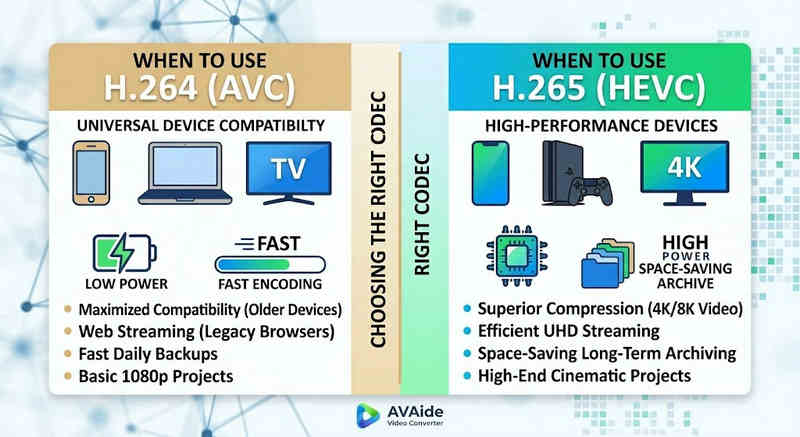
Wybór odpowiedniego kodeka zależy wyłącznie od Twoich konkretnych celów. Oto dlaczego możesz potrzebować jednego zamiast drugiego:
Dlaczego potrzebujesz HEVC (H.265):
- Maksymalne oszczędności w zakresie pamięci masowej: Jeśli tworzysz kopie zapasowe dłuższych filmów lub obszernych bibliotek 4K, HEVC działa jak naturalny kompresor rozmiaru wideo, zwalniając połowę miejsca na dysku twardym.
- Optymalizacja przepustowości: Format HEVC wymaga znacznie mniejszej przepustowości do przesyłania strumieniowego, dzięki czemu idealnie nadaje się do płynnego odtwarzania treści 4K nawet przy wolniejszym połączeniu internetowym i bez buforowania.
- Zabezpieczenie na przyszłość: W miarę jak branża przechodzi na treści w ultrawysokiej rozdzielczości (UHD) i VR, HEVC gwarantuje wysoką jakość Twoich filmów i ich kompatybilność z platformami nowej generacji.
Dlaczego potrzebujesz H.264 (AVC):
- Bezproblemowe odtwarzanie i edycja: Jeśli oprogramowanie do edycji wideo ma opóźnienia lub odtwarzacz multimedialny wyświetla komunikat „Kodek nie jest obsługiwany”
- Zgodność i bezproblemowe udostępnianie: H.264 to najszerzej kompatybilny kodek wideo. Niezależnie od tego, czy chcesz udostępniać swoje filmy znajomym, serwerom NAS, serwerom multimedialnym takim jak Plex czy Kodi, H.264 zapewni płynne udostępnianie i odtwarzanie.
Część 3. Jak łatwo konwertować między HEVC i H.264
W przypadku przesyłania filmów z i do formatów HEVC(H.265) i H.264, Konwerter wideo AVAide robi to lepiej niż reszta. Oferuje wydajny i łatwy w użyciu interfejs, który nie obniża jakości konwersji i obsługuje różne formaty. Bez względu na powód, może to być większa wydajność HEVC lub szersze przyjęcie H264, AVAide pozwala przełączać się między nimi bez problemu.
Szczegółowa procedura:
Krok 1Pobierz konwerter wideo AVAide
Pobierz, zainstaluj i uruchom Konwerter wideo AVAide na komputerze z systemem Windows lub Mac.

BEZPŁATNE POBIERANIE W systemie Windows 7 lub nowszym
 Bezpieczne pobieranie
BEZPŁATNE POBIERANIE Dla systemu Mac OS X 10.13 i nowszych
Bezpieczne pobieranieKrok 2Dodaj swoje filmy do konwertera wideo AVAide
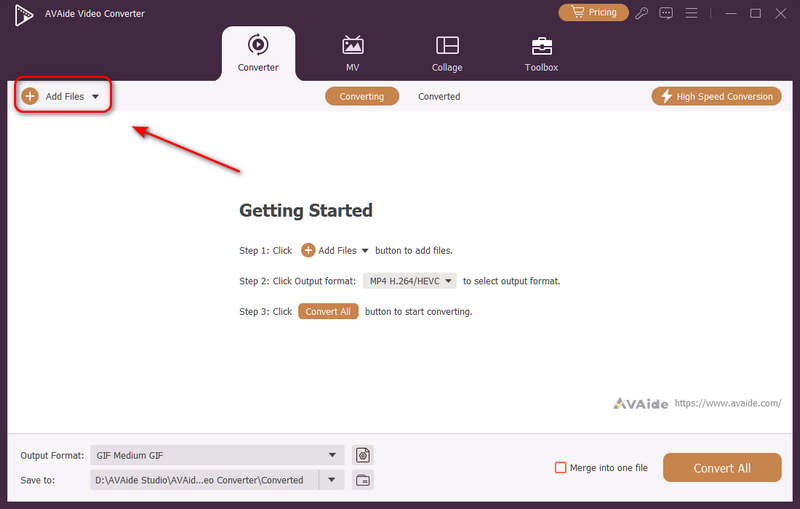
Możesz dodać wiele plików wideo i wykonać konwersję wsadową. Kliknij Dodaj pliki przycisk w lewym górnym rogu, aby zaimportować pliki wideo.
Krok 3Wybierz kodek H.264 lub H.265
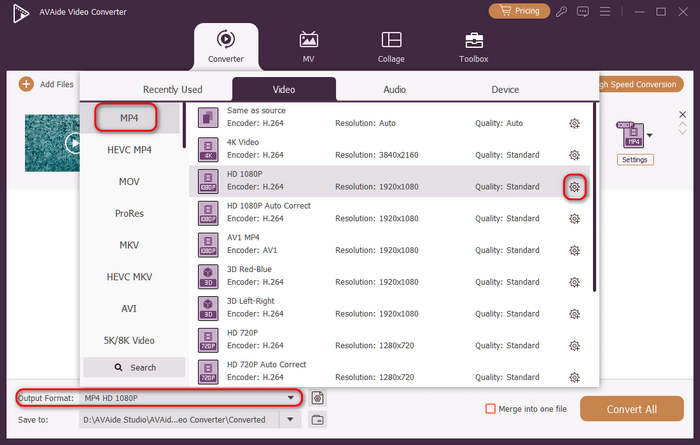
Kliknij Format wyjściowy przycisk menu rozwijanego w lewym dolnym rogu. Następnie możesz najpierw wybrać żądany format wideo. Następnie kliknij Profil niestandardowy przycisk (z ikoną koła zębatego) na pasku ustawień wideo.
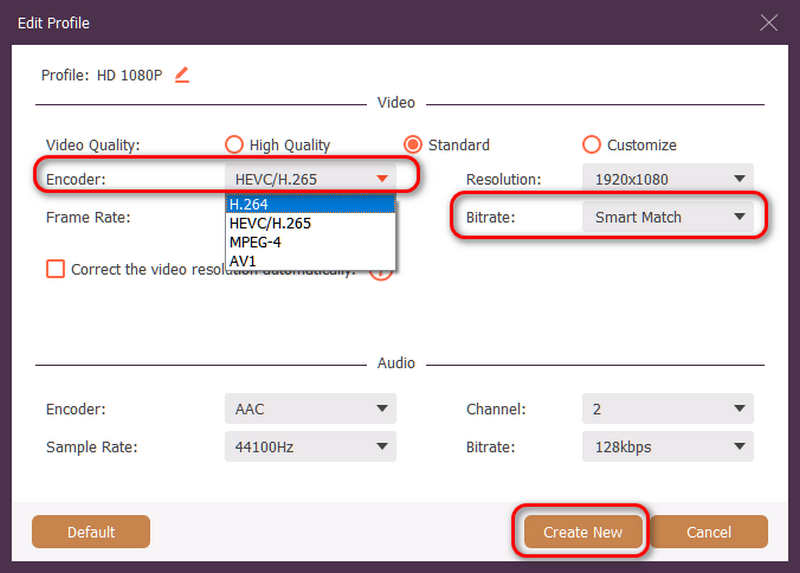
Następnie w tym panelu możesz kliknąć Koder przycisk rozwijany do wyboru H.264 lub HEVC/H.265 kodek. Jeśli chcesz zmienić jakość wideo, możesz dostosować Szybkość transmisji. Ale zalecamy Inteligentne dopasowanie aby zapewnić zgodność. Kliknij Tworzyć nowe przycisk, aby zapisać konfigurację.
Krok 4Rozpocznij ponowne kodowanie wideo
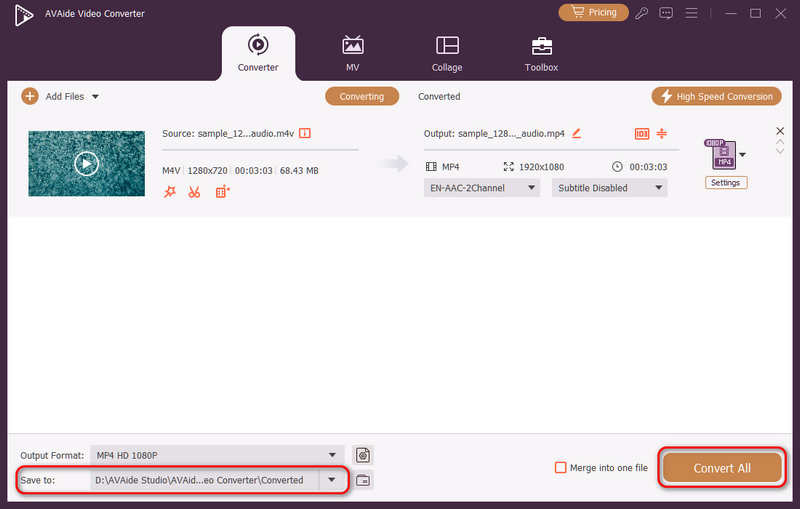
Na koniec możesz kliknąć Zapisz do przycisk rozwijany, aby wybrać żądany folder wyjściowy i kliknij Skonwertuj wszystko przycisk, aby zmienić kodek wideo na H.264 lub H.265.
Część 4. Najczęściej zadawane pytania dotyczące standardów H.265 i H.264
Jaka jest główna różnica pomiędzy NVENC H.264 i NVENC HEVC?
Główna różnica polega na wydajności kompresji i optymalizacji generowania sprzętowego. Kodek NVENC HEVC (H.265) zapewnia nawet o 501 TP3T lepszą kompresję niż kodek NVENC H.264 (AVC). Oznacza to, że może on zapewnić dokładnie taką samą jakość obrazu przy o połowę mniejszej przepływności (i o połowę mniejszym rozmiarze pliku), co czyni go doskonałym wyborem do archiwizacji filmów 4K lub streamingu przy ograniczonej przepustowości.
Czym jest modułowy wielokanałowy koder HEVC/H.264?
Modułowy, wielokanałowy enkoder HEVC/H.264 to urządzenie sprzętowe klasy korporacyjnej, zaprojektowane do kompresji i strumieniowania wielu strumieni wideo jednocześnie. W przeciwieństwie do konsumenckich enkoderów programowych, charakteryzuje się modułową (typu blade) konstrukcją, umożliwiającą użytkownikom wymianę lub modernizację sprzętowych kart kodujących w zależności od skali projektu. Obsługuje zarówno H.264, jak i HEVC/H.265.
Czym jest H.265+?
H.265+ (znany również jako Smart H.265+) to zaawansowana, opatentowana technologia kompresji wideo opracowana przez Hikvision, zoptymalizowana specjalnie pod kątem bezpieczeństwa i monitoringu.
Teraz można wykorzystać tę kompleksową analizę HEVC i H.264 aby określić, który kodek najlepiej pasuje do Twoich wymagań wideo. Niezależnie od tego, czy chcesz H.264 i skupić się na kompatybilności, czy też pragniesz HEVC i dążysz do lepszej kompresji, oba kodeki mają zalety. AVAide Video Converter oferuje eleganckie i wydajne rozwiązanie do radzenia sobie z tym problemem, zapewniając doskonałą jakość wyjścia przy jednoczesnym zachowaniu szybkości. AVAide ułatwia zadanie kompresji wideo i jego konwersji dzięki prostym interfejsom i zaawansowanym funkcjom.
O AUTORZE

Twój kompletny zestaw narzędzi wideo, który obsługuje ponad 350 formatów do konwersji w bezstratnej jakości.