Stel je voor dat je een enorme hoeveelheid foto's of documenten naar je computer overzet, en dat de velden 'Aanmaakdatum' of 'Wijzigingsdatum' volledig door elkaar staan. Of het nu komt door een back-upfout of een tijdzoneverschil, onjuiste bestandstijdstempels kunnen je digitale archivering verpesten en je workflow volledig in de war schoppen.
Gelukkig hoef je niet met die rommel te blijven zitten. Een toegewijde bestandsdatumwisselaar Met deze tools krijg je absolute controle over je metadata, waardoor je met slechts een paar klikken de tijdstempels van bestanden in batches kunt bewerken. In deze gids hebben we de 5 beste tools voor het wijzigen van bestandsdatums voor Windows en Mac verzameld, zodat je de controle over je digitale organisatie terugkrijgt. Laten we beginnen!
Deel 1. Overzicht van de 5 beste programma's om de bestandsdatum te wijzigen
In dit gedeelte presenteren we de beste tools om de datum van een bestand te wijzigen. Lees verder om te ontdekken hoe deze tools u kunnen helpen bij uw taak!
1. AVAide-videoconvertor
Beschikbaar voor zowel Windows als Mac. AVAide Video Converter is een veelzijdig platform uitgerust met een krachtige, ingebouwde functie voor het wijzigen van bestandsdatums. Met deze intuïtieve functie kunt u moeiteloos uitgebreide tijdstempelgegevens aanpassen, waaronder de aanmaak-, wijzigings- en laatst geraadpleegde datums.
- Verwerk probleemloos diverse mediaformaten, waaronder video, audio en afbeeldingen.
- Importeer en update meerdere bestanden tegelijk om tijd te besparen en uw workflow te stroomlijnen.
- De app biedt een overzichtelijke en gebruiksvriendelijke interface waarmee u snel de datum van een bestand kunt wijzigen.
- Zorg ervoor dat uw bestand er na datumwijzigingen altijd hetzelfde uitziet.
2. Bestandsdatumwisselaar
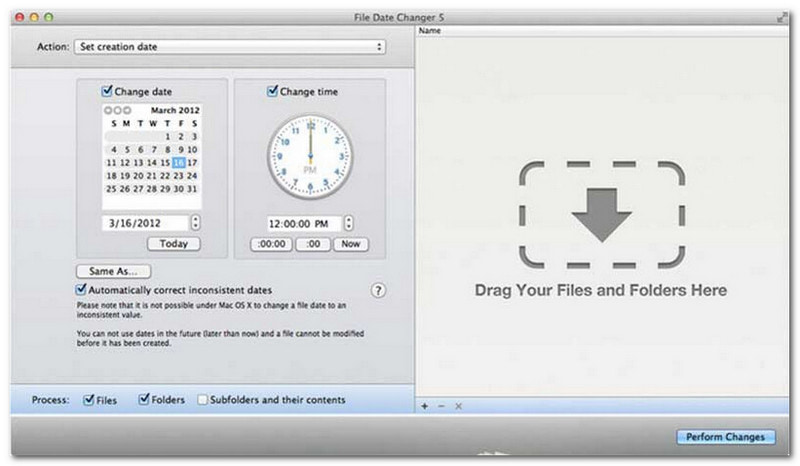
File Date Changer doet zijn naam eer aan door een speciale oplossing te bieden voor het wijzigen van de aanmaakdatum van bestanden. Het heeft een eenvoudig ontwerp, waardoor het toegankelijk is voor gebruikers van alle niveaus. Het ondersteunt het wijzigen van zowel de aanmaak- als de wijzigingsdatum. Of u nu de datum van individuele bestanden of complete mappen wilt wijzigen, deze File Date Changer voor Mac vereenvoudigt het proces met zijn efficiënte functionaliteit.
Hoewel File Date Changer een betaalde tool is, hangt de waarde ervan af van uw specifieke behoeften met betrekking tot kosten en functionaliteit. Sommige gebruikers vinden de functionaliteit wellicht wat beperkt in verhouding tot de prijs. Voor diegenen die efficiëntie en een naadloze workflow belangrijk vinden, blijft het echter een zeer betrouwbare en waardevolle investering in een tool voor het wijzigen van bestandsdatums.
Belangrijkste kenmerken van File Date Changer:
- Wijzig de aanmaak-, wijzigings- en laatst geraadpleegde datums en tijden voor meerdere bestanden.
- Ondersteuning voor het optellen of aftrekken van specifieke dagen, uren, minuten of seconden.
- Wijzig bestandseigenschappen zoals Alleen-lezen of Verborgen en werk de EXIF-metagegevens bij.
- De tool voor het wijzigen van de bestandsdatum werkt direct en biedt een overzichtelijke interface.
3. ExifTool
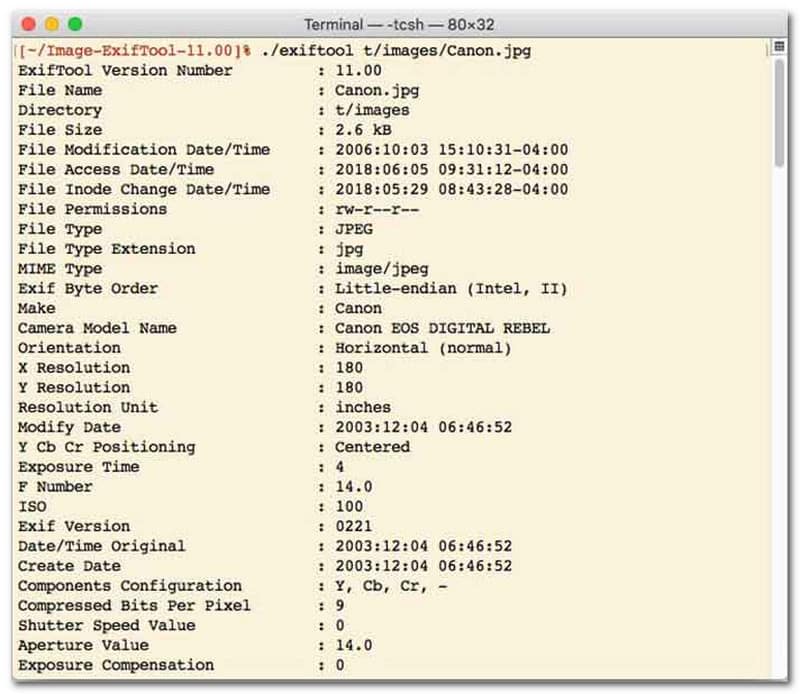
Voor gebruikers die de voorkeur geven aan een programma voor het wijzigen van bestandsdatums met een commandoregelinterface (CLI), is ExifTool de gouden standaard voor uiterst nauwkeurig bestandsbeheer. Deze uitzonderlijk veelzijdige tool ondersteunt een breed scala aan bestandstypen, waaronder foto's, video's, documenten en audio. Naast het bewerken van aanmaak- en wijzigingsdatums, kunt u met ExifTool ook naadloos tijdstempelmetadata van het ene bestand naar het andere kopiëren, zodat uw volledige mediabibliotheek probleemloos perfect gesynchroniseerd blijft.
Belangrijkste kenmerken van ExifTool:
- Bestandsysteemtijdstempels kunnen probleemloos worden gelezen en gewijzigd.
- Kopieer datums tussen volledig verschillende lagen metadata.
- Ondersteuning voor geavanceerde datum- en tijdberekeningen, zodat u bestandsdatums in batches kunt wijzigen.
- Extraheer datum- en media-informatie uit alle soorten bestanden.
4. Bulkbestandswisselaar
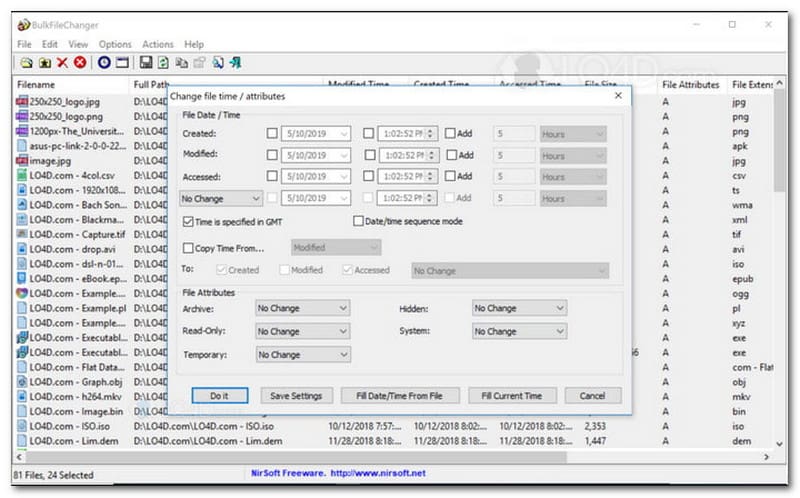
BulkFileChanger is een lichtgewicht, krachtig hulpprogramma voor het wijzigen van bestandsdatums, ontworpen voor moeiteloos beheer van bestandstijdstempels op Windows. Het stelt gebruikers in staat om snel verschillende datum- en tijdkenmerken te wijzigen, waaronder aanmaak-, wijzigings- en laatst geraadpleegde tijden, voor vrijwel elk bestandstype, van documenten en afbeeldingen tot video's. Hoewel de veelzijdigheid en snelheid het een uitstekend hulpprogramma maken voor het wijzigen van bestandsdatums bij het organiseren van digitale archieven, is het strikt beperkt tot het Windows-besturingssysteem. Dit betekent dat macOS- en Linux-gebruikers elders moeten zoeken.
Belangrijkste kenmerken van BulkFileChanger:
- Wijzig de aanmaakdatum, wijzigingsdatum en de datum waarop het bestand voor het laatst is geraadpleegd.
- Verwerkt probleemloos vrijwel alle bestandstypen, waaronder documenten, afbeeldingen en video's.
- Het lichte ontwerp maakt ultrasnelle, bulkgebaseerde updates van metadata mogelijk.
- Voeg specifieke dagen, uren, minuten en seconden toe of verwijder deze.
5. KenmerkMagic
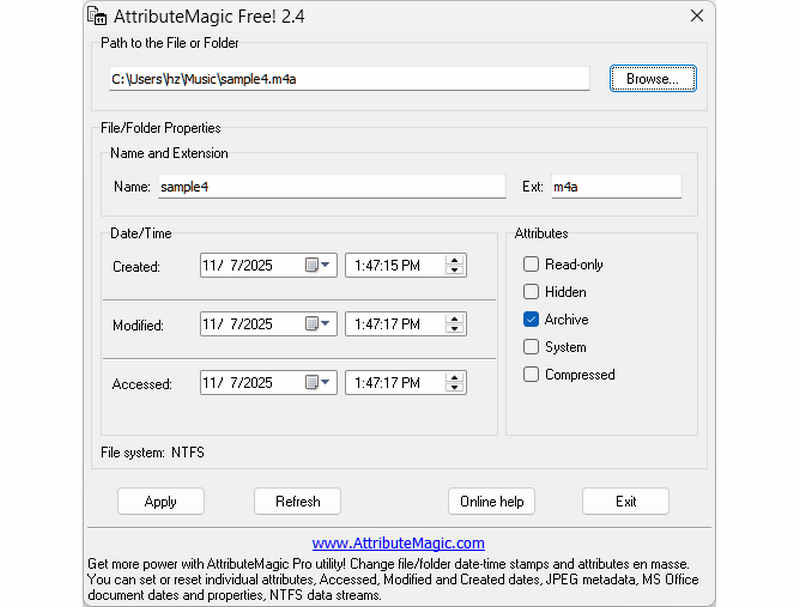
AttributeMagic gaat veel verder dan een simpele tool voor het wijzigen van bestandsdatums; het biedt een geavanceerde oplossing voor het beheren van zowel map- als bestandskenmerken. Deze uitgebreide tool maakt nauwkeurige tijdstempelwijzigingen mogelijk, waardoor gebruikers moeiteloos aanmaak-, wijzigings- en laatst geraadpleegde datums kunnen overschrijven. Naast de mogelijkheden als tool voor het wijzigen van bestandsdatums, biedt AttributeMagic diepgaande aanpassingsmogelijkheden voor bestandssysteemeigenschappen, afgestemd op uw specifieke archiveringsbehoeften. De gratis versie biedt essentiële functionaliteit voor het bewerken van tijdstempels, terwijl de premium-versie geavanceerde metadata-controle en krachtige automatiseringsfuncties ontsluit.
Belangrijkste kenmerken van AttributeMagic:
- Aanmaak-, wijzigings- en laatst geraadpleegde tijdstempels wijzigen of maskeren.
- Wijzig de datum van een bestand, zowel voor een enkel bestand als voor een hele map.
- U kunt eenvoudig de tijdstempels van bestanden verhogen, verlagen of vooruit of achteruit verschuiven.
- Hiermee kunt u essentiële bestandssysteemkenmerken zoals Alleen-lezen, Verborgen en Systeem instellen, resetten of omkeren.
Deel 2. Vergelijking van de 5 programma's voor het wijzigen van de bestandsdatum
| Product | Ondersteunde platformen | Gebruikersomgeving | Batchbewerking | Extra mogelijkheden |
| AVAide Video Converter | Windows en macOS | Modern, strak en vloeiend | Ja (supersnel) | Complete suite: 8K-videoconversie, dvd-rippen, metadata bewerken, MV/slideshow-creatie |
| Bestandsdatumwisselaar (NirSoft) | Alleen Mac | Verouderd (oude web-/gebruikersinterface) | Beperkt | Geen (voor eenmalig gebruik) |
| ExifTool | Windows, macOS, Linux | Alleen via de opdrachtregel (geen grafische gebruikersinterface) | Ja (vereist complexe scripts) | Alleen metadata lezen/schrijven |
| BulkFileChanger | Alleen voor Windows | Klassiek Windows-hulpprogramma | Ja | Basisinstellingen voor het aanpassen van bestandseigenschappen in Windows |
| Attribuutmagie | Alleen voor Windows | Stijf / Complex | Ja | Alleen beheer van vlaggetjes in het bestandssysteem |
Deel 3. Hoe u bestandsgegevens kunt wijzigen in AVAide Video Converter
Heeft u ooit de aanmaakdatum van een bestand moeten wijzigen om uw digitale bestanden beter te ordenen? Dat kun je doen met behulp van AVAide Video Converter! Blijf lezen om te leren hoe u de aanmaakdatum van een bestand kunt wijzigen, zodat u uw bestand beter kunt beheren.
Stap 1Download en installeer AVAide Video Converter vanaf de officiële website voor volledige toegang.

GRATIS DOWNLOAD Voor Windows 7 of hoger
 Veilige download
GRATIS DOWNLOAD Voor Mac OS X 10.13 of hoger
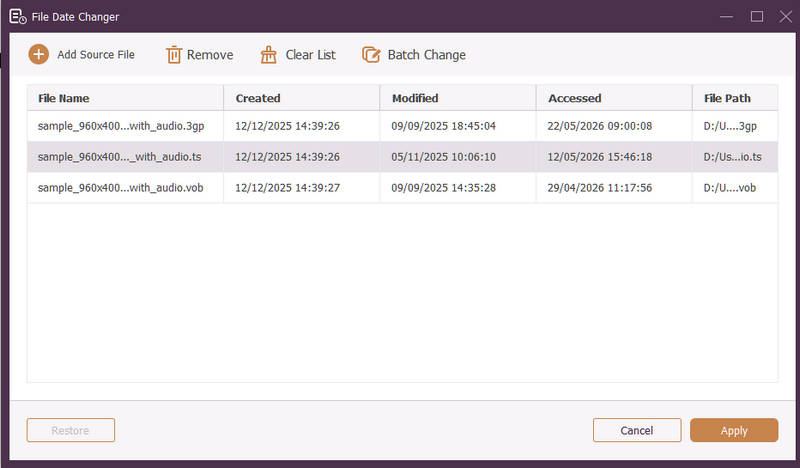
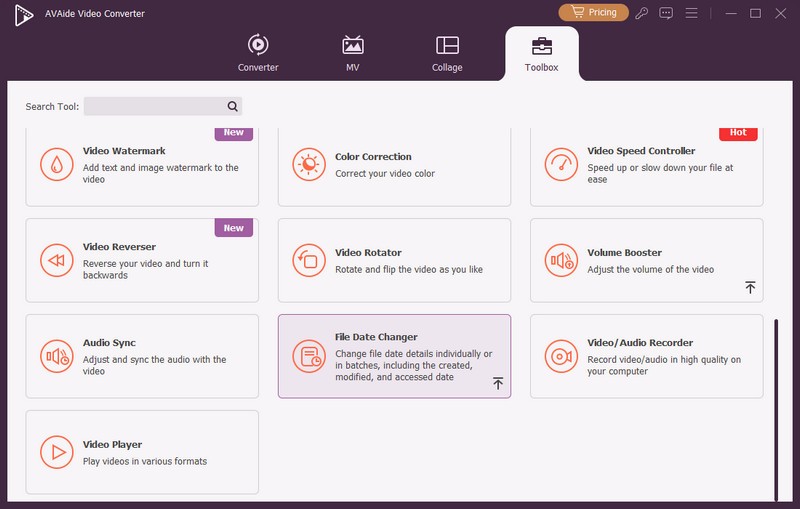
Veilige downloadStap 1Open het programma op uw computer om aan de slag te gaan. Ga naar de Gereedschapskist tabblad om toegang te krijgen tot verschillende functies. Scroll met de muis naar beneden, zoek naar Bestandsdatumwisselaar tussen de opties en klik erop. Het is de functie die u gaat gebruiken om de details van de bestandsdatum te wijzigen.
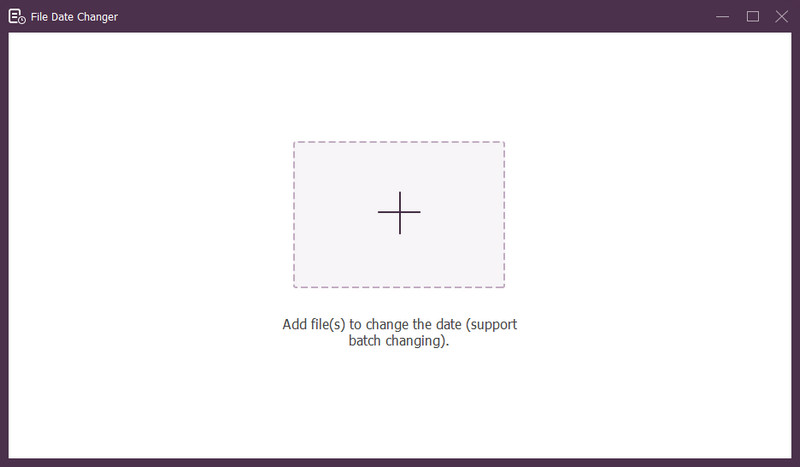
Stap 3Druk de (+) om bestanden te importeren. Dit kunnen audio-, afbeeldings- en audiobestanden zijn. U kunt meer dan één bestand importeren om de bestandsdetails te wijzigen.
Stap 4U kunt beginnen met het wijzigen van de datums zodra alle bestanden zijn geïmporteerd. U kunt de aanmaak-, gewijzigde en geopende datums dienovereenkomstig wijzigen. Om dat te doen, klikt u op het item totdat het Pijl verschijnt, wat aangeeft dat het moet worden bewerkt.
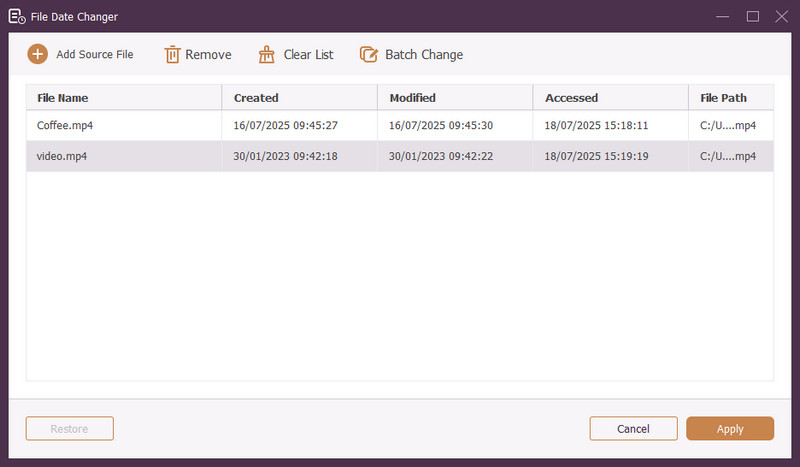
Stap 5Nadat u alle bestandsdatums hebt bewerkt, klikt u op de Van toepassing zijn knop om de wijzigingen te bevestigen. Nadat de wijzigingen zijn toegepast, controleert u de bijgewerkte bestandsgegevens om nauwkeurigheid te garanderen.
Deel 4. Veelgestelde vragen over Best File Date Changer
Hoe kan ik de datuminformatie van een bestand bekijken?
Als u wilt controleren wanneer een bestand is gemaakt of voor het laatst is gewijzigd, kunt u dit rechtstreeks op uw computer doen. Zoek het bestand, klik er met de rechtermuisknop op en kies Eigenschappen. Vervolgens kunt u alle details van het bestand bekijken. Deze omvatten de aanmaak- en wijzigingsdatums.
Weet iemand wanneer ik de datum van het bestand wijzig?
Nee! Het wijzigen van de datum van een bestand zou geen enkel spoor achterlaten. Niemand weet dus wanneer u de wijziging heeft aangebracht.
Wat is de reden waarom datums en tijden uit het bestand verdwijnen?
Er zijn een paar redenen waarom datums en tijden uit bestanden kunnen verdwijnen. Het kan gebeuren wanneer u een bestand downloadt en informatie verliest vanwege een slechte internetverbinding. Soms komt het door de website waar u het bestand hebt gedownload.
Kan ik de gewijzigde aanmaakdatum van het bestand opvragen?
Ja! U kunt de oorspronkelijke datum herstellen door deze handmatig terug te zetten op de oorspronkelijke waarde. Het is de enige manier om de aanmaakdatum van het bestand op te halen.
Heeft het wijzigen van de bestandsdatum en -tijd invloed op de bestandsintegriteit of inhoud?
Nee! Het wijzigen van de datums en tijden van een bestand heeft geen invloed op de inhoud of integriteit. Het verandert alleen de metadata, zoals aanmaak- en wijzigingsdatums. Het werkelijke bestand blijft ongewijzigd.
Daar heb je het! Je hebt geleerd hoe u de datum kunt wijzigen die in een bestand is aangemaakt, wat om verschillende redenen nuttig kan zijn. Voor een meer gestroomlijnde en beginnersvriendelijke ervaring kunt u overwegen om AVAide Video Converter te gebruiken als uw favoriete bestandsdatumwisselaar. Het is de beste keuze voor het beheren van uw digitale bestanden. Probeer het uit en deel uw mening hieronder!
OVER DE AUTEUR

De meest uitgebreide mediaconverter om video en audio te converteren zonder kwaliteitsverlies.
Bewerk video
- AI luxe video
- Verwijder watermerk uit video
- Tekst uit video verwijderen
- Downscalen van 4K naar 1080p/720p
- Achtergrondruis uit video verwijderen
- MP4-metadata-editor
- Videokwaliteit verscherpen
- Omgekeerde video
- Video van slechte kwaliteit repareren
- Metagegevens uit video/audio verwijderen
- Video van de frontcamera spiegelen/ontspiegelen