Het werken met lange video's levert vaak een frustrerend dilemma op: hoe behoud je een onberispelijke videokwaliteit zonder al je opslagruimte te verspillen? Hier komen videocompressiestandaarden om de hoek kijken. Als je een balans wilt vinden tussen videobestandsgrootte, kwaliteit en compatibiliteit met apparaten, zul je onvermijdelijk de keuze moeten maken tussen... H.264 (AVC) en H.265 (HEVC).
In deze uitgebreide handleiding bespreken we de belangrijkste verschillen tussen H.264 en HEVC, helpen we je bepalen welke het beste bij je workflow past en laten we je zien hoe je naadloos en zonder kwaliteitsverlies tussen beide kunt converteren.
Deel 1. HEVC versus H264: Wat zijn het?
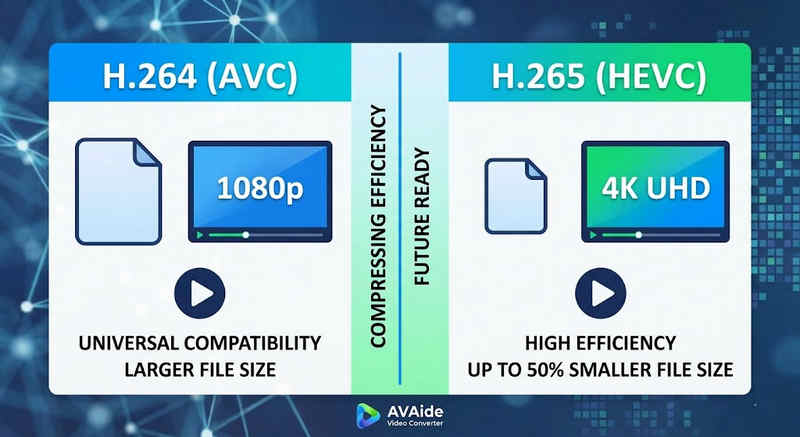
Het korte antwoord: H.264 (AVC) biedt universele compatibiliteit en werkt op vrijwel elk apparaat, maar creëert grotere bestanden. H.265 (HEVC) biedt superieure compressie, waardoor de bestandsgrootte tot wel 501 TP3 TB kleiner wordt met behoud van dezelfde beeldkwaliteit, maar vereist meer rekenkracht en wordt beperkt ondersteund door oudere hardware.
1. Wat is de H.264-codec (AVC)?
Oorspronkelijk geïntroduceerd als Advanced Video Coding (AVC), is H.264 de absolute koploper op het gebied van videocompatibiliteit. Het is de industriestandaard voor online streaming, mobiele opnames en het dagelijks afspelen van video's. Omdat er zeer weinig verwerkingskracht nodig is om H.264-video's te decoderen, worden ze probleemloos afgespeeld op vrijwel elk digitaal apparaat, van oude smartphones tot moderne smart-tv's.
2. Wat is de H.265-codec (HEVC)?
High Efficiency Video Coding (HEVC), of H.265, is de directe opvolger van H.264. Het is specifiek ontwikkeld om de enorme datavereisten van 4K-, 8K- en VR-content te verwerken. HEVC gebruikt geavanceerdere algoritmen om videogegevens veel efficiënter te comprimeren dan zijn voorganger, wat resulteert in scherpe beelden met een hoge resolutie en tot wel 501 TP3T kleinere bestandsgroottes. Deze efficiëntie heeft echter een prijs: het vereist moderne hardware om de gegevens zonder vertraging te verwerken.
H.265 versus H.264: Snelle vergelijkingstabel
| Functies | H.264 (AVC) | H.265 (HEVC) |
| Ondersteunde formaten | m2ts, evo, 3gp, f4v, mkv, mp4, qtff, asf, avi, mxf, ps, ts | mxf, ps, ts, 3gp, mkv, mp4, qtff, asf, avi |
| Compressie-efficiëntie | Gemiddeld (grotere bestandsgroottes) | Superieur (25-50% kleinere bestanden) |
| Video kwaliteit | Uitstekend voor 1080p. | Geoptimaliseerd voor 4K, 8K en HDR. |
| Apparaatcompatibiliteit | Universeel (99% van apparaten) | Beperkt (mogelijk niet compatibel met oudere pc's) |
| Verwerkingskracht | Laag (Snelle weergave/afspelen) | Hoog (Vereist nieuwere CPU's/GPU's) |
| Ideale use cases | Webstreaming, sociale media, oudere apparaten | 4K-dronebeelden, cinematische video's gemaakt met de iPhone, ruimtebesparende archivering. |
Deel 2. Wanneer kies je voor HEVC of H.264?
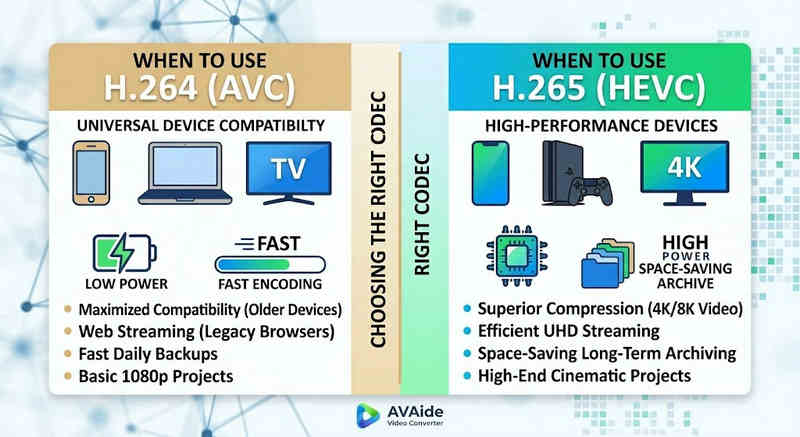
De keuze voor de juiste codec hangt volledig af van uw specifieke doelen. Hieronder leggen we uit waarom u mogelijk de ene codec boven de andere nodig hebt:
Waarom je HEVC (H.265) nodig hebt:
- Maximale opslagbesparing: Als je lange video's of enorme 4K-bibliotheken back-upt, werkt HEVC als een natuurlijke videoverkleiner, waardoor je de helft van je schijfruimte vrijmaakt.
- Bandbreedteoptimalisatie: HEVC vereist veel minder bandbreedte om te streamen, waardoor het ideaal is voor vloeiende 4K-weergave, zelfs op tragere internetverbindingen, zonder buffering.
- Toekomstbestendigheid: Nu de industrie overstapt op ultra-high-definition (UHD) en VR-content, zorgt HEVC ervoor dat uw video's van hoge kwaliteit blijven en compatibel zijn met de platforms van de volgende generatie.
Waarom je H.264 (AVC) nodig hebt:
- Vlekkeloze weergave en bewerking: Als je videobewerkingssoftware hapert of je mediaspeler de foutmelding 'Codec niet ondersteund' geeft
- Compatibiliteit en zorgeloos delen: H.264 is de meest compatibele videocodec. Of je je video's nu wilt delen met vrienden, een NAS, mediaservers zoals Plex of Kodi, H.264 zorgt voor probleemloos delen en afspelen.
Deel 3. Hoe u eenvoudig kunt converteren tussen HEVC en H.264
Bij het overbrengen van video's van en naar HEVC (H.265) en H.264 formaten, AVAide Video Converter doet het beter dan de rest. Het biedt een efficiënte en gebruiksvriendelijke interface die de kwaliteit van de conversie niet in gevaar brengt en verschillende formaten ondersteunt. Wat de reden ook is, het kan zijn voor de grotere efficiëntie van HEVC of de bredere acceptatie van H264, AVAide stelt u in staat om zonder gedoe heen en weer te schakelen tussen de twee.
Gedetailleerde procedure:
Stap 1Koop AVAide Video Converter
Downloaden, installeren en starten AVAide Video Converter op uw Windows- of Mac-computer.

GRATIS DOWNLOAD Voor Windows 7 of hoger
 Veilige download
GRATIS DOWNLOAD Voor Mac OS X 10.13 of hoger
Veilige downloadStap 2Voeg je video's toe aan AVAide Video Converter
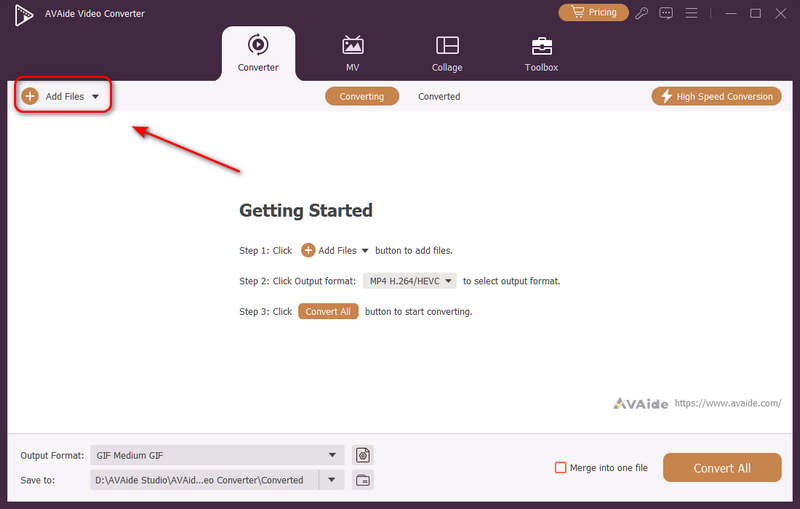
Je kunt meerdere videobestanden toevoegen en ze in batch converteren. Klik op de Bestanden toevoegen Gebruik de knop linksboven om uw videobestanden te importeren.
Stap 3Kies de H.264- of H.265-codec.
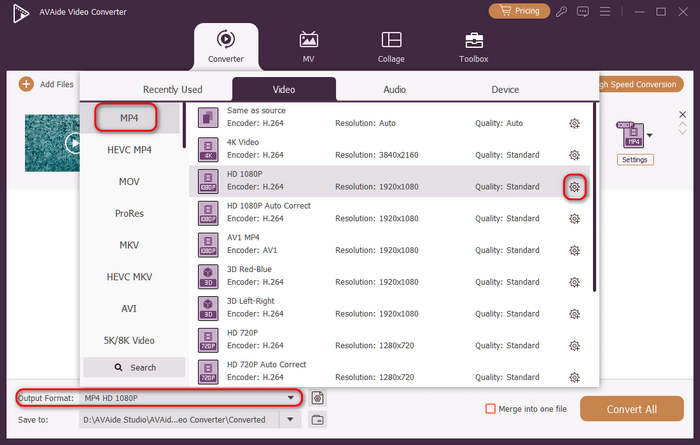
Klik op de Uitvoerformaat Klik op de vervolgkeuzemenuknop linksonder. Selecteer eerst het gewenste videoformaat. Klik vervolgens op de knop. Aangepast profiel knop (met een tandwielpictogram) in de videovoorinstellingenbalk.
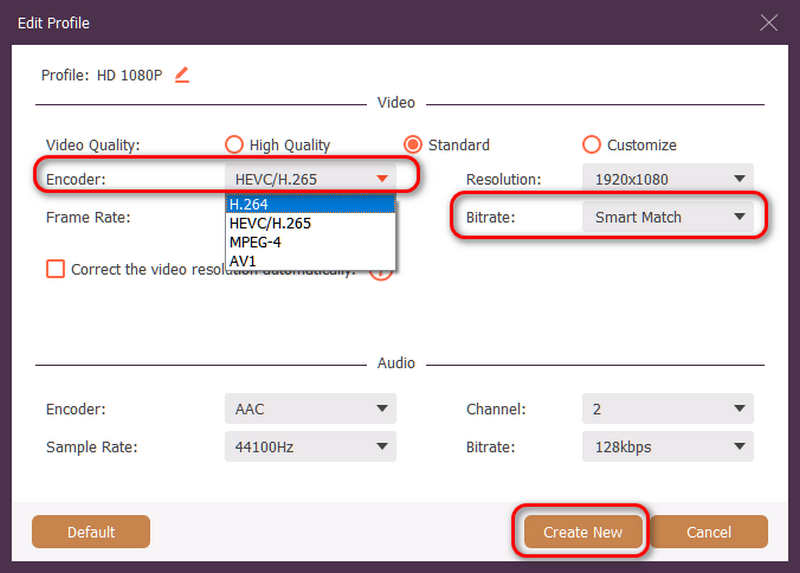
Vervolgens kunt u in dit paneel klikken op de Encoder vervolgkeuzeknop om te selecteren H.264 of HEVC/H.265 codec. Als je de videokwaliteit wilt wijzigen, kun je de codec aanpassen. BitsnelheidMaar we raden aan... Slimme match om compatibiliteit te garanderen. Klik op de Maak nieuw Klik op de knop om je configuratie op te slaan.
Stap 4Start met het opnieuw coderen van de video.
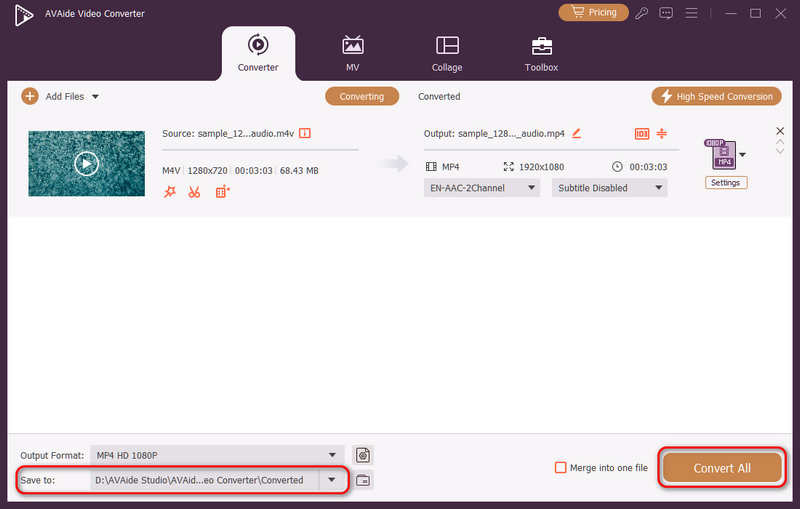
Ten slotte kunt u op klikken Opslaan in Gebruik de vervolgkeuzeknop om de gewenste uitvoermap te selecteren en klik vervolgens op de knop. Alles omzetten Met deze knop kunt u uw videocodec wijzigen naar H.264 of H.265.
Deel 4. Veelgestelde vragen over H.265 en H.264
Wat is het belangrijkste verschil tussen NVENC H.264 en NVENC HEVC?
Het voornaamste verschil zit hem in de compressie-efficiëntie en de optimalisatie van de hardwaregeneratie. NVENC HEVC (H.265) levert tot 50% betere compressie dan NVENC H.264 (AVC). Dit betekent dat dezelfde beeldkwaliteit kan worden bereikt met de helft van de bitrate (en de helft van de bestandsgrootte), waardoor het de superieure keuze is voor het archiveren van 4K-video's of streaming via een beperkte bandbreedte.
Wat is een modulaire meerkanalige HEVC/H.264-encoder?
Een modulaire multi-channel HEVC/H.264-encoder is een hardware-apparaat van professionele kwaliteit, ontworpen om meerdere videofeeds tegelijk te comprimeren en te streamen. In tegenstelling tot software-encoders voor consumenten, heeft deze een modulair (blade-achtig) ontwerp, waardoor gebruikers hardware-coderingskaarten kunnen wisselen of upgraden, afhankelijk van de omvang van hun project. Het apparaat ondersteunt zowel H.264 als HEVC/H.265.
Wat is H.265+?
H.265+ (ook bekend als Smart H.265+) is een geavanceerde, gepatenteerde videocompressietechnologie ontwikkeld door Hikvision, specifiek geoptimaliseerd voor beveiligings- en bewakingssystemen.
Men kan nu deze uitgebreide analyse van HEVC en H.264 om te bepalen welke codec het beste past bij uw videovereisten. Of u nu H.264 wilt en zich richt op compatibiliteit of HEVC wenst en mikt op betere compressie, beide codecs hebben voordelen. AVAide Video Converter biedt een elegante en efficiënte oplossing om met dat probleem om te gaan, door uitstekende kwaliteit output te leveren en tegelijkertijd snel te zijn. AVAide maakt de taak van videocompressie en de conversie ervan eenvoudig met zijn eenvoudige interfaces en geavanceerde functies.
OVER DE AUTEUR

Uw complete videotoolbox die 350+ formaten ondersteunt voor conversie in verliesvrije kwaliteit.