Bayangkan memindahkan sejumlah besar foto atau dokumen ke komputer anda, hanya untuk mendapati medan "Tarikh Dibuat" atau "Tarikh Diubah Suai" mereka bercampur aduk. Sama ada gangguan sandaran atau ketidakpadanan zon waktu, cap waktu fail yang salah boleh merosakkan pengarkiban digital anda dan menyebabkan aliran kerja anda huru-hara.
Mujurlah, anda tidak perlu hidup dengan keadaan kucar-kacir itu. Seorang yang berdedikasi penukar tarikh fail memberikan anda kawalan mutlak ke atas metadata anda, membolehkan anda mengedit cap masa fail secara kelompok hanya dengan beberapa klik. Dalam panduan ini, kami telah mengumpulkan 5 penukar tarikh fail terbaik untuk Windows dan Mac bagi membantu anda mendapatkan semula kawalan ke atas organisasi digital anda. Mari kita lihat!
Bahagian 1. Ulasan Induk 5 Pengubah Tarikh Fail Terbaik
Bahagian ini akan membentangkan penukar tarikh fail terbaik yang boleh anda harapkan. Teruskan membaca untuk mengetahui bagaimana alat ini dapat membantu anda mencapai tugas anda!
1. AVAide Video Converter
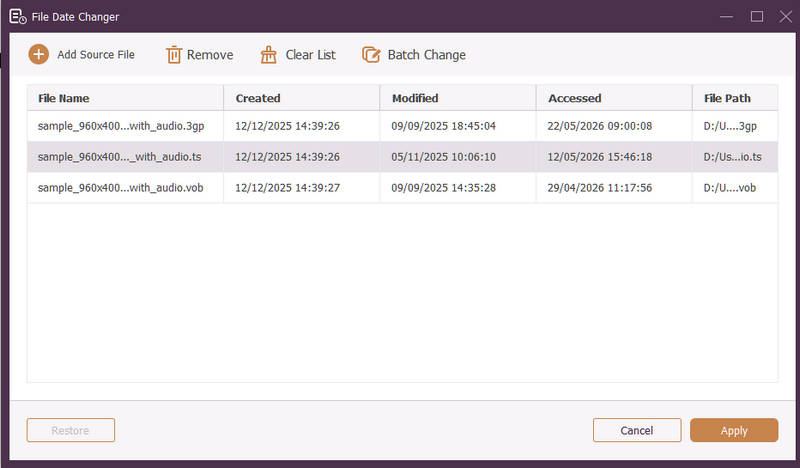
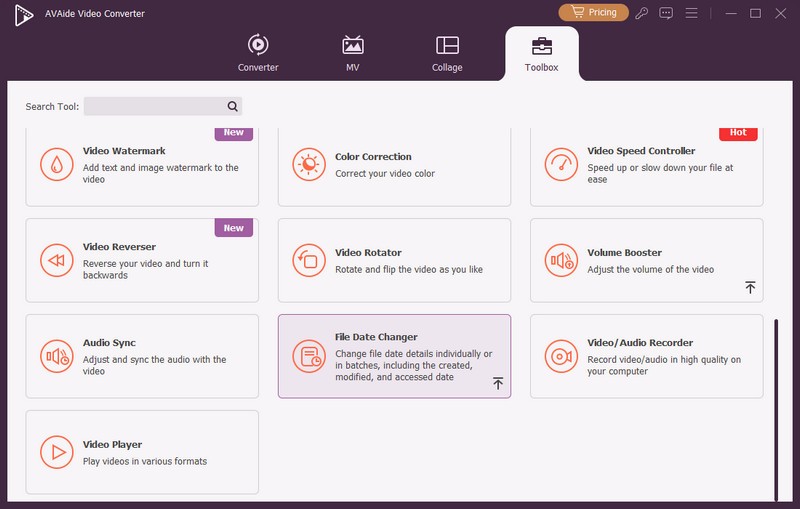
Tersedia untuk Windows dan Mac, Penukar Video AVAide ialah platform serba boleh yang dilengkapi dengan Pengubah Tarikh Fail terbina dalam yang berkuasa. Ciri intuitif ini membolehkan anda mengubah suai butiran cap waktu yang komprehensif dengan mudah, termasuk penciptaan, pengubahsuaian dan tarikh akses terakhir.
- Mengendalikan pelbagai format media merentasi video, audio dan imej dengan lancar.
- Import dan kemas kini berbilang fail secara serentak untuk menjimatkan masa dan melancarkan aliran kerja anda.
- Menampilkan antara muka yang bersih dan mesra pengguna untuk anda menukar tarikh fail dengan cepat.
- Pastikan fail anda lancar selepas perubahan tarikh.
2. Penukar Tarikh Fail
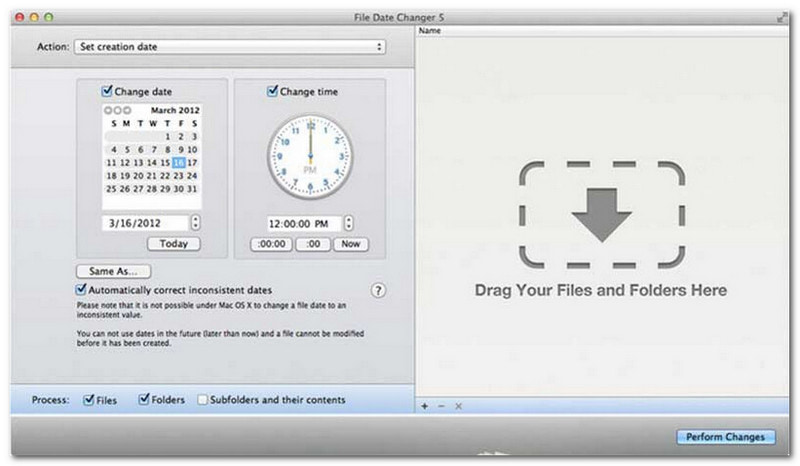
Pengubah Tarikh Fail menepati namanya dengan menawarkan penyelesaian khusus untuk menukar tarikh penciptaan fail. Ia menyediakan reka bentuk yang ringkas, menjadikannya mudah diakses oleh pengguna di semua peringkat. Ia menyokong pengubahsuaian untuk tarikh penciptaan dan pengubahsuaian. Sama ada anda perlu menukar tarikh untuk fail individu atau keseluruhan folder, pengubah tarikh fail pada Mac ini memudahkan proses dengan fungsinya yang cekap.
Walaupun Pengubah Tarikh Fail merupakan alat berbayar, nilainya bergantung pada keperluan khusus anda dari segi kos dan fungsi. Sesetengah pengguna mungkin mendapati set cirinya agak asas berbanding harga. Walau bagaimanapun, bagi mereka yang mengutamakan kecekapan dan aliran kerja yang lancar, ia kekal sebagai pelaburan yang sangat andal dan berbaloi untuk pengubah tarikh fail.
Ciri-ciri Utama Pengubah Tarikh Fail:
- Ubah suai tarikh dan masa penciptaan, pengubahsuaian dan akses terakhir untuk berbilang fail.
- Menyokong penambahan atau penolakan hari, jam, minit atau saat tertentu.
- Tukar sifat fail seperti Baca Sahaja atau Tersembunyi dan kemas kini metadata EXIF.
- Penukar tarikh fail berjalan serta-merta dan menawarkan antara muka yang jelas.
3. ExifTool
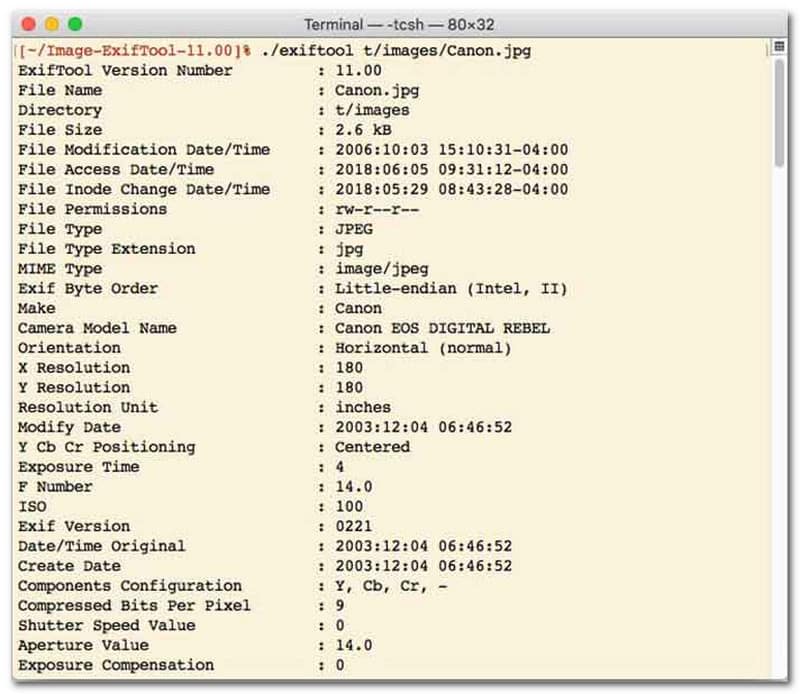
Bagi pengguna yang lebih suka penukar tarikh fail dengan antara muka baris arahan (CLI), ExifTool ialah standard emas untuk pengurusan fail ultra tepat. Alat penukar tarikh fail yang sangat versatil ini menyokong pelbagai jenis fail, termasuk foto, video, dokumen dan audio. Selain sekadar mengedit tarikh penciptaan dan pengubahsuaian, ExifTool membolehkan anda menyalin metadata cap waktu dengan lancar dari satu fail ke fail yang lain, memastikan keseluruhan pustaka media anda kekal disegerakkan dengan sempurna tanpa kerumitan.
Ciri-ciri Utama ExifTool:
- Membaca dan mengubah suai cap waktu sistem fail dengan lancar.
- Salin tarikh antara lapisan metadata yang berbeza sama sekali.
- Sokong matematik tarikh dan masa lanjutan untuk membantu anda menukar tarikh fail secara kelompok.
- Ekstrak maklumat tarikh dan media daripada semua jenis fail.
4. BulkFileChanger
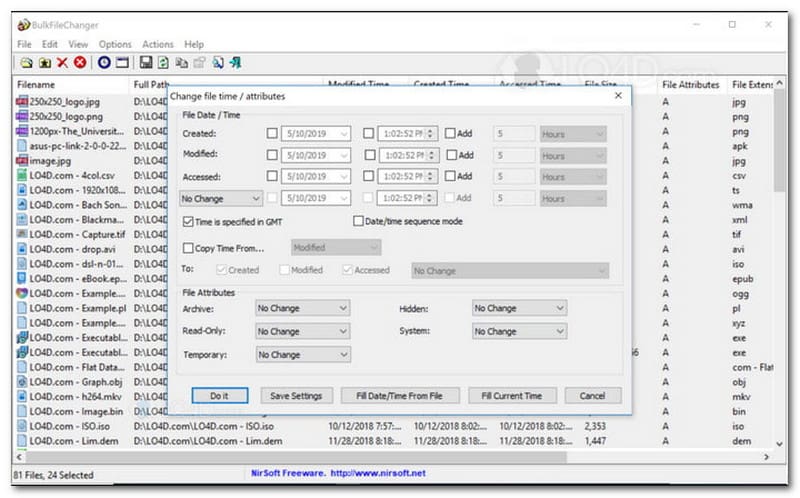
BulkFileChanger ialah utiliti penukar tarikh fail yang ringan dan berprestasi tinggi yang direka untuk pengurusan cap waktu fail yang mudah pada Windows. Ia membolehkan pengguna mengubah suai pelbagai atribut tarikh dan masa dengan cepat, termasuk penciptaan, pengubahsuaian dan masa akses terakhir, merentasi hampir semua jenis fail, daripada dokumen dan imej hingga video. Walaupun fleksibiliti dan kelajuannya merentas format menjadikannya penukar tarikh fail yang sangat baik untuk mengatur arkib digital, ketersediaannya terhad sepenuhnya kepada sistem pengendalian Windows, bermakna pengguna macOS dan Linux perlu mencari tempat lain.
Ciri-ciri Utama BulkFileChanger:
- Ubah suai penciptaan fail, pengubahsuaian dan tarikh akses terakhir.
- Mengendalikan hampir semua jenis fail dengan lancar, termasuk dokumen, imej dan video.
- Menampilkan reka bentuk ringan yang membolehkan pengemaskinian metadata pukal yang ultra pantas.
- Tambah atau ekstrak hari, jam, minit dan saat tertentu.
5. AttributeMagic
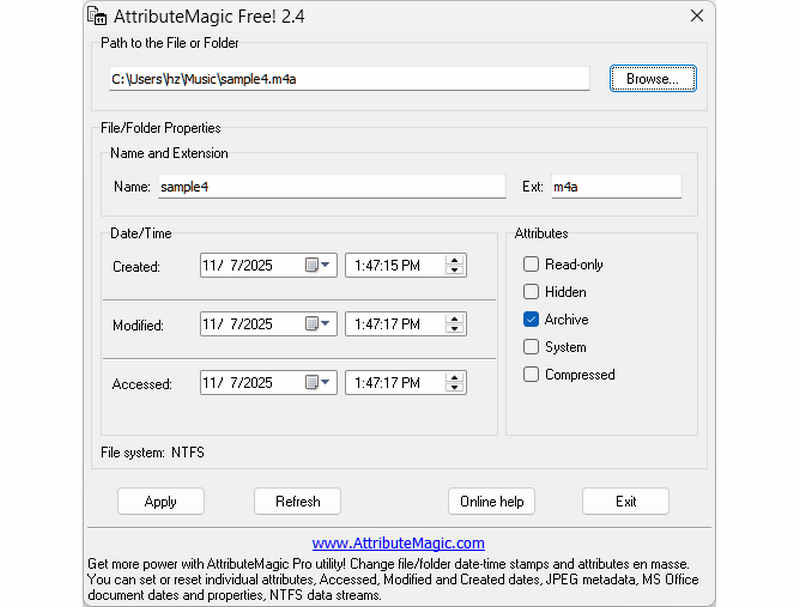
AttributeMagic jauh melangkaui sekadar penukar tarikh fail yang mudah dengan menawarkan penyelesaian canggih untuk mengurus atribut folder dan fail. Utiliti komprehensif ini membolehkan pengubahsuaian cap waktu yang tepat, membolehkan pengguna menulis semula tarikh penciptaan, pengubahsuaian dan akses terakhir dengan mudah. Selain keupayaannya sebagai penukar tarikh fail khusus, AttributeMagic menyediakan penyesuaian mendalam ke atas sifat sistem fail untuk memenuhi keperluan pengarkiban khusus anda. Walaupun versi percuma menyediakan fungsi penyuntingan cap waktu yang penting, peningkatan kepada edisi premium membuka kunci kawalan metadata canggih dan ciri automasi yang berkuasa.
Ciri-ciri Utama AttributeMagic:
- Ubah suai atau tutup penciptaan, pengubahsuaian dan cap waktu yang terakhir diakses.
- Tukar tarikh fail untuk fail tunggal atau keseluruhan folder fail.
- Tambah, kurangkan atau anjak cap masa fail ke hadapan atau ke belakang dengan mudah.
- tetapkan, tetapkan semula atau songsang atribut sistem fail teras seperti Baca Sahaja, Tersembunyi dan Sistem.
Bahagian 2. Perbandingan 5 Pengubah Tarikh Fail
| produk | Platform yang Disokong | Antaramuka pengguna | Penyuntingan Kelompok | Keupayaan Tambahan |
| Penukar Video AVAide | Windows & macOS | Moden, Bersih & Cecair | Ya (Ultra-Pantas) | Suit Penuh: Penukaran Video 8K, Koyakan DVD, Penyuntingan Metadata, Penciptaan MV/Tayangan Slaid |
| Penukar Tarikh Fail (NirSoft) | Mac Sahaja | Lapuk (Web/UI Legasi) | Terhad | Tiada (Tujuan tunggal) |
| ExifTool | Windows, macOS, Linux | Baris Perintah Sahaja (Tiada GUI) | Ya (Memerlukan skrip yang kompleks) | Pembacaan/penulisan metadata sahaja |
| Pengubah Fail Pukal | Windows Sahaja | Utiliti Windows Klasik | ya | Pengubahsuaian atribut fail Windows asas |
| AtributMagic | Windows Sahaja | Tegar / Kompleks | ya | Pengurusan bendera sistem fail sahaja |
Bahagian 3. Cara Menukar Data Fail dalam Penukar Video AVAide
Pernahkah anda perlu menukar tarikh penciptaan fail untuk menyusun fail digital anda dengan lebih baik? Anda boleh melakukannya menggunakan Penukar Video AVAide! Teruskan membaca untuk mengetahui cara menukar tarikh yang dibuat pada fail untuk membantu anda mengurus fail anda.
Langkah 1Muat turun dan Pasang AVAide Video Converter dari tapak web rasmi untuk akses lengkap.

MUAT TURUN PERCUMA Untuk Windows 7 atau lebih baru
 Muat Turun Selamat
MUAT TURUN PERCUMA Untuk Mac OS X 10.13 atau lebih baru
Muat Turun SelamatLangkah 1Buka program pada komputer anda untuk bermula. Menuju ke Kotak alat tab untuk mengakses beberapa ciri. Tatal ke bawah tetikus anda, cari Penukar Tarikh Fail antara pilihan, dan klik padanya. Ia adalah ciri yang anda akan gunakan untuk menukar butiran tarikh fail.
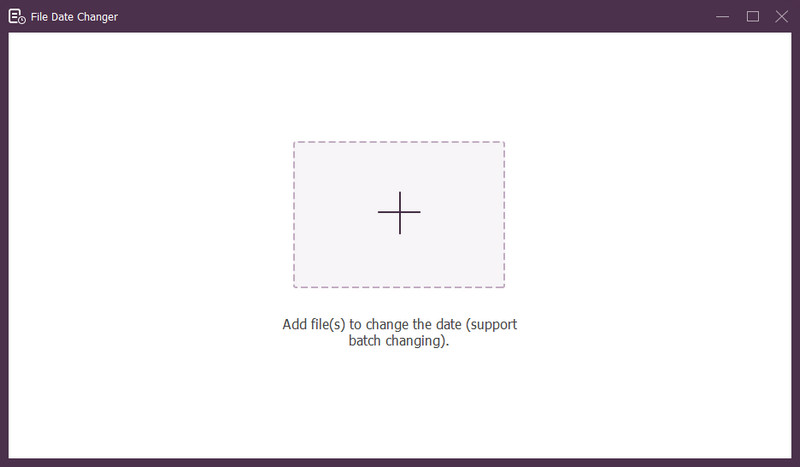
Langkah 3Tekan (+) butang untuk mengimport fail. Ini boleh menjadi fail audio, imej dan audio. Anda boleh mengimport lebih daripada satu fail untuk menukar butiran fail.
Langkah 4Anda boleh mula menukar tarikh mereka setelah semua fail diimport. Anda boleh menukar tarikh yang dibuat, diubah suai dan diakses dengan sewajarnya. Untuk melakukan itu, klik item sehingga anak panah muncul, menunjukkan untuk diedit.
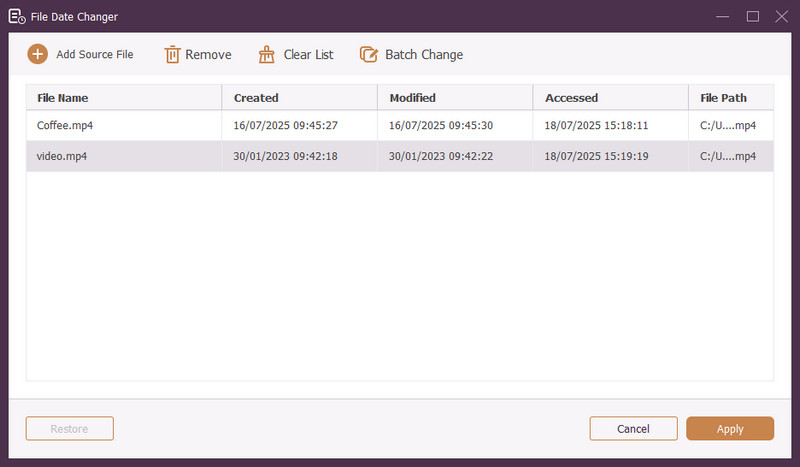
Langkah 5Selepas mengedit semua tarikh fail, klik butang Mohon butang untuk mengesahkan perubahan. Selepas perubahan digunakan, semak butiran data fail yang dikemas kini untuk memastikan ketepatan.
Bahagian 4. Soalan Lazim tentang Pengubah Tarikh Fail Terbaik
Bagaimanakah saya boleh melihat maklumat tarikh fail?
Jika anda ingin menyemak bila fail dibuat atau kali terakhir diubah suai, anda boleh melakukannya terus pada komputer anda. Sila cari fail, klik kanan padanya dan pilih Properties. Kemudian, anda boleh melihat semua butiran tentang fail tersebut. Ini termasuk tarikh penciptaan dan pengubahsuaian.
Adakah sesiapa tahu bila saya menukar tarikh fail?
Tidak! Menukar tarikh fail tidak akan meninggalkan sebarang kesan. Jadi, tiada siapa yang akan tahu bila anda membuat perubahan.
Apakah sebab mengapa tarikh dan masa hilang daripada fail?
Terdapat beberapa sebab mengapa tarikh dan masa mungkin hilang daripada fail. Ia boleh berlaku apabila anda memuat turun fail dan kehilangan beberapa maklumat kerana sambungan internet yang lemah. Kadang-kadang, ia adalah kerana tapak web tempat anda memuat turun fail.
Bolehkah saya mendapatkan semula tarikh penciptaan fail yang diubah suai?
Ya! Anda boleh memulihkan tarikh asal dengan menetapkannya semula secara manual kepada nilai asalnya. Ia adalah satu-satunya cara untuk mendapatkan semula tarikh penciptaan fail.
Adakah menukar tarikh dan masa fail menjejaskan integriti atau kandungan fail?
Tidak! Menukar tarikh dan masa fail tidak akan menjejaskan kandungan atau integriti. Ia hanya mengubah metadata, seperti tarikh penciptaan dan pengubahsuaian. Ia meninggalkan fail sebenar tidak berubah.
Itulah anda mempunyainya! Anda telah belajar bagaimana untuk menukar tarikh yang dibuat pada fail, yang boleh membantu untuk pelbagai sebab. Untuk pengalaman yang lebih ringkas dan mesra pemula, pertimbangkan untuk menggunakan AVAide Video Converter sebagai penukar tarikh fail anda. Ia adalah pilihan terbaik untuk menguruskan fail digital anda. Cubalah dan kongsi pendapat anda di bawah!
TENTANG PENGARANG

Penukar media paling komprehensif untuk menukar video & audio tanpa kehilangan kualiti.
Edit Video
- Video Kelas Atas AI
- Buang Tera Air daripada Video
- Alih Keluar Teks Daripada Video
- Turunkan 4K kepada 1080p/720p
- Buang Bunyi Latar Belakang daripada Video
- Editor Metadata MP4
- Tajamkan Kualiti Video
- Video Songsang
- Betulkan Video Kualiti Buruk
- Alih keluar Metadata daripada Video/Audio
- Video Kamera Depan Cermin/Nyah Cermin