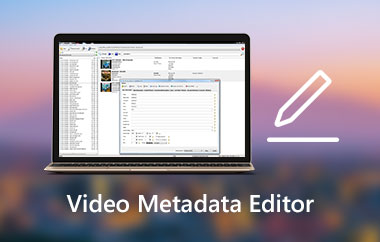
Előfordult már, hogy jobb gombbal kattintottál egy médiafájlra, és a „Tulajdonságok” menüpontot választottad a részletek, például az időtartam, a létrehozás dátuma, az előadó és a cím ellenőrzéséhez? Ha igen, akkor ezt az információt metaadatnak nevezik. A metaadatok megértése segíthet a következők kezelésében: zenei metaadatok szerkesztése, MP4 metaadatokat vagy bármilyen fájlformátum metaadatait. Ezen túlmenően sokkal hatékonyabbá és szervezettebbé teheti a digitális fájlok kezelését. Ebben az útmutatóban mindent megtudhat a média metaadatairól, azok fontosságáról, típusairól és a gond nélküli szerkesztésről.
1. rész. Mi a metaadat?
Magából a szóból kiindulva a metaadat az adatokról szóló adatot jelenti. Ez egy rejtett információréteg, amely egy videó- vagy zenefájlba van beépítve, és leírja annak tartalmát anélkül, hogy magának a tartalomnak a része lenne. Videó készítésekor az eszköz automatikusan metaadatokat csatol a létrehozandó fájlhoz. Ezek tartalmazzák a felvétel dátumát és időpontját, a fájlnevet, a felbontást, az időtartamot, a kodeket, sőt egyes esetekben a GPS-helyet is. A zenefájlok beágyazott címkéket is tartalmaznak, például címet, albumot, műfajt, előadókat és a megjelenés évét. Íme néhány metaadat-példa, amelyekkel már ismerős lehet a jobb megértés érdekében:
Cím: "Bohém rapszódia" a Queentől
Album: Egész éjjel az Operában
Művész: Királynő
Műsorszám: 11
Év: 1975
Műfaj: Szikla
Zeneszerző: Freddie Mercury
Időtartam: 5 perc és 55 másodperc
Hasonlóképpen, a videofájlok is ezt a logikát követik. A metaadatokból származó videofájl-leírás tartalmazhatja a klip címét, a képkockasebességet, a létrehozási dátumot, a használt kódolót és a szerzői jogi információkat. Ezek a fájlhoz csatolt összes információ bit és bájt, de lejátszás közben láthatatlanok.
2. rész. Metaadatok típusai
Tegyük fel, hogy tudod, hogyan kell használni a metaadatokat, amelyek lehetővé teszik a fájlok hatékonyabb kezelését és rendezését a különböző eszközökön és platformokon. De ez megváltozik, amikor megtudod, hogy a média metaadatai nem egyetlen kategóriát alkotnak. Ezt szem előtt tartva a metaadatokat különböző típusokba sorolják. A metaadat-típusoknak meghatározott céljuk van a tárolásuk és felhasználásuk módjától függően. Íme az igényeidnek megfelelő metaadat-típusok.
1. Műszaki metaadatok
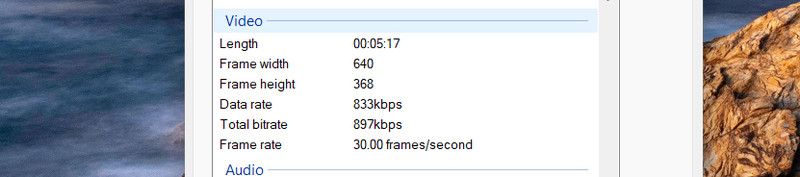
A technikai metaadatok olyan kritikus információkat tartalmaznak, amelyek dokumentálják a fájl technikai specifikációit. Az MP4 metaadatai esetében ezek jellemzően a bitrátát, a képkockasebességet, a mintavételi frekvenciát, a kodeket, a fájlméretet és a képarányt foglalják magukban. Valójában vannak... MP4 metaadat szerkesztők hogy könnyedén segítsen ezeknek a mezőknek a kitöltésében. Az ilyen típusú metaadatok segítségével biztosíthatja, hogy egy fájl kompatibilis legyen egy adott platformmal vagy eszközzel. Számok keverésekor a technikai metaadatok hasznosak lehetnek, különösen a hangmérnökök számára.
2. Leíró metaadatok
A leíró metaadatok a fájlról mutatnak információkat a cím, a kulcsszavak, a téma, a leírás és a szerző felfedésével. Ez az egyik leggyakoribb metaadattípus, amelyet általában egy video- vagy hangfájlon láthat. Videofájl esetében olyan mezőket tartalmazhat, mint a szinopszis, a cím és a címkék.

3. Strukturális metaadatok
A strukturális metaadatok arra utalnak, hogy egy fájl különböző részei hogyan kapcsolódnak egymáshoz. Azt is meghatározzák, hogy egy fájl hogyan van rendszerezve. Ezért ez a metaadattípus tartalmazza a jeleneteket, fejezeteket és a komponensek sorrendjét a fájlon belül egy videóban. Egy hosszú formátumú videó fejezetjelekkel ágyazható be, amelyek jelzik a különböző szakaszok kezdetét.
4. Adminisztratív metaadatok
Azok számára, akik egy fájl kezelését szeretnék megtekinteni, az adminisztratív metaadatok biztosítják ezt a lehetőséget. Megjelenítik a fájlformátumot, a létrehozási dátumot, a jogkezelést, a hozzáférési engedélyeket vagy a módosítás dátumát. Amikor olyan metaadatokat módosít, mint a szerzői jog tulajdonosa vagy a licencfeltételek, akkor az adminisztratív metaadatokat szerkeszti. Ha Ön szakember, archivátor vagy műsorszolgáltató, és a digitális média tulajdonjogát és az eszközeik jogainak használatát szeretné nyomon követni, ez a fajta metaadat kulcsfontosságú az Ön számára.

3. rész. Miért fontosak a metaadatok?
Sok felhasználó nem biztos, hogy érti a metaadatok használatát, mivel azok beágyazottak és láthatatlanok. A tendenciák olyan metaadatok, amelyeket elhanyagolnak és nem használnak fel. Ezenkívül a metaadatok használatának megértése az egyik leginkább alulértékelt készség a digitális tartalomkezelésben. Íme, miért fontosak a metaadatok a különböző helyzetekben:
Platformkompatibilitási és feltöltési követelmények
Az online platformok a videók és hanganyagok metaadataira támaszkodnak a megfelelő indexeléshez és megjelenítéshez. Ez azt jelenti, hogy megfelelő metaadatok nélkül a feltöltött videókat elutasíthatjuk, vagy helytelenül jeleníthetjük meg. Ezért egyes platformokon mezőket kell kitölteni egy videók vagy zenék feltöltése előtt.
Továbbfejlesztett lejátszási élmény
Megfelelő metaadat-szerkesztéssel észre fogod venni, hogy a zenelejátszók lejátszás közben megjelenítik az albumborítót, a számok számát és a dalszöveget. Ha testre szeretnéd szabni a hangprofil képét, megteheted albumborító hozzáadása MP3-hoz fájlt, és láthatóvá teszi a fotót lejátszás közben. Ugyanez vonatkozik a videolejátszókra is, amelyek a metaadatokból olvassák be a videofájl leírását. Fejezetnavigációt és egyéb kontextuális részleteket jelenítenek meg a jobb lejátszási élmény érdekében. Egyszerűen fogalmazva, egy jól címkézett médiafájl kifinomultabb és professzionálisabb felhasználói élményt nyújt.
Jobb kereshetőség és fájlrendszerezés
Általánosságban elmondható, hogy egy megfelelő nevű fájl könnyebben megtalálható, mint egy olyan, amelynek nincs megfelelő neve, és csak növeli a rendetlenséget. Ez a média metaadataira is igaz. Egy adott fájl megtalálása sokkal könnyebbé válik, ha a metaadatok teljesek és pontosak. Ez különösen hasznos, ha videó- és zenefájlokat gyűjt, és kezelni szeretné azokat.
4. rész. A legjobb eszköz a metaadatok egyszerű szerkesztéséhez
A metaadatok hatékony módosítása ugyanolyan fontos, mint a metaadatok megértése és fontosságának megértése. Valójában a folyamat zökkenőmentes lesz, ha rendelkezésre áll a metaadat-szerkesztő. Így mi elvégeztük a keresést Ön helyett, és megtaláltuk AVAide Video Converter mint egy hatékony videó metaadat-szerkesztő. Ez a program lehetővé teszi a metaadatok kezelését bármilyen médiafájlformátumon. A metaadatokat érintetlenül hagyja még a videó egyik formátumról a másikra konvertálása után is. Ezenkívül teljes kontrollt biztosít afelett, hogy a meglévő címkéket érintetlenül szeretné-e tartani, vagy frissíteni szeretné-e őket az exportálás előtt.
Ezen kívül ez az eszköz időt takaríthat meg a fájlok kötegelt feldolgozásával. Ez azt jelenti, hogy a felhasználók egyszerre több fájlt is importálhatnak, és módosíthatják a metaadataikat. Ami még fontosabb, az eszköz intuitív felületet kínál a könnyű navigáció érdekében. Könnyen elérheti a szükséges funkciókat, különösen a metaadatok szerkesztését. Minden fel van címkézve, hogy elkerülje a félreértéseket vagy az alkalmazás funkcióinak összekeverését. Az alábbiakban felsoroljuk a videofájl metaadatainak módosításának lépéseit:
1. lépésTöltse le és telepítse az AVAide Video Converter alkalmazást Windows vagy Mac számítógépére a következő gombra kattintva: Ingyenes letöltés az alábbi gombokat. A telepítés után indítsa el a programot.

INGYENES LETÖLTÉS Windows 7 vagy újabb rendszerhez
 Biztonságos letöltés
INGYENES LETÖLTÉS Mac OS X 10.13 vagy újabb rendszerhez
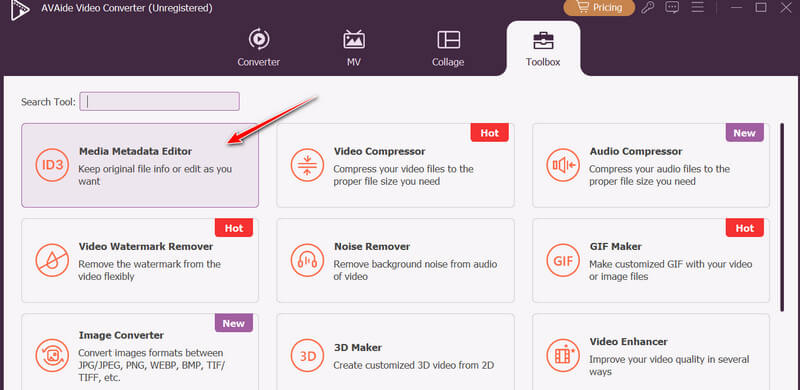
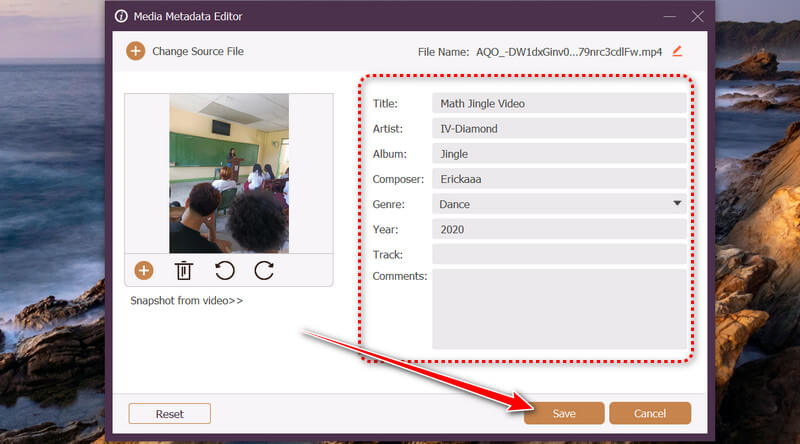
Biztonságos letöltés2. lépésAz alkalmazás elindításakor a felső menüben láthatja a fő füleket. Lépjen a Eszköztár fület, és válassza ki Média metaadat-szerkesztő fájl feltöltéséhez és a szerkesztőablak megnyitásához.
3. lépés Miután a fájl(ok) betöltődtek, megjelennek az elérhető metaadatmezők. Ezen a ponton frissítheti vagy kitöltheti a Cím, Művész, Album, Zeneszerző, Műfaj, Év, Nyomon követni, és Hozzászólások mezőket szükség szerint. Ezenkívül ebben a szakaszban lecserélheti vagy hozzáadhat egy borítóképet a profil kiegészítéséhez.
4. lépésA fenti lépések elvégzése után kattintson a Megment gombra a módosítások alkalmazásához. Ezután a program feldolgozza a fájlt. A folyamat befejezése után megjelenik a mentési mappa.
A videó metaadataitól kezdve a dal metaadatainak példáiig, amelyek az előadó és az album adatait jelenítik meg. Íme, most már alaposan megértetted, hogy mik is a metaadatok. Ez az adatréteg olyasmi, amit senki sem hagyhat figyelmen kívül, mivel segít a fájlok rendszerezésében, keresésében és felfedezésében. De csak akkor maximalizálhatod a célját, ha tudod... hogyan szerkeszthetjük a metaadatokat egy megbízható eszköz használatával. Ezért vázolta fel ez a bejegyzés a lépéseket a kényelmed érdekében.
A SZERZŐRŐL

A teljes videó eszköztár, amely több mint 350 formátumot támogat a veszteségmentes minőségben történő konvertáláshoz.
Videó szerkesztés
- AI előkelő videó
- Távolítsa el a vízjelet a videóból
- Szöveg eltávolítása a videóból
- Csökkentse a 4K-t 1080p/720p-re
- Távolítsa el a háttérzajt a videóból
- MP4 metaadatszerkesztő
- Élesebb videó minőség
- Fordított videó
- Rossz minőségű videó javítása
- Metaadatok eltávolítása videóból/hanganyagból
- Első kamera tükrözése/tükör nélküli használata videóval