Hosszú videókkal dolgozni gyakran bosszantó dilemmát vet fel: hogyan lehet megőrizni a makulátlan videóminőséget anélkül, hogy felemésztenénk az összes tárhelyet? Itt jönnek képbe a videótömörítési szabványok. Ha egyensúlyt akarunk teremteni a videó mérete, minősége és az eszközkompatibilitás között, elkerülhetetlenül választani kell a következők között: H.264 (AVC) és H.265 (HEVC).
Ebben az átfogó útmutatóban lebontjuk a H.264 és a HEVC közötti alapvető különbségeket, segítünk eldönteni, hogy melyik illik a munkafolyamatodhoz, és megmutatjuk, hogyan konvertálhatsz zökkenőmentesen a minőség romlása nélkül.
1. rész. HEVC vs. H264: Mik ezek?
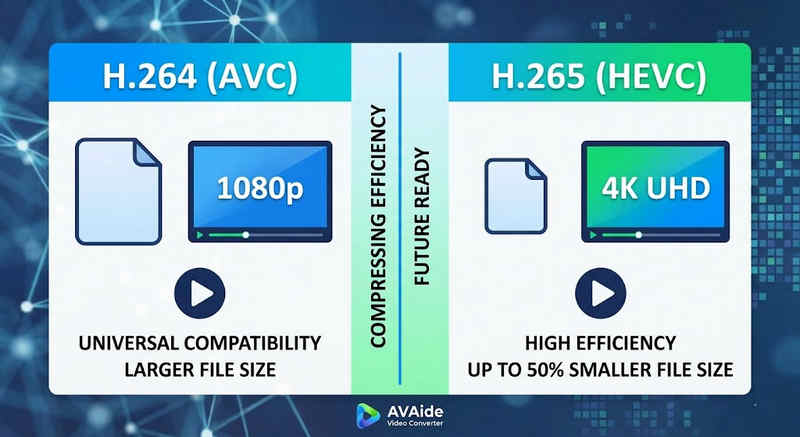
A rövid válasz: A H.264 (AVC) univerzális kompatibilitást kínál, és szinte bármilyen eszközön működik, de nagyobb fájlokat hoz létre. A H.265 (HEVC) kiváló tömörítést biztosít, akár 50%-vel is csökkentve a fájlméretet azonos vizuális minőség mellett, de nagyobb feldolgozási teljesítményt igényel, és régebbi hardvereken korlátozottan támogatott.
1. Mi a H.264 kodek (AVC)?
Az Advanced Video Coding (AVC) néven bevezetett H.264 a videókompatibilitás uralkodó királya. Ez az iparági szabvány az online streaming, a mobilfelvétel és a napi videólejátszás terén. Mivel a dekódolásához nagyon kevés feldolgozási teljesítményre van szükség, a H.264 videók szinte bármilyen elképzelhető digitális eszközön zökkenőmentesen játszhatók le, a régi okostelefonoktól a modern okostévékig.
2. Mi a H.265 kodek (HEVC)?
A nagy hatékonyságú videokódolás (HEVC), vagy H.265, a H.264 közvetlen utódja. Kifejezetten a 4K, 8K és VR tartalmak hatalmas adatigényének kezelésére tervezték. A HEVC fejlettebb algoritmusokat használ a videoadatok sokkal hatékonyabb tömörítésére, mint elődje, így éles, nagy felbontású képeket biztosít akár 50%-vel kisebb fájlméretben. Ez a hatékonyság azonban árat követel: modern hardverre van szükség a késleltetés nélküli feldolgozáshoz.
H.265 vs. H.264: Gyors összehasonlító táblázat
| Jellemzők | H.264 (AVC) | H.265 (HEVC) |
| Támogatott formátumok | m2ts, evo, 3gp, f4v, mkv, mp4, qtff, asf, avi, mxf, ps, ts | mxf, ps, ts, 3gp, mkv, mp4, qtff, asf, avi |
| Tömörítési hatékonyság | Közepes (Nagyobb fájlméretek) | Kiváló (25-50% kisebb fájlok) |
| Videó minőség | Kiváló 1080p felbontáshoz | 4K, 8K és HDR felbontásra optimalizálva |
| Eszköz kompatibilitás | Univerzális (99% eszközök) | Korlátozott (a régebbi számítógépek esetleg nem támogatják) |
| Feldolgozási teljesítmény | Alacsony (Gyors renderelés/lejátszás) | Magas (újabb CPU-kat/GPU-kat igényel) |
| Ideális használati esetek | Webes streaming, közösségi média, régi eszközök | 4K drónfelvétel, iPhone-os filmes videó, helytakarékos archiválás |
2. rész. Mikor válasszuk a HEVC-t a H.264-gyel szemben
A megfelelő kodek kiválasztása teljes mértékben a konkrét céljaidtól függ. Íme, miért lehet szükséged az egyikre a másikkal szemben:
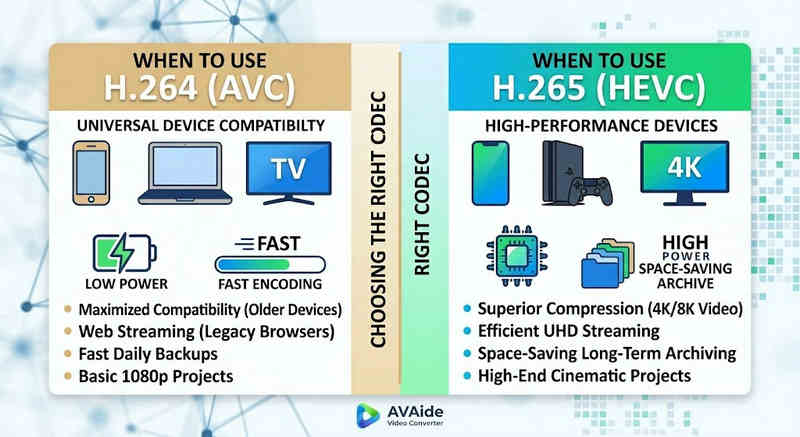
Miért van szükséged HEVC-re (H.265):
- Maximalizált tárhelymegtakarítás: Ha hosszú formátumú videókat vagy hatalmas 4K-s könyvtárakat mentesz el, a HEVC természetes videóméret-csökkentőként működik, felszabadítva a merevlemez-terület felét.
- Sávszélesség-optimalizálás: A HEVC sokkal kisebb sávszélességet igényel a streameléshez, így ideális a zökkenőmentes 4K lejátszáshoz még lassabb internetkapcsolaton is, pufferelés nélkül.
- Jövőbiztos: Ahogy az iparág az ultra-nagyfelbontású (UHD) és VR-tartalmak felé halad, a HEVC biztosítja, hogy videóid kiváló minőségűek és kompatibilisek maradjanak a következő generációs platformokkal.
Miért van szükséged H.264 (AVC) szabványra?
- Hibátlan lejátszás és szerkesztés: Ha a videószerkesztő szoftvered akadozik, vagy a médialejátszód „Nem támogatott kodek” hibát jelez
- Kompatibilitás és gondtalan megosztás: A H.264 a legszélesebb körben kompatibilis videokodek. Akár a barátaiddal, NAS-szal, médiaszerverekkel, például a Plexszel vagy a Kodival szeretnéd megosztani a videóidat, a H.264 zökkenőmentes megosztást és lejátszást biztosít.
3. rész. Hogyan lehet egyszerűen konvertálni HEVC és H.264 között
Videók HEVC(H.265) és H.264 formátumból történő átvitele esetén, AVAide Video Converter jobban csinálja, mint a többi. Hatékony és könnyen használható felületet biztosít, amely nem veszélyezteti az átalakítás minőségét, és támogatja a különböző formátumokat. Bármi legyen is az oka, lehet a HEVC nagyobb hatékonysága vagy a H264 szélesebb körű alkalmazása, az AVAide lehetővé teszi, hogy gond nélkül váltson a kettő között.
Részletes eljárás:
1. lépésSzerezze be az AVAide Video Convertert
Letöltés, telepítés és indítás AVAide Video Converter Windows vagy Mac számítógépén.

INGYENES LETÖLTÉS Windows 7 vagy újabb rendszerhez
 Biztonságos letöltés
INGYENES LETÖLTÉS Mac OS X 10.13 vagy újabb rendszerhez
Biztonságos letöltés2. lépésVideók hozzáadása az AVAide Video Converterhez
Több videofájlt is hozzáadhat, és kötegelt konverziót végezhet. Kattintson a Fájlok hozzáadása gombra a bal felső sarokban a videofájlok importálásához.
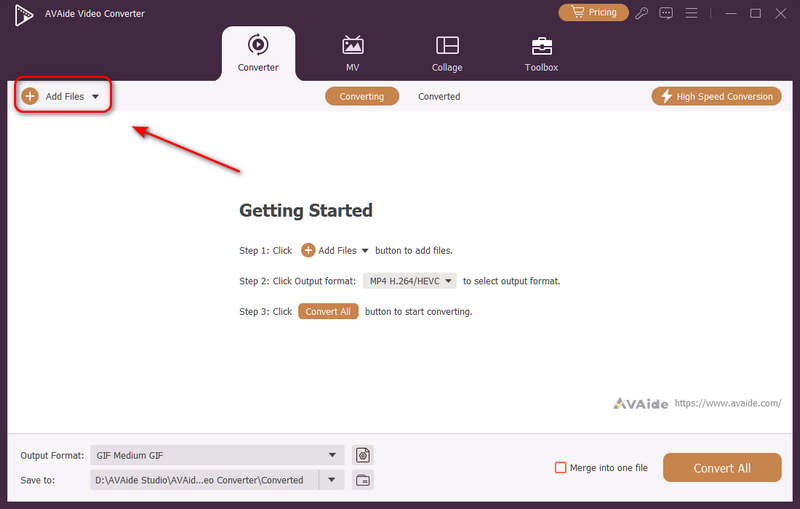
3. lépésVálasszon H.264 vagy H.265 kodeket
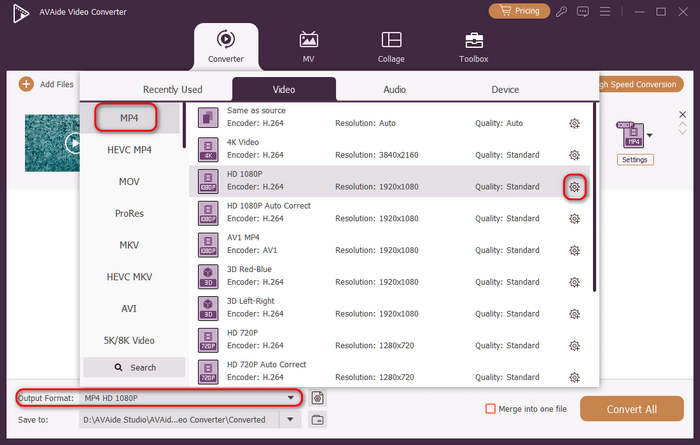
Kattints a Kimeneti formátum legördülő menü gombra a bal alsó sarokban. Ezután először kiválaszthatja a kívánt videoformátumot. Ezután kattintson a Egyéni profil gombra (fogaskerék ikonnal) a videó előbeállítások sávjában.
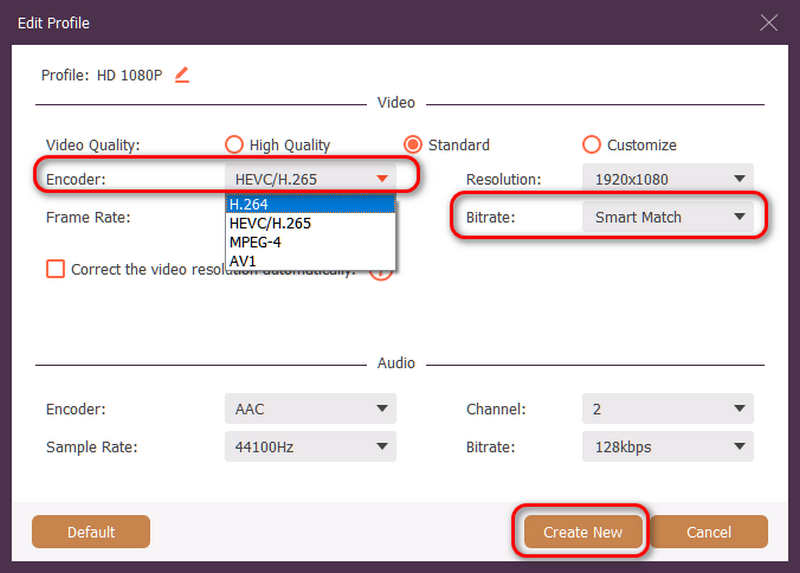
Ezután ezen a panelen rákattinthat a Kódoló legördülő gomb a kiválasztáshoz H.264 vagy HEVC/H.265 kodeket. Ha módosítani szeretné a videó minőségét, beállíthatja a BitrátaDe azt javasoljuk Intelligens egyezés a kompatibilitás biztosítása érdekében. Kattintson a Újat készíteni gombra a konfiguráció mentéséhez.
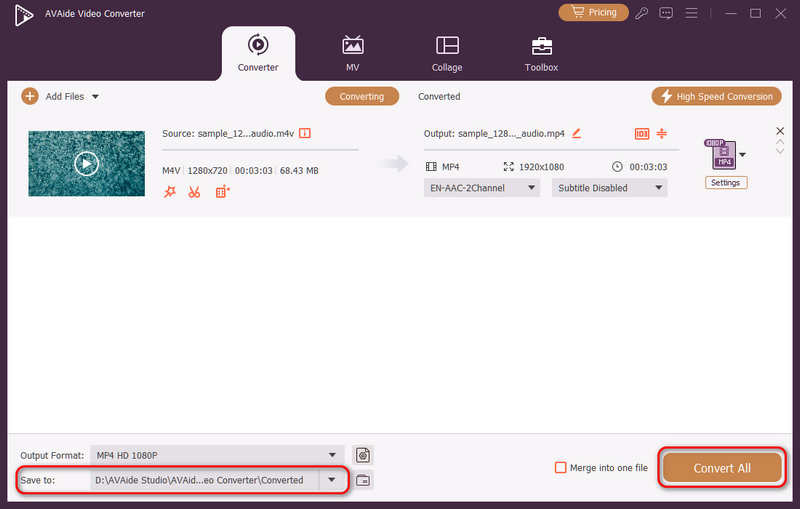
4. lépésVideó újrakódolásának indítása
Végül rákattinthat a Mentés ide legördülő menüből válassza ki a kívánt kimeneti mappát, majd kattintson a Összes konvertálása gombra a videokodek H.264 vagy H.265-re váltásához.
4. rész. A H.265 és H.264 szabványokkal kapcsolatos gyakori kérdések
Mi a fő különbség az NVENC H.264 és az NVENC HEVC között?
Az elsődleges különbség a tömörítési hatékonyságban és a hardveres generálás optimalizálásában rejlik. Az NVENC HEVC (H.265) akár 50%-vel jobb tömörítést biztosít, mint az NVENC H.264 (AVC). Ez azt jelenti, hogy pontosan ugyanazt a vizuális minőséget képes előállítani fele akkora bitrátával (és fele akkora fájlmérettel), így kiváló választás 4K videók archiválásához vagy korlátozott sávszélességen történő streameléshez.
Mi az a moduláris többcsatornás HEVC/H.264 kódoló?
A moduláris, többcsatornás HEVC/H.264 kódoló egy vállalati szintű hardvereszköz, amelyet több videojel egyidejű tömörítésére és streamelésére terveztek. A fogyasztói szoftveres kódolókkal ellentétben moduláris (blade stílusú) kialakítású, amely lehetővé teszi a felhasználók számára, hogy a projektjük mérete alapján üzem közben cseréljék vagy frissítsék a hardveres kódolókártyákat. Támogatja mind a H.264, mind a HEVC/H.265 szabványt.
Mi az a H.265+?
A H.265+ (más néven Smart H.265+) egy fejlett, saját fejlesztésű videotömörítési technológia, amelyet a Hikvision fejlesztett ki, és kifejezetten biztonsági és megfigyelési monitorozási célokra optimalizált.
Most már használhatjuk ezt az átfogó elemzést HEVC és H.264 annak meghatározásához, hogy melyik kodek felel meg legjobban a videókövetelményeinek. Akár H.264-et szeretne, és a kompatibilitásra összpontosít, akár HEVC-re vágyik, és a jobb tömörítésre törekszik, mindkét kodeknek megvannak az előnyei. Az AVAide Video Converter elegáns és hatékony megoldást kínál a probléma kezelésére, kiváló minőségű kimenetet biztosít, miközben gyors. Az AVAide egyszerű felületeivel és fejlett funkcióival megkönnyíti a videó tömörítését és konvertálását.
A SZERZŐRŐL

A teljes videó eszköztár, amely több mint 350 formátumot támogat a veszteségmentes minőségben történő konvertáláshoz.