Imagina transferir una gran cantidad de fotos o documentos a tu ordenador y descubrir que las fechas de creación o modificación están completamente desordenadas. Ya sea por un fallo en la copia de seguridad o por una diferencia horaria, las marcas de tiempo incorrectas en los archivos pueden arruinar tu archivo digital y desorganizar tu flujo de trabajo.
Afortunadamente, no tienes que vivir con el desorden. Un dedicado cambiador de fecha de archivo Te brinda control absoluto sobre tus metadatos, permitiéndote editar las marcas de tiempo de los archivos en lote con solo unos clics. En esta guía, hemos recopilado los 5 mejores cambiadores de fecha de archivo para Windows y Mac para ayudarte a recuperar el control de tu organización digital. ¡Comencemos!
- Parte 1. Análisis exhaustivo de los 5 mejores programas para cambiar la fecha de los archivos.
- Parte 2. Comparación de los 5 programas para cambiar la fecha de los archivos.
- Parte 3. Cómo cambiar los datos de un archivo en AVAide Video Converter
- Parte 4. Preguntas frecuentes sobre el mejor cambiador de fecha de archivo.
Parte 1. Análisis exhaustivo de los 5 mejores programas para cambiar la fecha de los archivos.
En esta sección te presentaremos la mejor herramienta para cambiar la fecha de tus archivos. ¡Sigue leyendo para descubrir cómo estas herramientas pueden ayudarte a lograr tu objetivo!
1. Convertidor de video AVAide
Disponible tanto para Windows como para Mac, Convertidor de video AVAide Es una plataforma versátil equipada con un potente cambiador de fecha de archivo integrado. Esta función intuitiva le permite modificar fácilmente todos los detalles de la marca de tiempo, incluidas las fechas de creación, modificación y último acceso.
- Gestiona sin problemas múltiples formatos multimedia de vídeo, audio e imágenes.
- Importa y actualiza varios archivos simultáneamente para ahorrar tiempo y optimizar tu flujo de trabajo.
- Cuenta con una interfaz limpia y fácil de usar para que puedas cambiar la fecha de tus archivos rápidamente.
- Mantén tu archivo intacto después de los cambios de fecha.
2. Cambiador de fecha de archivo
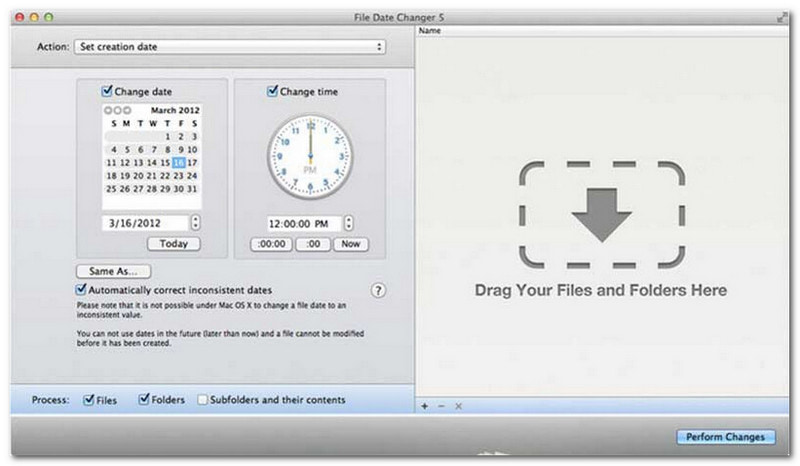
File Date Changer hace honor a su nombre al ofrecer una solución específica para cambiar las fechas de creación de archivos. Su diseño sencillo lo hace accesible para usuarios de todos los niveles. Permite modificar tanto la fecha de creación como la de modificación. Ya sea que necesite cambiar las fechas de archivos individuales o carpetas completas, este cambiador de fechas para Mac simplifica el proceso gracias a su eficiente funcionalidad.
Si bien File Date Changer es una herramienta de pago, su valor depende de tus necesidades específicas en cuanto a costo y funcionalidad. Algunos usuarios podrían considerar que sus funciones son algo básicas en relación con su precio. Sin embargo, para quienes priorizan la eficiencia y un flujo de trabajo fluido, sigue siendo una inversión muy confiable y que vale la pena para cambiar la fecha de tus archivos.
Características principales del cambiador de fecha de archivo:
- Modifique las fechas y horas de creación, modificación y último acceso para varios archivos.
- Permite sumar o restar días, horas, minutos o segundos específicos.
- Modifique las propiedades de los archivos, como Solo lectura u Oculto, y actualice los metadatos EXIF.
- El cambiador de fecha de archivo se ejecuta al instante y ofrece una interfaz clara.
3. Herramienta Exif
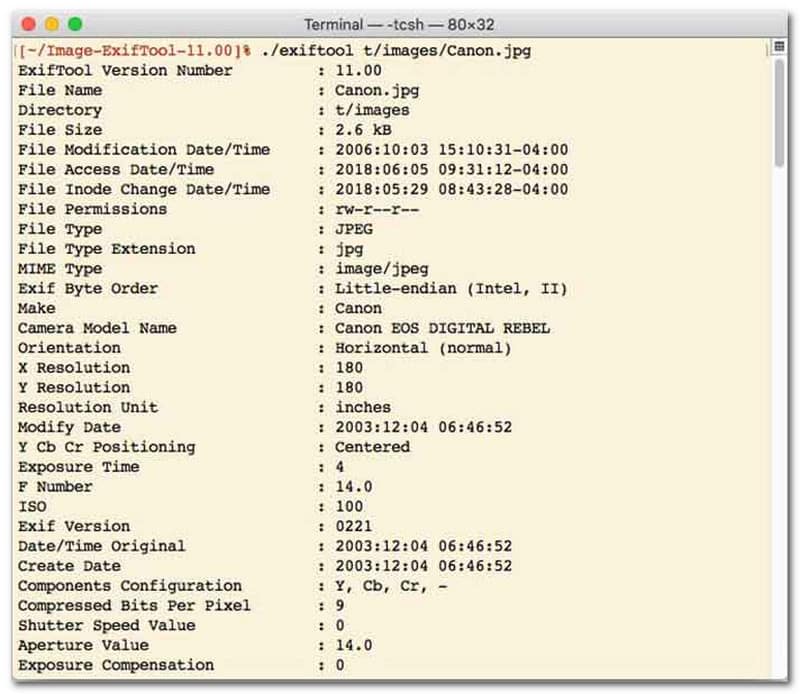
Para los usuarios que prefieren un cambiador de fecha de archivo con interfaz de línea de comandos (CLI), ExifTool es la opción ideal para una gestión de archivos ultraprecisa. Esta herramienta excepcionalmente versátil admite una amplia gama de tipos de archivo, incluyendo fotos, vídeos, documentos y audio. Además de editar las fechas de creación y modificación, ExifTool permite copiar sin problemas los metadatos de marca de tiempo de un archivo a otro, garantizando que toda su biblioteca multimedia se mantenga perfectamente sincronizada sin complicaciones.
Características principales de ExifTool:
- Lea y modifique sin problemas las marcas de tiempo del sistema de archivos.
- Copiar fechas entre capas de metadatos completamente diferentes.
- Admite cálculos avanzados de fecha y hora para ayudarte a cambiar las fechas de los archivos en lotes.
- Extrae la fecha y la información multimedia de todo tipo de archivos.
4. Cambiador de archivos masivo
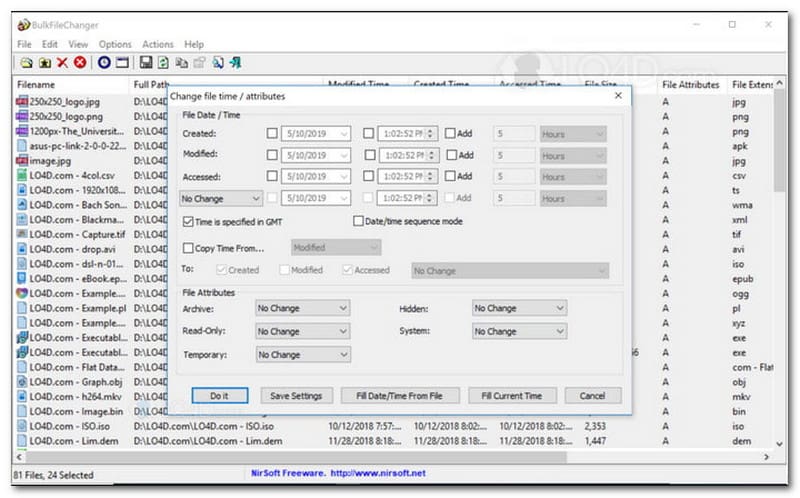
BulkFileChanger es una utilidad ligera y de alto rendimiento para cambiar la fecha de los archivos, diseñada para una gestión sencilla de la marca de tiempo en Windows. Permite modificar rápidamente diversos atributos de fecha y hora, como la creación, la modificación y el último acceso, en prácticamente cualquier tipo de archivo, desde documentos e imágenes hasta vídeos. Si bien su versatilidad multiformato y su velocidad la convierten en una excelente herramienta para organizar archivos digitales, su disponibilidad se limita exclusivamente al sistema operativo Windows, por lo que los usuarios de macOS y Linux deberán buscar otras alternativas.
Características principales de BulkFileChanger:
- Modificar las fechas de creación, modificación y último acceso a los archivos.
- Gestiona sin problemas prácticamente todos los tipos de archivos, incluidos documentos, imágenes y vídeos.
- Presenta un diseño ligero que permite la actualización masiva y ultrarrápida de metadatos.
- Agregar o eliminar días, horas, minutos y segundos específicos.
5. AtributoMagia
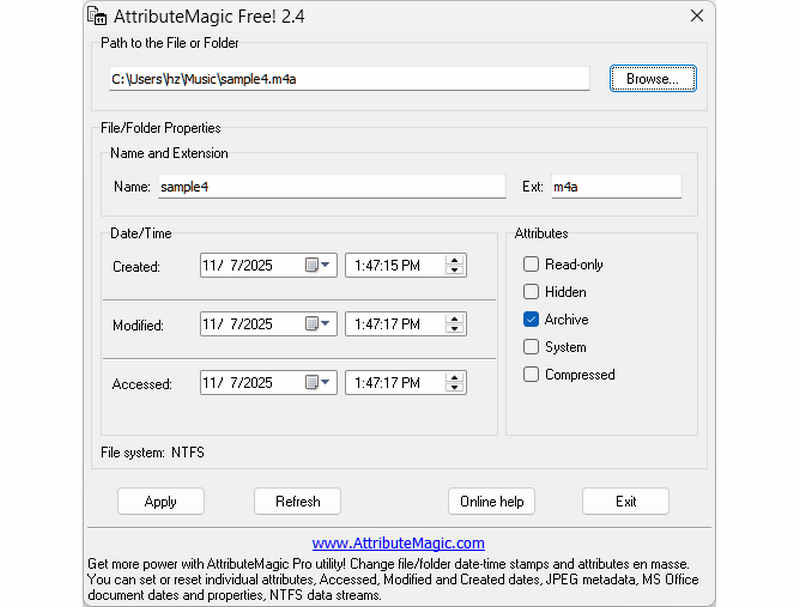
AttributeMagic va mucho más allá de un simple cambiador de fecha de archivo, ofreciendo una solución avanzada para la gestión de atributos de carpetas y archivos. Esta completa utilidad permite la modificación precisa de marcas de tiempo, facilitando a los usuarios la reescritura de las fechas de creación, modificación y último acceso. Además de sus funciones como cambiador de fecha de archivo, AttributeMagic ofrece una profunda personalización de las propiedades del sistema de archivos para adaptarse a sus necesidades específicas de archivado. Si bien la versión gratuita ofrece la funcionalidad básica de edición de marcas de tiempo, la actualización a la versión premium desbloquea un control avanzado de metadatos y potentes funciones de automatización.
Características principales de AttributeMagic:
- Modificar u ocultar las marcas de tiempo de creación, modificación y último acceso.
- Cambiar la fecha de archivo tanto para un solo archivo como para una carpeta de archivos completa.
- Incremente, decremente o desplace fácilmente las marcas de tiempo de los archivos hacia adelante o hacia atrás.
- establecer, restablecer o invertir atributos básicos del sistema de archivos, como Solo lectura, Oculto y Sistema.
Parte 2. Comparación de los 5 programas para cambiar la fecha de los archivos.
| Producto | Plataformas compatibles | Interfaz de usuario | Edición por lotes | Capacidades adicionales |
| Convertidor de video AVAide | Windows y macOS | Moderno, limpio y fluido. | Sí (ultrarrápido) | Paquete completo: Conversión de vídeo 8K, extracción de DVD, edición de metadatos, creación de vídeos musicales y presentaciones de diapositivas. |
| Cambiador de fecha de archivo (NirSoft) | Sólo Mac | Obsoleto (Interfaz web/de usuario heredada) | Limitado | Ninguno (de un solo uso) |
| Herramienta Exif | Windows, mac OS, Linux | Solo línea de comandos (sin interfaz gráfica) | Sí (Requiere scripts complejos) | Solo lectura/escritura de metadatos |
| Cambiador de archivos masivo | Solo para Windows | Utilidad clásica de Windows | Sí | Ajustes básicos de atributos de archivos de Windows |
| Magia de atributos | Solo para Windows | Rígido / Complejo | Sí | Gestión de indicadores del sistema de archivos únicamente |
Parte 3. Cómo cambiar los datos de un archivo en AVAide Video Converter
¿Alguna vez ha necesitado cambiar la fecha de creación de un archivo para organizar mejor sus archivos digitales? Puedes hacer eso usando Convertidor de video AVAide! Continúe leyendo para aprender cómo cambiar la fecha de creación de un archivo para ayudarlo a administrar su archivo.
Paso 1Descargue e instale AVAide Video Converter desde el sitio web oficial para obtener acceso completo.

DESCARGA GRATUITA Para Windows 7 o posterior
 Descarga segura
DESCARGA GRATUITA Para Mac OS X 10.13 o posterior
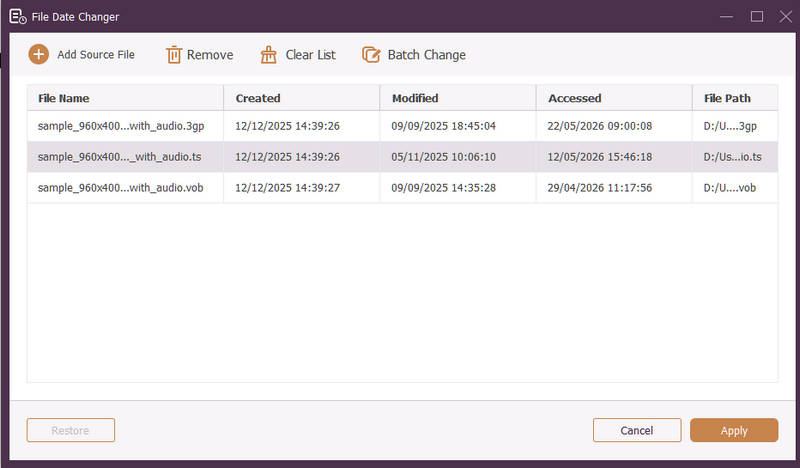
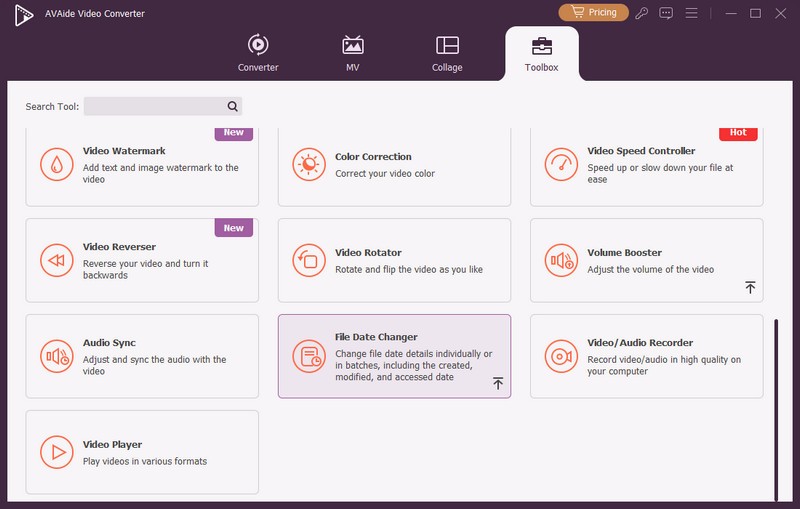
Descarga seguraPaso 1Abra el programa en su computadora para comenzar. Dirígete al Caja de herramientas pestaña para acceder a varias funciones. Desplácese hacia abajo con el mouse, busque Cambiador de fecha de archivo entre las opciones y haga clic en él. Es la función que utilizará para cambiar los detalles de la fecha del archivo.
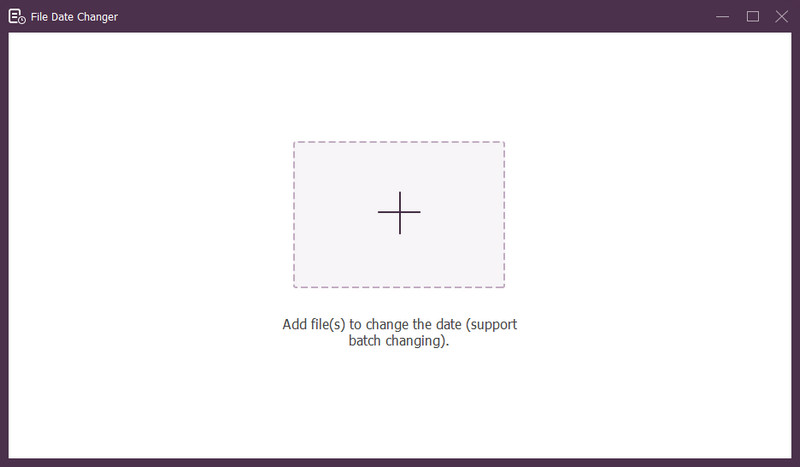
Paso 3Presione el (+) para importar archivos. Pueden ser archivos de audio, imagen y audio. Puede importar más de un archivo para cambiar los detalles del archivo.
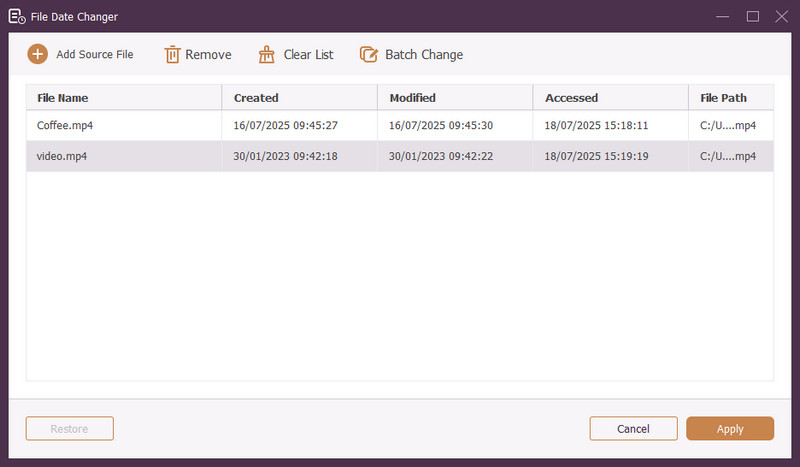
Etapa 4Puede comenzar a cambiar sus fechas una vez que se hayan importado todos los archivos. Puede cambiar las fechas de creación, modificación y acceso en consecuencia. Para hacerlo, haga clic en el elemento hasta que aparezca Flecha Aparece, indicando que se debe editar.
Paso 5Después de editar todas las fechas del archivo, haga clic en el Aplicar Botón para confirmar los cambios. Una vez aplicados los cambios, revise los detalles de los datos del archivo actualizados para garantizar la precisión.
Parte 4. Preguntas frecuentes sobre el mejor cambiador de fecha de archivo.
¿Cómo puedo ver la información de fecha de un archivo?
Si desea comprobar cuándo se creó o modificó por última vez un archivo, puede hacerlo directamente en su computadora. Busque el archivo, haga clic derecho sobre él y elija Propiedades. Luego, podrá ver todos los detalles sobre el archivo. Estos incluyen las fechas de creación y modificación.
¿Alguien sabrá cuándo cambio la fecha del archivo?
¡No! Cambiar la fecha de un archivo no dejaría ningún rastro. Así, nadie sabrá cuándo hiciste el cambio.
¿Cuál es la razón por la que las fechas y horas desaparecen del archivo?
Existen algunas razones por las que las fechas y horas pueden desaparecer de los archivos. Podría suceder cuando descargas un archivo y pierdes información debido a una mala conexión a Internet. A veces, se debe al sitio web donde descargaste el archivo.
¿Puedo recuperar la fecha de creación modificada del archivo?
¡Sí! Puede restaurar la fecha original configurándola manualmente a su valor inicial. Es la única forma de recuperar la fecha de creación del archivo.
¿Cambiar la fecha y hora del archivo afecta la integridad o el contenido del archivo?
¡No! Cambiar las fechas y horas de un archivo no afectaría el contenido ni la integridad. Sólo altera los metadatos, como las fechas de creación y modificación. Deja el archivo real sin cambios.
¡Ahí tienes! Has aprendido cómo cambiar la fecha creada en un archivo, que puede resultar útil por varios motivos. Para una experiencia más ágil y amigable para principiantes, considere usar AVAide Video Converter como su cambiador de fecha de archivos. Es la mejor opción para administrar sus archivos digitales. ¡Pruébalo y comparte tus pensamientos a continuación!
SOBRE EL AUTOR

El convertidor de medios más completo para convertir vídeo y audio sin pérdida de calidad.
Editar video
- Vídeo exclusivo con IA
- Eliminar marca de agua del vídeo
- Eliminar texto de un vídeo
- Reducir 4K a 1080p/720p
- Eliminar el ruido de fondo del vídeo
- Editor de metadatos MP4
- Mejorar la calidad del video
- Vídeo inverso
- Reparar video de mala calidad
- Eliminar metadatos de vídeo/audio
- Vídeo de la cámara frontal reflejado/des reflejado