Die Arbeit mit langen Videos stellt oft ein frustrierendes Dilemma dar: Wie lässt sich eine einwandfreie Videoqualität erzielen, ohne den gesamten Speicherplatz zu belegen? Hier kommen Videokomprimierungsstandards ins Spiel. Um Videogröße, Qualität und Gerätekompatibilität in Einklang zu bringen, steht man unweigerlich vor der Wahl zwischen … H.264 (AVC) und H.265 (HEVC).
In diesem umfassenden Leitfaden erläutern wir die wesentlichen Unterschiede zwischen H.264 und HEVC, helfen Ihnen bei der Entscheidung, welches Format am besten zu Ihrem Workflow passt, und zeigen Ihnen, wie Sie nahtlos zwischen den beiden Formaten konvertieren können, ohne Qualitätsverluste hinnehmen zu müssen.
Teil 1. HEVC vs. H264: Was sind sie?
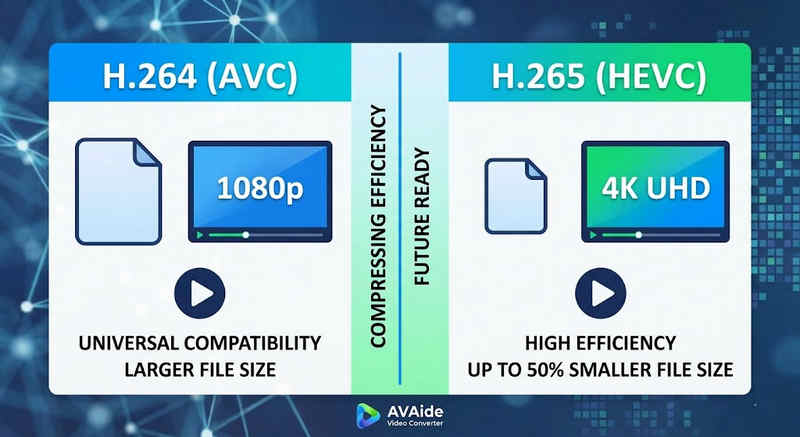
Die kurze Antwort: H.264 (AVC) bietet universelle Kompatibilität und funktioniert auf nahezu jedem Gerät, erzeugt aber größere Dateien. H.265 (HEVC) bietet eine überlegene Komprimierung und reduziert die Dateigröße um bis zu 501 Tsd. TB bei identischer Bildqualität, benötigt jedoch mehr Rechenleistung und wird von älterer Hardware nur eingeschränkt unterstützt.
1. Was ist der H.264-Codec (AVC)?
H.264, ursprünglich als Advanced Video Coding (AVC) eingeführt, ist der unangefochtene Marktführer im Bereich Videokompatibilität. Es ist der Industriestandard für Online-Streaming, mobile Videoaufnahmen und die tägliche Videowiedergabe. Da die Dekodierung von H.264-Videos nur sehr geringe Rechenleistung erfordert, lassen sie sich auf nahezu jedem erdenklichen digitalen Gerät flüssig abspielen – von älteren Smartphones bis hin zu modernen Smart-TVs.
2. Was ist der H.265-Codec (HEVC)?
High Efficiency Video Coding (HEVC), kurz H.265, ist der direkte Nachfolger von H.264. Es wurde speziell für die enormen Datenmengen von 4K-, 8K- und VR-Inhalten entwickelt. HEVC nutzt fortschrittlichere Algorithmen, um Videodaten deutlich effizienter zu komprimieren als sein Vorgänger und liefert so gestochen scharfe, hochauflösende Bilder bei bis zu 501 Tbit/s kleineren Dateigrößen. Diese Effizienz hat jedoch ihren Preis: Für eine ruckelfreie Verarbeitung ist moderne Hardware erforderlich.
H.265 vs. H.264: Kurzvergleichstabelle
| Merkmale | H.264 (AVC) | H.265 (HEVC) |
| Unterstützte Formate | m2ts, evo, 3gp, f4v, mkv, mp4, qtff, asf, avi, mxf, ps, ts | MXF, PS, TS, 3GP, MKV, MP4, QTFF, ASF, AVI |
| Kompressionseffizienz | Mittel (Größere Dateigrößen) | Superior (25-50% kleinere Dateien) |
| Videoqualität | Hervorragend für 1080p | Optimiert für 4K, 8K und HDR |
| Gerätekompatibilität | Universal (99% von Geräten) | Eingeschränkt (Ältere PCs werden möglicherweise nicht unterstützt) |
| Verarbeitungsleistung | Niedrig (Schnelle Darstellung/Wiedergabe) | Hoch (Erfordert neuere CPUs/GPUs) |
| Ideale Anwendungsfälle | Web-Streaming, soziale Medien, ältere Geräte | 4K-Drohnenaufnahmen, kinoreife iPhone-Videos, platzsparende Archivierung |
Teil 2. Wann sollte man HEVC oder H.264 wählen?
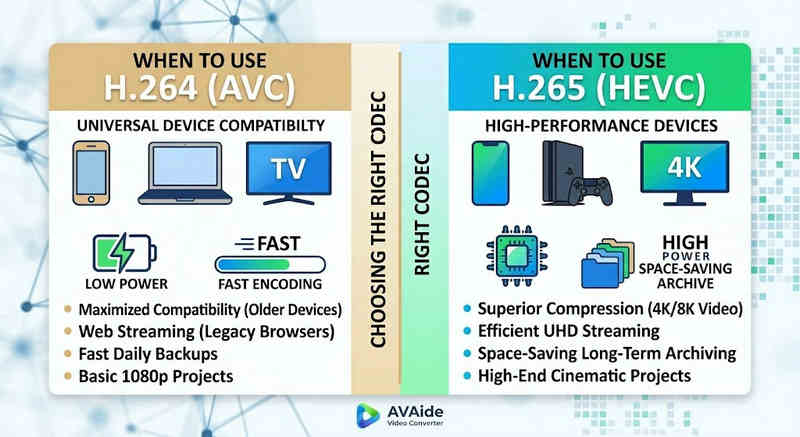
Die Wahl des richtigen Codecs hängt ganz von Ihren spezifischen Zielen ab. Hier erfahren Sie, warum Sie möglicherweise den einen oder den anderen benötigen:
Warum Sie HEVC (H.265) benötigen:
- Maximale Speichereinsparungen: Wenn Sie lange Videos oder riesige 4K-Bibliotheken sichern, fungiert HEVC als natürlicher Videogrößenreduzierer und gibt so die Hälfte Ihres Festplattenspeichers frei.
- Bandbreitenoptimierung: HEVC benötigt deutlich weniger Bandbreite zum Streamen und ist daher ideal für eine flüssige 4K-Wiedergabe auch bei langsameren Internetverbindungen ohne Pufferung.
- Zukunftssicherung: Während die Branche den Übergang zu Ultra-High-Definition (UHD)- und VR-Inhalten vollzieht, stellt HEVC sicher, dass Ihre Videos weiterhin von hoher Qualität und mit Plattformen der nächsten Generation kompatibel sind.
Warum Sie H.264 (AVC) benötigen:
- Makellose Wiedergabe und Bearbeitung: Wenn Ihre Videobearbeitungssoftware ruckelt oder Ihr Media-Player die Fehlermeldung „Codec nicht unterstützt“ ausgibt
- Kompatibilität und sorgenfreies Teilen: H.264 ist der am weitesten verbreitete und kompatible Videocodec. Egal, ob Sie Ihre Videos mit Freunden, auf einem NAS oder Medienservern wie Plex oder Kodi teilen möchten – H.264 gewährleistet reibungsloses Teilen und Abspielen.
Teil 3. So konvertieren Sie einfach zwischen HEVC und H.264
Beim Übertragen von Videos von und in die Formate HEVC (H.265) und H.264 AVAide Video Converter macht es besser als der Rest. Es bietet eine effiziente und benutzerfreundliche Oberfläche, die die Qualität der Konvertierung nicht beeinträchtigt und verschiedene Formate unterstützt. Was auch immer der Grund sein mag, es könnte die höhere Effizienz von HEVC oder die breitere Verbreitung von H264 sein, AVAide ermöglicht Ihnen, problemlos zwischen den beiden hin- und herzuwechseln.
Detaillierte Vorgehensweise:
Schritt 1Holen Sie sich den AVAide Video Converter
Herunterladen, installieren und starten AVAide Video Converter auf Ihrem Windows- oder Mac-Computer.

KOSTENLOSER DOWNLOAD Für Windows 7 oder höher
 Sicherer Download
KOSTENLOSER DOWNLOAD Für Mac OS X 10.13 oder höher
Sicherer DownloadSchritt 2Fügen Sie Ihre Videos zum AVAide Video Converter hinzu.
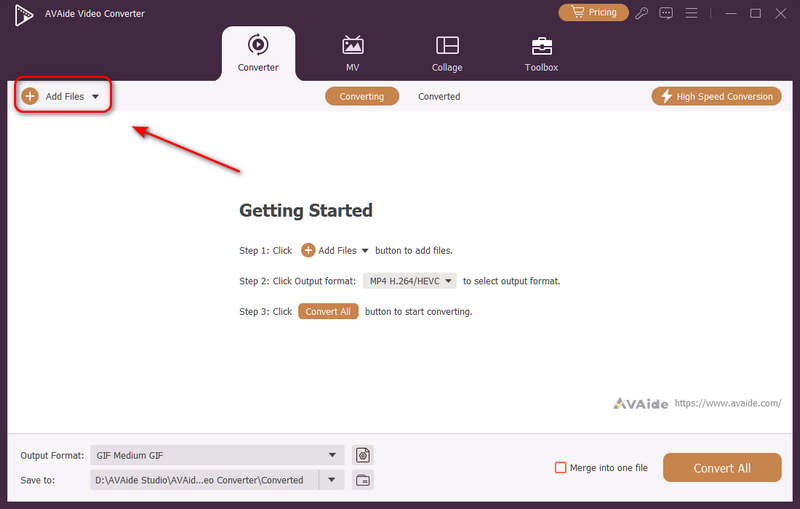
Sie können mehrere Videodateien hinzufügen und eine Stapelkonvertierung durchführen. Klicken Sie auf die Schaltfläche Dateien hinzufügen Klicken Sie auf die Schaltfläche oben links, um Ihre Videodateien zu importieren.
Schritt 3Wählen Sie den H.264- oder H.265-Codec.
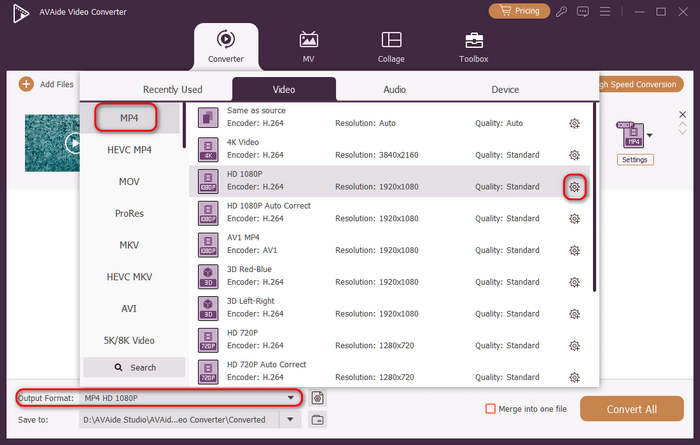
Drücke den Ausgabeformat Klicken Sie auf die Schaltfläche für das Dropdown-Menü unten links. Wählen Sie dort zunächst das gewünschte Videoformat aus. Klicken Sie anschließend auf die Schaltfläche. Benutzerdefiniertes Profil Schaltfläche (mit Zahnradsymbol) in der Video-Voreinstellungsleiste.
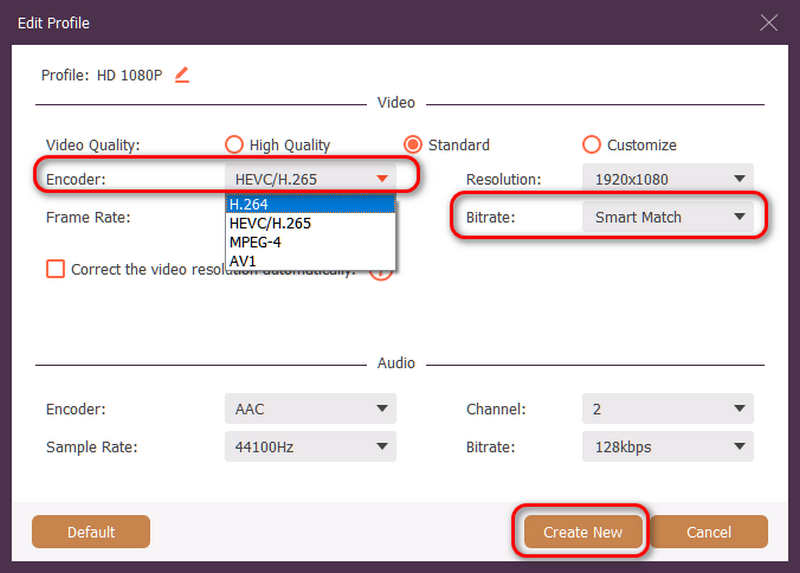
Anschließend können Sie in diesem Bereich auf die Schaltfläche klicken. Encoder Dropdown-Schaltfläche zum Auswählen H.264 oder HEVC/H.265 Codec. Wenn Sie die Videoqualität ändern möchten, können Sie die BitrateWir empfehlen jedoch Smart Match Um Kompatibilität zu gewährleisten, klicken Sie auf die Schaltfläche Erstelle neu Schaltfläche zum Speichern Ihrer Konfiguration.
Schritt 4Video-Neucodierung starten
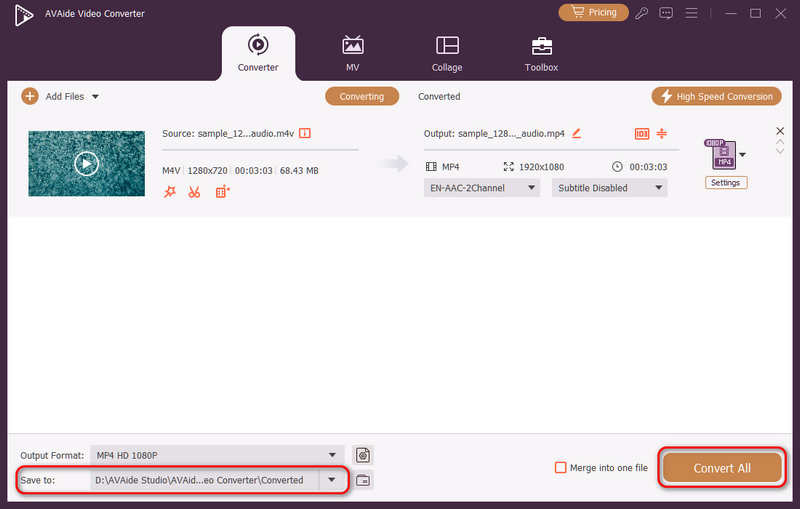
Zum Schluss können Sie auf das Speichern unter Klicken Sie auf die Dropdown-Schaltfläche, um den gewünschten Ausgabeordner auszuwählen. Konvertieren alle Schaltfläche zum Ändern des Videocodecs auf H.264 oder H.265.
Teil 4. Häufig gestellte Fragen zu H.265 und H.264
Worin besteht der Hauptunterschied zwischen NVENC H.264 und NVENC HEVC?
Der Hauptunterschied liegt in der Komprimierungseffizienz und der Optimierung der Hardwaregeneration. NVENC HEVC (H.265) bietet eine bis zu 501 TPS 3T bessere Komprimierung als NVENC H.264 (AVC). Das bedeutet, dass es die gleiche Bildqualität bei halber Bitrate (und halber Dateigröße) liefert und sich daher besser für die Archivierung von 4K-Videos oder das Streaming über begrenzte Bandbreiten eignet.
Was ist ein modularer Mehrkanal-HEVC/H.264-Encoder?
Ein modularer Mehrkanal-HEVC/H.264-Encoder ist ein Hardwaregerät der Enterprise-Klasse, das mehrere Videostreams gleichzeitig komprimiert und streamt. Im Gegensatz zu Software-Encodern für Endverbraucher zeichnet er sich durch ein modulares Design (Blade-Bauweise) aus, das es Anwendern ermöglicht, die Hardware-Codierungskarten je nach Projektumfang auszutauschen oder aufzurüsten. Er unterstützt sowohl H.264 als auch HEVC/H.265.
Was ist H.265+?
H.265+ (auch bekannt als Smart H.265+) ist eine fortschrittliche, proprietäre Videokomprimierungstechnologie, die von Hikvision entwickelt wurde und speziell für Sicherheits- und Überwachungstechnik optimiert ist.
Diese umfassende Analyse kann man nun nutzen, HEVC und H.264 um zu bestimmen, welcher Codec am besten zu Ihren Videoanforderungen passt. Ob Sie H.264 wollen und sich auf Kompatibilität konzentrieren oder HEVC wollen und eine bessere Komprimierung anstreben, beide Codecs haben Vorteile. AVAide Video Converter bietet eine elegante und effiziente Lösung für dieses Problem und liefert eine Ausgabe in hervorragender Qualität bei gleichzeitiger Geschwindigkeit. AVAide macht die Aufgabe der Videokomprimierung und -konvertierung mit seinen einfachen Schnittstellen und erweiterten Funktionen einfach.
ÜBER DEN AUTOR

Ihre komplette Video-Toolbox, die mehr als 350 Formate für die Konvertierung in verlustfreier Qualität unterstützt.
Video konvertieren