Du vil måske gemme det, der er på din skærm. Det kan være et spil, en vejledning eller et videoopkald. Du vil have det tydeligt og nemt at gemme til senere brug. Det er her, en skærm optagelsesapp bliver nyttig, hvilket denne beskrivelse vil give dig. Vi vil tale mere detaljeret om hver enkelt for at hjælpe dig med at se, hvilken der skiller sig mest ud.
Sådan testede og bedømte vi disse apps
- Optagelseskvalitet: Maksimal opløsning (1080p, 4K), billedhastighed (30/60 FPS) og bitrate-indstillinger.
- Brugervenlighed: Hvor brugervenlig er brugerfladen? Hvor mange tryk skal der til for at starte optagelsen?
- Lydunderstøttelse: Kan den optage mikrofonen, den interne lyd eller begge dele på én gang?
- Redigeringsfunktioner: Grundlæggende beskæring, tilføjelse af tekst og tegning på skærmen.
- Begrænsninger: Vandmærker, tidsbegrænsninger, annoncer eller betalingsmure.
- Platform: Android, iOS eller begge dele.
Del 1. Indbyggede skærmoptagere (den nemmeste løsning)
Din telefon har allerede en indbygget skærmoptager, der er klar til brug. Den tilbyder den nemmeste metode til at optage din skærm når som helst. Du behøver ikke ekstra optagelsesapps. Bare åbn den, og start optagelsen med det samme.
1. Indbygget iOS-skærmoptager (iPhone/iPad)
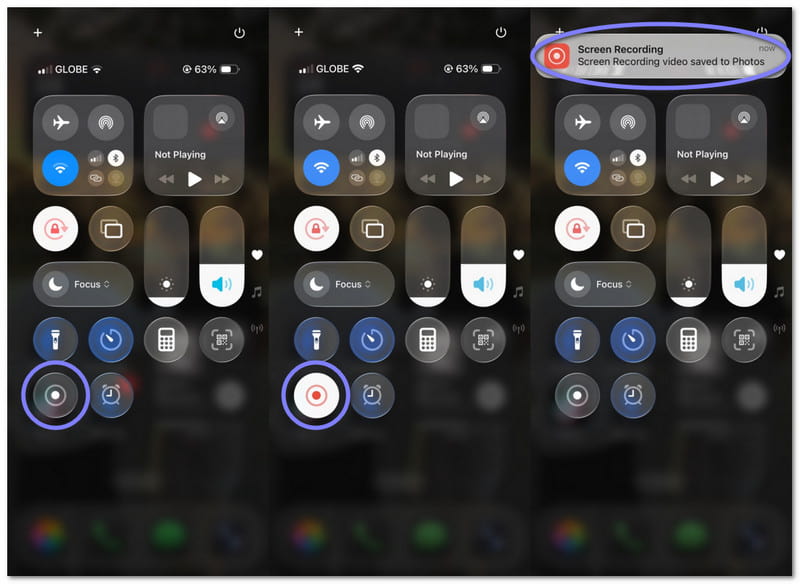
Det fungerer fra Kontrolcenteret og starter på få sekunder. Du kan nemt optage apps, spil eller tutorials. Det understøtter også mikrofonlyd. Det gør det til et enkelt og sikkert valg til hurtig skærmoptagelse på iPhone eller iPad.
2. Indbygget Android-skærmoptager
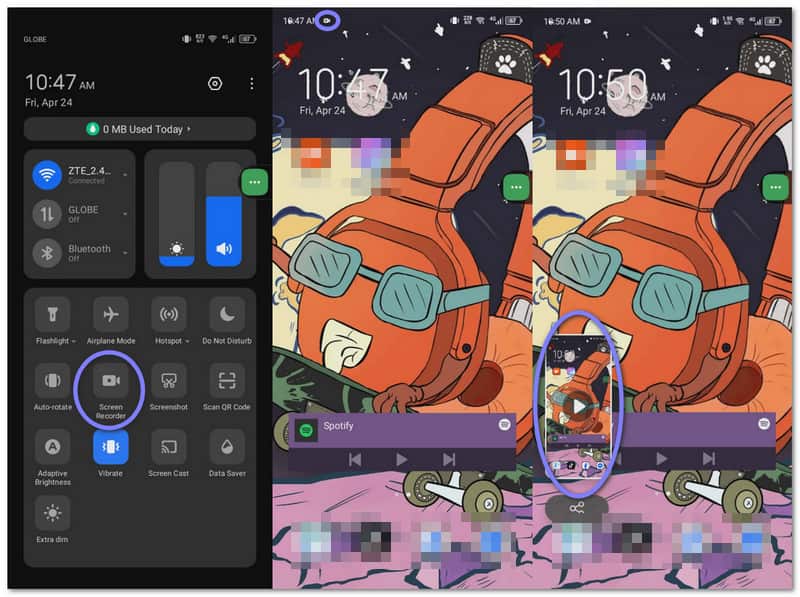
Du kan finde den i Hurtige indstillinger. Bare swipe, tryk og start optagelsen. Den fungerer godt til daglig brug, f.eks. spil eller guider. Nogle telefoner understøtter også intern lyd og grundlæggende indstillinger.
Del 2. Bedste tredjeparts skærmoptagerapps
Indbyggede skærmoptagere kan føles lidt begrænsede. De giver kun grundlæggende optagelse uden ekstra værktøjer. Hvis du ønsker flere funktioner og kontrol, kan disse tredjeparts skærmoptagerapps nedenfor hjælpe dig.
1. Skærmoptager - XRecorder
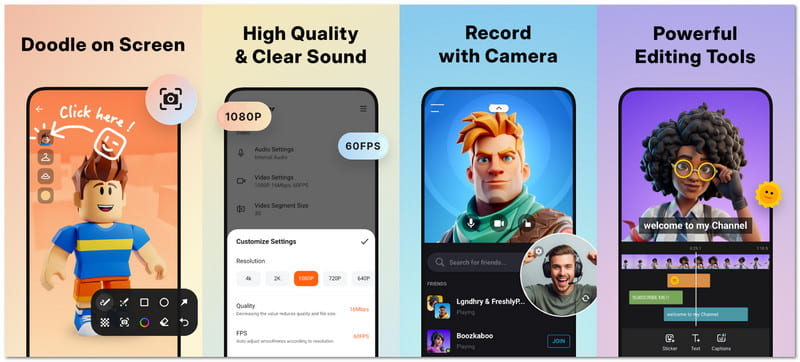
Skærmoptager - XRecorder føles let, men fungerer stærkt. Den hjælper dig med at optage spil, opkald og tutorials uden stress. Du får også værktøjer som FaceCam og tegning. Den betragtes uden tvivl som en af de bedste bedste skærmoptagere til Android telefoner.
Optagelseskvalitet: Den giver stabil optagelse med justerbar opløsning og jævn output til live og gemte videoer.
Brugervenlighed: Handlinger kræver blot et eller to tryk, og den flydende kontrol giver dig mulighed for at komme hurtigt i gang.
Lydunderstøttelse: Den optager både intern lyd og mikrofonlyd samtidigt.
Redigeringsfunktioner:
- Beskær og opdel klip.
- Tilføj musik og billedtekster.
- Anvend filtre og hastighedskontrol.
- Tegn på skærmen.
Begrænsninger: Intern lyd fungerer kun på nyere Android-enheder, og nogle apps kan blokere lyden.
Platform: Android
2. Skærmoptager - AZ-optager
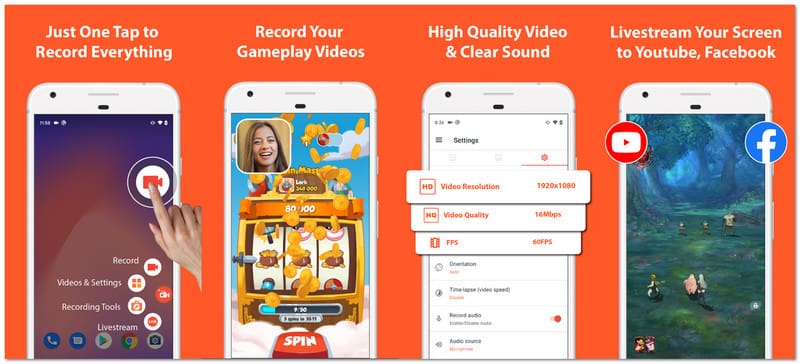
AZ Screen Recorder er en populær skærmoptager-app, der ses på mange tech-sider. Den tilbyder optagelse, redigering og livestreaming i én app. Den fungerer godt for brugere, der ønsker mere kontrol, men stadig har brug for en simpel og ren opsætning.
Optagelseskvalitet: Den understøtter HD op til højere opløsninger med flere billedhastighedsindstillinger for jævn videooutput.
Brugervenlighed: Brugerfladen er enkel, og optagelsen kan starte eller stoppe med meget få tryk.
Lydunderstøttelse: Den understøtter både mikrofon og intern lyd for klar lydoptagelse.
Redigeringsfunktioner:
- Beskær og flet videoer.
- Tilføj undertekster og musik.
- Beskær og roter klip.
- Uddrag rammer.
Begrænsninger: Kan ikke optage mikrofon og intern lyd samtidig på mange telefoner.
Platform: Android
3. Mobizen Skærmoptager
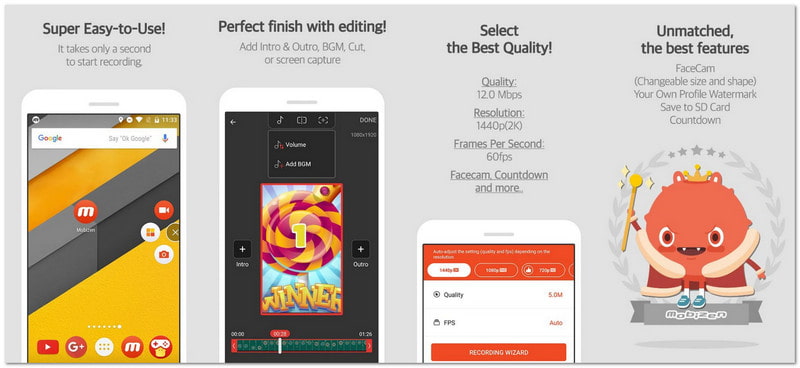
Denne Android-optagelsesapp er lavet til hurtig opstart og lange optagelser. Den hjælper brugerne med at optage uden stress. Sjove værktøjer som skærmhandlinger og GIF-oprettelse er også tilføjet. Hvis du ønsker ekstra kreative funktioner og nem kontrol, er dette en god mulighed.
Optagelseskvalitet: Den understøtter op til 2K opløsning med høj bitrate og jævn billedhastighed for detaljerede videoer.
Brugervenlighed: Start med et enkelt tryk gør det nemt for både begyndere og professionelle at bruge med det samme.
Lydunderstøttelse: Den optager mikrofonen og den interne lyd sammen for at give en klar stemme og systemlyd.
Redigeringsfunktioner:
- Grundlæggende videoredigeringer.
- Opret GIF'er.
- Tilføj et vandmærke.
- Tegn på skærmen.
Begrænsninger: Den flydende knap kan være i vejen under optagelse.
Platform: Android
4. DU-optager - Skærmoptager
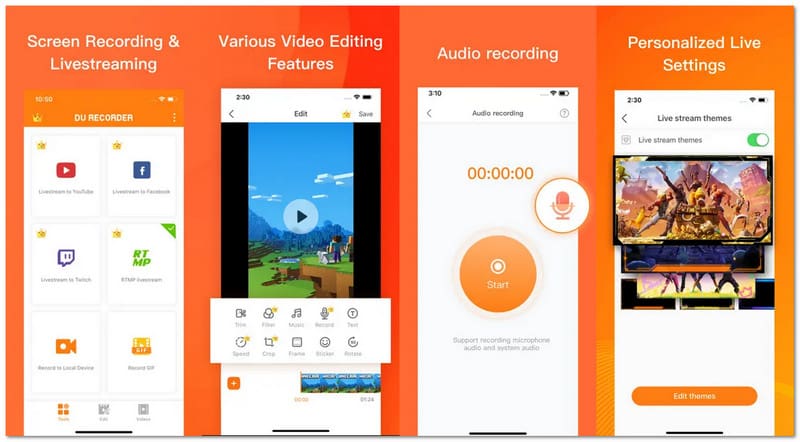
DU Recorder er en app til skærmoptagelse på iPhone og Android. Den er bygget til brugere, der ønsker at optag WhatsApp-videoopkald, gameplay, tutorials og andre skærmaktiviteter. Det giver også mulighed for skærmoptagelse under streaming på samme tid.
Optagelseskvalitet: Den giver stabil optagelse med justerbar opløsning og jævn output til gemt eller live indhold.
Brugervenlighed: Du kan hurtigt starte med den flydende kontrol, og handlinger kræver kun et eller to tryk.
Lydunderstøttelse: Den optager intern lyd og mikrofonlyd sammen på understøttede Android-versioner.
Redigeringsfunktioner:
- Klips klippes og kombineres
- Inkluder tekst og musik.
- Ændr tempoet.
- Opret en GIF.
Begrænsninger: Nogle funktioner kræver betaling for at blive låst op.
Platform: Android, iOS
5. Skærmoptager - Gå til optagelse
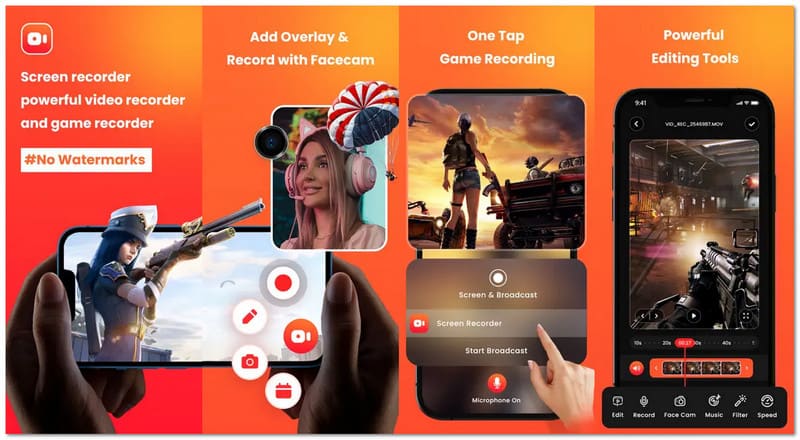
Vil du optage din skærm og vise din reaktion med en telefonoptagelsesapp? Screen Recorder - Go Record gør det nemt. Det fungerer godt til tutorials og spilklip. Du kan tilføje dit ansigt og din stemme for at gøre videoer mere sjove og personlige.
Optagelseskvalitet: Den understøtter op til 1080p med en jævn billedhastighed og klar videoudgang.
Brugervenlighed: Det er virkelig nemt at komme i gang uden tvivl takket være optagelse med et enkelt tryk.
Lydunderstøttelse: Den optager stemme tydeligt og understøtter lydkommentarer under optagelse.
Redigeringsfunktioner:
- Trim klip.
- Tilføj filtre.
- Juster hastigheden.
- Roter videoer.
Begrænsninger: Kræver betaling for alle værktøjer, og den interne lyd er begrænset på iPhone.
Platform: iOS
6. Skærmoptager Stemme & Video
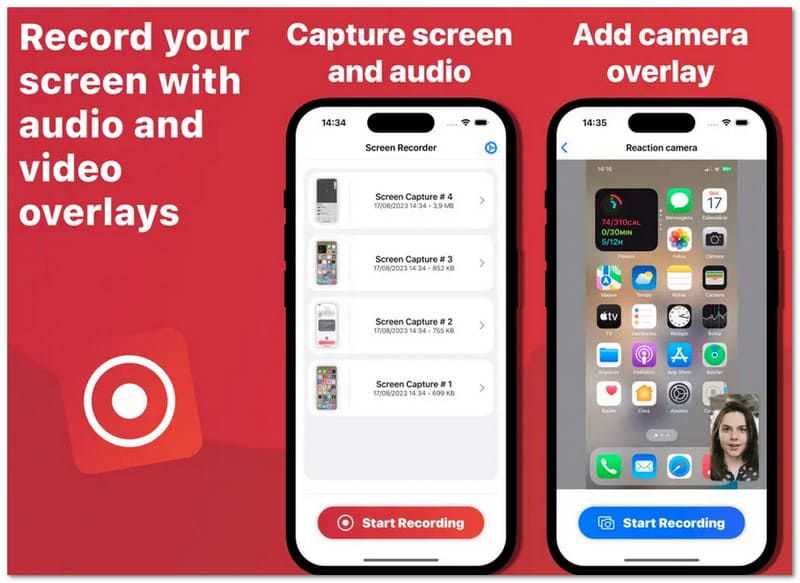
Screen Recorder Voice & Audio er en ren og enkel iPhone-optagelsesapp til brugere, der værdsætter privatliv. Den optager din skærm og gemmer filer på din enhed. Den er god til tutorials, demoer og hurtig deling uden ekstra trin eller kompleks opsætning.
Optagelseskvalitet: Til almindelige optagelsesbehov giver den pålidelig afspilning og skarpe optagelser.
Brugervenlighed: Det kræver kun et par tryk at begynde optagelsen, og designet er ligetil.
Lydunderstøttelse: Den gør et godt stykke arbejde med at optage mikrofonlyd til brug i stemme og fortælling.
Redigeringsfunktioner:
- Trim klip.
- Tilføj stemmeoverlay.
- Brug FaceCam.
Begrænsninger: Få redigeringsværktøjer og begrænsede ekstrafunktioner.
Platform: iOS
Del 3. Sammenligningstabel – Overblik over de bedste skærmoptagelsesapps
Er du forvirret over, hvilken af de bedste skærmoptagelsesapps du skal bruge? Bare rolig! Sammenligningstabellen nedenfor gør det nemt for dig at vælge den rigtige.
| Apps til skærmoptagelse | Platform | Begrænsninger for gratis version | Vandmærke | Maksimal kvalitet | Ansigtskamera | Bedst til |
| Skærmoptager – XRecorder | Android | Få begrænsninger, men nogle funktioner afhænger af enheden. | Intet vandmærke. | 1080p | ✓ | Ren optagelse og nem brug. |
| Skærmoptager – AZ-optager | Android | Annoncer og nogle funktioner skal opgraderes. | Intet vandmærke. | 4K | ✓ | Avanceret kontrol og streaming. |
| Mobizen skærmoptager | Android | Nogle tilstande tilføjer et vandmærke eller begrænsninger. | Valgfrit vandmærke. | 1440p | ✓ | Lang optagelse og enkle værktøjer. |
| DU Recorder – Skærmoptager | Android og iOS | Premium er påkrævet for komplette værktøjer. | Fjernet med premium. | 1080p | ✓ | Livestreaming og deling. |
| Skærmoptager – Gå til optagelse | iOS | Mange funktioner er låst bag et abonnement. | Intet vandmærke. | 1080p | ✓ | Reaktionsvideoer og vejledninger. |
| Skærmoptager Stemme & Video | iOS | Begrænsede funktioner i den gratis version. | Intet vandmærke. | 1080p | ✓ | Enkel og privat optagelse. |
Del 4. Hvis du vil optage din telefon med en større skærm
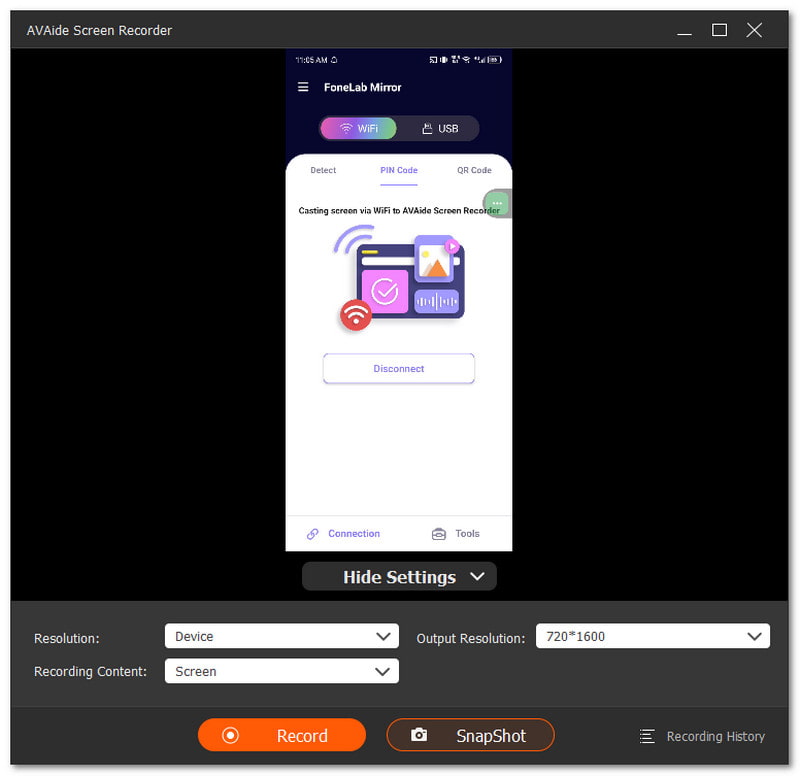
Du vil optage din telefon. Men skærmen føles for lille. Du vil have en større visning på din computer. Det er her, en optagelsesapp, som f.eks. AVAide skærmoptager, kan hjælpe. Den har en telefonoptager, der fungerer til både iOS og Android. Du skal blot tilslutte din telefon og derefter spejle den til din computerskærm.

GRATIS DOWNLOAD Til Windows 7 eller nyere
 Sikker download
GRATIS DOWNLOAD Til Mac OS X 10.13 eller nyere
Sikker downloadImponerende nok kan AVAide Screen Recorder optage i op til 4K. Med det forbliver din video skarp og klar, og let at se, selv når den afspilles på en større skærm. Du kan også optage din telefons mikrofon til stemme eller spillelyd. Har du brug for et hurtigt billede? Du kan tage skærmbilleder når som helst, hvilket er fantastisk til hurtigt at gemme vigtige øjeblikke.
Hvad du kan forvente:
- Understøttelse af iOS- og Android-optager: Fungerer med både iPhone- og Android-enheder og muliggør nem skærmspejling til din computer.
- Skærm + Webcam + Lydoptagelse: Optager skærm, webcam, systemlyd og mikrofon på samme tid.
- Jævn gameplay-optagelse: Optager spil i Full HD op til 60 FPS, hvilket er fantastisk til højdepunkter og tutorials.
- Videoredigering efter optagelse: Trim, komprimer, flet, konverter videoer, forstærk lyd og udtræk.
- Understøttelse af bredt medieformat: Gemmer filer i MP4, WMV, AVI, GIF, MP3 og flere formater.
Uanset om du bruger Android eller iPhone, har du mange skærmoptager-app valgmuligheder. Du kan starte med indbyggede optagere. De er enkle og nemme at bruge. Du kan også prøve tredjepartsværktøjer, hvis du ønsker flere funktioner og bedre kontrol.
Hvis du vil optage din telefon på en større skærm, kan du bruge AVAide skærmoptagerDu kan optage længere videoer med jævn ydeevne. Den understøtter også output uden vandmærker. Det får din video til at se ren ud og er klar til deling.
OM FORFATTEREN

Fang det bedste øjeblik med AVAide Screen Recorder. Screencast, tilpas og del på få sekunder.
Skærmoptagelse