قد ترغب في حفظ ما يظهر على شاشتك. قد تكون لعبة، أو درسًا تعليميًا، أو مكالمة فيديو. تريدها واضحة وسهلة الحفظ لاستخدامها لاحقًا. وهنا تكمن أهمية حفظ الشاشة. تطبيق التسجيل يصبح الأمر مفيدًا، وهو ما ستوفره هذه المقالة. سنتحدث عن كل منها بمزيد من التفصيل لمساعدتك على معرفة أيها يبرز أكثر.
كيف اختبرنا هذه التطبيقات وقيمناها
- جودة التسجيل: أقصى دقة (1080 بكسل، 4K)، ومعدل الإطارات (30/60 إطارًا في الثانية)، وخيارات معدل البت.
- سهولة الاستخدام: ما مدى سهولة استخدام واجهة المستخدم؟ كم عدد النقرات اللازمة لبدء التسجيل؟
- دعم الصوت: هل بإمكانه تسجيل الميكروفون، أو الصوت الداخلي، أو كليهما في وقت واحد؟
- ميزات التحرير: تقليم أساسي، إضافة نص، ورسم على الشاشة.
- القيود: العلامات المائية، والحدود الزمنية، والإعلانات، أو جدران الدفع.
- برنامج: أندرويد، أو iOS، أو كليهما.
الجزء الأول: مسجلات الشاشة المدمجة (الخيار الأسهل)
يحتوي هاتفك بالفعل على مسجل شاشة مدمج جاهز للاستخدام. يوفر لك هذا التطبيق أسهل طريقة لتسجيل شاشتك في أي وقت. لا حاجة لتطبيقات تسجيل إضافية. ما عليك سوى فتحه والبدء بالتسجيل فورًا.
1. مسجل الشاشة المدمج في نظام iOS (آيفون/آيباد)
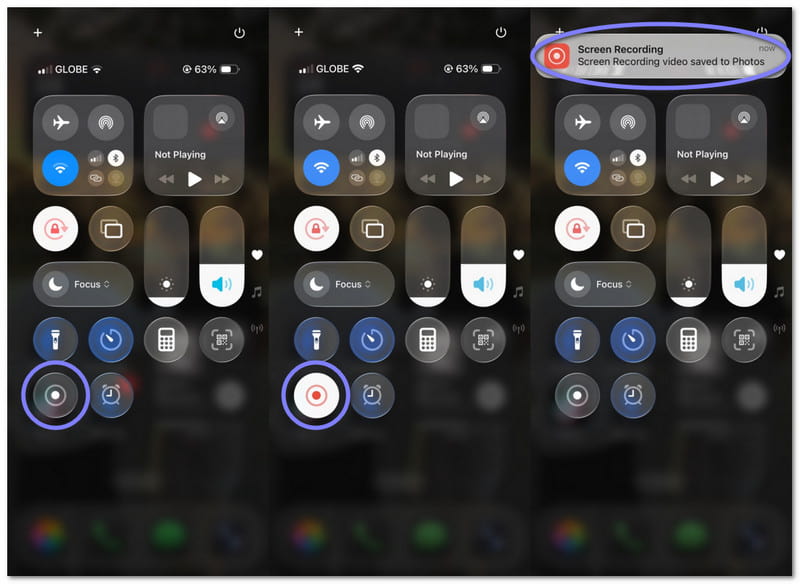
يعمل التطبيق من مركز التحكم ويبدأ في ثوانٍ. يمكنك تسجيل التطبيقات والألعاب والدروس التعليمية بسهولة. كما يدعم تسجيل الصوت عبر الميكروفون. مما يجعله خيارًا بسيطًا وآمنًا لتسجيل الشاشة بسرعة على أجهزة iPhone أو iPad.
2. مسجل الشاشة المدمج في نظام أندرويد
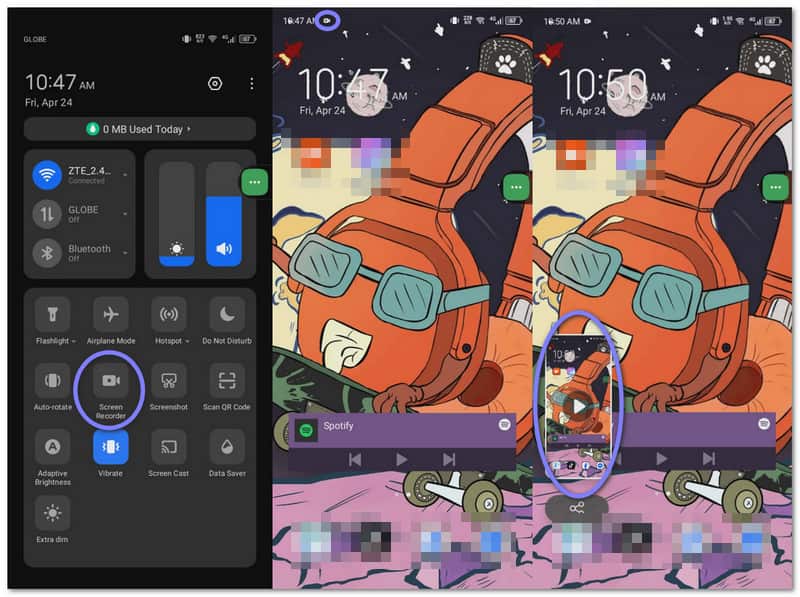
يمكنك العثور عليه في الإعدادات السريعة. ما عليك سوى التمرير والنقر وبدء التسجيل. إنه مناسب للاستخدام اليومي، مثل الألعاب أو الأدلة. تدعم بعض الهواتف أيضًا الصوت الداخلي والإعدادات الأساسية.
الجزء الثاني: أفضل تطبيقات تسجيل الشاشة الخارجية
قد تبدو برامج تسجيل الشاشة المدمجة محدودة بعض الشيء، فهي لا توفر سوى التسجيل الأساسي دون أدوات إضافية. إذا كنت ترغب في المزيد من الميزات والتحكم، فإن تطبيقات تسجيل الشاشة الخارجية المذكورة أدناه ستساعدك.
1. مسجل الشاشة - XRecorder
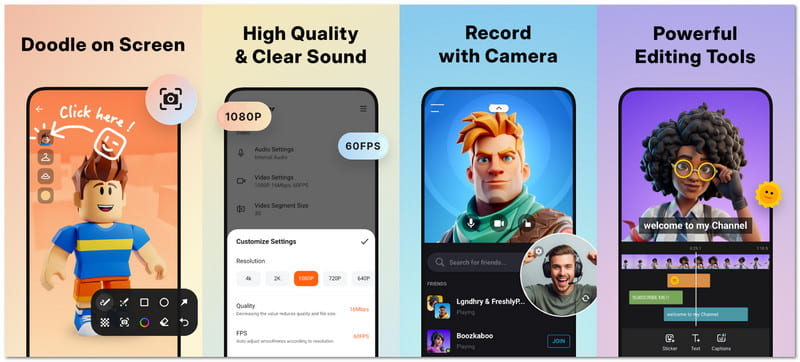
مسجل الشاشة - XRecorder خفيف الوزن لكنه قوي الأداء. يساعدك على تسجيل الألعاب والمكالمات والبرامج التعليمية بسهولة تامة. كما يوفر لك أدوات مثل كاميرا الوجه والرسم. بلا شك، يُعتبر من أفضل البرامج في هذا المجال. أفضل مسجلات الشاشة لنظام Android الهواتف.
جودة التسجيل: يوفر تسجيلًا مستقرًا بدقة قابلة للتعديل وإخراجًا سلسًا للفيديوهات المباشرة والمحفوظة.
سهولة الاستخدام: لا تتطلب الإجراءات سوى نقرة أو نقرتين، ويتيح لك عنصر التحكم العائم البدء بسرعة.
دعم الصوت: يسجل الصوت الداخلي وصوت الميكروفون في وقت واحد.
ميزات التحرير:
- قص وفصل المشابك.
- أضف الموسيقى والترجمة.
- قم بتطبيق الفلاتر والتحكم في السرعة.
- ارسم على الشاشة.
القيود: لا يعمل الصوت الداخلي إلا على أجهزة أندرويد الأحدث، وقد تقوم بعض التطبيقات بحظر الصوت.
برنامج: ذكري المظهر
2. مسجل الشاشة - مسجل AZ
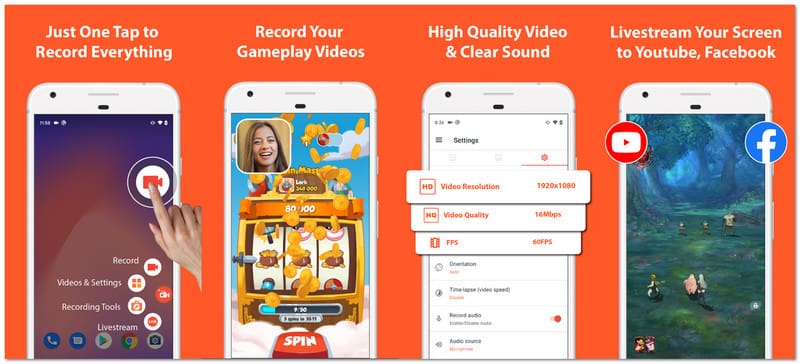
يُعدّ تطبيق AZ Screen Recorder من أشهر تطبيقات تسجيل الشاشة، وقد ظهر في العديد من المواقع التقنية. يوفر التطبيق التسجيل والتحرير والبث المباشر في تطبيق واحد، وهو مناسب للمستخدمين الذين يرغبون في مزيد من التحكم مع الحفاظ على سهولة الاستخدام وبساطة الإعدادات.
جودة التسجيل: يدعم هذا الجهاز دقة عالية تصل إلى دقة أعلى مع خيارات متعددة لمعدل الإطارات للحصول على إخراج فيديو سلس.
سهولة الاستخدام: الواجهة بسيطة، ويمكن بدء التسجيل أو إيقافه ببضع نقرات فقط.
دعم الصوت: يدعم كلاً من الميكروفون والصوت الداخلي لتسجيل صوت واضح.
ميزات التحرير:
- قص ودمج مقاطع الفيديو.
- أضف الترجمة والموسيقى.
- قص وتدوير المقاطع.
- استخراج الإطارات.
القيود: لا يمكن تسجيل صوت الميكروفون والصوت الداخلي معًا في العديد من الهواتف.
برنامج: ذكري المظهر
3. مسجل الشاشة موبيزن
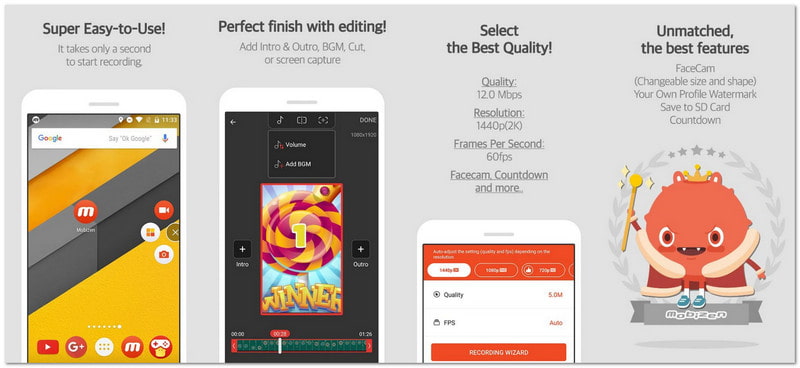
صُمم تطبيق التسجيل هذا لنظام أندرويد لتسهيل بدء التسجيلات السريعة والطويلة، مما يُساعد المستخدمين على التسجيل بسلاسة. كما يتضمن أدوات ممتعة مثل تفاعلات الشاشة وإنشاء صور GIF. إذا كنت ترغب في ميزات إبداعية إضافية وتحكم سهل، فهذا خيار ممتاز.
جودة التسجيل: يدعم دقة تصل إلى 2K مع معدل بت عالي ومعدل إطارات سلس للحصول على مقاطع فيديو مفصلة.
سهولة الاستخدام: تتيح خاصية التشغيل بنقرة واحدة سهولة الاستخدام للمبتدئين والمحترفين على حد سواء.
دعم الصوت: يقوم بتسجيل صوت الميكروفون والصوت الداخلي معًا للحصول على صوت واضح وصوت النظام.
ميزات التحرير:
- تعديلات الفيديو الأساسية.
- أنشئ صور GIF.
- أضف علامة مائية.
- ارسم على الشاشة.
القيود: قد يعيق الزر العائم عملية التسجيل.
برنامج: ذكري المظهر
4. مسجل DU - مسجل الشاشة
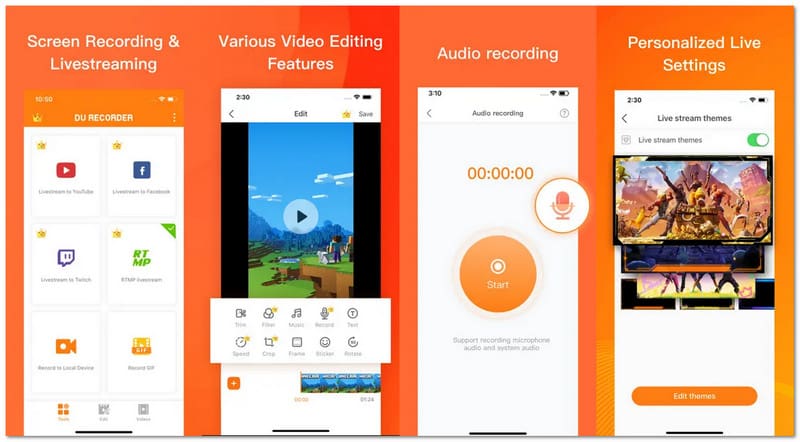
تطبيق DU Recorder هو تطبيق لتسجيل الشاشة على أجهزة iPhone وAndroid. وهو مصمم للمستخدمين الذين يرغبون في تسجيل مكالمات الفيديو عبر واتسابيتضمن التطبيق أيضًا تسجيل الشاشة أثناء البث المباشر، بالإضافة إلى عرض أسلوب اللعب، والدروس التعليمية، وغيرها من الأنشطة على الشاشة.
جودة التسجيل: يوفر تسجيلًا مستقرًا بدقة قابلة للتعديل وإخراجًا سلسًا للمحتوى المحفوظ أو المباشر.
سهولة الاستخدام: يمكنك البدء بسرعة باستخدام عنصر التحكم العائم، ولا تتطلب الإجراءات سوى نقرة أو نقرتين.
دعم الصوت: يلتقط الصوت الداخلي وصوت الميكروفون معًا على إصدارات أندرويد المدعومة.
ميزات التحرير:
- يتم قص المشابك ودمجها
- يتضمن النص والموسيقى.
- غيّر الوتيرة.
- أنشئ صورة GIF.
القيود: بعض الميزات تتطلب الدفع لفتحها.
برنامج: أندرويد، iOS
5. مسجل الشاشة - سجل الشاشة
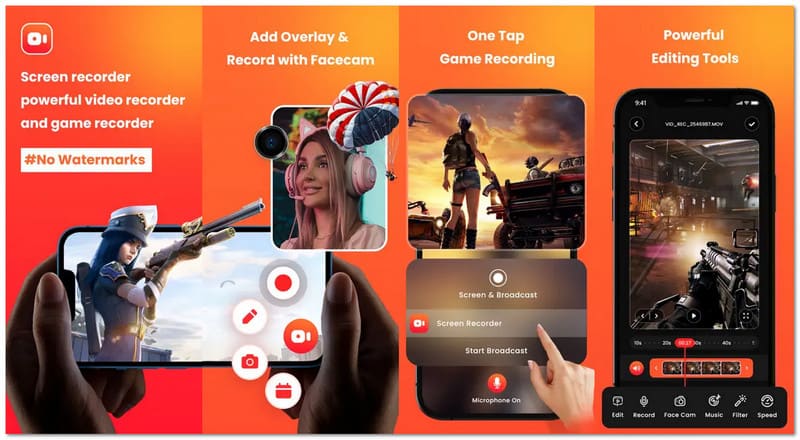
هل ترغب بتسجيل شاشتك وإظهار ردة فعلك باستخدام تطبيق تسجيل على هاتفك؟ تطبيق "مسجل الشاشة - جو ريكورد" يجعل الأمر في غاية السهولة. إنه مثالي لتسجيل الشروحات ومقاطع الألعاب. يمكنك إضافة وجهك وصوتك لجعل الفيديوهات أكثر متعة وشخصية.
جودة التسجيل: يدعم دقة تصل إلى 1080 بكسل بمعدل إطارات سلس وإخراج فيديو واضح.
سهولة الاستخدام: من السهل جدًا البدء دون أي شك، وذلك بفضل التسجيل بنقرة واحدة.
دعم الصوت: يسجل الصوت بوضوح ويدعم التعليق الصوتي أثناء التسجيل.
ميزات التحرير:
- مشابك تقليم.
- أضف فلاتر.
- اضبط السرعة.
- قم بتدوير الفيديوهات.
القيود: يتطلب الأمر دفع رسوم للحصول على الأدوات الكاملة، كما أن الصوت الداخلي محدود على أجهزة iPhone.
برنامج: iOS
6. مسجل الشاشة للصوت والفيديو
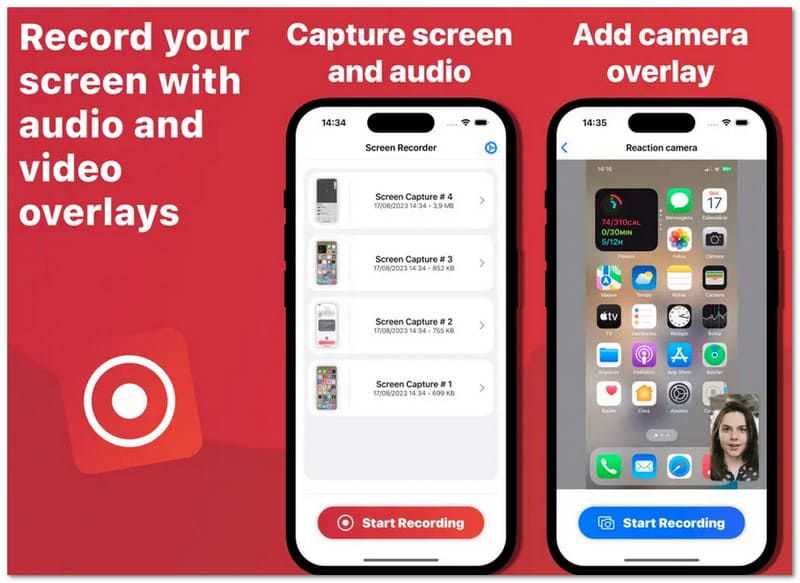
تطبيق Screen Recorder Voice & Audio هو تطبيق تسجيل صوتي بسيط وسهل الاستخدام لأجهزة iPhone، مصمم خصيصًا للمستخدمين الذين يهتمون بالخصوصية. يسجل التطبيق شاشة جهازك ويحفظ الملفات عليه. وهو مثالي لإنشاء الشروحات والعروض التوضيحية، ومشاركة الملفات بسرعة وسهولة دون الحاجة إلى خطوات إضافية أو إعدادات معقدة.
جودة التسجيل: بالنسبة لمتطلبات التسجيل المنتظمة، فإنه يوفر تشغيلًا موثوقًا به ولقطات واضحة.
سهولة الاستخدام: لا يتطلب الأمر سوى بضع نقرات لبدء التسجيل، والتصميم بسيط للغاية.
دعم الصوت: إنه يقوم بعمل جيد في تسجيل صوت الميكروفون لاستخدامه في التعليق الصوتي والسرد.
ميزات التحرير:
- مشابك تقليم.
- أضف طبقة صوتية.
- استخدم كاميرا الوجه.
القيود: أدوات تحرير قليلة وميزات إضافية محدودة.
برنامج: iOS
الجزء 3. جدول المقارنة – أفضل تطبيقات تسجيل الشاشة في لمحة
هل أنت محتار بشأن أفضل تطبيقات تسجيل الشاشة التي يجب استخدامها؟ لا تقلق! سيساعدك جدول المقارنة أدناه على اختيار التطبيق المناسب بسهولة.
| تطبيقات تسجيل الشاشة | برنامج | قيود النسخة المجانية | علامة مائية | جودة فائقة | كاميرا الوجه | أفضل ل |
| مسجل الشاشة – XRecorder | ذكري المظهر | هناك قيود قليلة، لكن بعض الميزات تعتمد على الجهاز. | لايوجد علامة مائية. | 1080 بكسل | ✓ | تسجيل نظيف وسهل الاستخدام. |
| مسجل الشاشة - مسجل AZ | ذكري المظهر | الإعلانات وبعض الميزات تحتاج إلى تحديث. | لايوجد علامة مائية. | 4K | ✓ | التحكم المتقدم والبث المباشر. |
| مسجل الشاشة Mobizen | ذكري المظهر | تضيف بعض الأوضاع علامة مائية أو قيودًا. | علامة مائية اختيارية. | 1440 بكسل | ✓ | تسجيل طويل وأدوات بسيطة. |
| مسجل DU – مسجل الشاشة | أندرويد و iOS | يتطلب استخدام الأدوات الكاملة اشتراكًا مميزًا. | تمت إزالته باشتراك مميز. | 1080 بكسل | ✓ | البث المباشر والمشاركة. |
| مسجل الشاشة – سجل الشاشة | iOS | العديد من الميزات محصورة باشتراك مدفوع. | لايوجد علامة مائية. | 1080 بكسل | ✓ | فيديوهات ردود الفعل والدروس التعليمية. |
| مسجل الشاشة للصوت والفيديو | iOS | ميزات محدودة في الإصدار المجاني. | لايوجد علامة مائية. | 1080 بكسل | ✓ | تسجيل بسيط وخاص. |
الجزء الرابع: في حال رغبتك بتسجيل هاتفك باستخدام شاشة أكبر
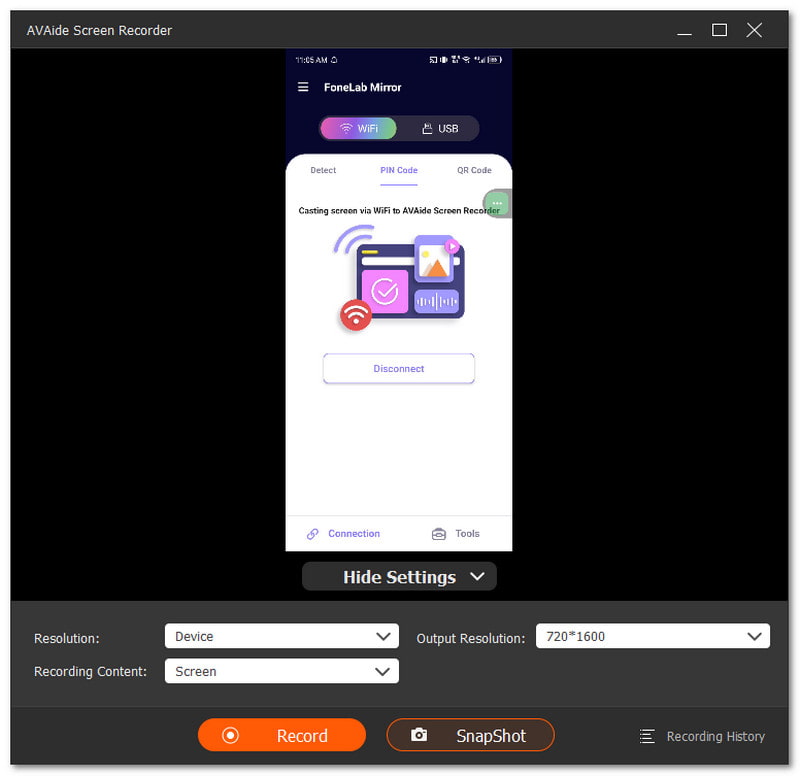
تريد تسجيل فيديو من هاتفك، لكن الشاشة تبدو صغيرة جدًا. تريد عرضًا أكبر على جهاز الكمبيوتر. هنا يأتي دور تطبيق التسجيل، مثل AVAide مسجل الشاشةيمكن أن يساعدك هذا التطبيق. فهو يحتوي على مسجل صوت يعمل مع كل من نظامي iOS وAndroid. ما عليك سوى توصيل هاتفك، ثم عكس الشاشة على شاشة الكمبيوتر.

تنزيل مجاني لنظام التشغيل Windows 7 أو أحدث
 تحميل آمن
تنزيل مجاني لنظام التشغيل Mac OS X 10.13 أو الإصدارات الأحدث
تحميل آمنبشكلٍ مثير للإعجاب، يُمكن لبرنامج AVAide Screen Recorder التسجيل بدقة تصل إلى 4K. بفضل هذه الميزة، يبقى الفيديو واضحًا ونقيًا، وسهل المشاهدة حتى عند تشغيله على شاشة أكبر. كما يُمكنك تسجيل صوت الميكروفون في هاتفك، سواءً كان صوتًا صوتيًا أو صوت اللعبة. هل تحتاج إلى صورة سريعة؟ يُمكنك التقاط لقطات شاشة في أي وقت، وهو أمر رائع لحفظ اللحظات المهمة بسرعة.
ما يمكن توقعه:
- دعم مسجل الصوت لنظامي التشغيل iOS و Android: يعمل مع أجهزة iPhone و Android ويتيح عرض الشاشة بسهولة على جهاز الكمبيوتر الخاص بك.
- الشاشة + كاميرا الويب + تسجيل الصوت: يلتقط الشاشة وكاميرا الويب وصوت النظام والميكروفون في نفس الوقت.
- تسجيل سلس للعب: يسجل الألعاب بدقة Full HD تصل إلى 60 إطارًا في الثانية، وهو أمر رائع للمقاطع المميزة والدروس التعليمية.
- تحرير الفيديو بعد التسجيل: قص وضغط ودمج وتحويل مقاطع الفيديو، وتحسين الصوت، واستخراجه.
- دعم تنسيقات الوسائط العريضة: يحفظ الملفات بصيغ MP4 و WMV و AVI و GIF و MP3 وغيرها من الصيغ.
سواء كنت تستخدم نظام أندرويد أو آيفون، لديك العديد من الخيارات. تطبيق تسجيل الشاشة خيارات متعددة. يمكنك البدء باستخدام مسجلات الصوت المدمجة، فهي بسيطة وسهلة الاستخدام. كما يمكنك تجربة برامج خارجية إذا كنت ترغب في مزيد من الميزات وتحكم أفضل.
في حال رغبتك في تسجيل هاتفك على شاشة أكبر، يمكنك استخدام AVAide مسجل الشاشةيمكنك تسجيل فيديوهات أطول بأداء سلس. كما يدعم إخراج الفيديو بدون علامة مائية، مما يجعل الفيديو الخاص بك يبدو نقيًا وجاهزًا للمشاركة.
نبذة عن المؤلف

التقط أفضل لحظة باستخدام AVAide Screen Recorder. تسجيل الشاشة وتخصيصها ومشاركتها في ثوانٍ.
تسجيل الشاشة