غالباً ما يمثل العمل مع مقاطع الفيديو الطويلة معضلة محبطة: كيف تحافظ على جودة فيديو فائقة دون استهلاك مساحة التخزين بالكامل؟ هنا تبرز أهمية معايير ضغط الفيديو. إذا كنت ترغب في تحقيق التوازن بين حجم الفيديو وجودته وتوافقه مع الأجهزة، فستواجه حتماً خياراً بين H.264 (AVC) و H.265 (HEVC).
في هذا الدليل الشامل، سنقوم بتحليل الاختلافات الأساسية بين H.264 و HEVC، ومساعدتك في تحديد أي منهما يناسب سير عملك، ونوضح لك كيفية التحويل بينهما بسلاسة دون فقدان الجودة.
الجزء الأول: مقارنة بين HEVC و H264: ما هما؟
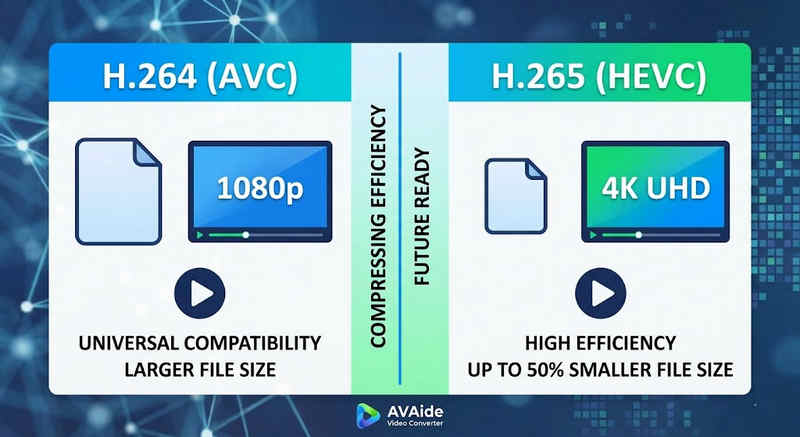
الإجابة المختصرة: يوفر ترميز H.264 (AVC) توافقًا عالميًا ويعمل على معظم الأجهزة، ولكنه ينتج ملفات أكبر حجمًا. أما ترميز H.265 (HEVC) فيوفر ضغطًا فائقًا، حيث يقلل حجم الملفات بما يصل إلى 50% مع الحفاظ على جودة الصورة نفسها، ولكنه يتطلب قدرة معالجة أعلى ودعمًا محدودًا على الأجهزة القديمة.
1. ما هو برنامج الترميز H.264 (AVC)؟
يُعدّ ترميز الفيديو المتقدم (AVC)، المعروف سابقًا باسم H.264، المعيار الرائد في مجال توافق الفيديو. فهو المعيار الصناعي للبث المباشر عبر الإنترنت، وتسجيل الفيديو على الأجهزة المحمولة، وتشغيل الفيديو اليومي. وبفضل استهلاكه القليل جدًا من طاقة المعالجة لفك التشفير، تعمل فيديوهات H.264 بسلاسة على جميع الأجهزة الرقمية تقريبًا، بدءًا من الهواتف الذكية القديمة وصولًا إلى أجهزة التلفزيون الذكية الحديثة.
2. ما هو برنامج الترميز H.265 (HEVC)؟
ترميز الفيديو عالي الكفاءة (HEVC)، أو H.265، هو الجيل التالي المباشر لترميز H.264. صُمم خصيصًا للتعامل مع متطلبات البيانات الضخمة لمحتوى 4K و8K والواقع الافتراضي. يستخدم HEVC خوارزميات أكثر تطورًا لضغط بيانات الفيديو بكفاءة أعلى بكثير من سابقه، مما يوفر صورًا فائقة الوضوح وعالية الدقة بأحجام ملفات أصغر تصل إلى 501 تيرابايت. مع ذلك، تأتي هذه الكفاءة بتكلفة: فهي تتطلب أجهزة حديثة للمعالجة دون تأخير.
H.265 مقابل H.264: جدول مقارنة سريع
| سمات | H.264 (AVC) | H.265 (HEVC) |
| التنسيقات المدعومة | m2ts، evo، 3gp، f4v، mkv، mp4، qtff، asf، avi، mxf، ps، ts | mxf، ps، ts، 3gp، mkv، mp4، qtff، asf، avi |
| كفاءة الضغط | متوسط (أحجام ملفات أكبر) | ملفات أصغر حجماً (25-50%) |
| جودة الفيديو | ممتاز لدقة 1080 بكسل | مُحسَّن لدقة 4K و8K وHDR |
| توافق الجهاز | عالمي (99% من الأجهزة) | محدود (قد لا تدعم أجهزة الكمبيوتر القديمة) |
| قوة المعالجة | منخفض (عرض/تشغيل سريع) | عالي (يتطلب معالجات مركزية/معالجات رسومية أحدث) |
| حالات الاستخدام المثالية | البث عبر الإنترنت، ووسائل التواصل الاجتماعي، والأجهزة القديمة | لقطات طائرة بدون طيار بدقة 4K، فيديو سينمائي من آيفون، أرشفة موفرة للمساحة |
الجزء الثاني: متى نختار HEVC مقابل H.264
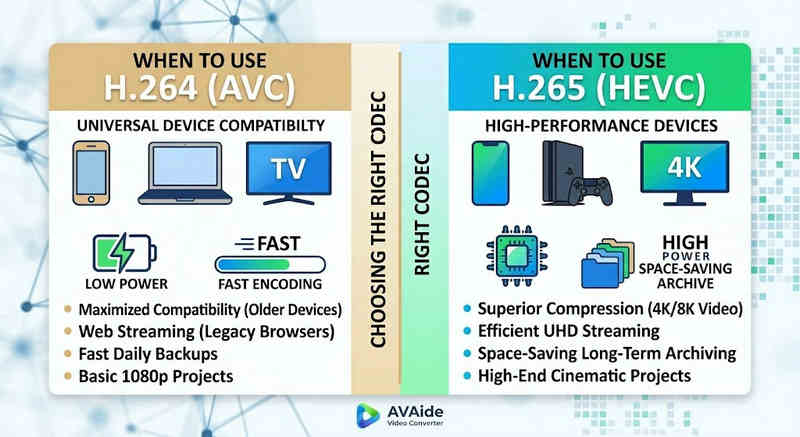
يعتمد اختيار برنامج الترميز المناسب كلياً على أهدافك المحددة. إليك سبب تفضيلك لأحدهما على الآخر:
لماذا تحتاج إلى ترميز الفيديو عالي الكفاءة (H.265):
- توفير أقصى قدر من مساحة التخزين: إذا كنت تقوم بعمل نسخ احتياطية لمقاطع الفيديو الطويلة أو مكتبات 4K الضخمة، فإن HEVC يعمل كمخفض طبيعي لحجم الفيديو، مما يوفر نصف مساحة القرص الصلب لديك.
- تحسين عرض النطاق الترددي: يتطلب ترميز HEVC نطاقًا تردديًا أقل بكثير للبث، مما يجعله مثاليًا لتشغيل 4K بسلاسة حتى على اتصالات الإنترنت البطيئة دون تخزين مؤقت.
- الاستعداد للمستقبل: مع تحول الصناعة نحو المحتوى فائق الوضوح (UHD) ومحتوى الواقع الافتراضي، يضمن ترميز الفيديو عالي الجودة (HEVC) أن تظل مقاطع الفيديو الخاصة بك عالية الجودة ومتوافقة مع منصات الجيل التالي.
لماذا تحتاج إلى ترميز H.264 (AVC):
- تشغيل وتحرير سلسان: إذا كان برنامج تحرير الفيديو الخاص بك يعاني من بطء في الأداء أو إذا كان مشغل الوسائط الخاص بك يعرض رسالة "برنامج الترميز غير مدعوم"
- التوافق والمشاركة بدون قلق: يُعدّ ترميز الفيديو H.264 الأكثر توافقًا على نطاق واسع. سواءً أكنت ترغب في مشاركة مقاطع الفيديو مع أصدقائك، أو مع أجهزة التخزين الشبكية (NAS)، أو مع خوادم الوسائط مثل Plex أو Kodi، فإنّ H.264 يضمن لك مشاركة وتشغيلًا سلسًا.
الجزء الثالث: كيفية التحويل بسهولة بين ترميز HEVC وترميز H.264
في حالة نقل مقاطع الفيديو من وإلى تنسيقات HEVC(H.265) وH.264، افايد محول الفيديو يقوم AVAide بذلك بشكل أفضل من غيره. فهو يوفر واجهة فعّالة وسهلة الاستخدام ولا تؤثر على جودة التحويل وتدعم تنسيقات مختلفة. أياً كان السبب، فقد يكون ذلك بسبب الكفاءة الأكبر لـ HEVC أو التبني الأوسع لـ H264، حيث يسمح لك AVAide بالتبديل بين الاثنين دون أي متاعب.
الإجراء التفصيلي:
الخطوة 1احصل على محول الفيديو AVAide
قم بالتنزيل والتثبيت والتشغيل افايد محول الفيديو على جهاز الكمبيوتر الذي يعمل بنظام ويندوز أو ماك.

تنزيل مجاني لنظام التشغيل Windows 7 أو أحدث
 تحميل آمن
تنزيل مجاني لنظام التشغيل Mac OS X 10.13 أو الإصدارات الأحدث
تحميل آمنالخطوة 2أضف فيديوهاتك إلى برنامج AVAide Video Converter
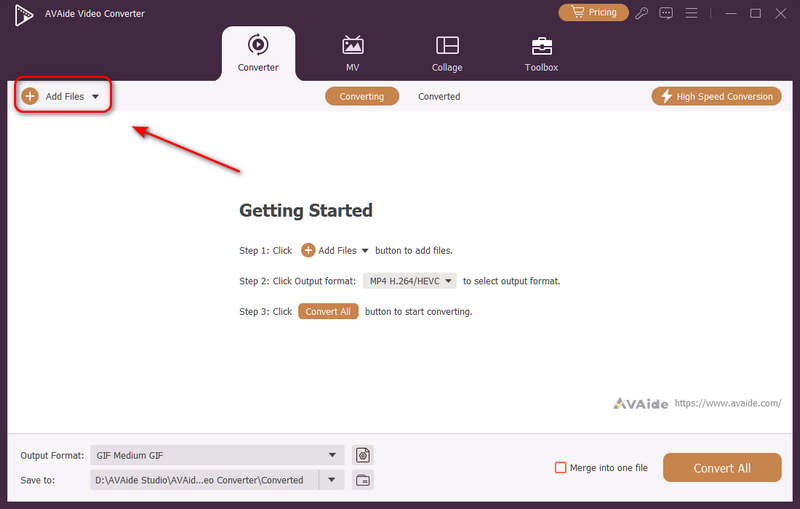
يمكنك إضافة ملفات فيديو متعددة وإجراء تحويل جماعي. انقر فوق إضافة ملفات الزر الموجود في أعلى اليسار لاستيراد ملفات الفيديو الخاصة بك.
الخطوه 3اختر ترميز H.264 أو H.265
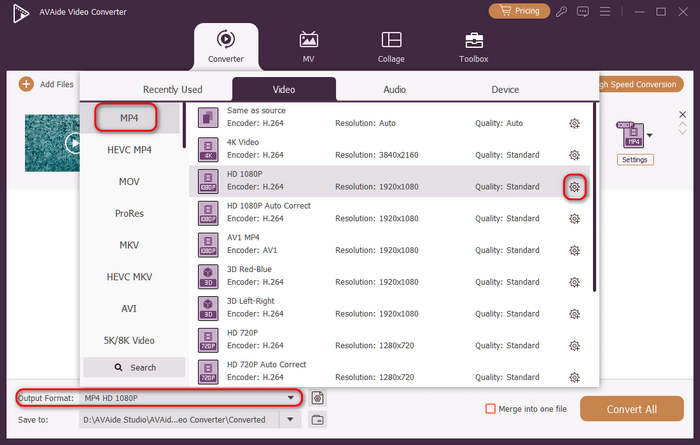
انقر على تنسيق الإخراج يوجد زر القائمة المنسدلة أسفل الجانب الأيسر. بعد ذلك، يمكنك اختيار تنسيق الفيديو المطلوب أولاً. ثم انقر فوق ملف تعريف مخصص زر (يحمل رمز الترس) في شريط الإعدادات المسبقة للفيديو.
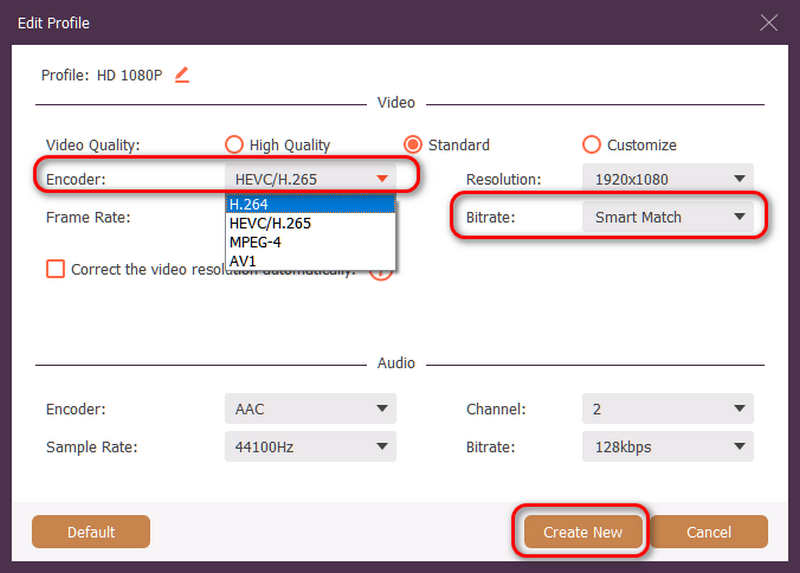
ثم، في هذه اللوحة، يمكنك النقر على التشفير زر القائمة المنسدلة للاختيار H.264 أو تنسيق HEVC/H.265 برنامج الترميز. إذا كنت ترغب في تغيير جودة الفيديو، يمكنك ضبط معدل البتلكننا نوصي المطابقة الذكية لضمان التوافق. انقر فوق خلق جديد إبداع جديد زر لحفظ إعداداتك.
الخطوة 4بدء إعادة ترميز الفيديو
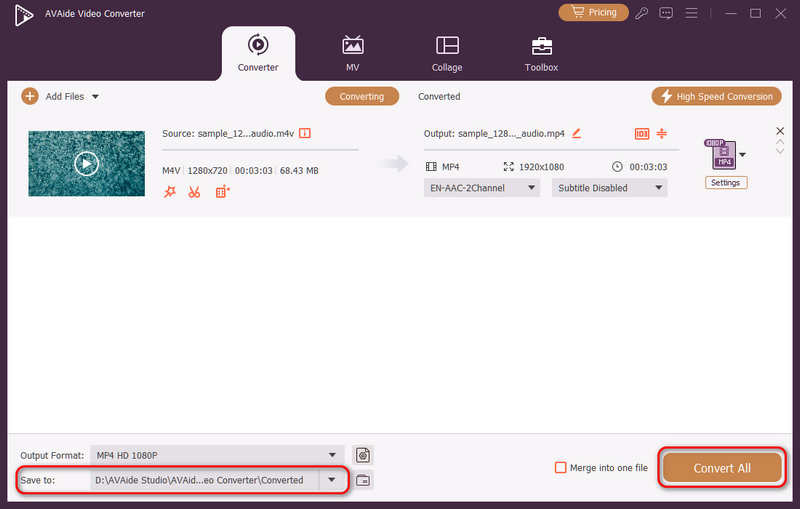
وأخيرا، يمكنك النقر فوق حفظ في انقر على زر القائمة المنسدلة لاختيار مجلد الإخراج المطلوب. تحويل جميع زر لتغيير ترميز الفيديو إلى H.264 أو H.265.
الجزء الرابع: الأسئلة الشائعة حول H.265 و H.264
ما هو الفرق الرئيسي بين NVENC H.264 و NVENC HEVC؟
يكمن الاختلاف الرئيسي في كفاءة الضغط وتحسين أداء الأجهزة. يوفر ترميز NVENC HEVC (H.265) ضغطًا أفضل يصل إلى 50% مقارنةً بترميز NVENC H.264 (AVC). هذا يعني أنه يُمكنه إنتاج نفس الجودة المرئية تمامًا بنصف معدل البت (ونصف حجم الملف)، مما يجعله الخيار الأمثل لأرشفة فيديوهات 4K أو البث عبر نطاق ترددي محدود.
ما هو جهاز التشفير المعياري متعدد القنوات HEVC/H.264؟
جهاز التشفير المعياري متعدد القنوات HEVC/H.264 هو جهاز مُصمم خصيصًا للمؤسسات، لضغط وبثّ عدة مصادر فيديو في آنٍ واحد. على عكس برامج التشفير المُخصصة للمستهلكين، يتميز هذا الجهاز بتصميم معياري (على شكل شفرة)، مما يسمح للمستخدمين باستبدال أو ترقية بطاقات التشفير المادية أثناء التشغيل، بما يتناسب مع حجم مشاريعهم. وهو يدعم كلاً من ترميز H.264 وHEVC/H.265.
ما هو H.265+؟
H.265+ (المعروف أيضًا باسم Smart H.265+) هي تقنية ضغط فيديو متطورة وخاصة طورتها شركة Hikvision، وهي مُحسَّنة خصيصًا لأغراض المراقبة الأمنية.
يمكنك الآن استخدام هذا التحليل الشامل لـ HEVC و H.264 لتحديد برنامج الترميز الذي يناسب متطلبات الفيديو لديك بشكل أفضل. سواء كنت تريد H.264 وتركز على التوافق أو ترغب في HEVC وتهدف إلى ضغط أفضل، فإن كلا البرنامجين لهما مزايا. يقدم AVAide Video Converter حلاً أنيقًا وفعالًا للتعامل مع هذه المشكلة، حيث يوفر جودة إخراج ممتازة مع السرعة. يجعل AVAide مهمة ضغط الفيديو وتحويله سهلة بفضل واجهاته البسيطة ووظائفه المتقدمة.
نبذة عن المؤلف

مربع أدوات الفيديو الكامل الخاص بك الذي يدعم أكثر من 350 تنسيقًا للتحويل بجودة لا مثيل لها.